“You won’t make flow changes directly in your Production instance… would you?” That’s Salesforce Admin 101, and any self-respecting Salesforce administrator would not need to pick one reason as to why something like this would be straight-up risky. From things like running the risk of impacting critical business processes that would immediately impact users and potentially cause data loss, to having a lack of a testing environment. Also, there is the risk of no rollback option; there may be no easy options left.
While Salesforce is leading the forefront of the current AI space, the recent launch of Agentforce 3 showcased a whole bunch of new features geared to make Agentic AI a digital labour revolution. With the dedication to making highly accurate, low-hallucinogenic AI agents, making sure that they work correctly in the guardrails that are defined for them and provide accurate responses is of the highest importance.
Keeping this in mind, Salesforce introduced the Agentforce Testing Center on November 20, 2024, via a press release describing it as a “first‑of‑its‑kind AI Agent Lifecycle Management Tooling”. The Testing Center entered a closed pilot shortly after and was made available to the general public in December 2024.
Agentforce Testing Center (ATC) is an enterprise-grade platform developed by Salesforce to provide end-to-end lifecycle management for AI agents. It provides everything from development and testing to deployment and optimization. In the same way, we don’t simply develop flows directly in Production, ATC allows admins to test AI Agents in sandbox environments before implementation, so problems can be ironed out without affecting businesses.
As per Salesforce,
“This new category of Agentic Lifecycle Management requires unique tools, and Salesforce is meeting the moment again with Agentforce Testing Center, which will help companies roll out trusted AI agents with no-code tools for testing, deploying, and monitoring in a secure, repeatable way.”
The main benefit is that Salesforce has extended sandbox support to both Data Cloud and Agentforce. This provides safe, production-like environments for development and testing. These sandboxes allow teams to build, prototype, and conduct User Acceptance Testing (UAT) without impacting live systems.
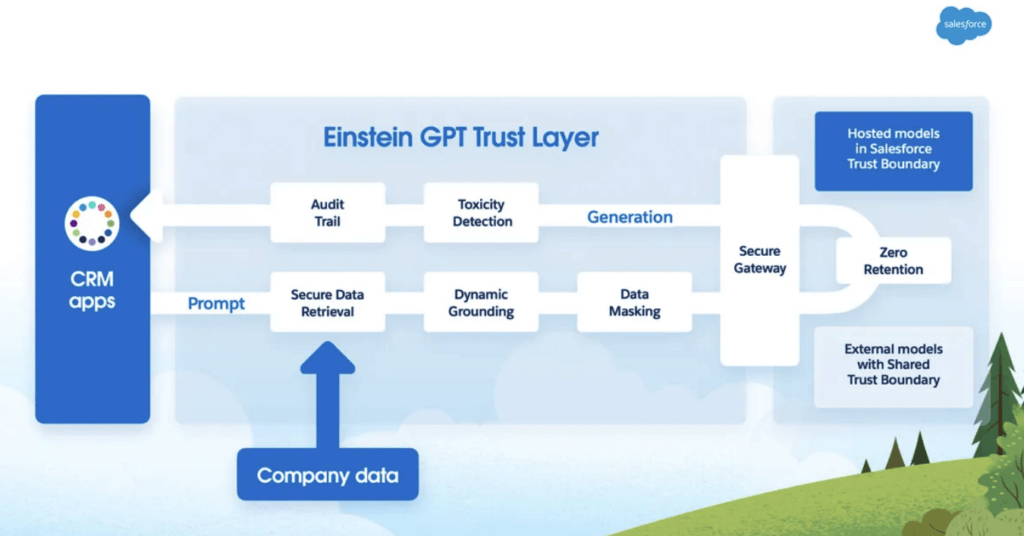
Also, teams can now test AI configurations within pre-production environments using the Einstein Trust Layer, which means no compromising on data security. This setup provides real-time feedback tracking, an audit trail for all AI interactions, and tools like Agentforce Analytics and Utterance Analysis. These help measure adoption and improve agent accuracy over time.
The Testing Center process is straightforward. The data can be added to a CSV file using the included template. Then simply create a test, upload the file, and run it. Admins also have the option to use gen AI to generate the test cases for them and then run the test as well. The results show when your topic, actions, and responses matched or didn’t match the expected values. If a test fails, the utterance can be tested again in Agentforce Builder, and that detailed data can be used to fine-tune the instructions, actions, or topics. You can run up to 10 test jobs at a time in a 10-hour timeframe and have up to 1000 test cases per test.
How To Use:
-
Accessing the Testing Center
Navigate in Setup → Quick Find → Testing Center. Ensure the work is being done in a sandbox environment.
-
Preparing Your Test Cases
Option A: Download and Use the CSV Template. In the Testing Center, click New Test, choose your agent, then click the Template link to download the CSV template. The template includes required columns:
- Utterance
- Expected Topic
- Expected Actions
- Expected Response
Fill in both positive (valid inputs) and negative (edge/failure scenarios) test cases to strengthen your validation
Option B: Generate Test Cases via AI Instead of manual input, click Generate Test Cases, provide a few examples, and the number of cases you need—for example, 10 or 20 to start. The system uses AI to generate diverse scenarios for testing
-
Running the Tests
Once your test file is ready (manual or AI-generated), click New Test, input a name and optional description, select the agent, and upload the CSV or accept the AI-generated cases. Click Save & Run to execute the test suite. Wait for completion; the status indicators like Topic Pass %, Action Pass %, and Response Pass % will be shown.
-
Analyzing Test Results
After running the tests, review results by filtering for All, Passed, or Failed test cases. Each line includes:
- Utterance
- Expected vs Actual Topic and their pass/fail status
- Expected vs Actual Actions and their pass/fail status
- Expected vs Actual Response and their pass/fail status
- For failures, copy the problematic utterance into Agentforce Builder’s Conversation Preview to debug using the plan canvas and logic traces.
While topic and action validation are essential, organizations increasingly require end-to-end validation of complete conversational flows. Automated testing of full agent conversations ensures that multi-step interactions behave exactly as expected across various edge cases and branching scenarios.
Conclusion
Agentforce Testing Center can help in generating large volumes of test cases that can be executed on a regular basis to ensure that Agentforce is running without any errors or hallucinations. The tool is key to have a stable, long-term successful Agentforce implementation.
For organizations planning long-term AI agent deployment strategies, Agentforce page provides a centralized foundation for building, governing, testing, and scaling AI agents securely across enterprise environments. It enables structured lifecycle management, ensuring that innovation happens safely within defined guardrails.
Have any questions? Feel free to drop an email to support@astreait.com or visit astreait.com to schedule a consultation.