In today’s digital age, businesses must keep leads engaged to convert them into loyal customers. Lead nurturing is the process of building relationships with prospects at every stage of their journey, from awareness to purchase and beyond. In this blog post, we'll explore how to automate lead nurturing using Salesforce Marketing Cloud, a robust platform that offers powerful tools for delivering personalized, automated content at scale.
1. Understanding Lead Nurturing
Before diving into the automation process, let’s briefly review what lead nurturing entails. It’s about delivering relevant content to your leads over time, based on their behavior, interests, and interactions with your brand. Instead of bombarding prospects with generic messaging, lead nurturing enables you to send personalized emails, SMS, and social media posts that guide them through the buyer’s journey.
2. Salesforce Marketing Cloud: The Ideal Tool for Lead Nurturing
Salesforce Marketing Cloud (SFMC) is a comprehensive digital marketing platform that enables you to create, manage, and optimize automated marketing campaigns. The platform includes several key components to enhance lead nurturing, including:
- Email Studio: For creating and managing email marketing campaigns.
- Journey Builder: For automating multi-channel campaigns that nurture leads over time.
- Automation Studio: For scheduling and automating repetitive marketing tasks.
- Audience Builder: For segmenting your contacts based on behavior and interests.
With these tools, you can engage leads at every touchpoint in a personalized and automated manner.
3. Steps to Automate Lead Nurturing in Salesforce Marketing Cloud
Step 1: Define Your Lead Nurturing Goals
Before setting up automation in SFMC, you need to define what you want to achieve with your lead nurturing efforts. Are you aiming to educate your leads? Drive them to a sale? Encourage them to take a specific action, such as downloading a resource or attending a webinar? By clearly defining your goals, you can tailor your automated campaigns to meet your objectives. Goals could include:
- Converting leads into customers.
- Increasing engagement with educational content.
- Encouraging lead qualification.
- Promoting limited-time offers.
Step 2: Build Lead Segments
Once your goals are set, it's time to segment your leads. Salesforce Marketing Cloud offers powerful segmentation tools to divide your leads into groups based on criteria such as:
- Demographics (age, location, industry, etc.)
- Behavioral data (website visits, email opens, clicks, etc.)
- Lead lifecycle stage (new, qualified, or in the decision-making process)
Segmenting your audience ensures that your automated emails and content are targeted and relevant to each lead’s specific needs and interests.
Step 3: Design and Set Up Journeys in Journey Builder
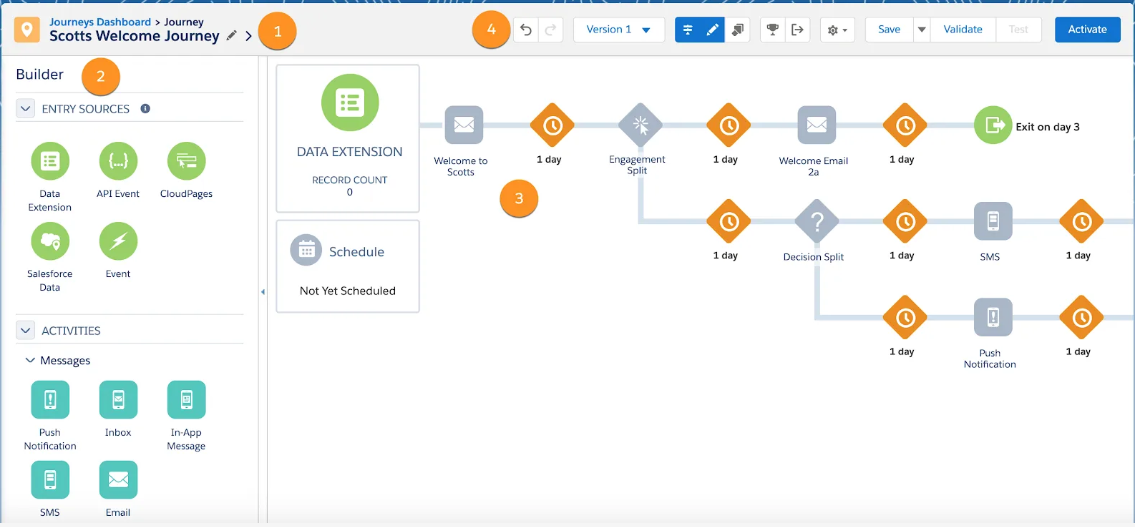
Journey Builder is the heart of automation in SFMC. It allows you to create sophisticated, multi-step journeys that engage leads based on their interactions. Here’s how to use it effectively:
- Create a New Journey: Start by selecting the "Journey" option from Journey Builder and create a new one. Define the entry source (how leads enter the journey) and add key decision points to determine how leads move through different stages.
- Set Entry Criteria: Define when a lead should enter your nurturing journey. For instance, when they download a whitepaper, sign up for a webinar, or complete a contact form.
- Create Personalized Emails: Use Email Studio to create dynamic, personalized email content based on the data you have about each lead. Personalization could include first names, company names, or tailored recommendations based on behavior.
- Add Action Steps: Create actions such as sending an email, SMS, or pushing data to other systems based on how leads interact with your content. For instance, if a lead opens an email, they can receive another piece of content, or if they click on a specific link, they could enter a more targeted part of the journey.
-
Set Wait Steps: Include wait steps between actions to give leads time to engage with your content before moving them to the next stage. This ensures your communication feels natural and not overwhelming.
Step 4: Automate Lead Scoring and Qualification
A crucial aspect of lead nurturing is determining which leads are ready for a sales conversation. You can integrate lead scoring into your automation to assign points based on behaviors such as email opens, clicks, website visits, and more. This helps prioritize leads and ensures your sales team focuses on those who are most likely to convert.
- Use Automation Studio to automate the lead scoring process.
- Set up triggers in Journey Builder to advance or qualify leads based on their score.
Step 5: Monitor, Optimize, and Iterate
Automation is not a “set it and forget it” process. You need to monitor the performance of your automated campaigns, analyze key metrics such as open rates, click-through rates, conversion rates, and engagement. Salesforce Marketing Cloud provides detailed reporting and analytics to track your success.
- A/B Testing: Use A/B testing for your email subject lines, content, and call-to-action buttons to see what resonates best with your leads.
- Journey Optimization: Regularly update and refine your journeys to improve lead nurturing. If certain content pieces or steps are underperforming, replace them with better options.
4. Best Practices for Lead Nurturing Automation in Salesforce Marketing Cloud
- Personalization: Always personalize your communication based on lead behavior and interests. Generic content won’t engage your leads.
- Use Dynamic Content: Take advantage of dynamic content in emails to show different messaging based on lead preferences, industry, or location.
- Test and Learn: Continuously test different aspects of your nurturing campaigns, including subject lines, email content, and sending frequency, to find what works best for your audience.
- Multi-Channel Approach: Engage your leads through multiple channels—email, SMS, social media, and even in-app messages, depending on the context and lead preference.
Conclusion
Automating lead nurturing in Salesforce Marketing Cloud helps businesses save time, deliver personalized experiences, and improve conversion rates. By leveraging tools like Journey Builder, Automation Studio, and Audience Builder, you can create targeted, automated campaigns that engage leads at the right time with the right content. With the right strategy and ongoing optimization, Salesforce Marketing Cloud can significantly improve your lead nurturing efforts, making it easier to turn prospects into long-term customers.
Start small, experiment, and continuously optimize your journeys for the best results. Happy nurturing!
Have any questions? Feel free to drop an email to support@astreait.com