In today’s fast-paced business world, timely access to financial insights can be a game-changer. Whether it’s tracking monthly budgets, comparing forecasts with actuals, or identifying top-performing customer groups — financial clarity is essential.
Enter the Budget Analysis Agent — a powerful, AI-driven solution built using Salesforce Agent Actions and Apex logic This setup enables users to ask natural questions like “What was the forecast for June?” or “Give me Actual vs Budget for an Automotive manufacturing client,” and receive real-time answers based on structured financial data within Salesforce.
In this blog, we’ll walk through how this solution works, what problems it solves, and how it empowers business users to interact with financial data easily and efficiently — all without external integrations or complicated dashboards.
Introduction
This Budget and Forecast Analysis Agent is integrated with Salesforce to simplify financial analysis and improve decision-making across business teams. It provides detailed Budget, Forecast, and Actual data based on month, quarter, or year, and helps users compare financial performance across customer groups using conversational queries.
Built using Salesforce AI Agent + Apex + Custom Objects,
This solution enables automated variance analysis, tracks top and bottom performers, and ensures data is logged and organized in Salesforce for further analysis.
Key Challenges Solved by the Budget Analysis Agent
- Dynamically access financial data for any month, quarter, or year.
- Compare Budget vs Actual and Actual vs Forecast.
- Identify top-performing and underperforming customer groups.
- Automate the storage and tracking of query results within Salesforce.
Goals of the Budget Analysis Agent
The purpose of this Agent setup is to bring clarity and speed into financial tracking and analysis, without relying on spreadsheets or manual effort.
1. Retrieve Financial Values by Month
The Agent allows users to ask questions like “What are the values for May?” or “How did Domestic customers perform in April?”
2. Analyze Variance and Deviation
Built-in Apex logic calculates key gaps such as Actual vs Budget, Actual vs Forecast, and even % deviation from the plan.
3. Provide Quarterly and Yearly Summaries
Users can get summarized financial values for any quarter or for the entire year — supporting faster decision-making.
4. Find Top and Bottom Performers
Using annual Actuals, the system identifies the highest and lowest performing customer groups automatically.
5. Use Only Salesforce Apex & Agent Actions
No third-party system is involved. The entire functionality is powered via standard and custom Salesforce objects, Apex classes, and AI Agent topics — making it clean, fast, and easy to maintain.
Custom Objects in Use
To ensure this financial solution is purpose-built for analysis and reporting, the following custom objects are used within Salesforce:
Forecast_and_Actual_Budget__c
This is the core object that stores all monthly values for each unit and customer group. It holds critical financial metrics for reporting.
Key Fields Include:
Unit__c (Lookup): The business unit associated with the data
Group__c (Lookup): Customer group name
Customer__c: The individual customer (Name)
Month__c: The fiscal month (e.g., Apr, May, Jun)
Budget__c: Planned value for the month
Forecast__c: Predicted value
Actual__c: Final achieved value
Fiscal_Year__c: The financial year (e.g., 2025-2026)
These custom fields and relationships allow for precise grouping, filtering, and calculations during agent execution. They form the foundation for all logic used in the Apex class and AI Agent responses.
Creating an Intelligent Budget Analysis Agent with Einstein Studio
The brain of this solution lies in Salesforce’s Einstein Studio, where the Budget Analysis Agent is defined and configured. The agent uses natural language understanding and invokes a single Apex method to perform powerful financial analysis.
How does the Agent Simplify Financial Data Analysis?
Financial Planning Queries: AI-Powered Budget, Forecast & Actuals Agent: With businesses needing fast answers on how financials are tracking, the Budget Analysis Agent uses Salesforce AI to simplify financial data access, comparison, and decision-making. Below are the key types of queries handled by the agent, along with example interactions that make monthly and yearly reporting effortless.
1. Monthly Budget Inquiry
- Problem: Users want to retrieve month-specific Budget, Forecast, and Actuals for a particular customer or unit.
- How the Agent Helps: The agent fetches and compares financial values for any customer group, unit, or individual customer based on the month selected.
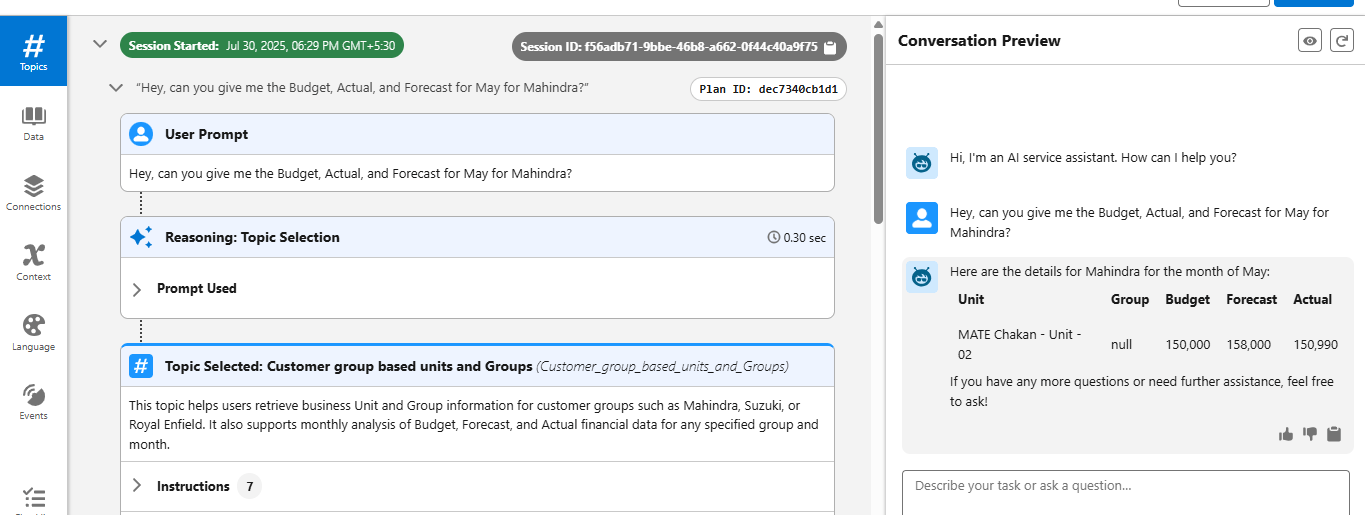
Example Interaction:
- User: Hey, can you give me the Budget, Actual, and Forecast for May for Manufacturing company A?
- Agent: Here are the details for Manufacturing company A for the month of May:
2. Variance Analysis (Budget vs Actual / Forecast vs Actual)
- Problem: Users need to identify how close their financial plans were to the actual outcome.
- How the Agent Helps: The agent calculates and presents differences and % deviations across Budget, Forecast, and Actual data.
Example Interaction:
- User: Give me the difference between Budget and Actual.
- Agent: The difference between the Budget and Actual for Manufacturing company A in May is:

3. Unit & Customer-Based Monthly Insights
- Problem: Users want to analyze financial data across business units and customer segments.
- How the Agent Helps: Using the Customer Group object and Unit mappings, the agent aggregates and compares data dynamically.
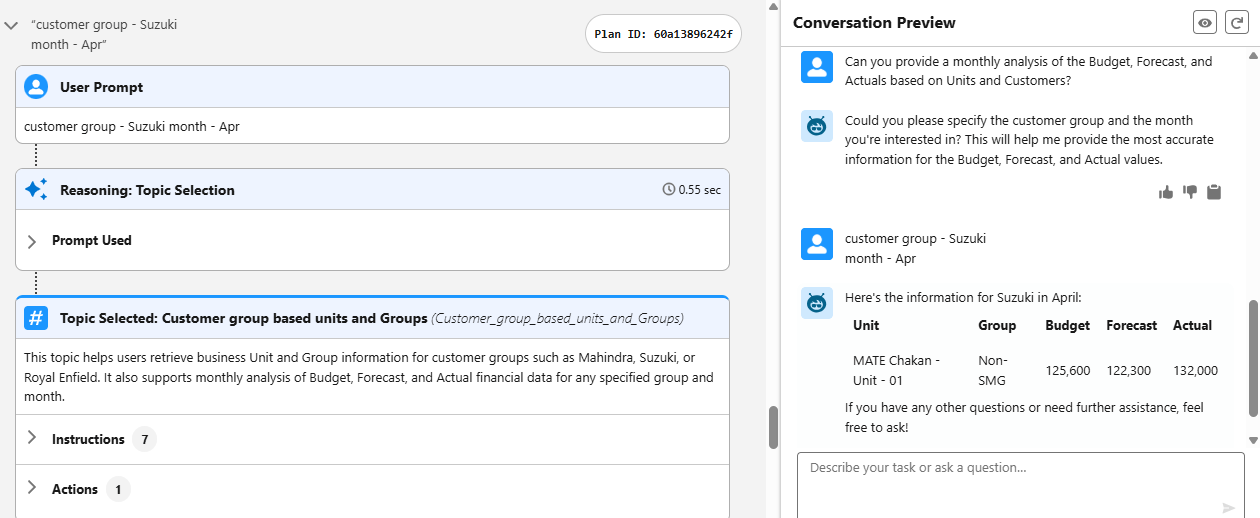
Example Interaction:
- User: Can you provide a monthly analysis of the Budget, Forecast, and Actuals based on Units and Customers?
- Agent: Here's the information for Manufacturing company B in April:
4. Month-on-Month Performance
- Problem: Users want to track all Budget, Forecast, and Actual values across multiple months.
- How the Agent Helps: The agent summarizes data from month-wise fields like Apr_Budget, May_Actual, etc., stored in the Customer Group object.
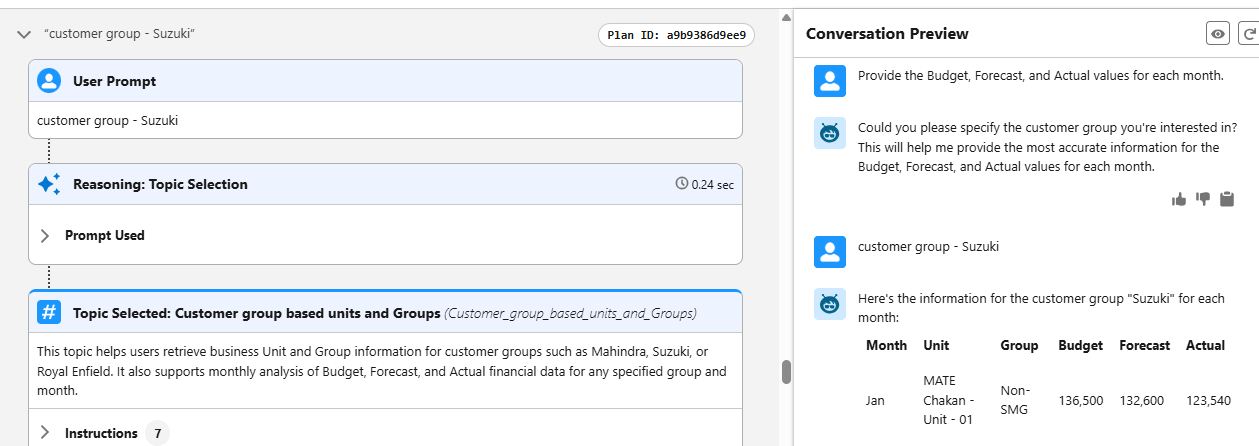
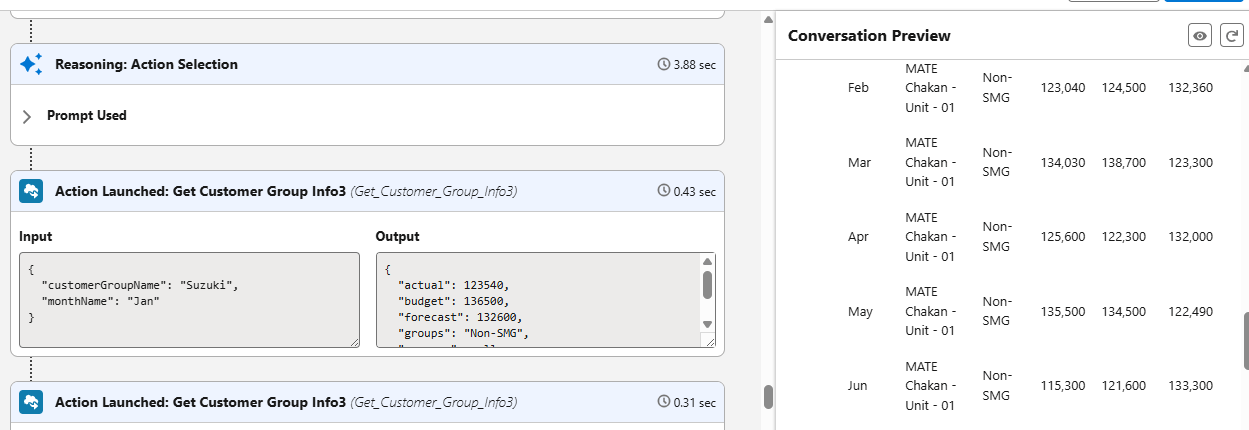
Example Interaction:
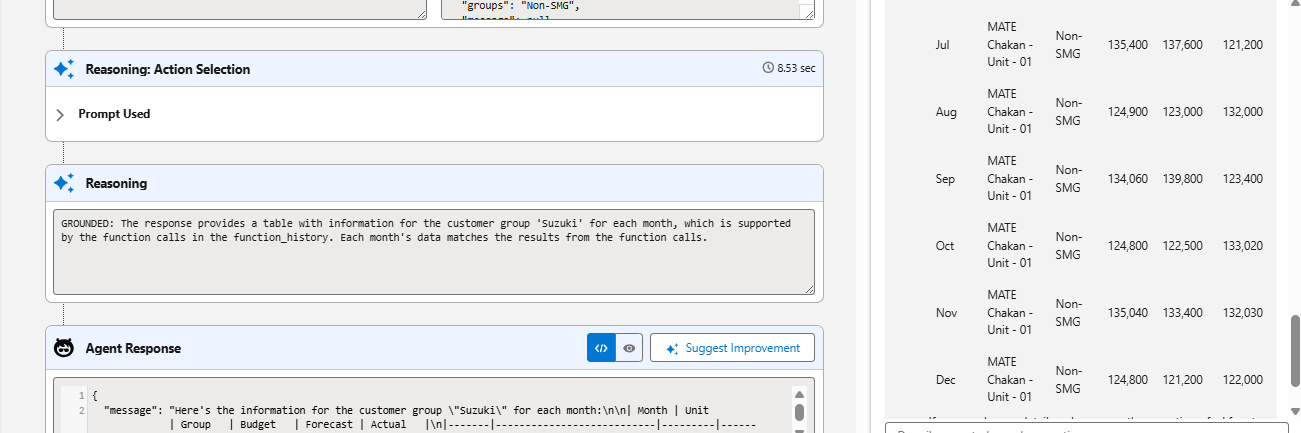
- User: Provide the Budget, Forecast, and Actual values for each month.
- Agent: Here's the information for the customer group "Manufacturing company B" for each month:
5. Monthly Gap Between Budget and Forecast
- Problem: Users want to identify prediction accuracy and financial discipline.
- How the Agent Helps: Agent calculates gaps between forecasted and planned budgets month-wise using Apex logic.
Example Interaction:
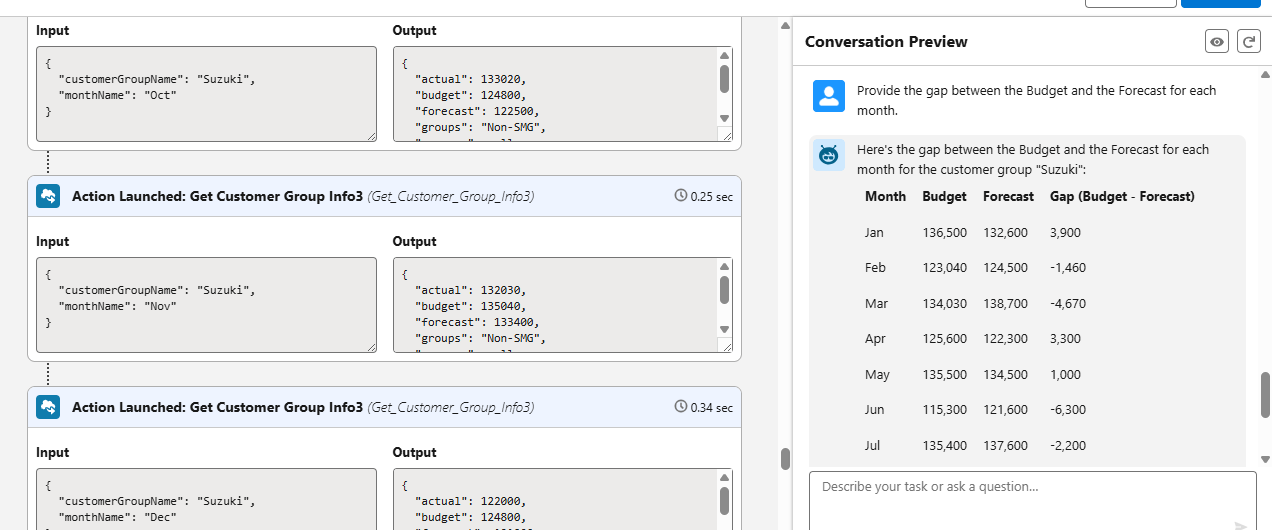
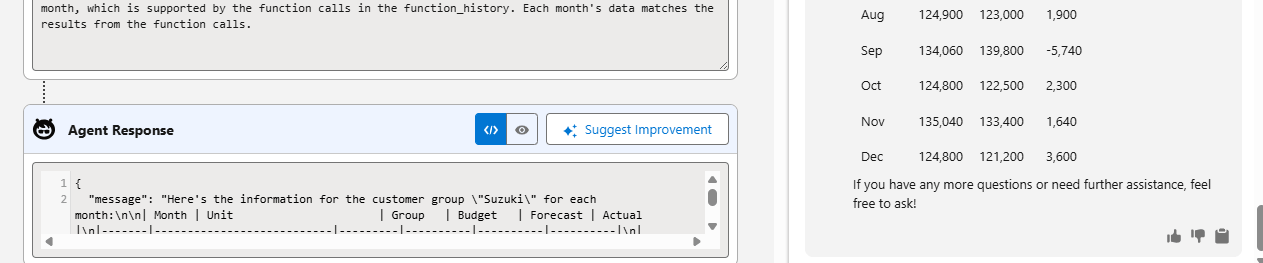
- User: Provide the gap between the Budget and the Forecast for each month.
- Agent: Here's the gap between the Budget and the Forecast for each month for the customer group "Manufacturing company B":
6. Quarterly Financial Summary
- Problem: Business leaders want quick summaries for fiscal quarters.
- How the Agent Helps: The agent aggregates values quarterly and compares them by Group and Unit.
Example Interaction:
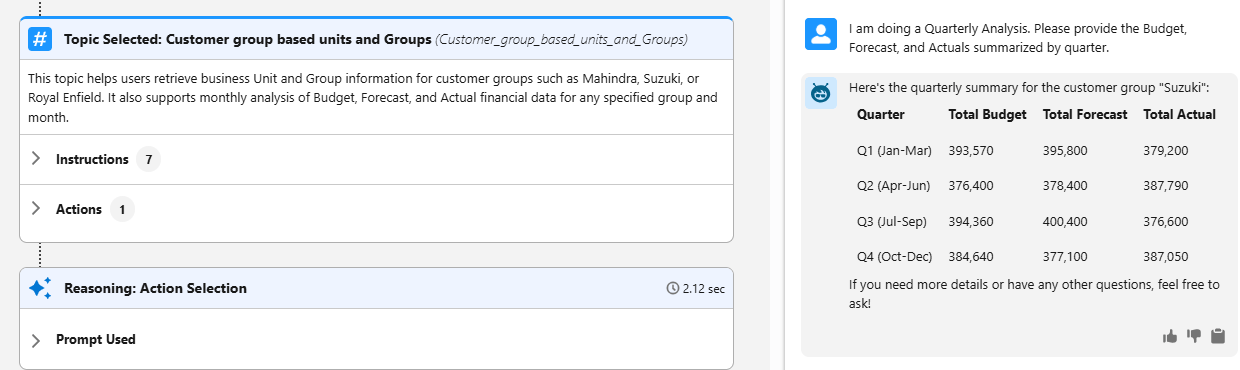
- User: I am doing a Quarterly Analysis. Please provide the Budget, Forecast, and Actuals summarized by quarter.
- Agent: Here's the quarterly summary for the customer group "Manufacturing company B":
7. Yearly Financial Summary
- Problem: Users need a complete year’s financial picture.
- How the Agent Helps: The agent calculates annual totals using month-wise fields and returns high-level comparisons.
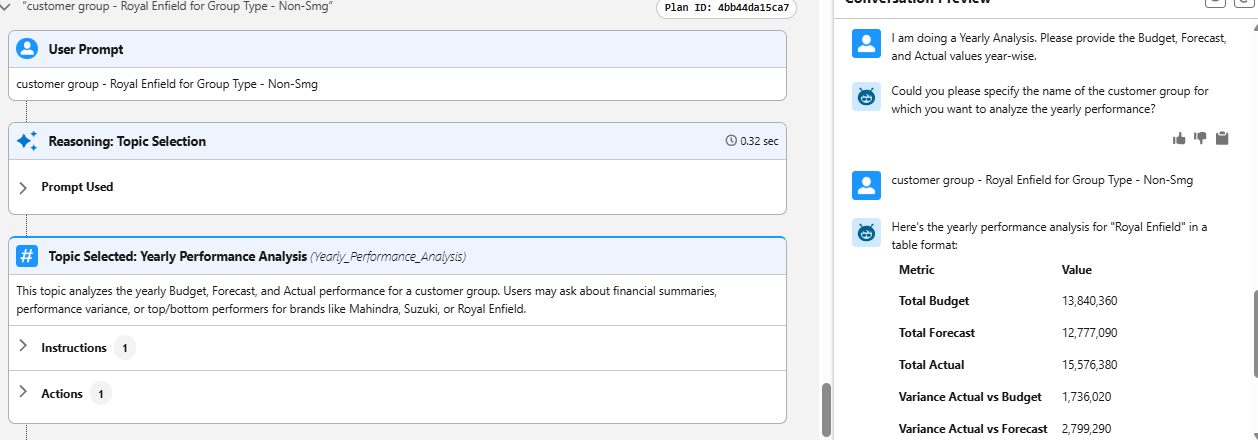
Example Interaction:
- User: I am doing a Yearly Analysis. Please provide the Budget, Forecast, and Actual values year-wise.
- Agent: Here's the yearly performance analysis for "Manufacturing Bike Company":

8. Forecast Accuracy and Deviation Tracking
- Problem: Leadership wants to see how close their forecasts were to actuals over time.
- How the Agent Helps: Calculates % deviation month-wise and identifies trend alignment or anomalies.
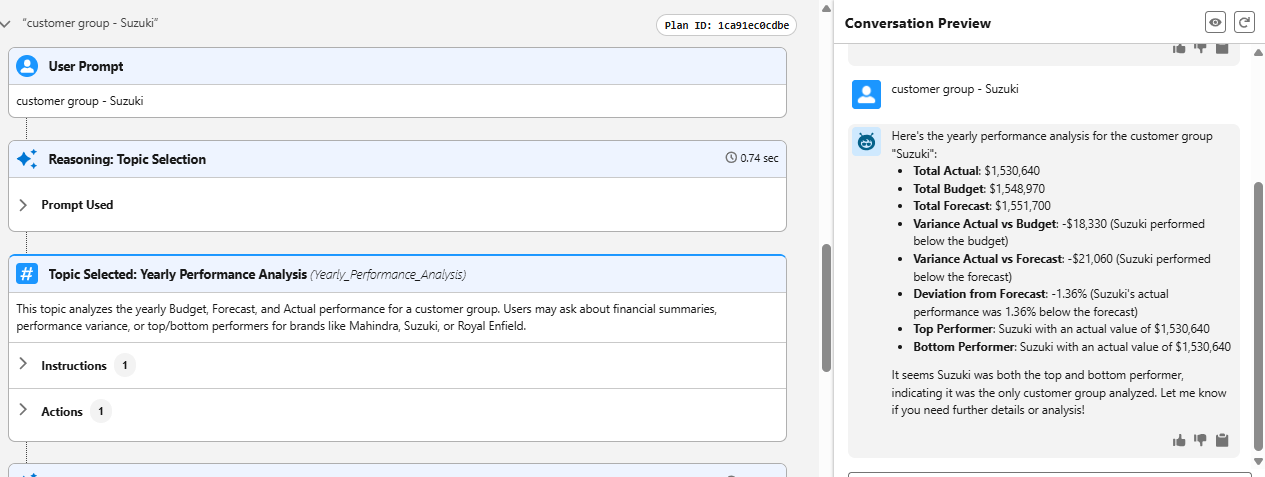
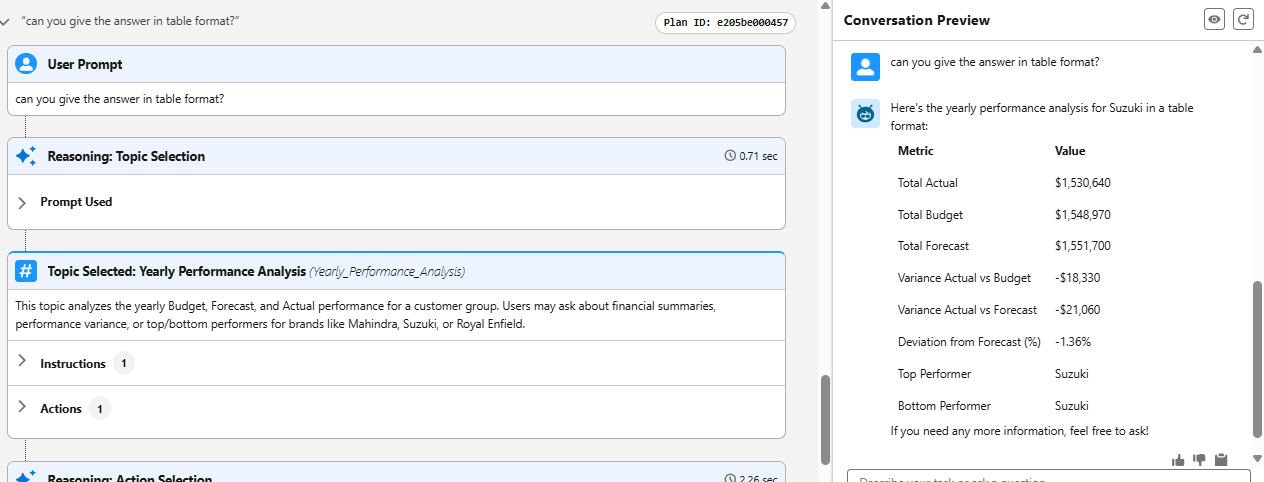
Example Interaction:
- User: Can you do some trend deviation and see how accurate our forecast is?
- Agent: Sure, I can help with that. Could you please provide the name of the customer group for which you want to analyze the yearly performance?
9. Top and Bottom Performing Customer Groups
- Problem: Decision-makers want to know which customer groups contribute most/least to financial goals.
- How the Agent Helps: Using actual values, the agent identifies high and low-performing groups.
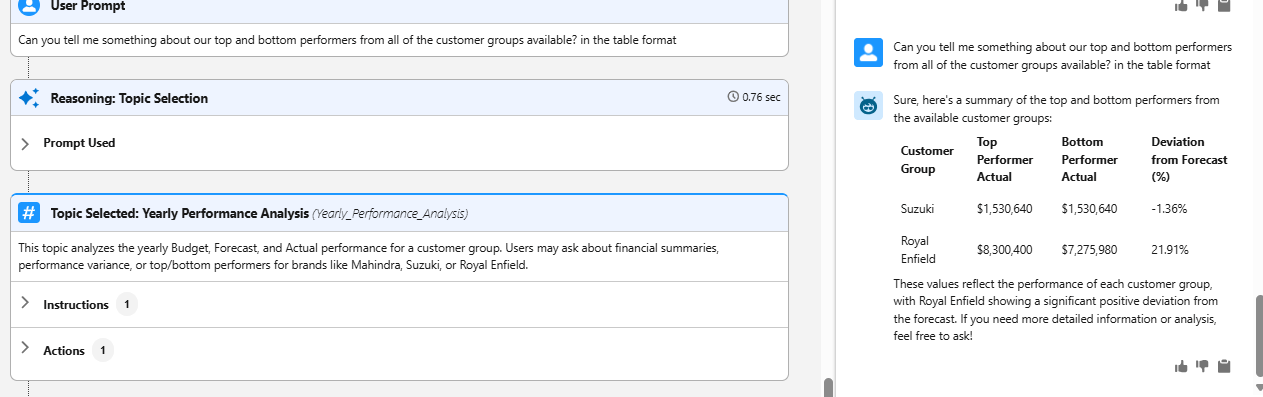
Example Interaction:
- User: Can you tell me something about our top and bottom performers from all of the customer groups available?
- Agent: Here's a summary of the top and bottom performers across all customer groups:
Generative AI: Transforming Financial Data Analysis with Intelligent Agents in Salesforce:
Generative AI is revolutionizing how organizations manage financial performance by leveraging natural language processing (NLP) to deliver instant insights on budgets, forecasts, and actuals. Embedded seamlessly into Salesforce, it enables dynamic financial analysis, empowering teams to ask questions and receive intelligent, data-backed responses in real time.
The Budget Analysis Agent, powered by AI, interprets user queries related to fiscal performance — such as comparing planned vs. achieved values or identifying deviations over time. It streamlines analysis across business units and customer groups, reducing manual reporting effort and accelerating decision-making.
Key Benefits:
- Conversational Financial Insights: Users can ask natural questions like “What’s the variance for SMG in June?” and get instant, accurate answers.
- Automation of Complex Calculations: The agent computes monthly and quarterly totals, variance percentages, and trend patterns automatically — no spreadsheets required.
- 24/7 Self-Service Reporting: Team members no longer need to wait for analysts; insights are always available with a single query.
- Scalable Across Business Units: Supports multiple units (e.g., MATE Chakan 01, Chennai Units) and fiscal years, maintaining consistent logic across data sets.
- Strategic Recommendations: Identifies top-performing and underperforming groups, helping leadership focus on high-impact decisions.
Summary:
This article showcases the use of a Salesforce AI Agent for financial performance analysis. By combining structured data models with NLP-powered queries, the solution enables organizations to track budgets, forecasts, and actuals in real time — without the need for manual report generation. The AI agent simplifies variance analysis, empowers business teams, and ensures data-driven decisions are just one question away.
Organizations aiming to scale AI-driven automation across multiple departments can explore enterprise-ready frameworks such as Agentforce Page. It provides a structured foundation for deploying intelligent agents securely, ensuring governance, scalability, and measurable business impact across finance, operations, and customer-facing functions.
Note: This blog is based on a real-time implementation using custom Salesforce objects (Forecast_and_Actual_Budget__c and Customer_Group__c) , along with two Apex-powered Agent Actions. While designed specifically for financial reporting, the architecture is flexible and can be extended to other domains requiring dynamic data analysis and real-time responses.
For additional queries on Salesforce AI Agents, please reach out to support@astreait.com or visit astreait.com to schedule a consultation.