Overview:
The client had a requirement to integrate WhatsApp Account of User to their Salesforce instance. They want to store the personal Chats, Group chats in Salesforce for different business purposes.
Solution / Approach:
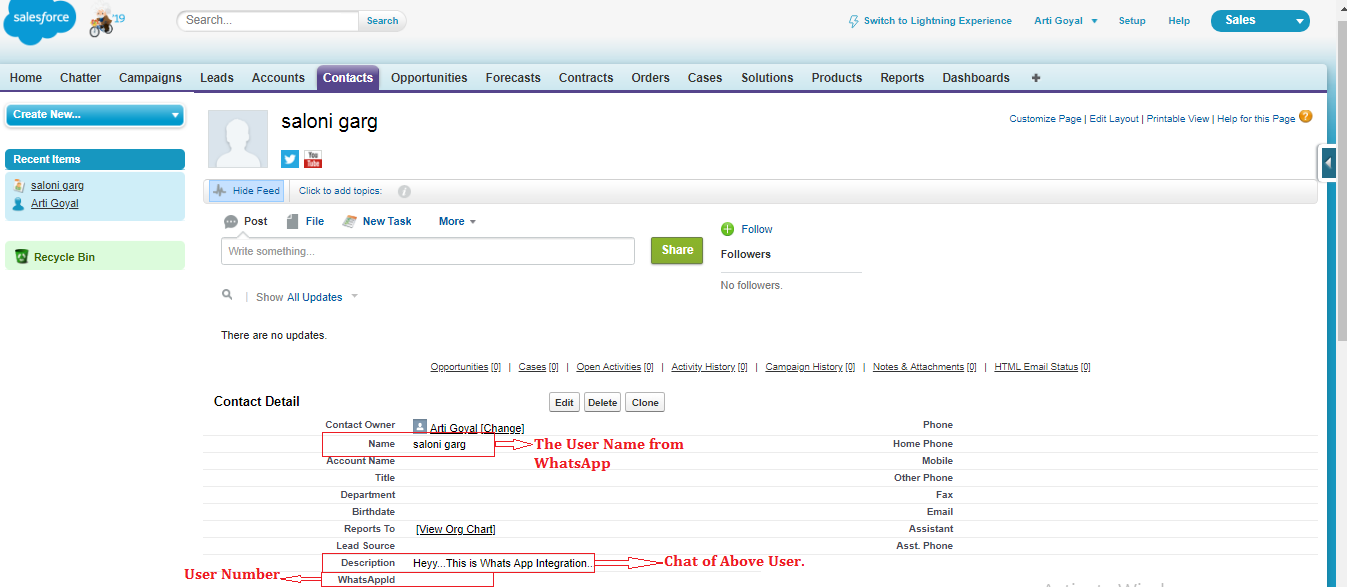
We have used Chat API to sync chats of Whatsapp and related details in the Contact Object of Salesforce. Mobile Number field of Contact is used as a Unique Id in Salesforce to store the chat of WhatsApp. The chats which already have the Mobile Number in the Salesforce, will be updated in the Salesforce, or we can create a new contact to store new chats as per the business needs. If users does not want to sync any other chat, then a checkbox is used to prevent syncing of chats in Salesforce.
While WhatsApp integration enables capturing and storing customer conversations in Salesforce, organizations often extend this capability to internal team collaboration platforms like Slack. Using automation tools such as n8n, businesses can create workflows that sync Salesforce data with Slack channels in real time, improving team communication and responsiveness.
A User can sync the Chats from WhatsApp to Salesforce by the following ways:
- Clicking on the Specific Button.
- Running the batch at the specific time.
Chat API is used for the Integration, there is a field Description in the Contact Object, we are saving the chats by showing Sender’s Name besides Sender’s message, You and Owner’s chat as shown below:
Stephen Mark: Heyy.
You: Hi. Welcome to Salesforce- WhatsApp Integration.
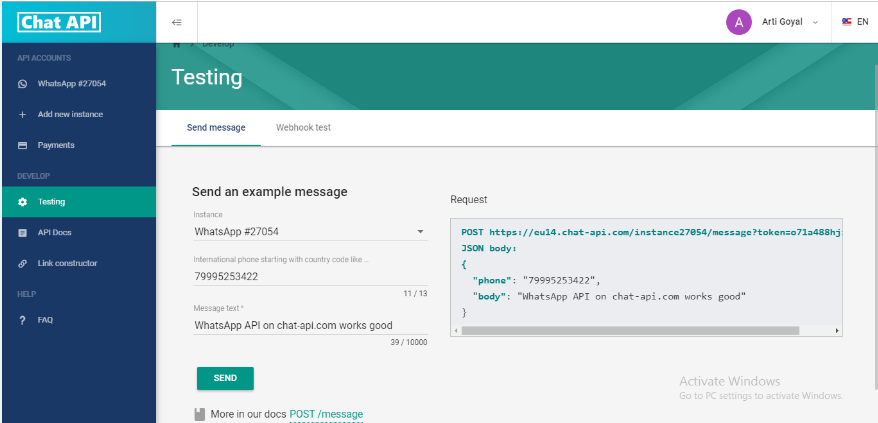
There is a Instance Number in the Chat API. Chat instance is required that we are fetching via Chat API as shown in the Screenshot below:
We accomplished following functionalities:
- Fetch the chats of a Particular Person from Whatsapp to Contact Object of Salesforce.
- Get the Chat person details in Salesforce line Name, Phone Number etc.
- The Whatsapp Contacts who have Contact records in Salesforce are synced.
- Phone Number is used to initiate identity of Contact and manage duplicates.
- Markup to identify the sender of message.
- Get the Group Chats in Salesforce
Beyond chat synchronization, real-time alerts and notifications are essential for keeping teams aligned on critical business events such as deal closures or customer interactions. By integrating Salesforce with tools like Slack, Airtable, and automation platforms, organizations can enable instant notifications and improve decision-making speed.
Automation plays a critical role in ensuring timely communication across systems. Platforms like Make.com allow businesses to create no-code workflows that connect Salesforce with Slack, enabling automated notifications and updates without manual intervention. This approach is particularly useful for event-driven scenarios and operational efficiency.
Modern CRM systems rely heavily on integrations with communication platforms, automation tools, and external applications to deliver a seamless user experience. Salesforce serves as a central hub for these integrations, enabling businesses to unify communication, data, and workflows. To explore a wide range of Salesforce integration solutions and best practices, visit our Integration Expertise page.
Resources
The base URI for API resource is: https://app.chat-api.com/instance/xxxxx where app is a instance of whatsapp and xxxxx is the Instance number.
Example:-https://eu14.chat-api.com/instance/27054
For any query on Salesforce Whatsapp Integration, contact support@astreait.com