1- Introduction
In modern teams, most issues are discussed in Slack—but very few are actually tracked properly. Important problems often get buried in conversations, leading to delays, missed follow-ups, and manual effort in creating support cases.
What if these conversations could automatically turn into structured Salesforce cases?
In this project, we built an intelligent system that listens to Slack conversations, analyzes them using AI, and automatically creates Salesforce Cases along with Contact details and a summarized view of the issue. By leveraging Agentforce, Apex, and Slack APIs, this solution transforms unstructured chat into actionable insights—without any manual intervention.
2 - Problem Statement
In many organizations, teams rely heavily on Slack for communication and issue reporting. However, these discussions are often informal and unstructured, making it difficult to track problems effectively.
Important issues can easily get lost in long conversation threads, and there is no standardized way to convert these discussions into actionable records. As a result, teams face delays in response, lack of visibility, and increased manual effort in creating and managing support cases.
3 - Solution Overview
To solve this problem, we developed an automated system that converts Slack conversations into structured Salesforce Cases using AI.
The system fetches conversations from Slack channels, processes them using Agentforce Prompt Templates, and extracts key details such as issue summary, priority, and user information. Based on this analysis, it automatically creates a Case and links it with the appropriate Contact in Salesforce.
Additionally, the system generates a summarized “case brief” view, enabling quick understanding of the issue. It also includes logic to prevent duplicate case creation, ensuring efficient and accurate case management.
4 - Real Slack Conversation (Problem in Action)
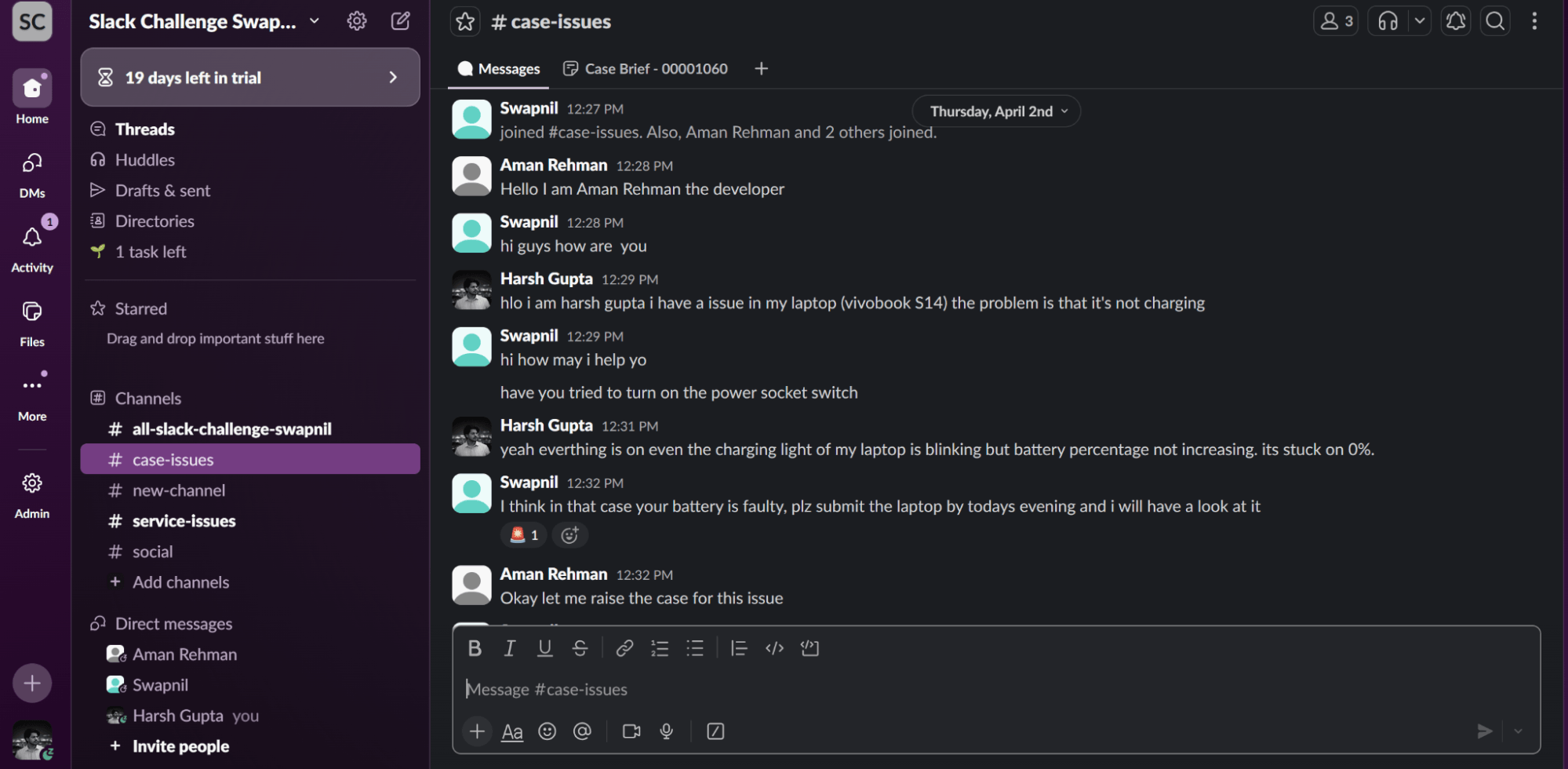
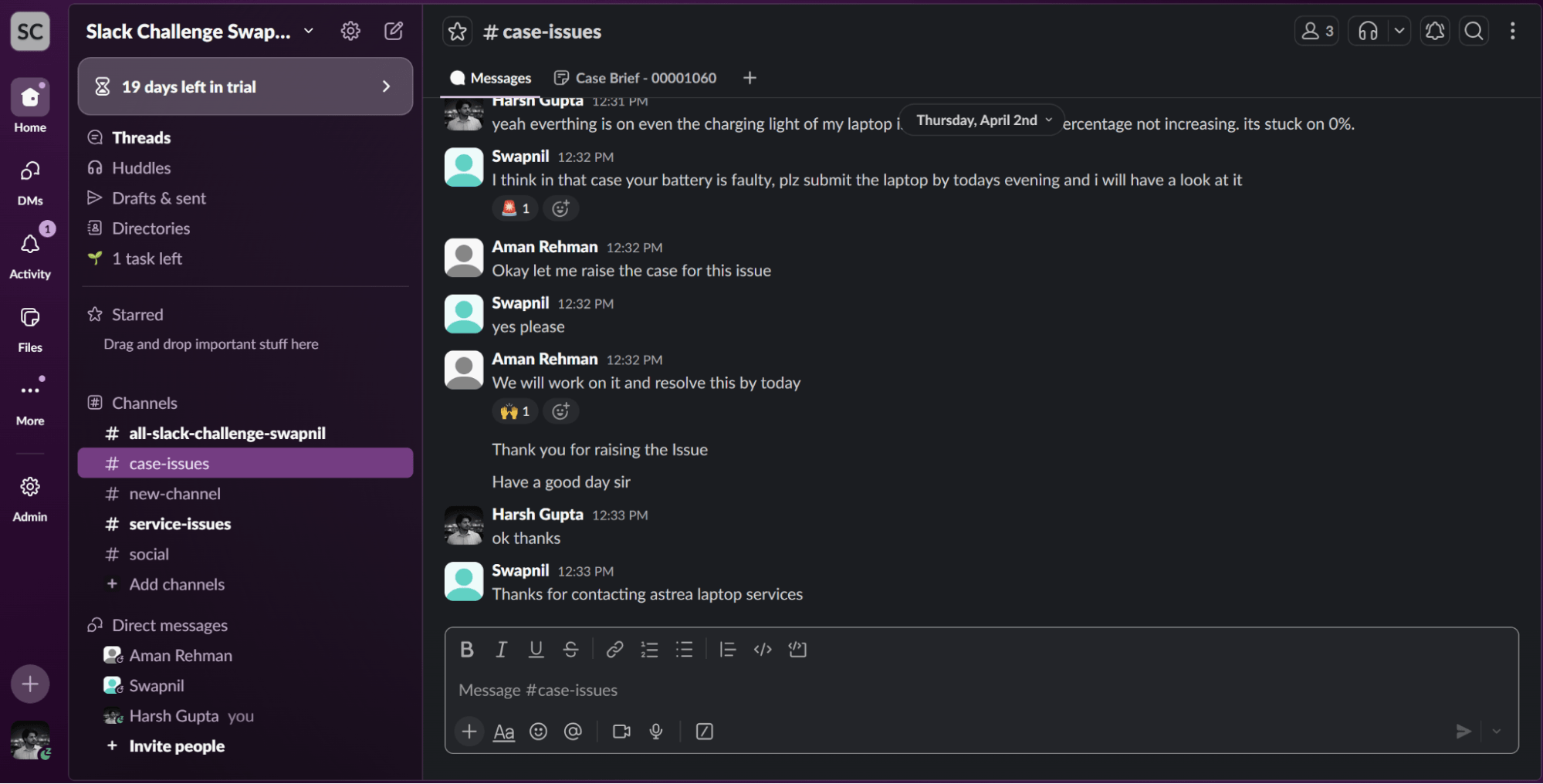
The image above shows a typical Slack conversation where a user reports an issue—in this case, a laptop not charging. Team members respond and discuss possible solutions, but the conversation remains unstructured.
While the issue is clearly important, there is no formal tracking mechanism in place. Without converting this discussion into a system like Salesforce, the problem could easily be forgotten or delayed. This highlights a common challenge in modern workflows—valuable information exists within conversations, but it is not captured in a structured or actionable format.
5 - Case Creation using Slack Reactions

To make the system more intuitive and user-friendly, case creation is triggered directly from Slack using reactions.
Whenever a user adds a specific reaction (such as) to a message, it acts as a signal that the issue should be converted into a Salesforce Case. This is implemented using Slack Event Subscriptions, which listen for reaction events in real time.
Once the reaction is detected, the system automatically initiates the process of fetching the conversation, analyzing it using AI, and creating the corresponding Case in Salesforce.
This approach eliminates the need for manual input and allows teams to create cases seamlessly within their existing workflow.
6 - AI-Powered Analysis using Agentforce
Once the Slack conversation is triggered, the system processes the unstructured chat data using Agentforce Prompt Templates.
First, the Slack messages are fetched using the Slack API and converted into a readable chat transcript format. This transcript is then passed to an AI-powered prompt template, which analyzes the conversation and extracts structured information such as:
- Issue summary
- Description
- Priority
- Reported user
- Whether a case should be created
The AI returns this information in a structured JSON format, which is then used by the system to automate further actions.
7- Behind the Scenes (Code Logic)
In the backend, an Apex method processes the Slack response and prepares the chat transcript. This transcript is sent to a Flow-based Prompt Template, which generates structured output.
The system then parses this output and uses it to create records in Salesforce.
8 - Canvas-Style Summary Generation
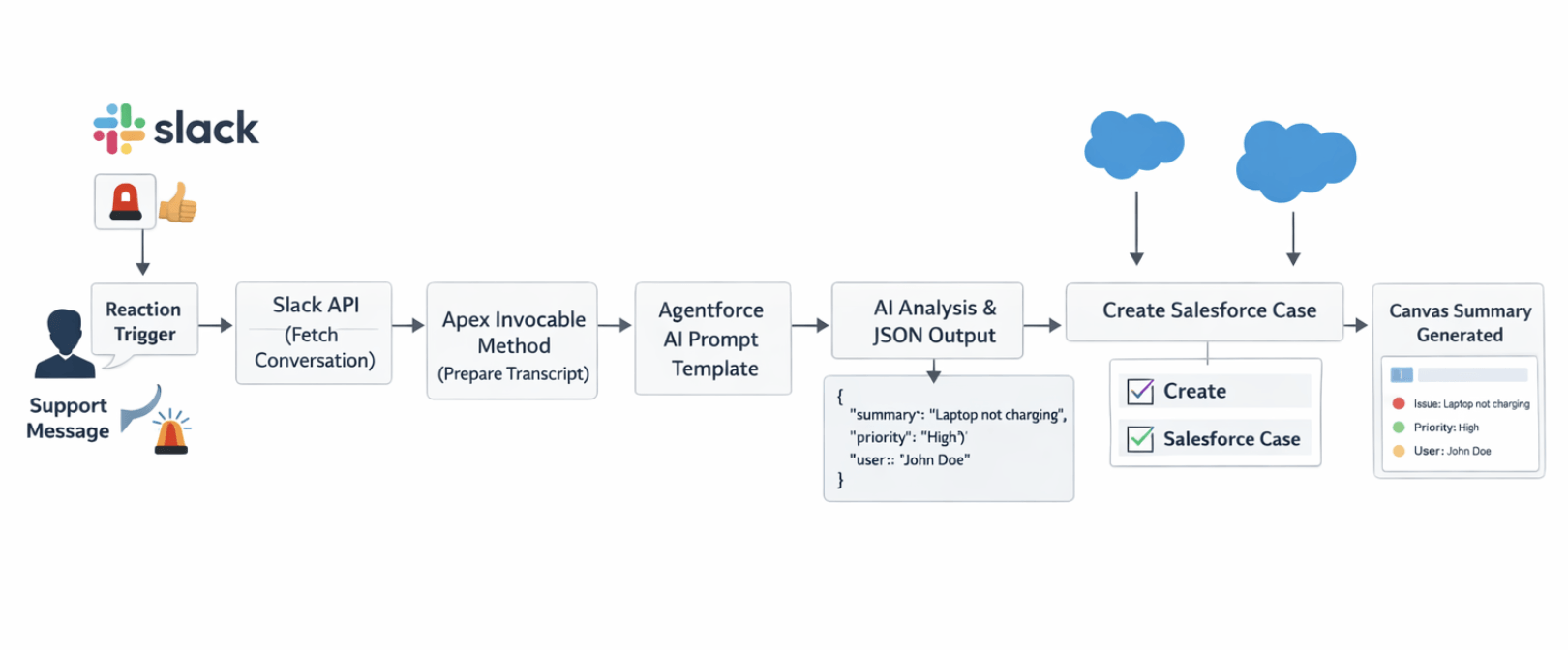
After the case is created, the system generates a canvas-style summary of the issue. This provides a quick and structured view of the case, including key details extracted by AI.
This is implemented using an asynchronous Apex job, ensuring that the summary is generated efficiently without affecting performance.
9 - System Architecture
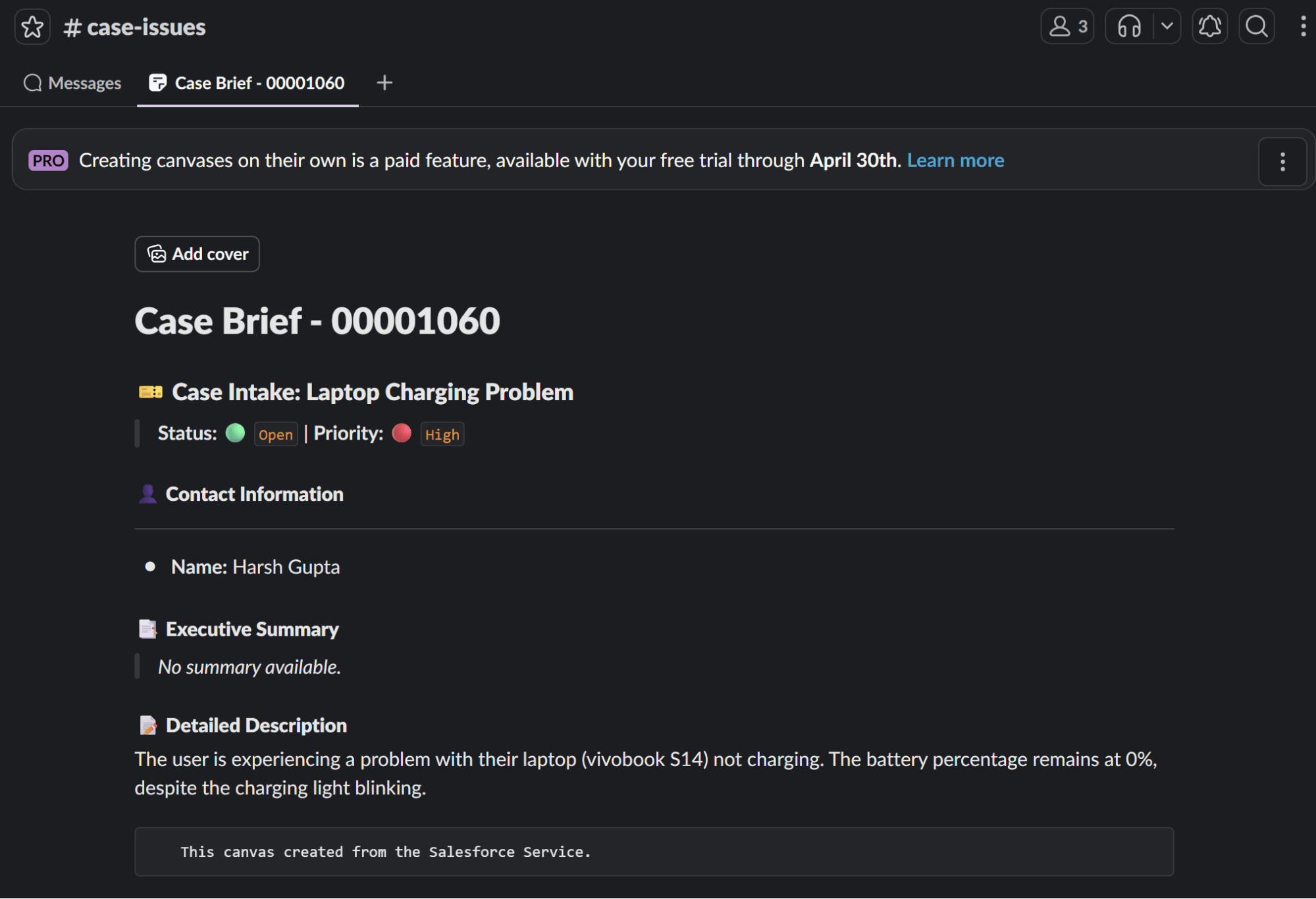
The system follows a structured pipeline to convert Slack conversations into Salesforce Cases using AI.
The process begins when a Slack message is triggered using a reaction. The system then fetches the complete conversation from the Slack channel using the Slack API ( conversations.history).
This data is passed to an Apex Invocable Method, where it is cleaned and converted into a readable chat transcript. The transcript is then sent to an Agentforce Prompt Template, which analyzes the conversation and generates structured output in JSON format.
Based on this output, the system creates a Case and a related Contact in Salesforce. Finally, a canvas-style summary is generated to provide a quick overview of the issue.
10 - End-to-End Flow
The complete flow of the system can be summarized as follows:
Slack Message
- Reaction Trigger
- Slack API (Fetch Conversation)
- Apex Processing
- AI Prompt Template (Agentforce)
- Structured Output (JSON)
- Salesforce Case & Contact Creation
- Canvas Summary Generation
11 - Apex Implementation for Slack Integration
The core logic of the system is implemented using Apex. An Invocable Method is used to fetch Slack conversations, process them using AI, and create records in Salesforce.
This approach allows seamless integration between Slack, Agentforce, and Salesforce, enabling end-to-end automation.
11.1. Fetching Slack Conversations
The system uses the Slack API ( conversations.history) to retrieve all messages from a specific Slack channel. This is done using an HTTP callout with secure authentication via a token.
- Endpoint is dynamically built using channel ID
- Authorization is handled using a stored token
11.2. Converting Chat into Transcript
The fetched Slack messages are parsed and converted into a readable chat transcript format. This step filters out bot messages and ensures only meaningful user conversations are processed.
This transcript becomes the input for AI analysis.
11.3. AI Processing using Prompt Template
The chat transcript is passed to an Agentforce Prompt Template through a Flow. The AI analyzes the conversation and returns structured data in JSON format.
This includes:
- Issue summary
- Description
- Priority
- User details
- Decision to create case
Key method used:
- callPromptTemplate()
11.4. Contact & Case Creation
Once the AI response is received, the system extracts user details from Slack using the users.info API and creates a corresponding Contact in Salesforce.
A Case is then created with the extracted information, including subject, description, priority, and status. The Contact is linked as the case reporter.
11.5. Canvas Summary Generation
After the Case is successfully created, a canvas-style summary is generated using an asynchronous Apex job.
This is implemented using a Queueable class, which ensures efficient processing without impacting system performance.
12 - Salesforce Output
Once the system processes the Slack conversation, a Case is automatically created in Salesforce along with the associated Contact.
The generated case includes key details such as subject, description, priority, and status. In addition, a canvas-style summary is created to provide a clear and structured overview of the issue.
This allows support teams to quickly understand the problem without going through the entire conversation, improving efficiency and response time.
13 - Impact
This solution significantly improves the way teams handle issues discussed in Slack. By automating the entire process, it eliminates manual effort and ensures that no important issue goes unnoticed.
Key benefits include:
- Faster issue resolution
- Reduced manual effort
- No missed issues from conversations
- Prevention of duplicate case creation
14 - Future Enhancements
This system can be further enhanced with additional features such as:
- Real-time Slack to Salesforce synchronization
- Thread-level conversation analysis
- Bi-directional updates (sending case updates back to Slack)
- Advanced UI-based visualization for case summaries
15 - Conclusion
This project demonstrates how AI and automation can transform everyday conversations into structured and actionable insights.
By integrating Slack with Salesforce using Agentforce and Apex, we created a system that not only reduces manual effort but also improves visibility and efficiency in issue management.
This approach showcases the potential of combining conversational platforms with enterprise systems to build smarter and more responsive workflows.
For any queries please reach out to support@astreait.com