Mastering the Sender Authentication Package (SAP) in Marketing Cloud
In our previous article we have discussed Marketing Cloud and its best possible use, an Organization or any Marketer can make.
Now, to achieve this, initially when a Salesforce Marketing Cloud account is bought, Sender Authentication Package(SAP) setup needs to be done for better Email Deliverability results and performance.
Let's have a look into Sender Authentication Package(SAP) and it's features.
1) Sender Authentication Package(SAP) is a Marketing Cloud account branding tool that allows you to customize links and images to match branding for the authenticated domain you're sending email from.
2) SAP Features
- Account Branding- Marketing Cloud brands your account with your chosen authenticated custom domain. This feature modifies view-as-a-webpage, link and image wrapping, and removes all references to Marketing Cloud in favor of your custom authenticated domain.
- Private Domain for Email sending - This feature assigns a domain used to send email. This domain acts as the From address fro your email sends. Salesforce Marketing Cloud authenticates your email sends using the Sender Policy Framework(SPF), Sender ID ad Domain Keys/DKIM authentication.
- Custom Domain for Cloud Pages - This feature includes a private domain for Cloud Pages.
- Dedicated IP Address - This feature assigns a unique IP address to your account. All email messages sent from your Marketing Cloud account use this IP address. This IP address represents most of your sending reputation.
- Reply Mail Management This feature controls the replies you receive from your subscribers. You can assign filters for out-of-office messages and manual unsubscribe requests.
Once sender authentication is properly configured, marketers can further enhance email personalization using AMPscript, Salesforce Marketing Cloud’s scripting language. AMPscript allows dynamic customization of email content, enabling personalized subject lines, content blocks, and subscriber-specific messaging. When combined with a properly configured Sender Authentication Package (SAP), AMPscript ensures that personalized emails are both engaging and delivered with high reliability.
A user can check information related to the SSL certificates by following the below mentioned path:
Login into SFMC > Setup > Settings > Security > Domain SSL Certificates
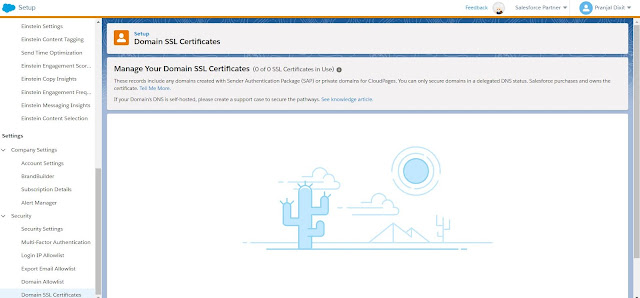
Domain Delegation in Marketing Cloud
- DNS for SAP domain is managed by the Salesforce Marketing Cloud dedicated team if it is not self hosted.
- Self hosting - It has to be done by the DNS team of that specific Organization which is not recommended by Salesforce Marketing Cloud.
Summary
To ensure effective email delivery and personalization, it is important to manage customer data efficiently. Salesforce Marketing Cloud provides Contact Builder, which allows marketers to unify customer data from multiple sources into a single data model. This unified data helps improve targeting, segmentation, and personalization, all of which contribute to better email deliverability when combined with SAP.
In advanced implementations, organizations often integrate Salesforce Marketing Cloud with external systems using APIs. These integrations help automate email sending, manage subscriber data, and monitor deliverability metrics programmatically. The Sender Authentication Package plays an important role in ensuring that emails sent via API integrations maintain proper authentication and reputation.
Salesforce Marketing Cloud provides a wide range of tools for email marketing, personalization, automation, and data management. Features such as Sender Authentication Package (SAP), AMPscript, APIs, and Contact Builder work together to improve deliverability and customer engagement. To explore more tutorials, guides, and best practices related to Salesforce Marketing Cloud, visit our Salesforce Marketing Cloud page.