Artificial Intelligence is becoming a core capability in modern applications. Salesforce is also rapidly integrating AI into its ecosystem, enabling developers to work with Large Language Models (LLMs) directly inside the platform.
Previously, if a Salesforce developer wanted to use an AI model, they typically had to integrate external APIs such as OpenAI using HTTP callouts. This required managing API keys, configuring Named Credentials, and writing additional logic to handle authentication and responses.
Salesforce now simplifies this process by providing SFDC AI supported models, which allow developers to interact with AI models directly from Apex using the Models API.
In this blog, we will explore how developers can use Apex with Salesforce-managed models to generate AI responses within Salesforce applications.
The Traditional Approach
Before native AI capabilities were introduced, integrating AI with Salesforce usually required several external configurations:
- Selecting an external AI provider
- Generating API keys
- Configuring Named Credentials
- Writing HTTP callouts in Apex
- Handling authentication and parsing responses
Although this approach works, it introduces additional complexity and maintenance overhead.
With the Salesforce Models API, developers can now interact with supported AI models directly from Apex without building custom API integrations.
What Are SFDC AI-supported models?
SFDC AI supported models are Salesforce-managed large language models available through the Einstein AI Platform.
Key advantages include:
- Native integration with Salesforce
- Simplified development workflow
- Secure AI access through Salesforce infrastructure
- Reduced dependency on external API management
This allows developers to focus on building intelligent features within Salesforce applications rather than managing external integrations.
Calling an LLM Using Apex
Salesforce provides the Models API, which allows developers to generate AI responses directly from Apex.
To generate text, developers can call the ModelsAPI.createGenerations() method and provide a prompt in the request body. If the request is successful, the response contains the generated text.
Apex Example – Generate Text
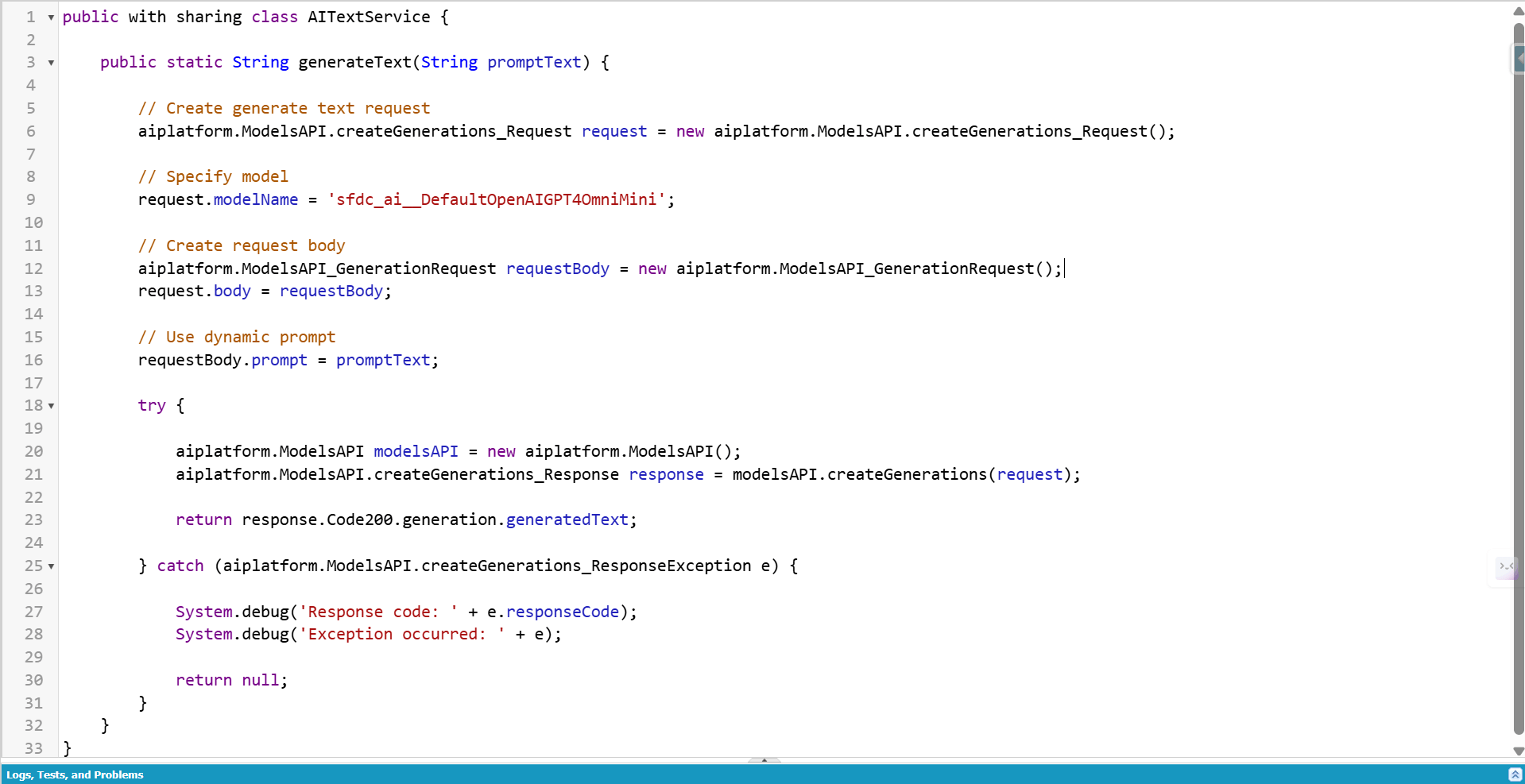
In this example:
- A request is created using the Models API
- A supported AI model is specified
- A prompt is sent to the model
- The generated response is returned back to Apex
This allows developers to integrate AI-generated content directly into Salesforce applications.
Demonstrating the Output Using a Lightning Web Component
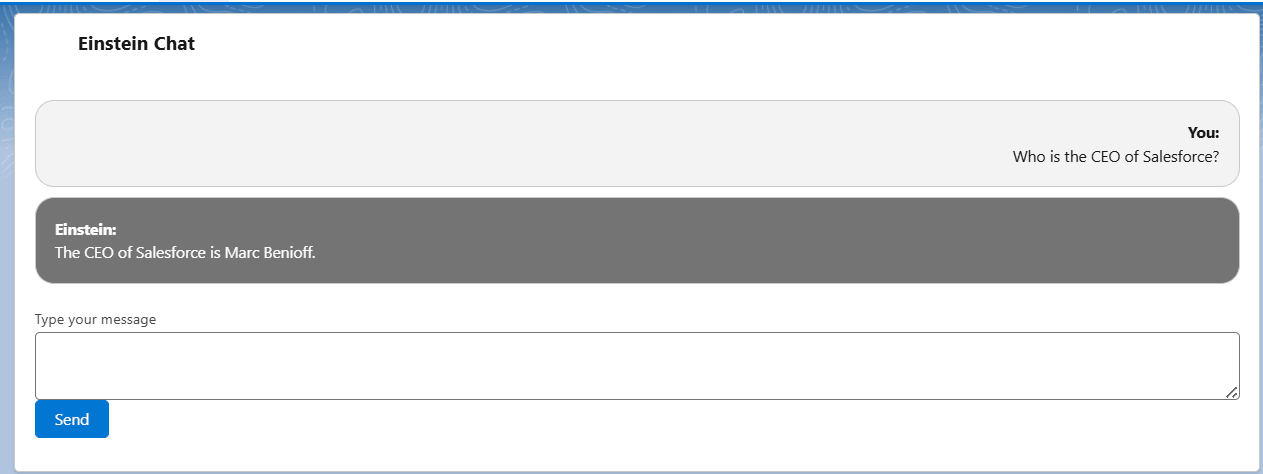
To demonstrate the working of the Models API, a simple Lightning Web Component was created where a prompt is sent to Apex and the AI-generated response is displayed in the UI.
Below is an example of the response generated by the AI model.
Supported Models in Salesforce
Salesforce provides several Salesforce-managed models that can be used with the Models API. These models are available out of the box through Einstein Studio.
OpenAI / Azure OpenAI Models
- sfdc_ai__DefaultGPT4Omni
- sfdc_ai__DefaultGPT4OmniMini
- sfdc_ai__DefaultGPT41
- sfdc_ai__DefaultGPT41Mini
- sfdc_ai__DefaultGPT5
Anthropic Models (Amazon Bedrock)
- sfdc_ai__DefaultBedrockAnthropicClaude4Sonnet
- sfdc_ai__DefaultBedrockAnthropicClaude45Sonnet
- sfdc_ai__DefaultBedrockAnthropicClaude45Haiku
Google Vertex AI Models
- sfdc_ai__DefaultVertexAIGemini25Flash001
- sfdc_ai__DefaultVertexAIGeminiPro25
- sfdc_ai__DefaultVertexAIGemini30Flash <
Some models are geo-aware, meaning Salesforce automatically routes requests to the nearest data center to minimize latency.
Einstein Trust Layer
All AI requests made through Salesforce pass through the Einstein Trust Layer, which ensures that enterprise data remains secure.
The Trust Layer provides several important safeguards:
- Data masking and protection
- Secure prompt processing
- Governance and compliance controls
- Isolation of customer data
This architecture ensures that sensitive Salesforce data remains protected while interacting with external AI models.
Conclusion
Salesforce is steadily embedding AI capabilities into its platform, and SFDC AI supported models provide developers with a powerful way to integrate LLM functionality directly using Apex.
By leveraging the Models API, developers can generate text, build conversational AI features, and incorporate intelligent automation directly into Salesforce applications.
As Salesforce continues expanding its AI ecosystem, understanding how to work with LLMs through Apex and the Models API will become an increasingly valuable skill for Salesforce developers.
To explore more insights, best practices, and industry solutions, visit our Salesforce Sales Cloud page.