Every data platform eventually confronts the same question: how do you keep a lakehouse in sync with the systems feeding it, without re-reading everything, every time? As data volumes grow, a full refresh stops being a convenience and starts being a liability — it burns compute, slows downstream reporting, and scales worse with every new source connected to the pipeline. Incremental loading is the discipline of processing only what has actually changed, and Databricks has built an unusually rich toolbox for it like Auto Loader, Change Data Feed, declarative CDC etc that act as the Foundation of Scalable Data Pipelines.
Overview: Why Incremental Loading
Incremental loading is a data ingestion strategy that processes only new or modified records since the last successful pipeline execution, instead of reprocessing the entire source dataset.
- Improves Performance: Eliminates the need to scan and process the full source table on every run, significantly reducing execution time.
- Reduces Compute Costs: Processes only the delta (new or changed data), minimizing resource consumption and cloud costs.
- Enables Faster Data Availability: Smaller processing volumes result in lower pipeline latency and quicker data refreshes.
- Scales Efficiently: As source datasets grow, incremental processing maintains predictable performance without increasing processing overhead linearly.
- Supports Reliable Data Engineering: Ensures that pipelines efficiently capture ongoing data changes while avoiding unnecessary reprocessing.
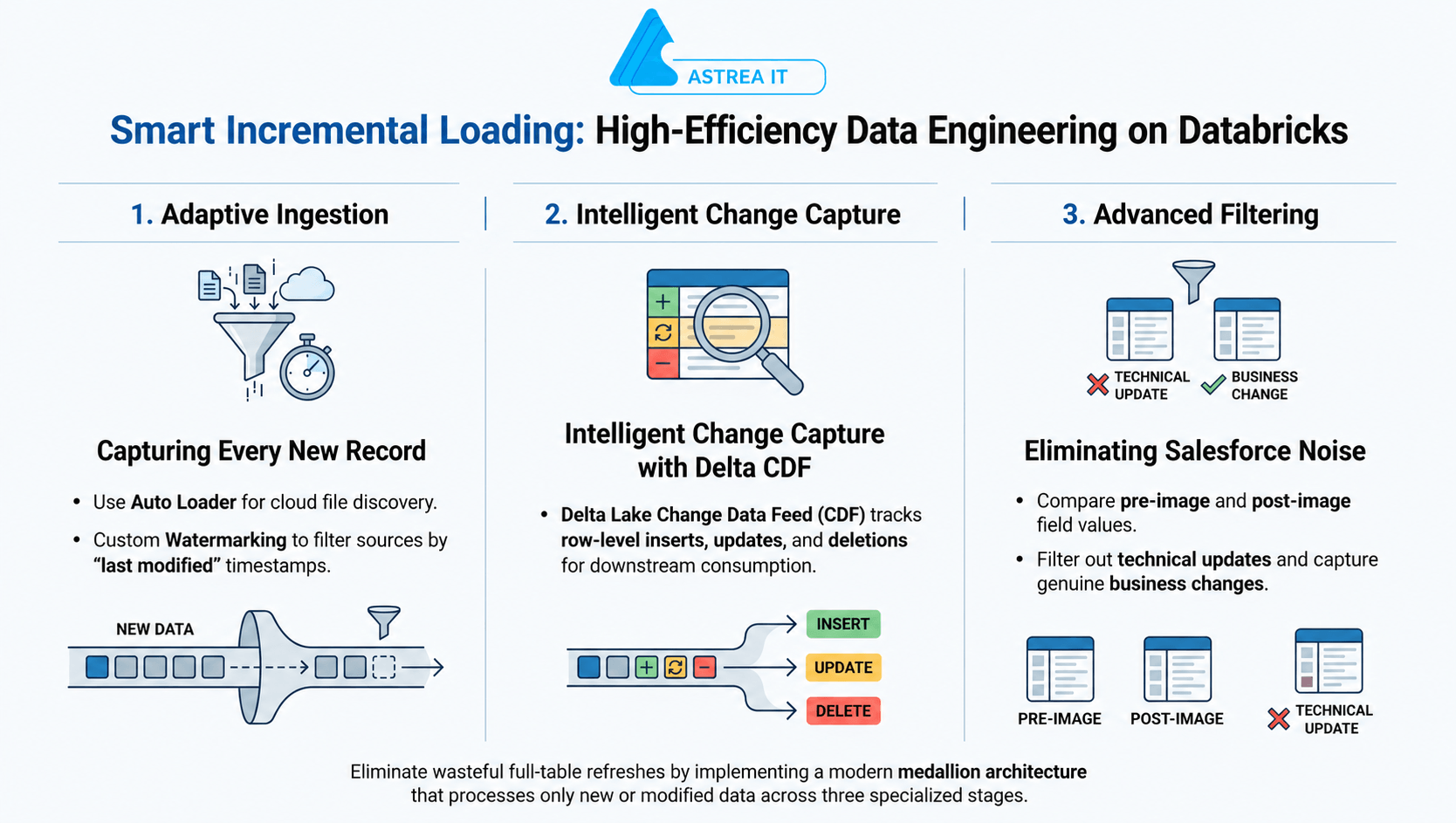
Incremental Loading Approaches in Databricks
Custom Watermark-Based Processing
|
Change Data Capture (CDC)
|
Auto Loader
|
Lakeflow Declarative Pipelines
|
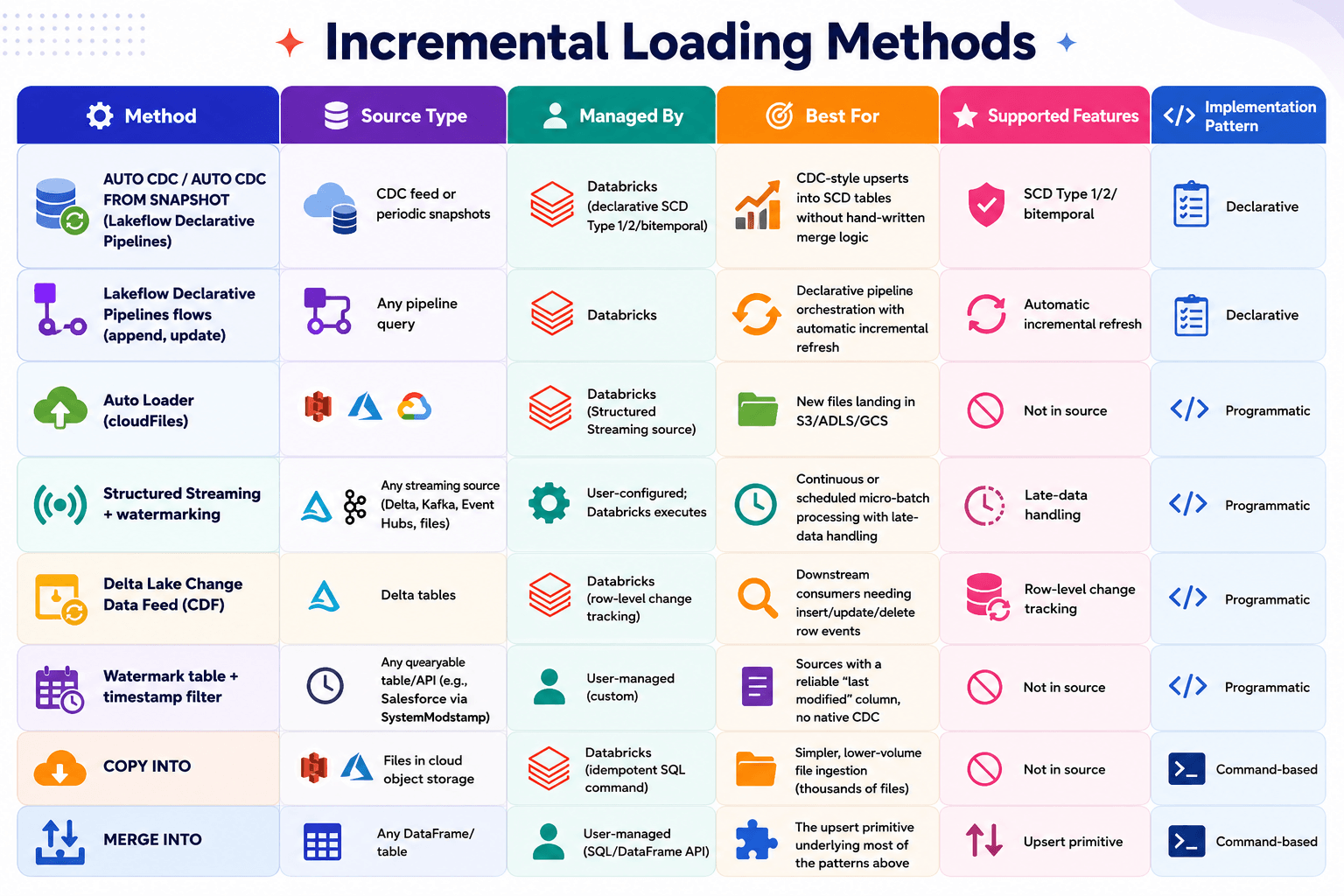
Choosing the Right Approach
The best incremental loading strategy depends on several factors:
- Source Type: Database table, cloud files, or streaming source.
- Data Arrival Pattern: Batch, micro-batch, or continuous streaming.
- Change Detection Requirements: Whether you need only new records or complete row-level tracking (inserts, updates, and deletes).
- Operational Complexity: Preference for custom implementation versus managed pipeline capabilities.
The Recommended Approach: Instead, use the Databricks Secrets API or dbutils to retrieve secrets at runtime. When a notebook requests a secret, Databricks verifies permissions, the scope validates access, and the value is returned securely—hidden even from the notebook output.
1. Custom Watermark-Based Incremental Loading
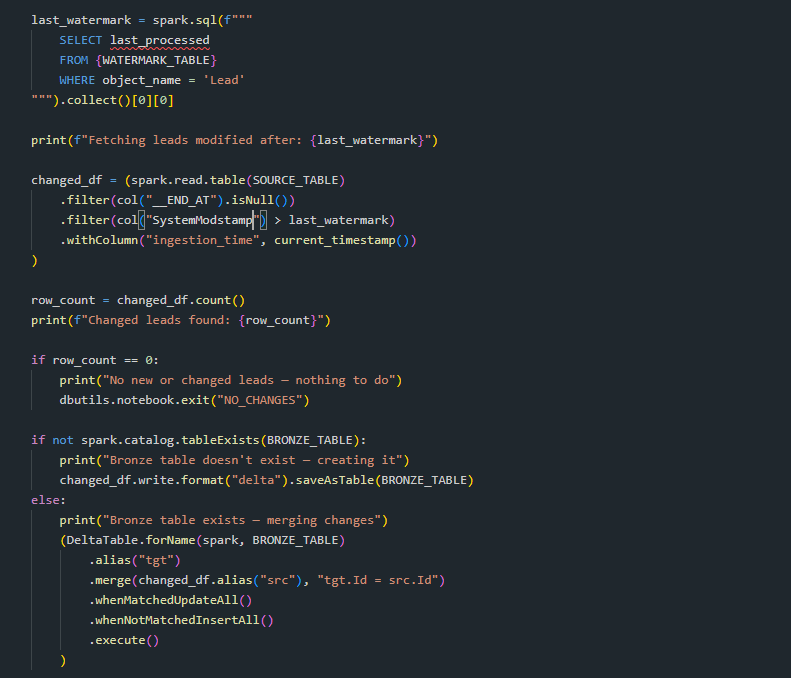
Watermark-Based Incremental Loading is a technique that loads only the records that have been added or modified since the last successful pipeline run. It uses a watermark—typically the highest processed timestamp, date, or sequential ID—to identify new or changed data.
How It Works
- During the first pipeline execution, all available records are loaded.
- The pipeline stores the highest processed watermark value (for example, the maximum last_updated_timestamp or id) in a watermark table or metadata store.
- On subsequent runs, the pipeline reads the stored watermark value.
- It extracts only records with a watermark value greater than the stored value.
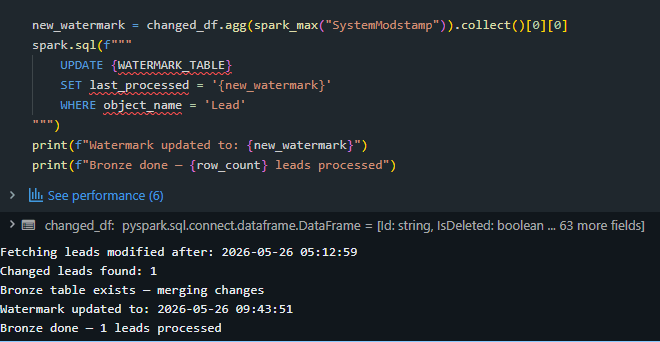
- After successful processing, the watermark is updated to the latest processed value for the next run.
Implementation:
Strengths:
- Reduces data processing time by reading only incremental records.
- Lowers compute and storage costs.
- Improves pipeline performance and scalability.
- Simple to implement for sources with reliable timestamp or ID columns.
- Works well for scheduled batch ingestion.
Limitations:
- Requires a reliable and monotonically increasing watermark column.
- Does not automatically detect deleted records.
- Late-arriving or out-of-order data may be missed unless additional logic is implemented.
- Updates can be missed if the watermark column is not refreshed during modifications.
2. Auto Loader (cloudFiles)
Auto Loader is Databricks' native file ingestion mechanism for incrementally loading data from cloud object storage. It uses the cloudFiles Structured Streaming source to automatically detect, track, and process only newly arrived files, eliminating the need to manually manage file discovery or maintain file-listing metadata.
Unlike traditional file ingestion methods that repeatedly scan directories, Auto Loader efficiently maintains the state of processed files, making it highly scalable for continuously growing datasets.
How It Works
- Specify the source cloud storage directory (for example, AWS S3, Azure Data Lake Storage, or Google Cloud Storage).
- Auto Loader scans the directory and discovers available files.
- During the initial run, it can process existing files (if configured).
- Auto Loader automatically tracks which files have already been processed.
- As new files arrive, only the new files are discovered and ingested.
- The ingestion state is maintained automatically, preventing duplicate processing.
- The data is continuously or periodically loaded into Delta tables using Structured Streaming or Lakeflow Declarative Pipelines.
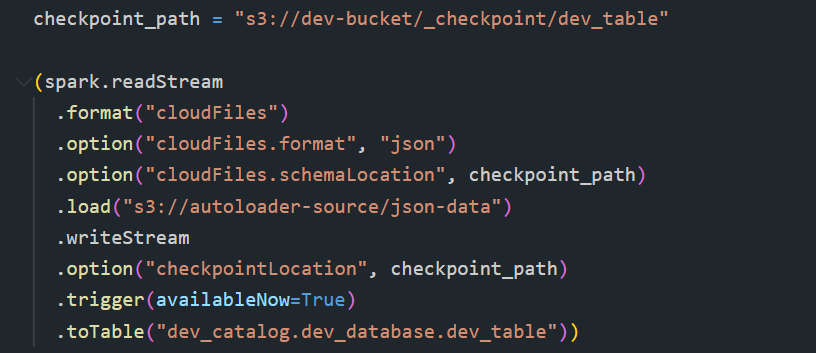
Best for: New files continuously or periodically landing in S3, ADLS, or GCS — the file-based equivalent of the watermark pattern above, but with Databricks managing file-level state instead of a timestamp column.
Advantages
- Eliminates manual file-list management.
- Provides highly scalable file ingestion for large datasets.
- Reduces directory scanning overhead and improves performance.
- Prevents duplicate file processing through automatic state management.
Limitations
- Designed for file-based data sources only (not database tables).
- Processes files incrementally but does not track row-level changes within files.
- File updates or deletions require additional handling, as Auto Loader primarily detects newly arrived files.
3. COPY INTO
A simpler, SQL-native alternative to Auto Loader for lower-volume or less-frequent file ingestion. With COPY INTO, SQL users can idempotently and incrementally ingest data from cloud object storage into Delta tables, and it can be used in Databricks SQL, notebooks, and Lakeflow Jobs.
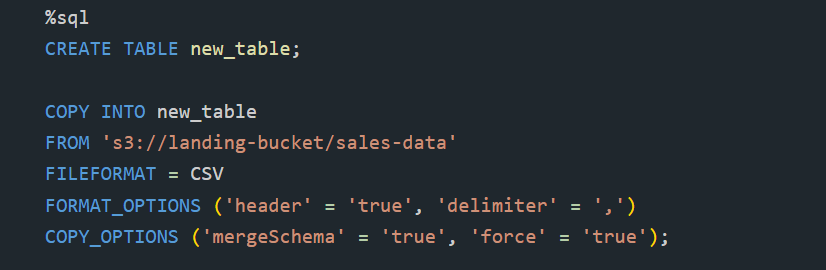
Choosing between Auto Loader and COPY INTO: if you're going to ingest files in the order of thousands over time, COPY INTO is a reasonable choice; beyond that scale, or for near-real-time needs, Auto Loader is the recommended path.
4. Structured Streaming with Watermarking
Structured Streaming with Watermarking is Databricks' stream processing framework for incrementally processing continuously arriving data from sources such as Delta tables, Apache Kafka, Azure Event Hubs, and cloud storage. It supports both real-time streaming and scheduled micro-batch processing, enabling efficient incremental data ingestion while providing exactly-once processing guarantees.
Unlike traditional streaming applications that run continuously, Databricks allows pipelines to execute in batch-like mode using Trigger.AvailableNow or Trigger.Once. In this approach, the job starts, processes all new data that has arrived since the previous execution in one or more micro-batches, updates the checkpoint, and then automatically stops. This combines the reliability of streaming with the operational simplicity and lower cost of scheduled batch jobs.
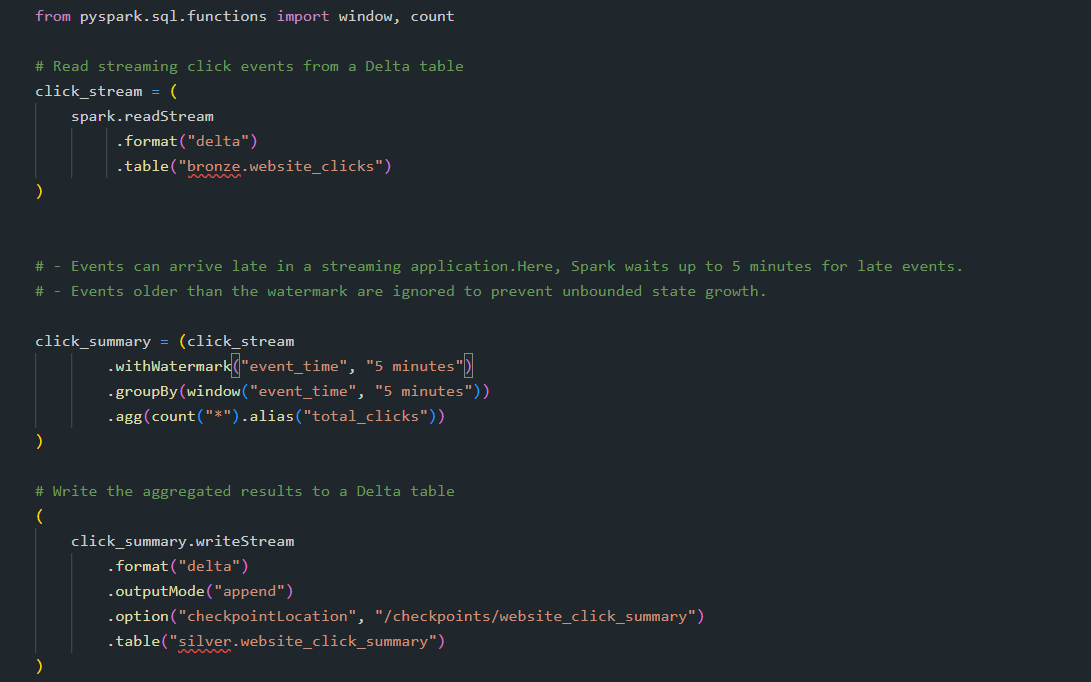
The checkpoint location is what tracks progress between runs. Always store it in a durable location, and never delete or move it without understanding the restart implications.
5. Delta Lake Change Data Feed (CDF)
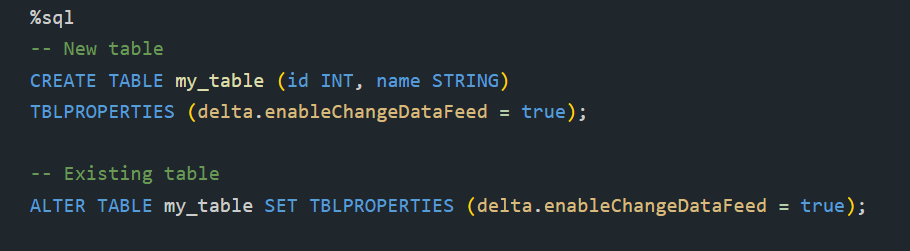
Delta Lake Change Data Feed (CDF) is a feature that captures row-level changes made to a Delta table. Whenever data is inserted, updated, or deleted, CDF records these changes as change events, allowing downstream pipelines to process only the modified rows instead of reprocessing the entire table.
By reading changes from a specific table version or timestamp, CDF enables efficient incremental data processing and simplifies the implementation of Change Data Capture (CDC) pipelines in the Databricks Lakehouse.
Enabling CDF on a table:
How It Works
- Enable Change Data Feed on a Delta table.
- When records are inserted, updated, or deleted, Delta Lake automatically records the change events.
- Each change is associated with Delta table version metadata and operation details.
- Downstream pipelines read only the changes that occurred after a specified table version or timestamp.
- The pipeline processes these incremental changes and updates the target table accordingly.
- The latest processed version or timestamp is stored and used as the starting point for the next execution.
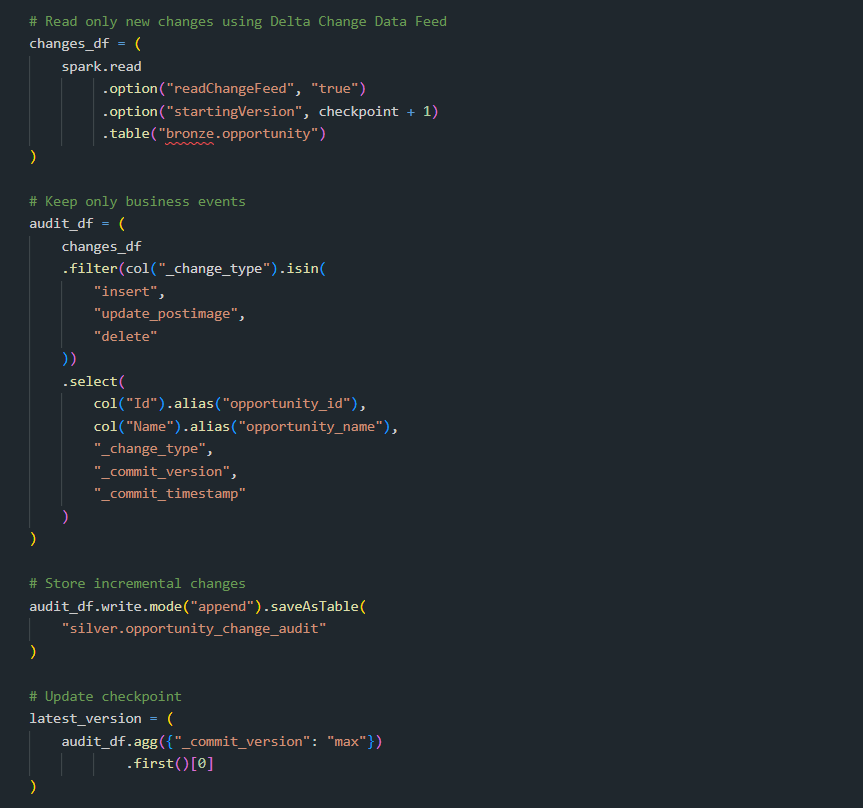
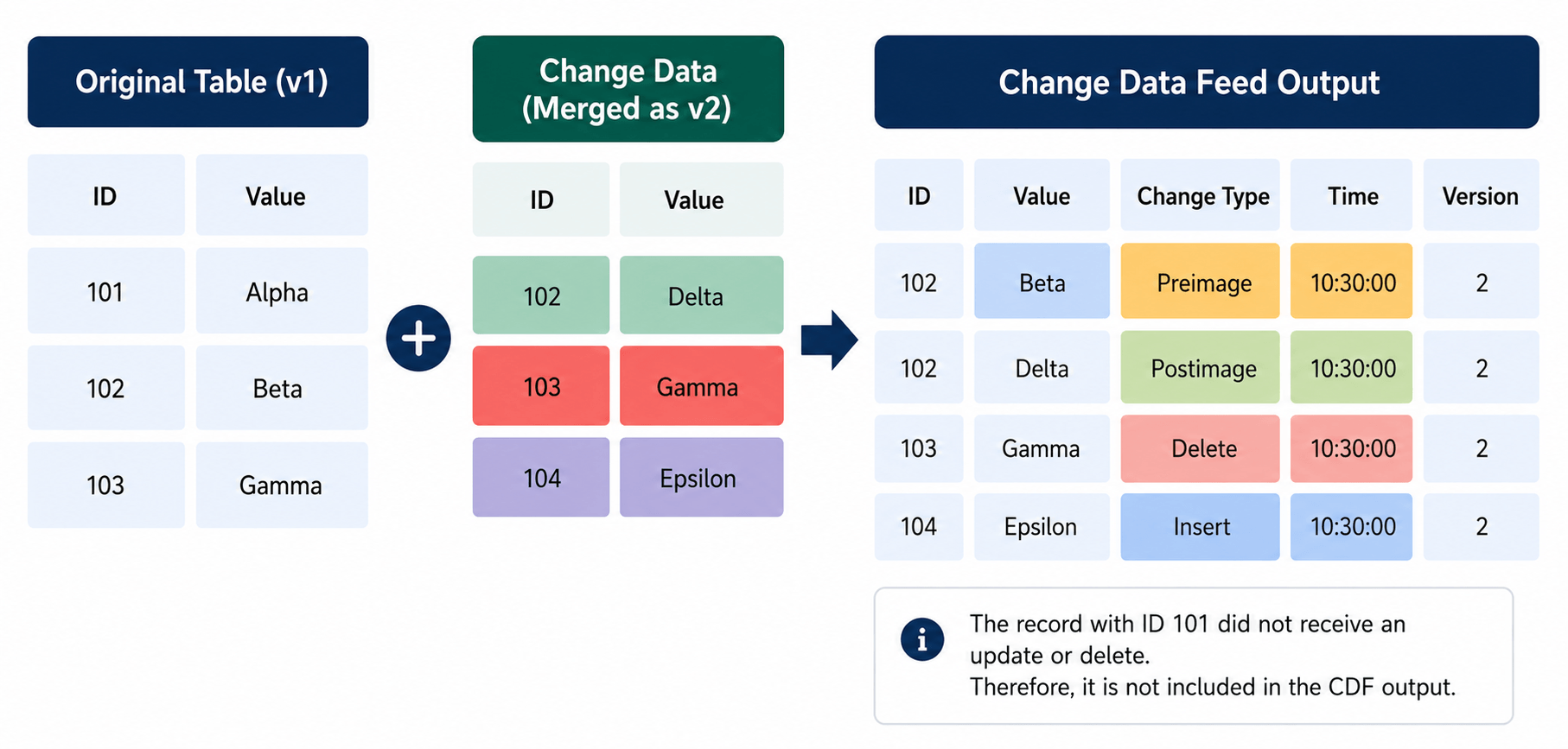
Each change row includes _change_type (insert, update_preimage, update_postimage, or delete), _commit_version, and _commit_timestamp in addition to the table's own columns. Preimage is the value before the update, and postimage is the value after the update.
Advantages
- Processes only changed records, reducing compute costs.
- Simplifies incremental ETL and ELT pipeline development.
- Provides reliable tracking of row-level changes.
- Supports downstream data synchronization and replication.
- Enables efficient propagation of changes across Bronze, Silver, and Gold layers.
- Ensures data consistency through Delta Lake transaction logs.
Limitations
- Available only for Delta tables with Change Data Feed enabled.
- Tracks changes only after CDF has been enabled; earlier changes are not captured.
- Additional storage is required to maintain change data.
- Change data retention depends on Delta Lake retention policies.
6. Merge (Upsert) with Delta Lake
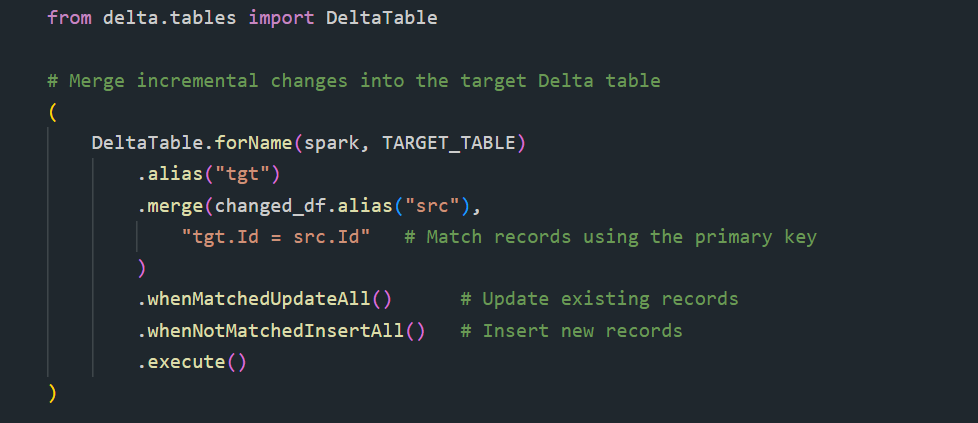
Delta Lake MERGE INTO is an atomic upsert operation that synchronizes data between a source and a target Delta table in a single transaction. It updates existing records when a matching key is found and inserts new records when no match exists. Optionally, it can also delete records based on specified conditions.
MERGE INTO is the primary mechanism used to apply incremental changes from sources such as Watermark-Based Incremental Loading, Auto Loader, Structured Streaming, and Delta Lake Change Data Feed (CDF) into Delta tables while maintaining ACID transaction guarantees.
Operations Supported
- INSERT – Adds new records that do not exist in the target table.
- UPDATE – Modifies existing records that match the merge condition.
- DELETE (Optional) – Removes matching records when required.
- UPSERT – Performs insert and update operations in a single transaction.
Key Features
- Performs atomic upsert operations using a single SQL statement.
- Supports insert, update, and delete operations.
- Maintains ACID transaction guarantees through Delta Lake.
- Optimized for large-scale incremental data processing.
- Integrates seamlessly with Delta Lake, Structured Streaming, Auto Loader, and Change Data Feed (CDF)
7. Lakeflow Declarative Pipelines Flows
At the pipeline-orchestration level, Databricks organizes incremental processing around the concept of a flow — a query and, typically, a target, where the flow processes the query either as a batch or incrementally as a stream of data into the target, and lives within a pipeline in Lakeflow Spark Declarative Pipelines. A flow runs each time its defining pipeline updates, and depending on flow type and the state of source data, an update may perform an incremental refresh (processing only new records) or a full refresh (reprocessing everything).
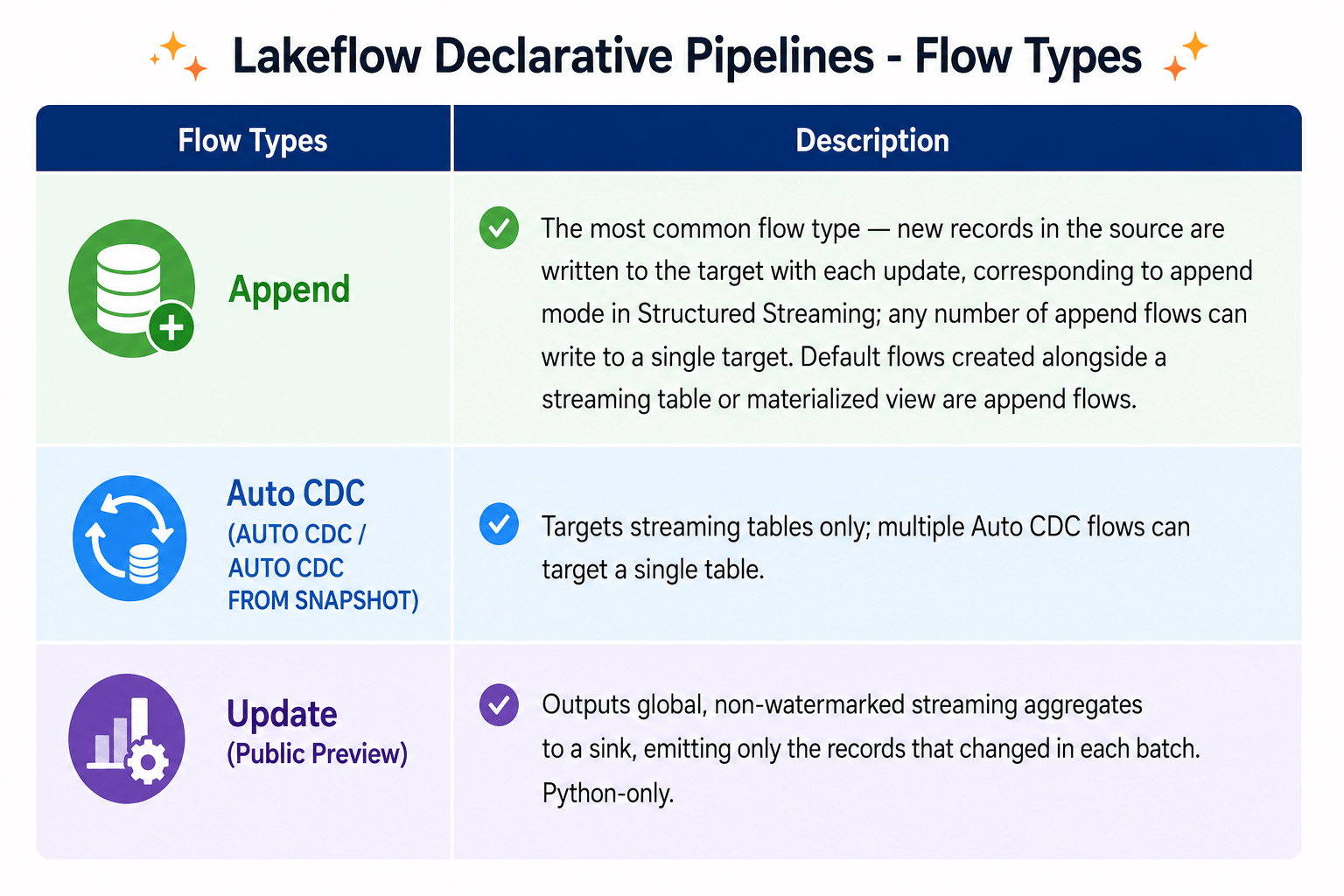
Defining flows separately from their target lets multiple flows append data into a single target . Useful for adding streaming sources without a full refresh, backfilling historical data, or combining multiple sources without a UNION clause.
Detailed Implementation of Auto CDC in Lakeflow Declarative Pipelines
For teams building on Lakeflow Declarative Pipelines, Databricks provides a declarative alternative to hand-writing CDF-diff-and-merge logic: the AUTO CDC API (formerly APPLY CHANGES). This API automates the complexity of computing slowly changing dimensions (SCD) Type 1 and Type 2 from either a CDC feed or database snapshots, and also supports bitemporal tracking, which records changes across two time dimensions.
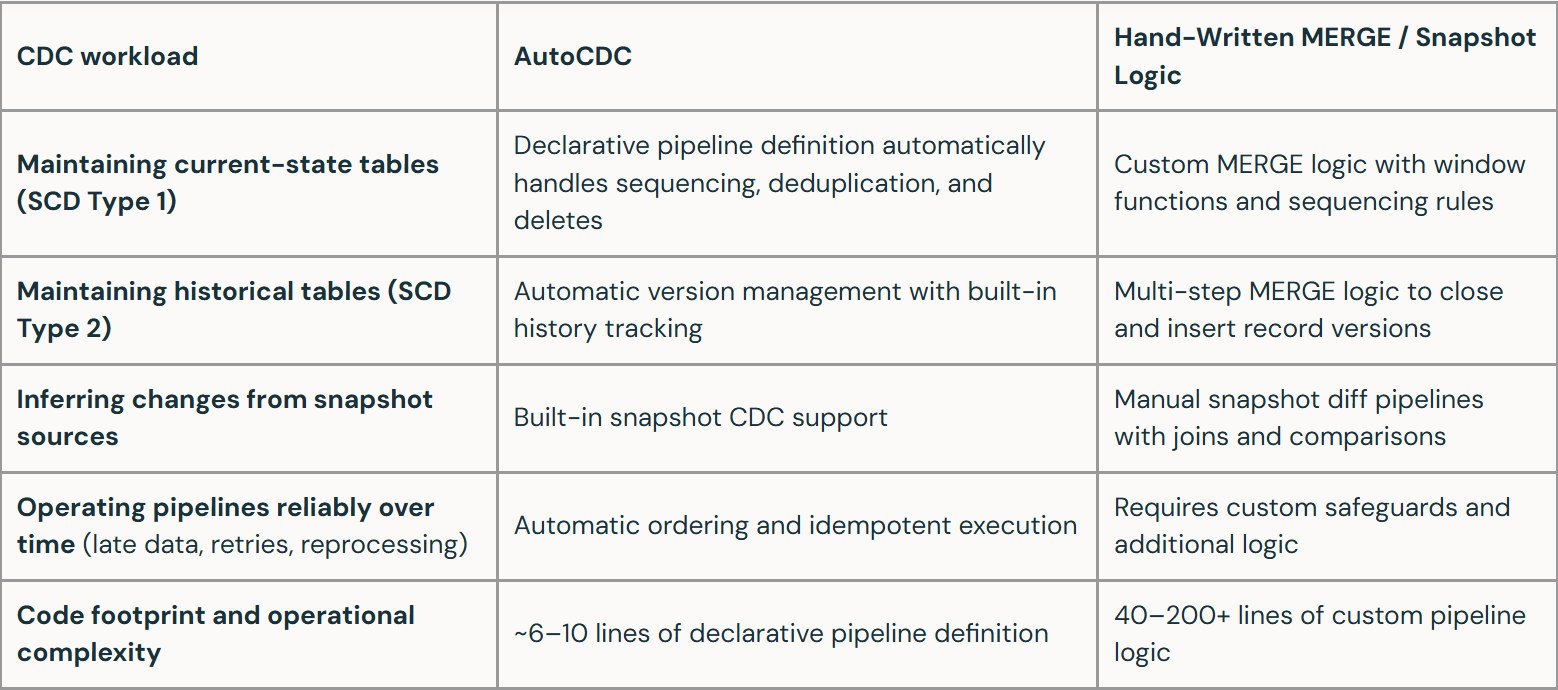
Two entry points exist depending on the source:
- AUTO CDC — use this when the source database has a CDC feed enabled; it processes changes from a change data feed and is supported in both the SQL and Python pipeline interfaces.
- AUTO CDC FROM SNAPSHOT — use this when CDC is not enabled on the source and only periodic snapshots are available; it compares successive snapshots to determine changes, and is supported only in the Python interface.
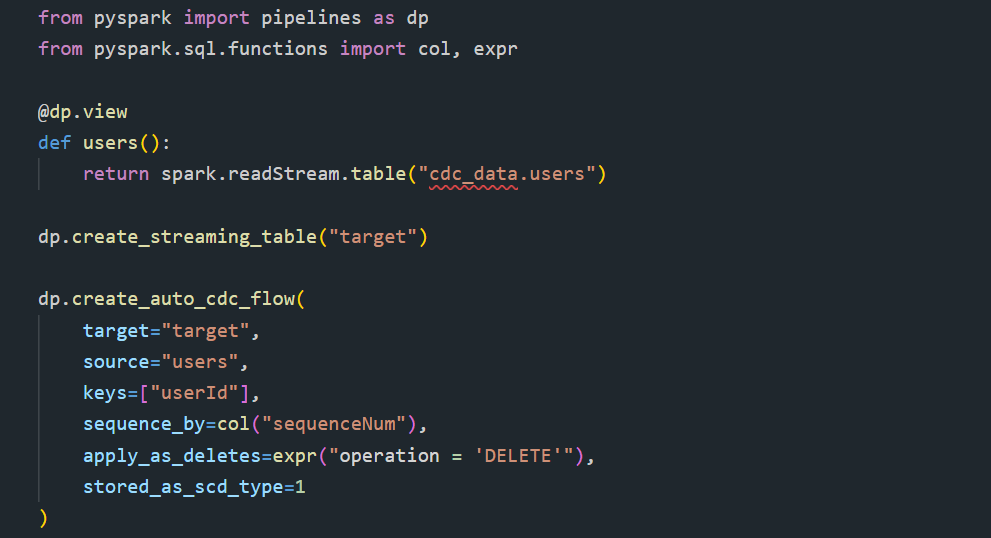
SCD Type 1 example (keep only the latest state per key):
SCD Type 2 example (retain full history, with __START_AT / __END_AT versioning):
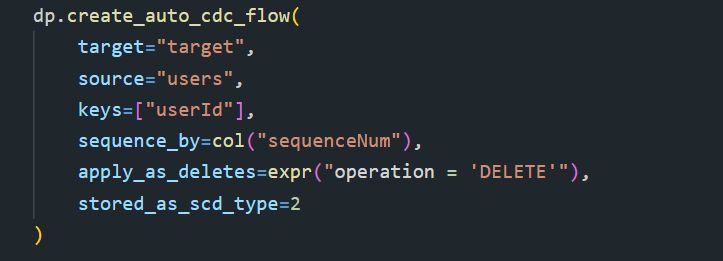
You can also scope SCD Type 2 tracking to a subset of columns with track_history_except_column_list, so changes to excluded columns update the current row in place instead of creating new history rows — directly analogous to the "excluded columns" strategy we hand-built for the Opportunity pipeline (Section 8).
Bitemporal AUTO CDC (Beta) extends SCD Type 2 to track two time dimensions simultaneously — business time (when an event actually happened) and system time (when the system recorded or ingested it) — which is useful for auditing, regulatory reporting, and financial decision-making where you need to reconstruct "what we believed, and when."
Requirements & limitations:
- Requires serverless Lakeflow Declarative Pipelines or the Pro/Advanced pipeline editions.
- The sequencing column must be a sortable data type, and NULL sequencing values are not supported.
- AUTO CDC FROM SNAPSHOT is Python-only.
Conclusion
Incremental loading is a core data engineering practice for building scalable, high-performance, and cost-efficient pipelines in Databricks. By processing only new or modified data, it minimizes compute costs, reduces processing time, and improves data freshness. Databricks provides multiple incremental loading patterns—including Watermark-Based Loading, Auto Loader, Structured Streaming, Delta Lake Change Data Feed (CDF), and Delta Lake MERGE INTO—to address different ingestion and change-tracking requirements. Selecting the appropriate approach based on the data source, workload, and latency enables organizations to build reliable, scalable, and production-ready data pipelines. Hence , “Efficient Data Pipelines Begin with Incremental Processing”
If you're interested in exploring more Databricks solutions, visit our Databricks Page
For any queries please reach out to support@astreait.com