The Core Challenge
In modern manufacturing enterprises, operations and commercial sales typically run on separate systems. Day-to-day warehouse picking, logistics, and order fulfillment occur inside an Enterprise Resource Planning (ERP) platform such as SAP or Oracle. Meanwhile, commercial relationships, negotiated pricing, and long-term volume commitments reside in Salesforce Manufacturing Cloud.
A common requirement is to reflect fulfilled ERP orders against active Sales Agreements in Manufacturing Cloud so that sales teams can track quarterly commitment attainment in real time. However, direct point-to-point synchronous integrations frequently fail in production due to key technical hurdles:
- Governor Limits and Timeouts: Direct synchronous webhooks require Salesforce to validate, resolve references, and create headers and lines within an open HTTP thread. Heavy transaction surges during month-end or quarter-end billing frequently trigger CPU timeouts, causing the ERP request to fail.
- Duplicate Deliveries from Network Replays: ERP middleware automatically resends webhooks when network responses take longer than a few seconds. Without deterministic deduplication, repeated deliveries create duplicate Order and OrderItem records, artificially inflating fulfilled volumes and corrupting rebate calculations.
- Unmapped Master Data Failures: When an ERP order references a newly onboarded distributor branch or an unmapped SKU, synchronous APIs fail completely, rejecting the entire batch and leaving no actionable audit trail inside Salesforce.
- Manufacturing Cloud Lifecycle Rules: In Manufacturing Cloud, Sales Agreements cannot be activated before their Start Date, and agreement actuals only calculate automatically from orders that are in an Activated status and linked directly via the SalesAgreementId field.
Solution Architecture
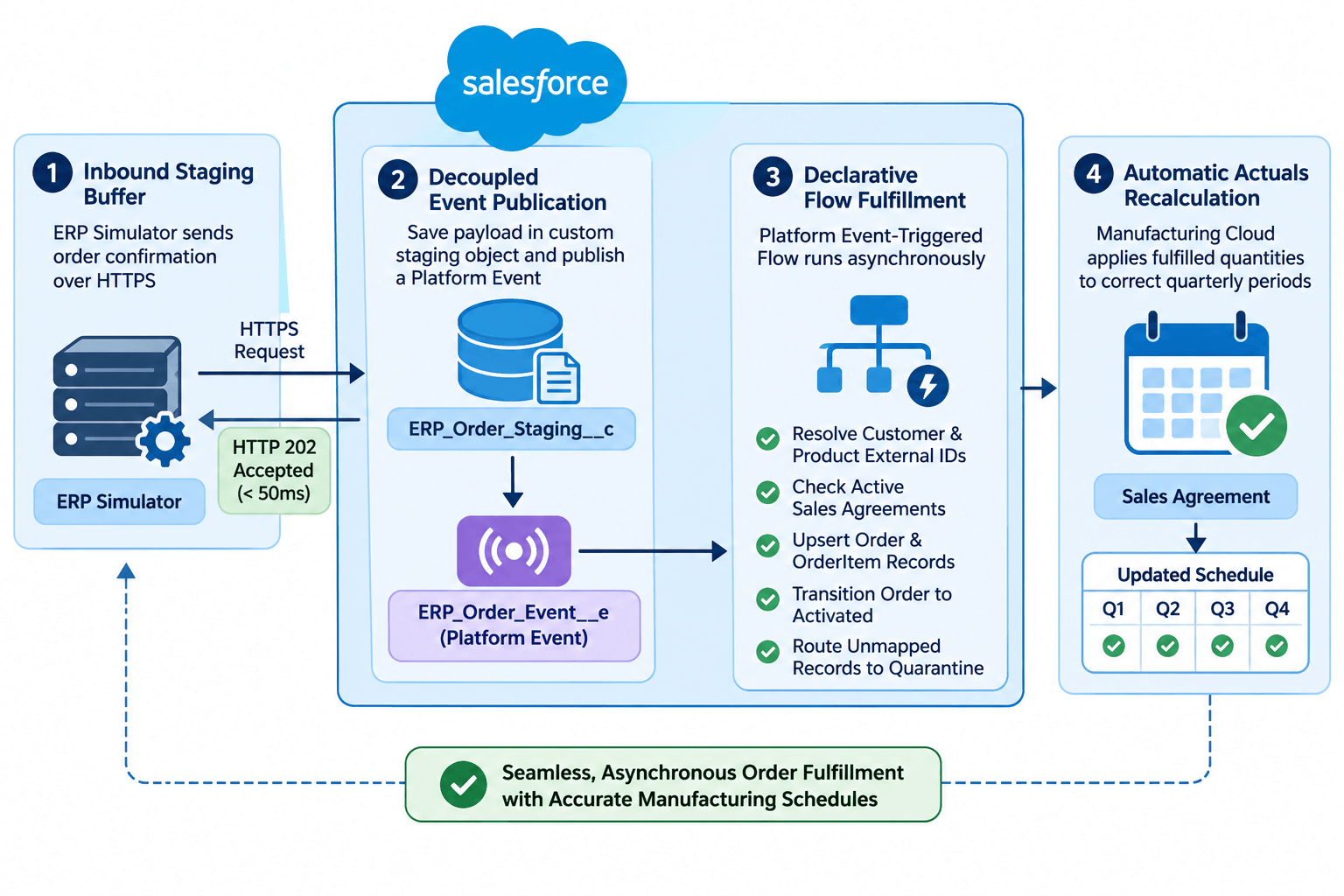
To solve these issues, the architecture separates inbound ingestion from internal fulfillment processing using a decoupled, event-driven pattern powered by Salesforce Platform Events and Flow.
1. Inbound Staging Buffer: An external ERP Simulator dispatches order confirmation events over HTTPS to a lightweight Salesforce endpoint. Rather than processing the entire order synchronously, Salesforce immediately save the raw payload into a custom staging object (ERP_Order_Staging__c) and returns an HTTP 202 Accepted response in under 50 milliseconds. This insulates the ERP from internal Salesforce processing times.
2. Decoupled Event Publication: Upon creating the staging record, Salesforce publishes a Platform Event (ERP_Order_Event__e) carrying the staging record identifier.
3. Declarative Flow Fulfillment: A Platform Event-Triggered Flow listens to the event and coordinates fulfillment asynchronously. The Flow resolves customer and product external IDs, checks active Sales Agreements, upserts Order and OrderItem records, transitions the Order to Activated, and routes any unmapped records to a Quarantine queue.
4. Automatic Actuals Recalculation: With the Order activated and linked to the Sales Agreement, Manufacturing Cloud automatically applies fulfilled product quantities to the correct quarterly schedule periods.
Key Components Used
The integration relies on a concise set of standard and custom Salesforce components to ensure reliable data flow:
| Component Name | Component Type | Purpose in Integration |
|---|---|---|
| ERP_Order_Staging__c | Custom Object | Durable staging table that stores raw inbound JSON, event ID, customer code, and lifecycle status. |
| ERP_Order_Line_Staging__c | Custom Object | Child staging object storing product code, quantity, unit price, and composite line keys. |
| ERP_Order_Event__e | Platform Event | Asynchronous event bus notification that hands off the staged record to Flow Builder. |
| ERP_Order_Fulfillment_Flow | Platform Event Flow | Declarative automation that resolves external IDs, upserts Orders, and manages errors. |
| ERP_Customer_Code__c | Account Field | Unique External ID matching the ERP customer identifier (e.g. CUST-1001). |
| ERP_Product_Code__c | Product2 Field | Unique External ID matching the ERP material/SKU number (e.g. MOTOR-001). |
| ERP_Order_Number__c | Order Field | Unique External ID ensuring idempotent order creation without duplicates. |
| ERP_Order_Line_Key__c | OrderItem Field | Composite External ID (OrderNumber + "|" + LineId) preventing duplicate line items. |
| SalesAgreement | Standard Object | Manufacturing Cloud agreement tracking planned vs actual product commitments. |
Step-by-Step Implementation Guide
The implementation converts complex integration requirements into declarative, maintainable steps using Salesforce Flow and external identifiers.
Step 1: Establishing the Manufacturing Cloud Foundation
Before synchronizing incoming orders, the commercial structure must be active inside Salesforce:
- - Customer Account: Create the distributor Account (e.g., "Apex Distributors") and populate ERP_Customer_Code__c with "CUST-1001".
- - Product Catalog: Configure the product (e.g., "Industrial Motor") with ERP_Product_Code__c set to "MOTOR-001" and add a Standard Price Book entry of ₹5,000.
- - Active Sales Agreement: Create a Sales Agreement with active dates (such as 2026-01-01 to 2026-12-31), set Actuals Calculation Mode to "Orders" (automatically from direct orders), and configure 4 quarterly schedules of 250 planned units each. Activate the agreement.
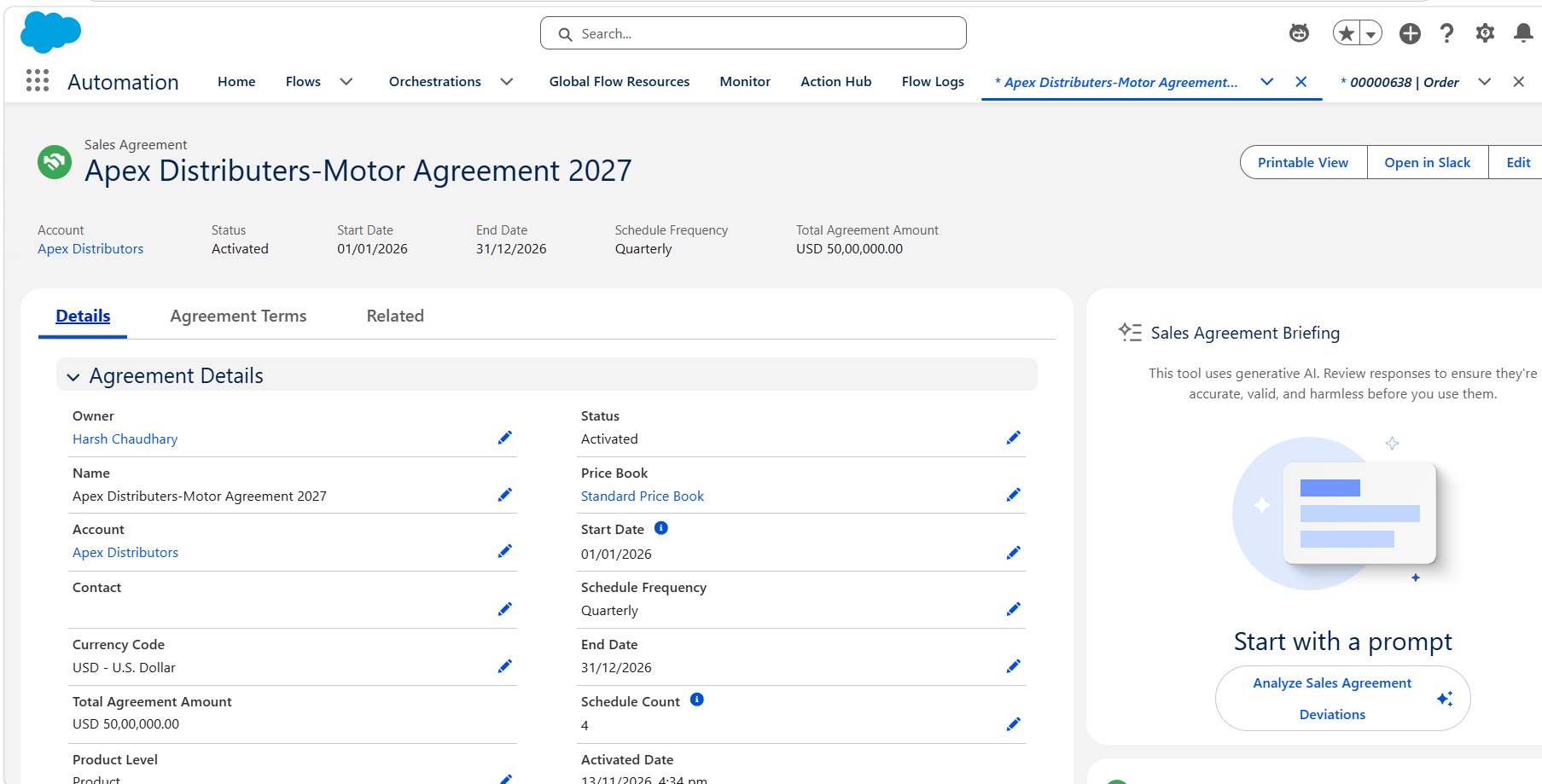
Active Sales Agreement record
Step 2: Configuring External IDs and Durable Staging
External IDs eliminate the need for the ERP to maintain Salesforce record IDs. Configure unique, indexed text fields on Account, Product2, Order, and OrderItem. Deploy the staging objects ERP_Order_Staging__c and ERP_Order_Line_Staging__c to store incoming payloads and track lifecycle status (Pending, Processed, Quarantined).
Step 3: Inbound Ingestion and Event Firing
An inbound REST service receives the ERP JSON confirmation payload. It performs an immediate deduplication check: if the ERP Event ID has already been staged, it returns HTTP 200 OK immediately without creating duplicate data. For new events, it persists the staging records, publishes ERP_Order_Event__e, and returns an immediate HTTP 202 Accepted response, freeing the ERP connection.
Step 4: Declarative Flow Orchestration (Platform Event-Triggered Flow)
The core business logic is executed declaratively by a Platform Event-Triggered Flow (ERP_Order_Fulfillment_Flow) responding to ERP_Order_Event__e:
- - Retrieve Staging Record: A Get Records element retrieves the staged order header and child lines using the record ID provided in the event.
- - Resolve Account via External ID: A Get Records element finds the Account where ERP_Customer_Code__c matches the staging customer code.
- - Evaluate Account Decision: A Decision element checks if the Account exists. If missing, the Flow routes to a Quarantine branch that marks the staging record as Quarantined and logs a clear error message.
- - Locate Active Sales Agreement: If the customer is valid, the Flow queries for an active Sales Agreement associated with the Account.
- - Idempotent Order Upsert: The Flow checks whether an Order already exists with the matching ERP_Order_Number__c. If it exists, the Order is updated; if not, a new Order is created with the resolved Account, active Sales Agreement, Price Book, and effective order date in Draft status.
- - Upsert Order Items: The Flow loops through the staging line items, matches products by ERP_Product_Code__c, and upserts OrderItem records using the composite ERP_Order_Line_Key__c key.
- - Activate Order: Once lines are attached, an Update Records element sets Order Status to "Activated". This status transition is what tells Manufacturing Cloud to recalculate schedule actuals.
- - Mark Staging Processed: The staging record is updated to Processed status, completing the audit trail.
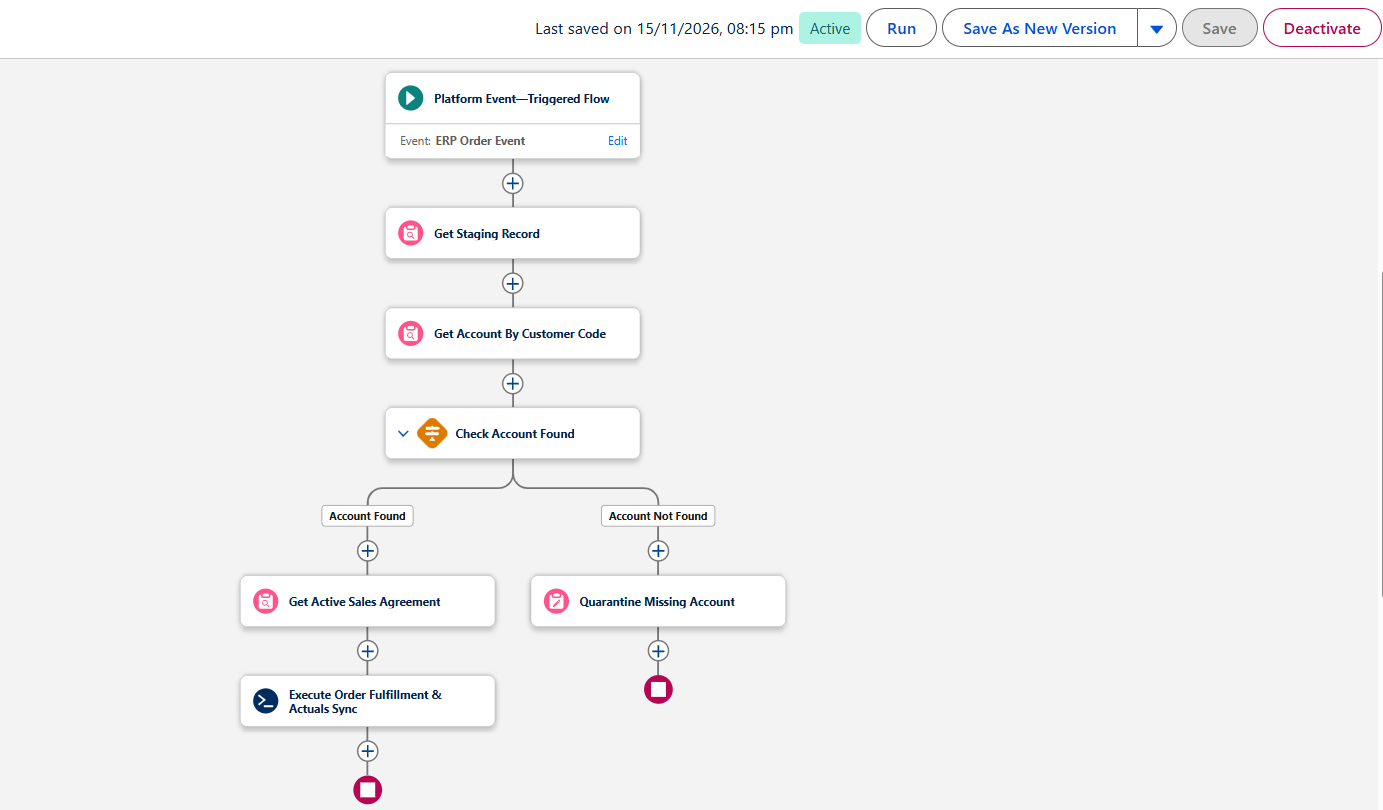
Platform Event-Triggered Flow elements
Step 5: Verifying Order Creation and Agreement Actuals
When an order event is processed, Salesforce creates the synchronized Order record in Activated status, linked directly to the commercial agreement.
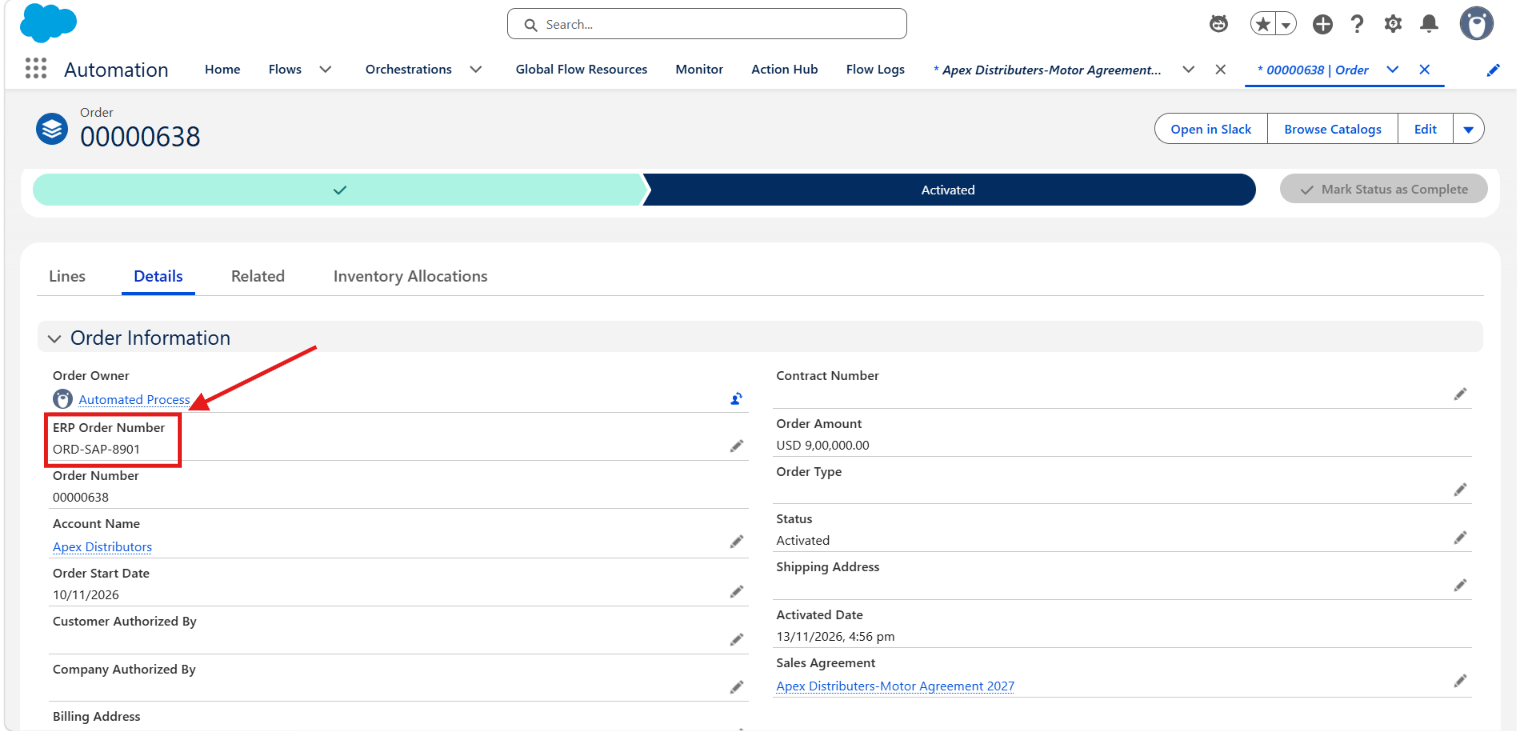
Synchronized Activated Order record in Salesforce showing ERP order number and linked Sales Agreement
Because the Sales Agreement is configured to derive actuals automatically from orders, Manufacturing Cloud matches the order products and effective dates against the agreement product schedules. The fulfilled quantities and amounts automatically populate the appropriate schedule period.
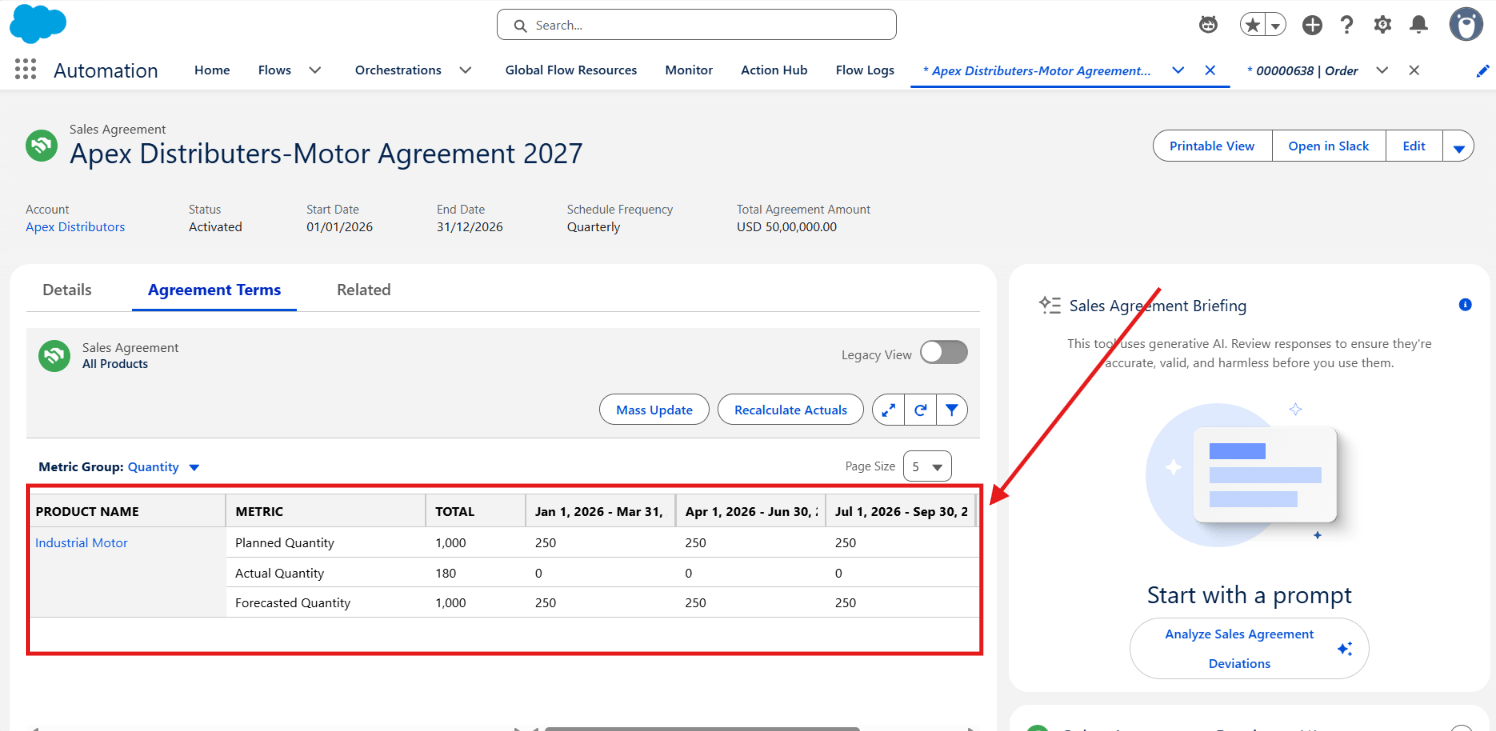
Sales Agreement Terms tab showing updated Actual Quantity and Actual Amount across schedule periods
Step 6: Testing Idempotency and Quarantine Handling
Two critical operational scenarios must be verified:
- - Idempotency / Duplicate Replay: Resending an existing event payload (e.g. EVT-SAP-2026-001) returns an instant HTTP 200 OK status. Salesforce creates zero duplicate orders or line items, preserving clean reporting.
- - Quarantine Routing: Sending an order with an unknown customer code (e.g. UNKNOWN-DISTRIBUTOR-999) causes the Flow to route the record to Quarantined status with an explicit diagnostic note ("Customer code not found in Salesforce Accounts"). The record is preserved in the staging list for review without blocking other transactions.
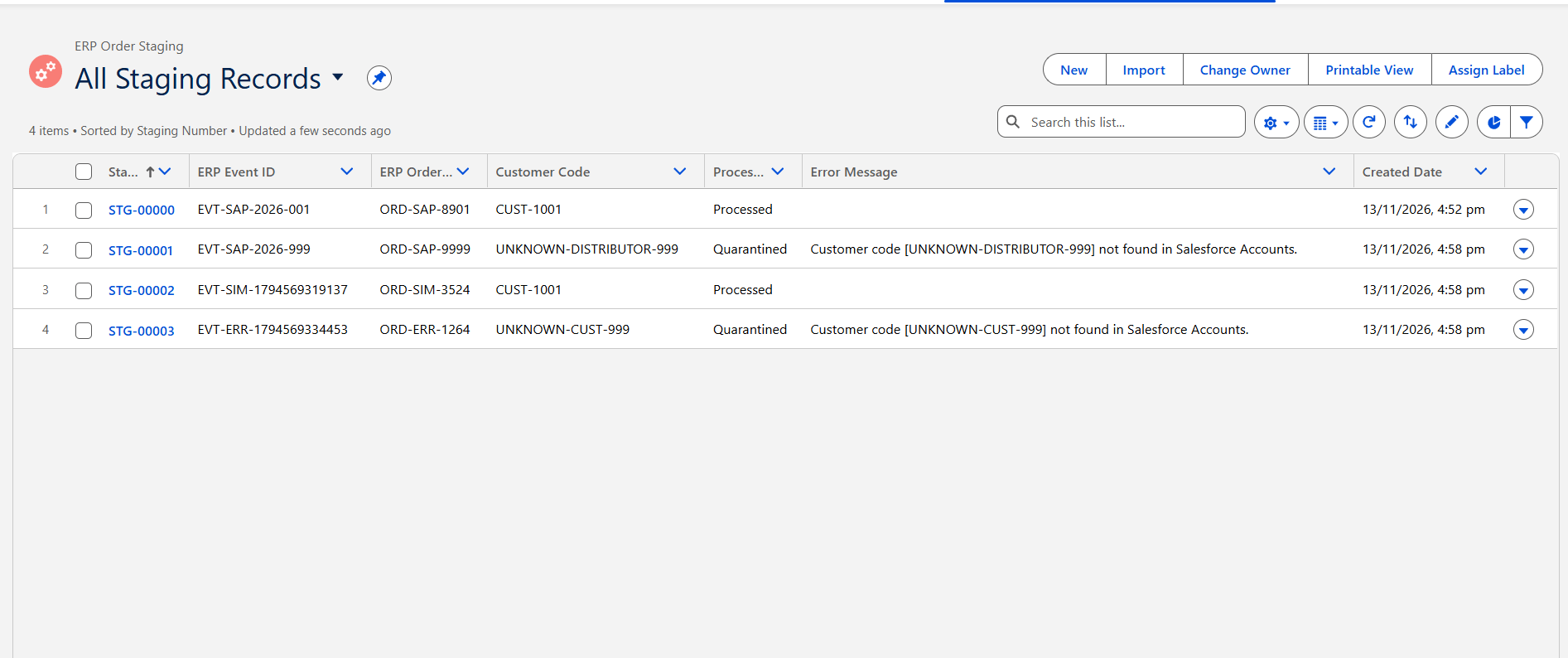
Staging record list view showing Processed and Quarantined statuses with error descriptions
Business Value & ROI
Transitioning to a staged, flow-driven integration delivers significant operational and commercial returns:
- - Elimination of Duplicate Orders: Composite external IDs enforce deterministic replay protection, eliminating double-counted orders and inaccurate rebate liability.
- - Sub-Second ERP Responsiveness: Decoupling ingestion from execution ensures webhooks acknowledge in under 50 milliseconds, eliminating ERP connection pool exhaustion.
- - Declarative Maintainability: By implementing the business rules inside Salesforce Flow, administrators and integration teams can adjust mappings, add notifications, or change validation criteria without writing or testing Apex code.
- - Self-Contained Quarantine Management: Unmapped master data is isolated into a visible dashboard rather than dropped into log files, reducing exception resolution time from days to minutes.
- - Real-Time Commercial Alignment: Sales account managers and distribution executives gain live visibility into contract commitment attainment directly inside Manufacturing Cloud, eliminating end-of-quarter volume surprises.
Summary
Connecting an ERP system to Salesforce Manufacturing Cloud requires more than passing JSON payloads into standard tables. By pairing lightweight durable staging with Platform Events and declarative Salesforce Flow orchestration, manufacturing organizations achieve a robust, self-healing integration.
This pattern protects Salesforce from governor limit spikes, prevents duplicate transactions during network retries, isolates data errors gracefully, and automatically feeds verified fulfillment actuals into Manufacturing Cloud Sales Agreements.