Introduction
Identity Resolution in Salesforce Data Cloud is the process of identifying, matching, and unifying customer data that comes from multiple systems into a single, trusted customer profile. In real-world business environments, customer data is scattered across different platforms such as CRM systems, marketing tools, websites, mobile applications, eCommerce platforms, and loyalty systems. Each of these systems captures customer information in its own way, often using different identifiers and formats.
Because of this fragmentation, the same customer usually appears multiple times across systems. Identity Resolution solves this problem by linking related records and creating a Unified Individual Profile that represents one real customer. This unified profile becomes the foundation for analytics, segmentation, personalization, and activation in Salesforce Data Cloud.
Identity Resolution is a core capability of Data Cloud. Without it, customer data remains fragmented, which leads to inaccurate segmentation, poor personalization, misleading analytics, and unreliable AI predictions.
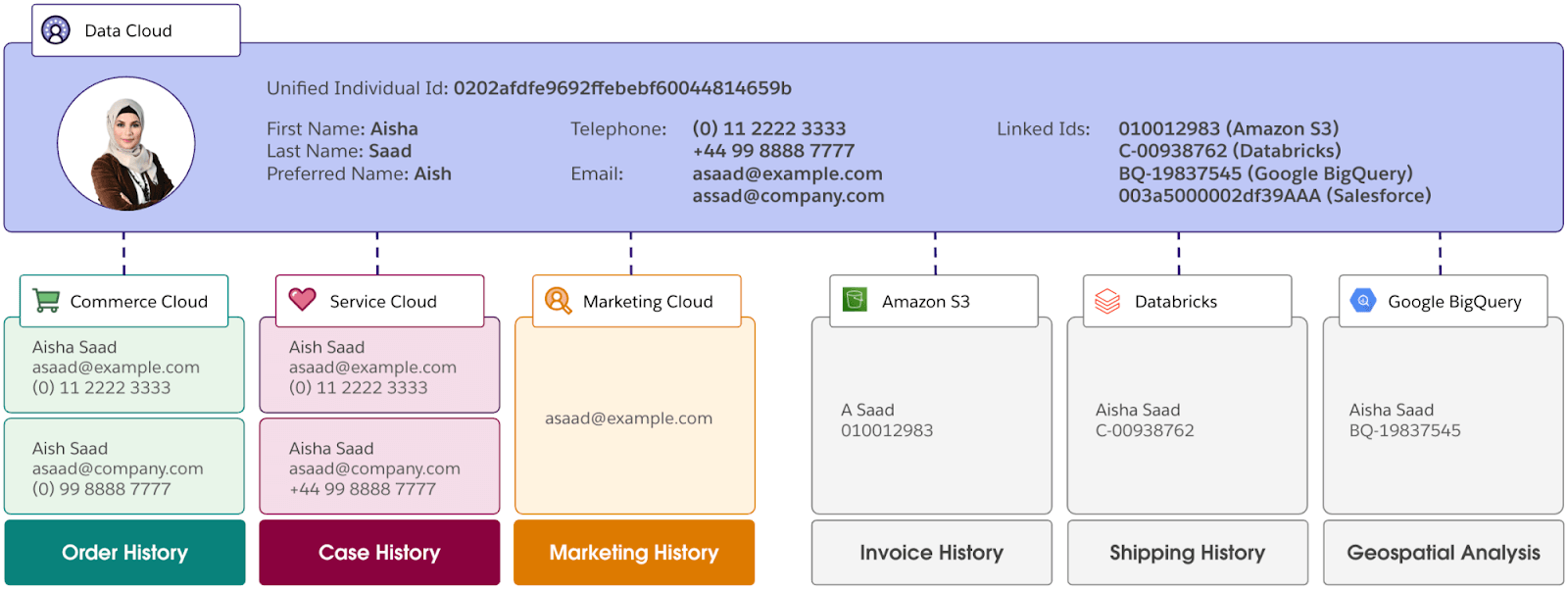
Position of Identity Resolution in Data Cloud Architecture
Salesforce Data Cloud follows a structured flow for managing customer data. First, data is ingested from different source systems into Data Lake Objects (DLOs). This ingestion is typically performed using Data Streams, which create pipelines that bring data from CRM systems, marketing platforms, data lakes, and other sources into Data Cloud. After ingestion, the data becomes available for processing and identity matching. Next Data Transforms are used to clean, normalize, and prepare the data. After this preparation, Identity Resolution is applied to link records that belong to the same individual and create unified profiles.
Once unified profiles are created through Identity Resolution, organizations frequently search and analyze these profiles to support segmentation, analytics, and personalization use cases. Salesforce Data Cloud optimizes this process using search indexing mechanisms that enable faster querying and retrieval of customer data across large datasets. These indexing strategies ensure efficient lookup of identities and attributes within the platform.
Core Concepts of Identity Resolution
Source Profiles
Source profiles are the raw customer records ingested into Data Cloud from different systems. Each source profile represents how a customer exists in one specific system, such as a Contact from Sales Cloud, a subscriber from Marketing Cloud, or a web visitor identified by a cookie ID. Source profiles are never merged or modified; instead, they act as inputs for identity matching.
Unified Profiles
Unified profiles represent a single real-world customer created by linking multiple source profiles. A unified profile can contain personal details, multiple identifiers, purchase history, web and mobile behavior, and engagement data. These profiles are used throughout Data Cloud for segmentation, activation, analytics, and AI.
Identifiers
Identifiers are the attributes used to connect records across systems. Common identifiers include email address, phone number, customer ID, loyalty ID, device ID, and cookie ID. Strong identifiers are stable, unique, and consistently populated, while weak identifiers such as free-text names or frequently changing values should be avoided.
Identity Resolution Matching Approaches
Salesforce Data Cloud uses two types of matching to resolve identities: deterministic matching and probabilistic matching.
Deterministic Matching
Deterministic matching links records based on defined comparison logic between identifiers. It supports multiple match methods:
Exact Match
Compares values character-by-character with no tolerance for variation. Values must match perfectly, including case sensitivity.
Normalized Match
Applies standardization before comparison, handling formatting differences such as capitalization, whitespace, and common variations (e.g., "john@email.com" equals "JOHN@email.com").
Fuzzy Match
Uses AI-powered algorithms to identify similar but non-identical values, accounting for typos, nicknames, and variations. Fuzzy matching offers three precision levels:
- High Precision: Stringent matching requiring near-exact similarity.
- Medium Precision: Moderate flexibility allowing abbreviated names and initials ("S" and "Sharon") or loosely similar names ("Bob" and "Roberto").
- Low Precision: Maximum flexibility for capturing wider variations, useful for data with misspellings or significant inconsistencies.
Deterministic matching is highly accurate, easy to audit, and carries low risk of false matches. However, it depends on data quality and works only when reliable identifiers are available. Best practice: Always start with deterministic matching.
Probabilistic Matching
Probabilistic matching evaluates multiple attributes together (name, address, device information) and assigns a confidence score based on overall similarity. Records are linked when the score exceeds a defined threshold.
This approach reduces fragmentation when exact matches aren't available, but must be carefully tuned to avoid false positives linking unrelated customers.
Identity Resolution Rulesets
Rulesets define how Salesforce Data Cloud performs identity matching. A ruleset specifies the type of matching used, the identifiers involved, the priority of rules, and any confidence thresholds. Multiple rulesets can exist and are evaluated in sequence. For example, an organization may use an email exact-match ruleset with high priority, followed by a phone match, and finally a probabilistic name-and-address match.
Reconciliation Rules
After profiles are linked, conflicts may occur when different source profiles contain different values for the same attribute. Reconciliation rules decide which value is retained in the unified profile. Common strategies include keeping the most recent value, the most frequent value, or prioritizing data from a trusted source such as CRM over web data. Reconciliation ensures consistency and reliability in unified profiles.
Identity Graph
The Identity Graph visually represents how identifiers, source profiles, and unified profiles are connected. It shows which identifiers caused profiles to be linked and how different records relate to one another. The identity graph is useful for auditing matches, debugging incorrect merges, and ensuring governance and compliance.
Implementation of Identity Resolution (Step-by-Step)
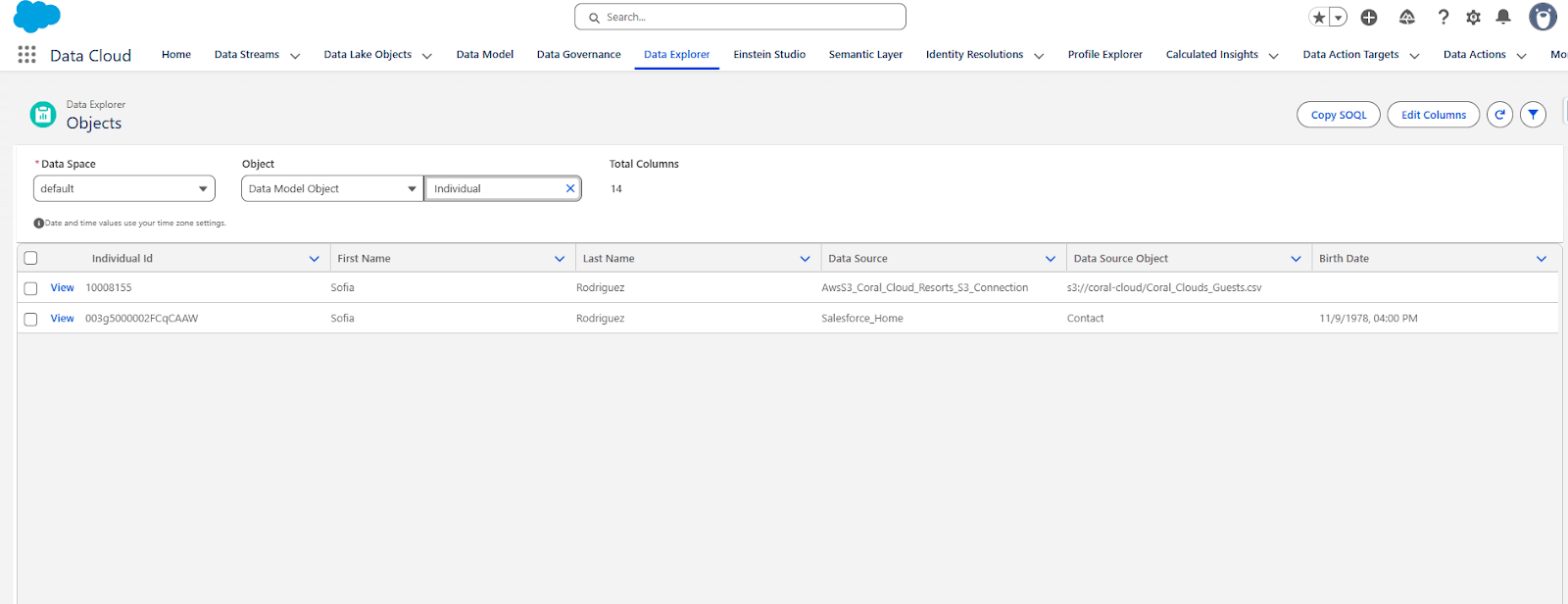
Step 1: Verify Source Data
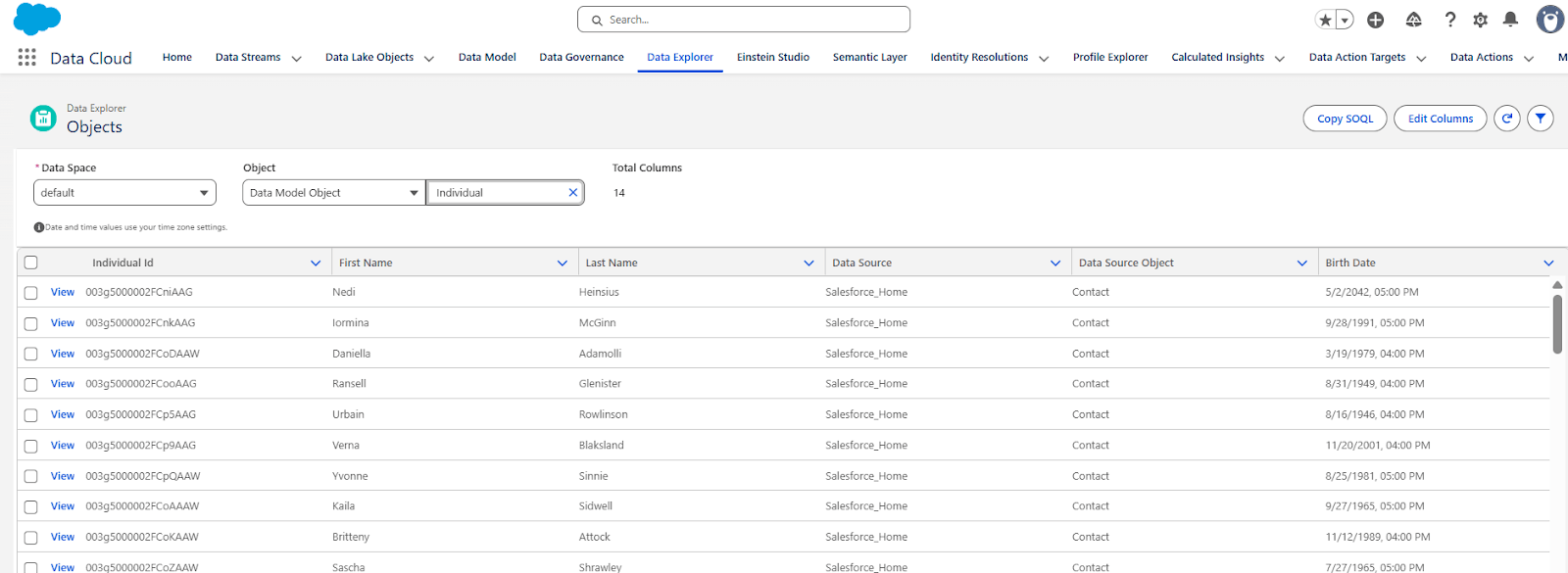
- Navigate to Setup → Data Cloud → Data Explorer
- Select the Individual object
- Verify that records exist
- Confirm key identifiers are populated (Email, Phone, etc.)
Step 2: Create Identity Resolution Ruleset
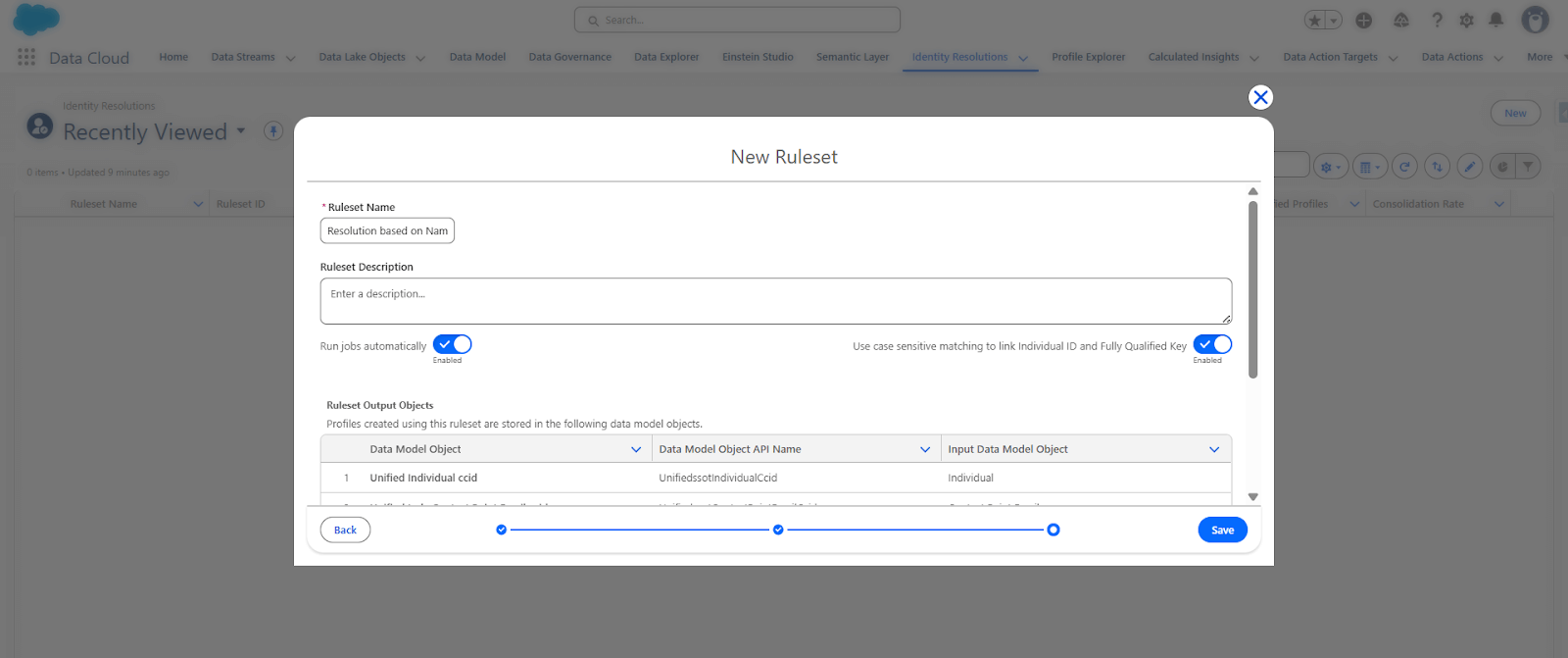
- Go to Setup → Data Cloud → Identity Resolution
- Click New Ruleset
- Enter Ruleset Name (e.g., "Customer Email and Phone Matching")
- Add Description explaining the ruleset purpose
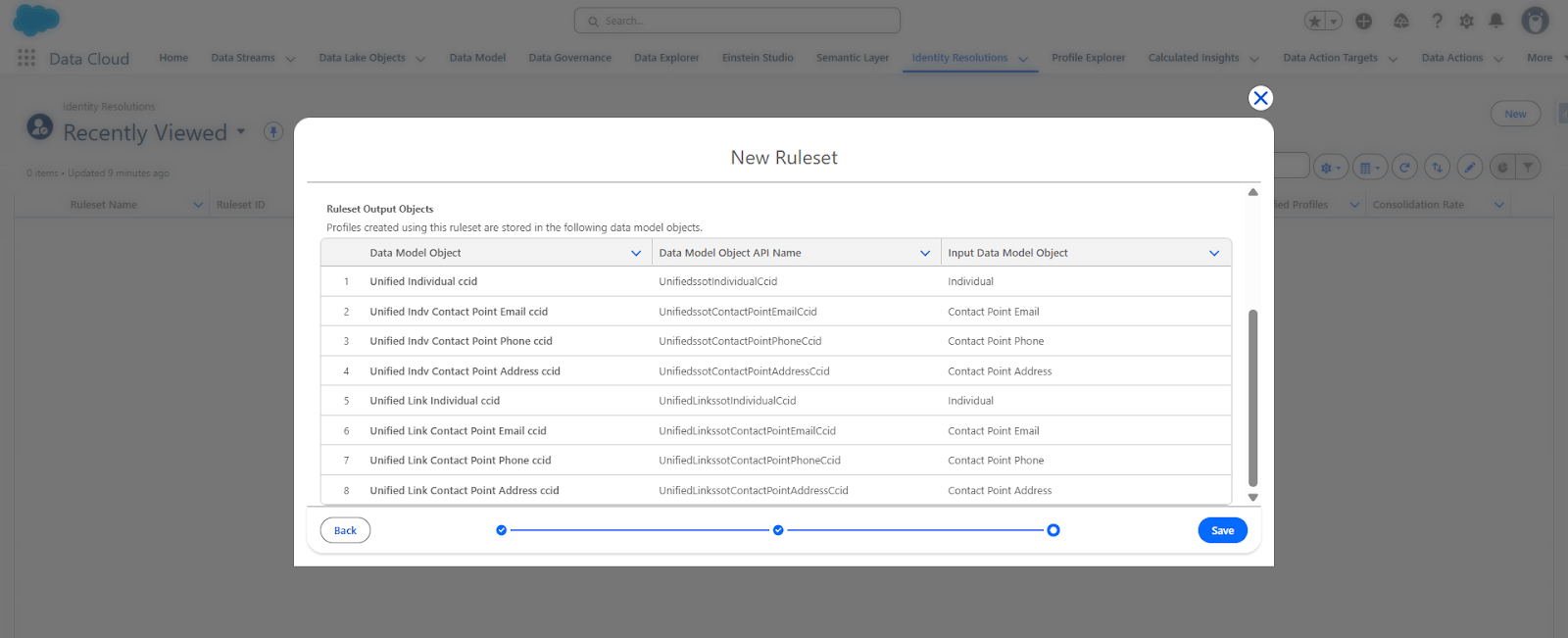
- Review auto-created output objects
- Click Save
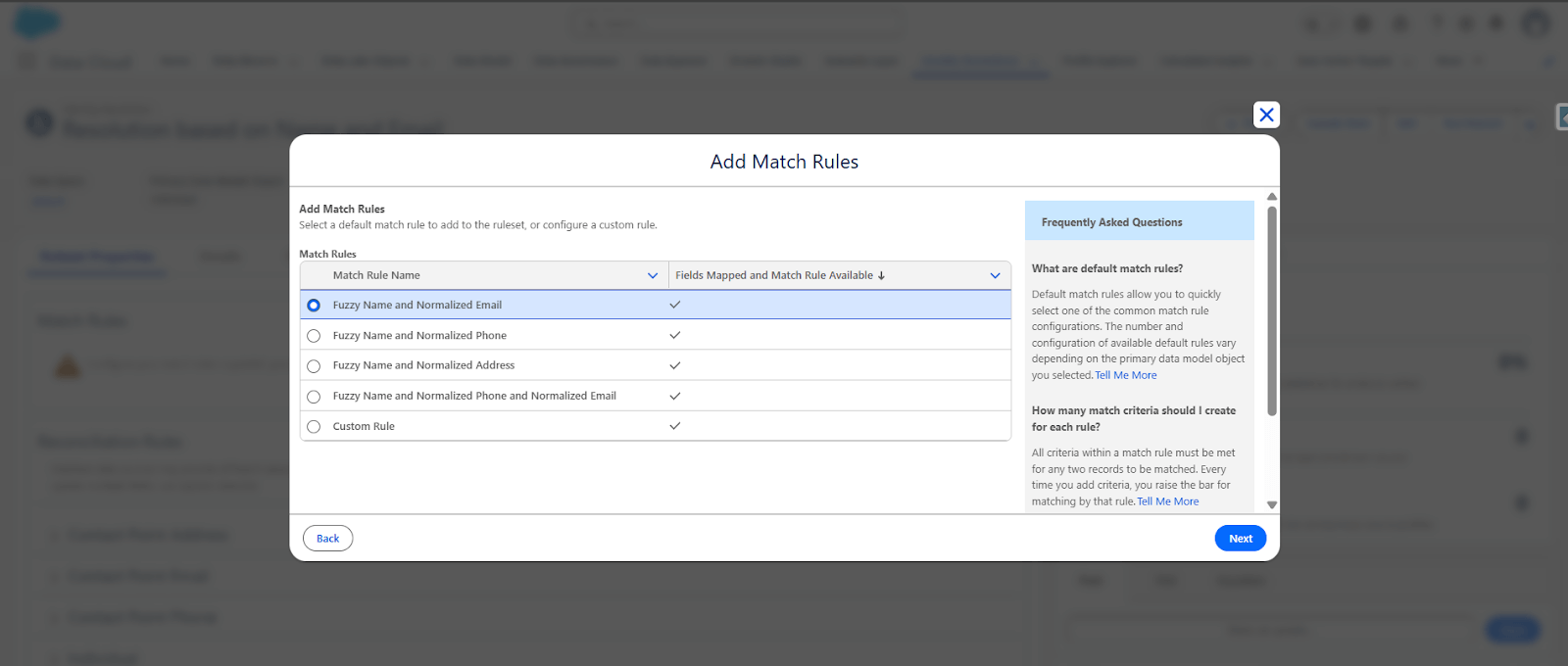
Step 3: Add and Configure Match Rules
- Open your created ruleset
- Click Add Match Rules
- Select a template (e.g., "Fuzzy Name and Normalized Email")
- Continue Continue
-
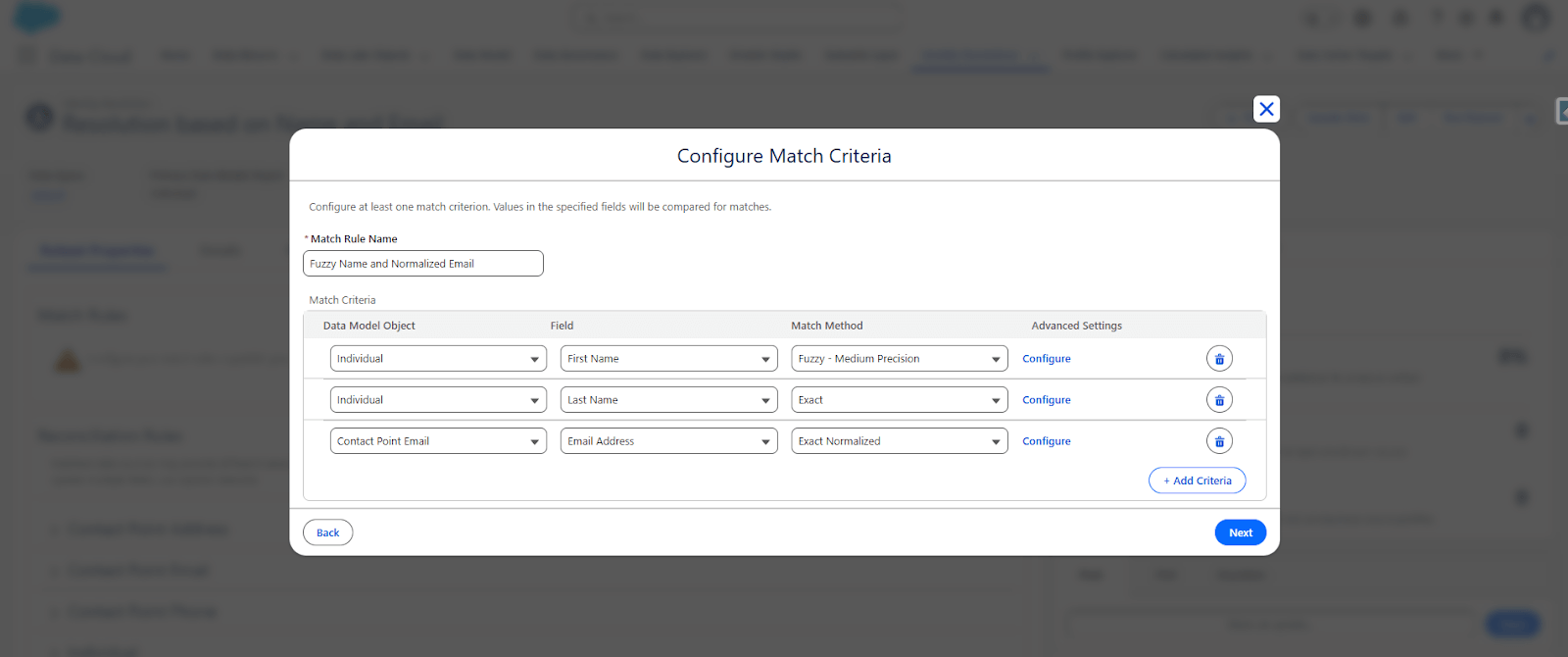
Configure match criteria:
- Email: Normalized Exact
- First Name: Fuzzy
- Last Name: Exact
- Click Save
Step 4: Configure Reconciliation Rules
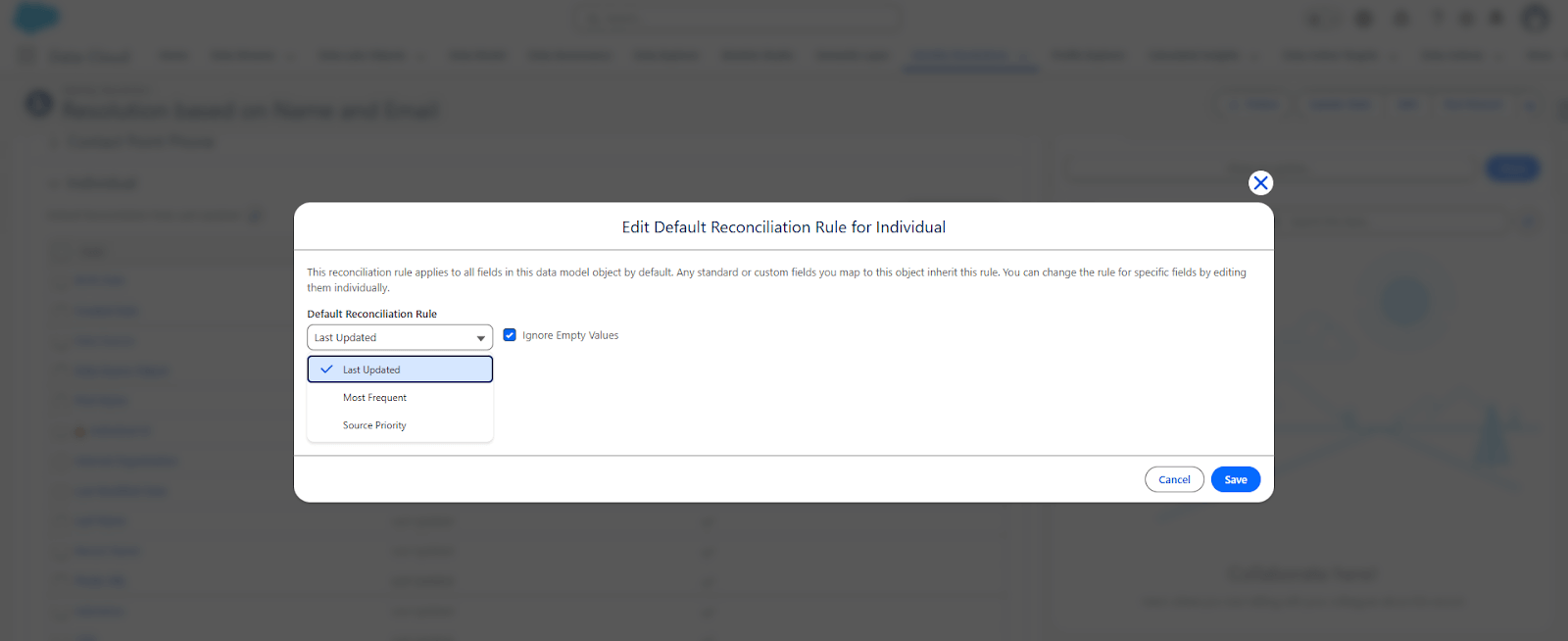
- Within the ruleset, click Reconciliation Rules
- Select the Individual object
-
Choose reconciliation strategy:
- Most Recent: Keep the latest value
- Source Priority: Prioritize specific data sources
- Most Frequent: Use the most common value
- Click Save
Step 5: Publish and Run Ruleset
- Click Publish to activate the ruleset
- Click Run Ruleset
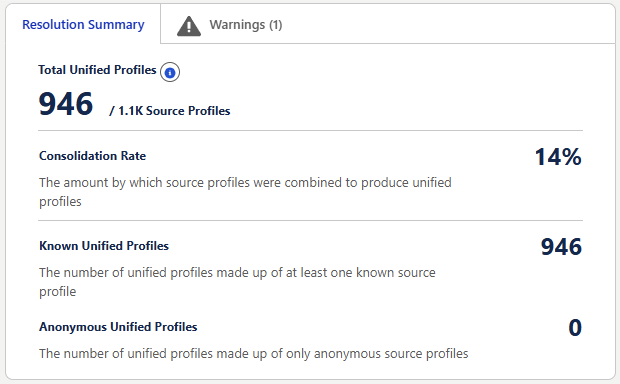
- Monitor the execution progress
- Wait for completion and review summary
Step 6: Validate Results
- Go to Data Explorer
- Open Unified Individual object
- Verify that multiple source records are merged into unified profiles
- Open Unified Link Individua to check mappings
- Confirm multiple Individual IDs link to single Unified Individual IDs

Common Mistakes and Best Practices
Common mistakes include using weak identifiers, aggressive probabilistic matching, and ignoring reconciliation logic. Best practices involve starting with deterministic matching, monitoring match accuracy, aligning with privacy requirements, and continuously refining rulesets.
Conclusion
Identity Resolution is the heart of Salesforce Data Cloud. It transforms fragmented customer data into a single, trusted customer identity. When implemented correctly, it enables accurate personalization, reliable analytics, effective activation, and scalable AI use cases. Without Identity Resolution, Salesforce Data Cloud cannot deliver its full value.
Salesforce Data Cloud enables organizations to centralize customer data from multiple platforms and create a complete Customer 360 view. This unified view helps businesses deliver better personalization, analytics, and customer engagement across channels. To explore the broader capabilities and architecture of Salesforce Data Cloud, visit our Salesforce Data Cloud page.
Have questions? Learn more about our services at support@astreait.com or visit astreait.com to schedule a consultation.