Introduction
In our previous blog, we explored how to create a Billing record in Accounting Seed using a Salesforce sales transaction. At that stage, the Billing acted as an invoice header, capturing customer and billing information without affecting the organization's financial records.
However, creating a Billing record is only the beginning of the invoicing process.
To complete the invoice, products or services must be added as Billing Lines, and the Billing must be posted. Posting is a critical step because it transforms the invoice into an accounting transaction by generating Journal Entries and updating the General Ledger.
In this article, we'll explore the purpose of Billing Lines, understand the Posting process, and examine how Accounting Seed records financial transactions.
What Are Billing Lines?
A Billing record contains general invoice information such as the customer, billing date, and accounting period. However, it doesn't specify what is being billed.
This information is stored in Billing Lines.
Each Billing Line represents an individual product or service included in the invoice and contains details such as:
- Product
- Quantity
- Unit Price
- Amount
- General Ledger Account (depending on configuration)
For example:
| Product | Quantity | Unit Price | Amount |
| Laptop Pro | 5 | $1,200 | $6,000 |
A single Billing can contain multiple Billing Lines, allowing businesses to invoice multiple products or services on one invoice.

Creating Billing Lines
Navigate to the Billing Lines related list and click New.
Enter the required details for the product or service being invoiced, including:
- Product
- Quantity
- Unit Price
- Revenue GL Account (if applicable)
Save the record.
Once the Billing Line is created, the invoice total is automatically updated based on the quantity and unit price entered.
After Billing Lines


Billing Record with Billing Lines
Why Are Billing Lines Important?
Billing Lines define the financial details of an invoice.
Without Billing Lines:
- The invoice contains no products or services.
- The invoice amount remains incomplete.
- Posting cannot generate accurate accounting entries.
In simple terms, the Billing serves as the invoice header, while Billing Lines represent the individual items that make up the invoice.
Key Insight
Billing Lines provide the financial information required for Accounting Seed to generate accurate accounting transactions during Posting.
Understanding the Posting Process
Creating a Billing and adding Billing Lines prepares the invoice, but the transaction is not yet reflected in accounting records.
This happens only when the Billing is posted.
Posting validates the invoice and generates the corresponding accounting entries based on the Billing information.
The process can be summarized as follows:
Billing → Billing Lines → Post Billing → Journal Entry → Journal Entry Lines → General Ledger
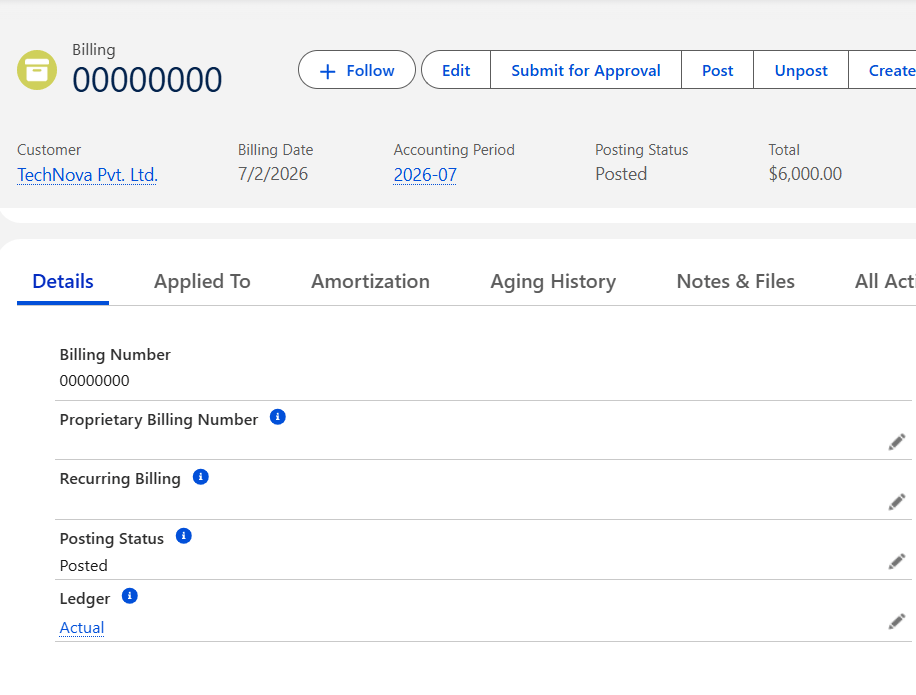
What Happens Behind the Scenes?
When a Billing is posted, Accounting Seed automatically:
- Validates the Billing record.
- Creates the required Journal Entry.
- Generates Journal Entry Lines.
- Updates the General Ledger.
- Makes the transaction available for financial reporting.
This automation eliminates manual journal creation while ensuring accounting accuracy.
Common Errors During Posting
While posting a Billing, you may encounter validation errors if the required accounting information is missing.
Some common issues include:
- Closed Accounting Period
- Missing General Ledger Account mappings
- Missing Billing Lines
- Required Billing fields not populated
- Invalid accounting configuration
Reviewing these configurations before posting helps ensure successful invoice processing.
Best Practices
When working with Billing and Posting in Accounting Seed, consider the following best practices:
- Verify that the Accounting Period is open before posting.
- Ensure all required Billing Lines are added.
- Confirm that General Ledger mappings are configured correctly.
- Review invoice details before posting, as posted transactions may require additional accounting processes to reverse or adjust.
Conclusion
Billing Lines and Posting are essential components of the Accounting Seed invoicing process.
While the Billing record establishes the invoice, Billing Lines define the products or services being invoiced. Posting then transforms the invoice into an accounting transaction by automatically generating Journal Entries and updating the General Ledger.
Understanding these concepts is fundamental for anyone implementing Accounting Seed, as they represent the point where operational sales data becomes financial information.
If you're interested in exploring more Accounting seed solutions, visit our Accounting Seed Page.
For any queries please reach out to support@astreait.com