Why Lakebase
Modern AI applications need real-time transactions, fresh analytical data, agent memory, and continuous model feedback loops. Historically, delivering this required stitching together separate systems:
- PostgreSQL (transactions)
- Kafka (streaming)
- Reverse ETL (moving data to apps)
- Feature Store (ML features)
- Data Warehouse (analytics)
- CDC pipelines (keeping it all in sync)
Lakebase was built to collapse this stack into one platform: a Postgres-compatible, serverless OLTP database natively integrated with the Databricks Lakehouse. It provides high-performance SQL, full ACID guarantees (Atomic, Consistent, Isolated, and Durable transactions for reliable data management) , and native sync with Lakehouse data — without replacing the Lakehouse.
In May 2025 , Databricks acquired Neon, a serverless Postgres company, to enhance its capabilities in the AI and data management landscape. Neon's innovative architecture allows for instant provisioning, elastic scaling, and branching, making it ideal for AI-native applications. The acquisition aims to combine Neon's serverless Postgres technology with Databricks' data processing capabilities, creating a robust platform for developers and AI agents. This partnership is expected to reshape how data is managed and utilized, addressing the growing demands of AI-driven applications.
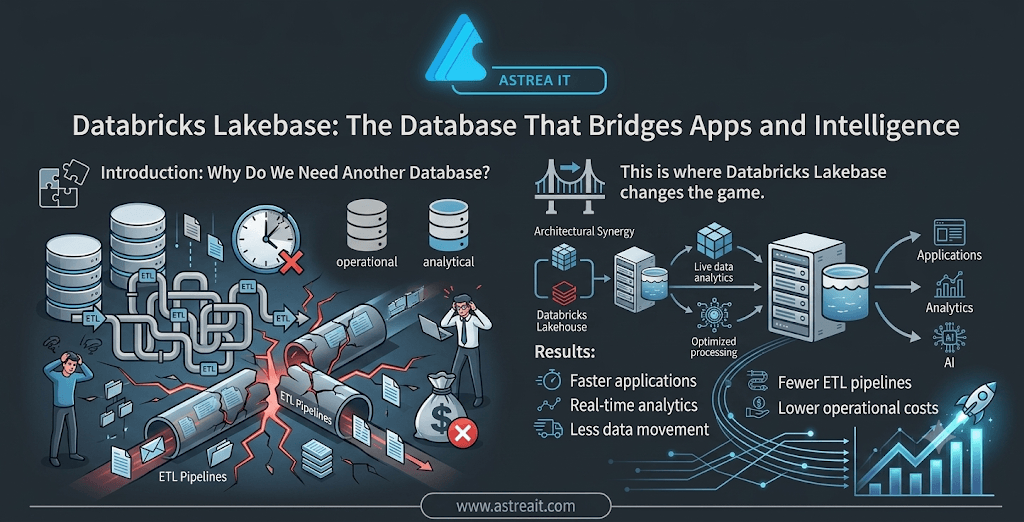
Lakebase at a Glance
Think of Lakebase as PostgreSQL with superpowers —a fully managed, serverless PostgreSQL database built on the Databricks Data Intelligence Platform. Its biggest innovation is the separation of compute and storage, allowing each to scale independently.
The Traditional approach: In conventional databases, compute and storage are tightly coupled. As workloads grow, you have to provision larger database servers, even if they're only needed during peak traffic. This creates the classic provisioning dilemma: over-provision and pay for idle resources, or under-provision and risk performance issues when demand spikes.
The Lakebase approach: Lakebase stores data in low-cost, durable cloud object storage—the same storage layer used by the Lakehouse—while PostgreSQL compute runs independently on top. Compute scales automatically based on demand and can even scale down to zero when the database is idle, so you only pay for the resources you actually use.
This separation brings three big benefits:
- Cost efficiency — you only pay for compute when you're using it
- Elasticity — it adapts to workload changes automatically
- Simplicity — no capacity planning or manual scaling
And because Lakebase is standard PostgreSQL under the hood, every library, ORM, and tool you already use works exactly the same way. Your developers don't need to learn anything new.
OLTP vs. OLAP: Why the Distinction Matters
Every database is built to be good at one of two things, rarely both.
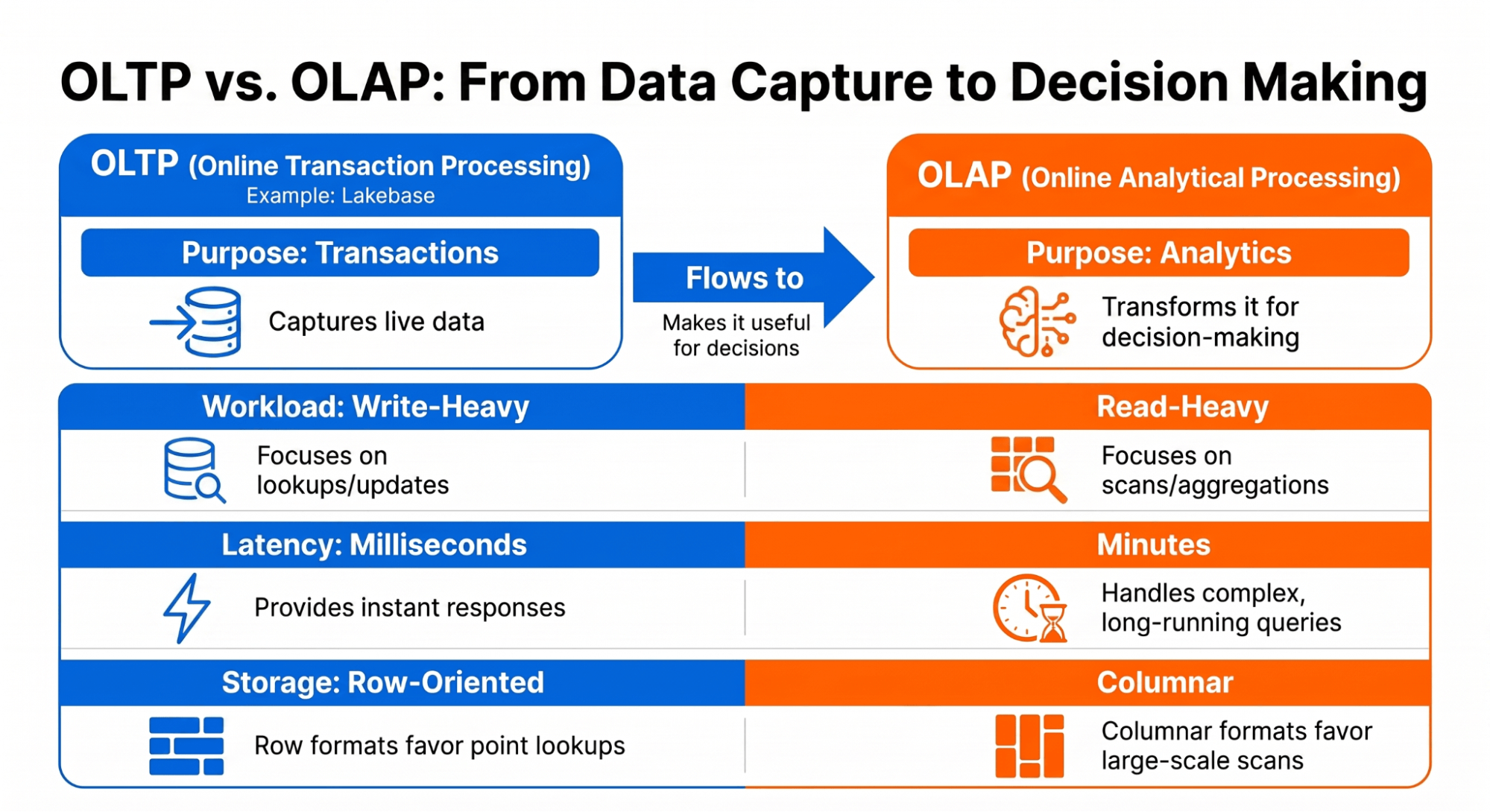
OLTP (Online Transaction Processing) systems — think PostgreSQL, MySQL, Oracle — are built for short, frequent, single-record operations: look up a user, update an order, insert a row. Data is normalized and row-based, and queries return in milliseconds. They're bad at scanning millions of rows at once.
OLAP (Online Analytical Processing) systems, like the Databricks Lakehouse, Snowflake, or BigQuery, are the opposite. They use columnar storage, are built for large scans and aggregations, and are excellent at answering "what happened across the last 12 months" — but too slow for a live app waiting on a response in milliseconds.
The Lakehouse and Lakebase: Better Together
A common question: "Is Lakebase replacing the Lakehouse?" No — they serve different purposes and work together.
- The Lakehouse handles large-scale data engineering, analytics, and machine learning across massive datasets, with unified governance through Unity Catalog. It's your central data repository.
- Lakebase handles low-latency reads and writes, high concurrency, and serves as the operational source of truth for applications. It's your application database.
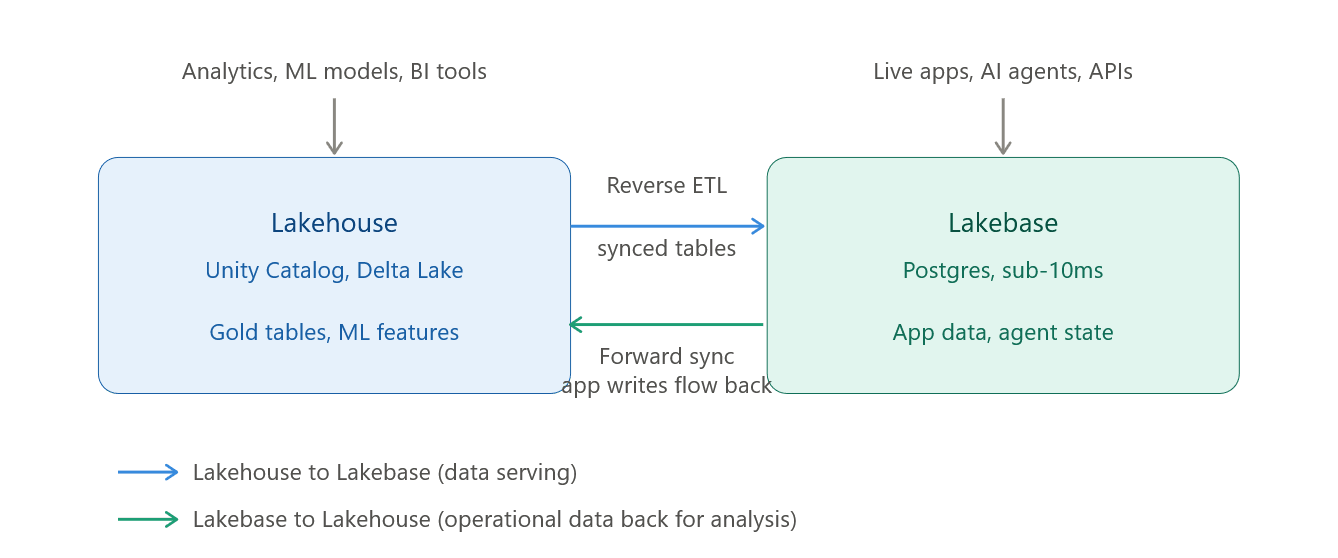
- Reverse ETL (Lakehouse → Lakebase): Curated Unity Catalog tables — gold tables, ML features, model predictions — get synced into Lakebase as Postgres tables called synced tables, on a snapshot, scheduled, or continuous basis. No custom pipeline code, no retries or monitoring to build yourself.
- Forward sync (Lakebase → Lakehouse): Changes made by your application in Lakebase (new orders, updated statuses, user actions) flow back into the Lakehouse automatically, so analytics is always working off live operational data.
Lakebase lets teams build data-aware applications that respond quickly, while Unity Catalog continues to handle governance, lineage, and permissions.
Sync Tables in Lakebase
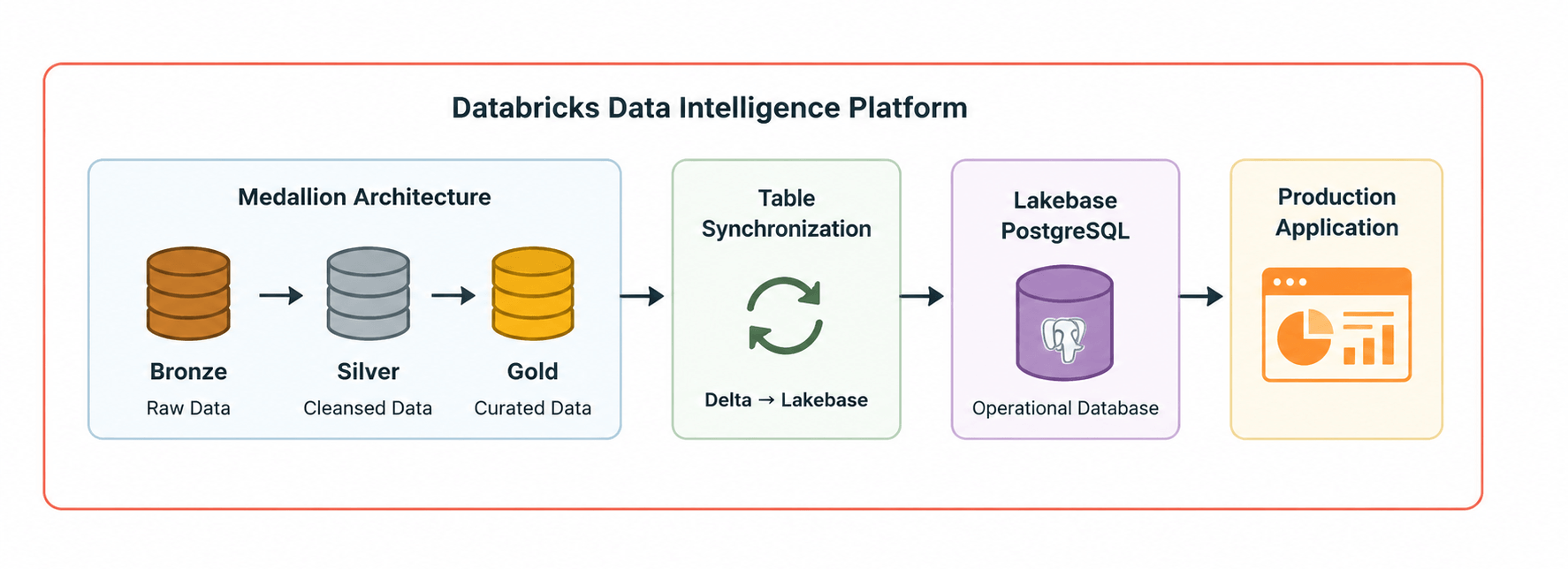
Synced tables in Lakebase are PostgreSQL tables whose data is automatically synchronized from Unity Catalog tables in the Databricks Lakehouse. They provide a transactional PostgreSQL interface to curated Lakehouse data, with synchronization available as a one-time snapshot, on a schedule, or continuously. They enable:
- Low-latency queries: Sub-second response times for operational analytics
- PostgreSQL compatibility: Use familiar SQL tools and applications
- Real-time synchronization: Continuous updates from source tables
- Governance: Maintained through Unity Catalog for security and lineage
Syncing tables provides a simple and performant way to move data from:
OLAP workloads and→ OLTP workloads
This ensures your Lakebase database table and analytical tables stay in sync.
How to create a synced table:
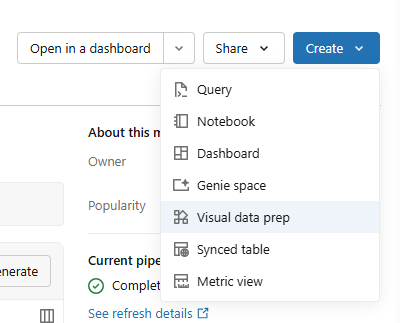
- In Databricks, go to Catalog → Schema → Table, and select Synced Table.
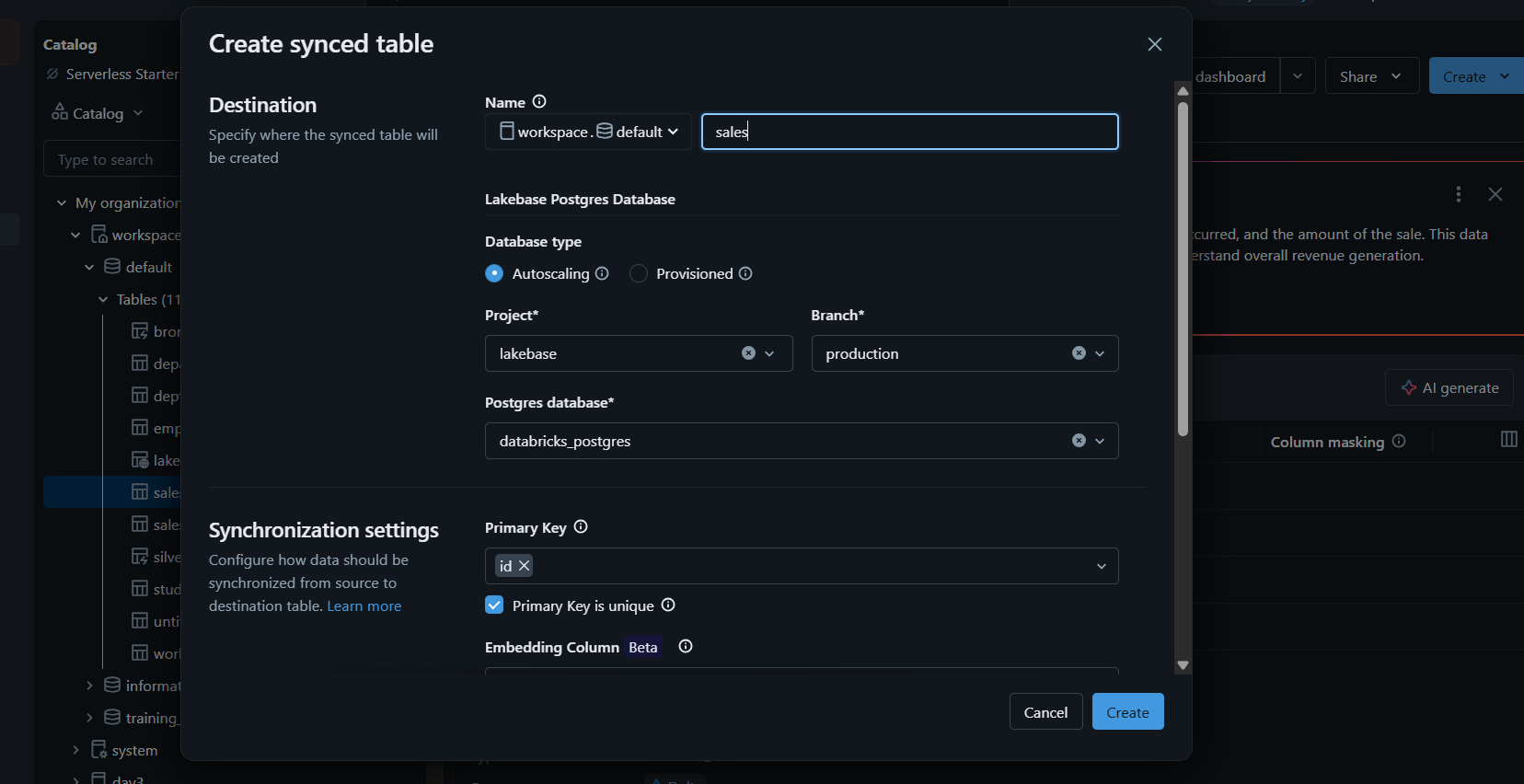
- Set your destination and sync details — table name, database type, project, branch, and Postgres database, along with primary key and embedding column — then click
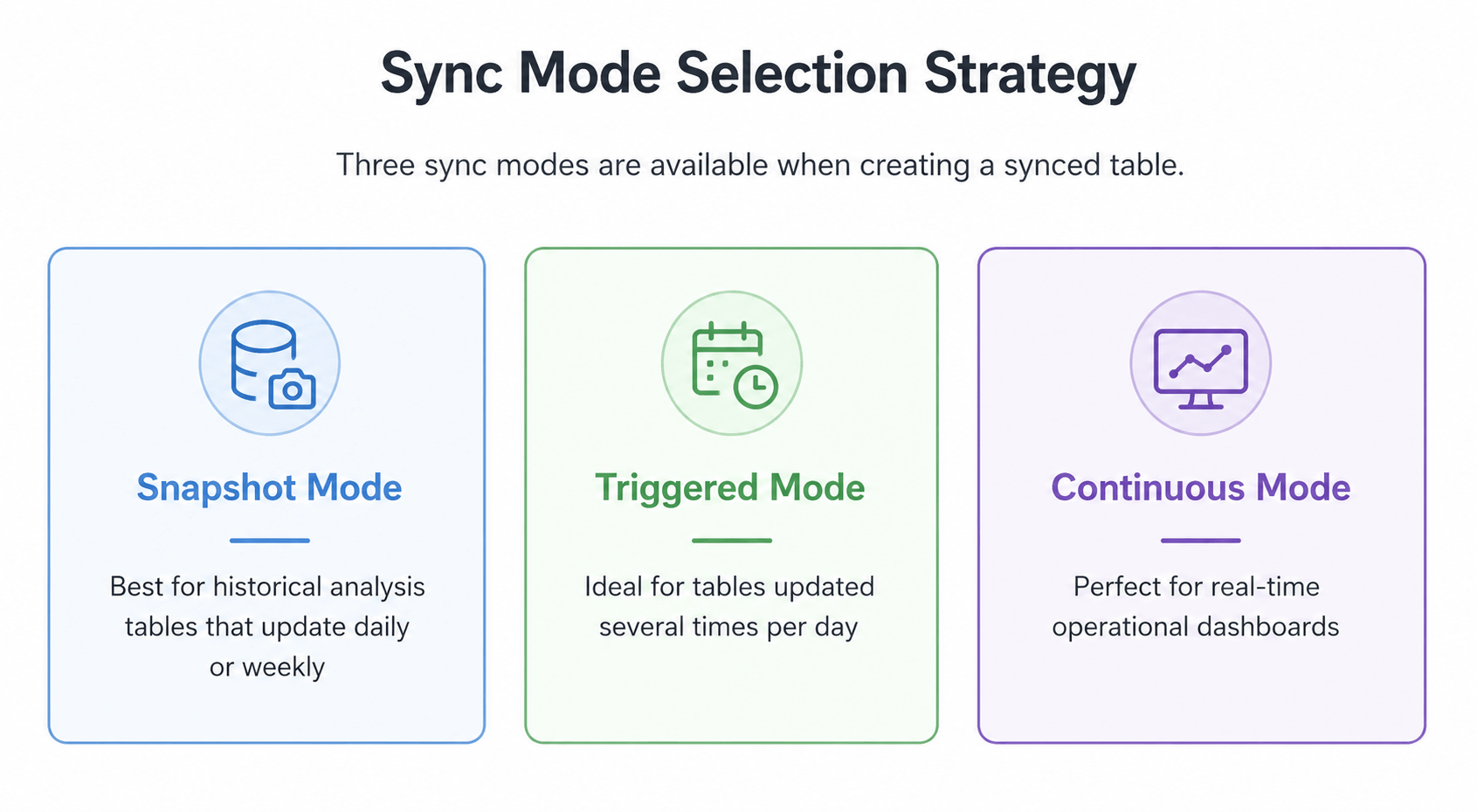
For Triggered and Continuous sync modes, the source table must have Change Data Feed (CDF) enabled. CDF tracks all changes (inserts, updates, deletes) to the table, allowing the sync pipeline to apply only incremental changes
- Once created, the synced table shows up in the Catalog like any other table — status Online, synced via Snapshot, pipeline Completed.
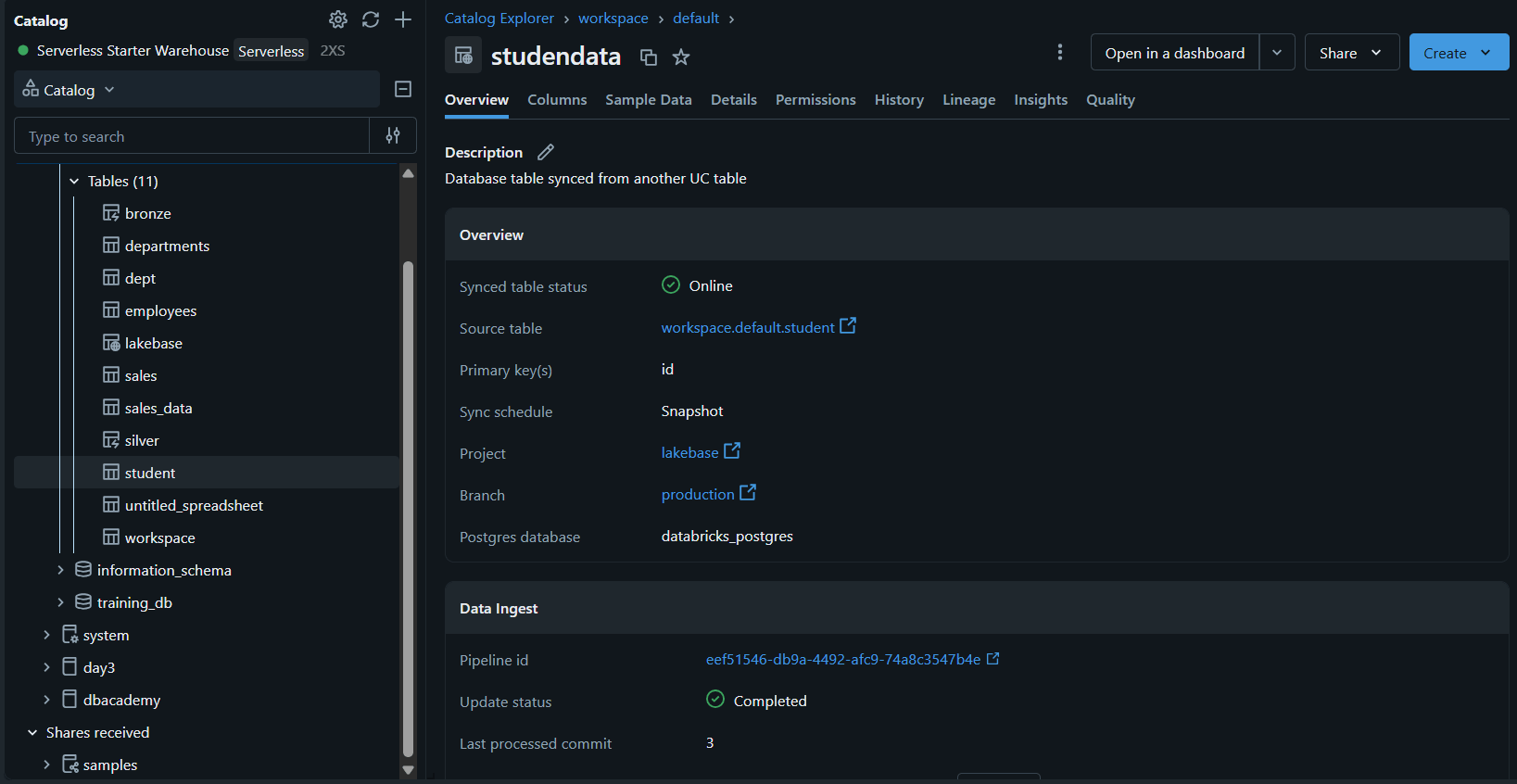
The synced table (studentdata) is replicated exactly at Lakebase — same columns, types, and primary key as the source, no manual schema work required.
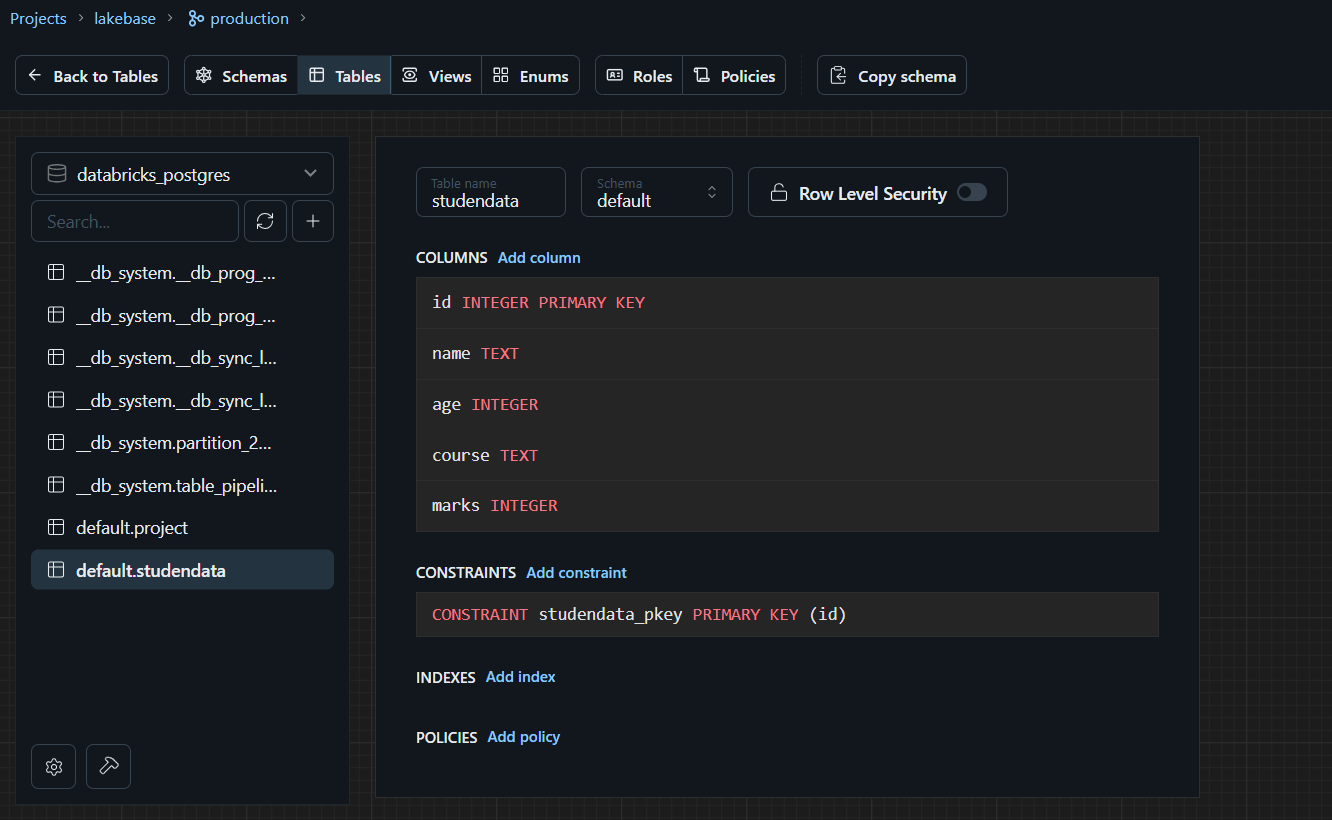
The “sync tax” is the engineering time and infrastructure spent keeping operational and analytical data aligned. Sync Tables eliminate it: with one click
This built-in synchronization provides:
- Managed pipelines operated by Databricks
- Freshness guarantees with configurable sync modes
- Schema alignment and reliability handled automatically
Unity Catalog: One Governance Model for All
Security and compliance are table stakes. Lakebase databases are registered in Unity Catalog, giving a single governance model across operational, analytical, and AI data.
- Consistent access controls: the same roles and permissions apply across all data — no more managing permissions in five different systems.
- Automated lineage: understand where data comes from and how it's used across the platform.
- Unified auditing: one place to track who accessed what, when, and why.
For enterprise teams facing strict compliance requirements, this is a genuine game-changer
Bridging Apps and Intelligence
Lakebase provides PostgreSQL-compatible access, making it ideal for operational use cases like powering live applications, internal tools, and services that need very fast responses.
Consider a Support Ticket Portal- Agents need to see an escalation-risk score generated by a machine learning model while updating ticket statuses and adding comments in real time.
Without Lakebase, this architecture becomes complex. The ML model runs in the Lakehouse and writes predictions to a Unity Catalog table. The application, runs on a separate PostgreSQL database, so those predictions must be copied over using a custom ETL or Reverse ETL pipeline. Every few minutes, the pipeline transfers new scores into PostgreSQL, while another pipeline captures ticket updates and writes them back to the Lakehouse for reporting and model retraining. These pipelines require ongoing maintenance, monitoring, and retry logic—and they inevitably introduce data freshness delays.
With Lakebase, the architecture is much simpler:
The ML model writes escalation-risk scores to a Unity Catalog table. A synced table automatically makes those predictions available in Lakebase—no custom synchronization pipeline required. The support application reads and writes directly to Lakebase using standard PostgreSQL drivers, delivering sub-10 ms query latency for operational workloads.
Changes made by support agents—such as status updates and comments—are automatically synchronized back to the Lakehouse, where they become immediately available for dashboards, analytics, and future model training.
Instead of stitching together separate operational databases and data pipelines, Lakebase keeps applications and the intelligence layer continuously synchronized. Developers get the familiar PostgreSQL experience for building transactional applications, while data engineers and ML teams continue working with the Lakehouse—all on a single, unified data platform.
Example - easyJet used Lakebase and Databricks Apps to replace a decade-old desktop application and one of Europe's largest legacy SQL Server environments, consolidating more than 100 Git repositories down to two and cutting development cycles from nine months to four. Dennis Michon, easyJet's Head of Data Product, has described the resulting revenue management app as faster and more reliable than what it replaced, with work that used to take months now landing in a fraction of the time.
Two Types of Lakebase: Provisioned vs Autoscaling
Lakebase comes in two flavors, each designed for different needs. Let's break down the difference so you can choose what's right for you.
Lakebase Provisioned: The Original Offering
Lakebase Provisioned is the original Lakebase offering that uses provisioned compute you scale manually. Think of it like traditional database hosting—you pick a fixed size, and that's what you get.
Key characteristics:
- Fixed compute size that you manually adjust and pay only for the used compute
- Suitable for predictable, steady workloads
The provisioned model is straightforward but comes with the familiar tradeoffs: you need to plan capacity ahead of time, and you're paying for resources even when they're idle.
Lakebase Autoscaling: The Next Generation
Lakebase Autoscaling is the latest version of Lakebase that dynamically adjusts compute resources based on actual workload demand. Since March 12, 2026, new Lakebase instances are created as Autoscaling projects.
Key characteristics:
- Compute adjusts automatically within a user-defined range
- Supports scale-to-zero for maximum cost efficiency
- Instant branching and point-in-time recovery capabilities
- More granular control with 2 GB per Compute Unit (CU)
How Autoscaling Works
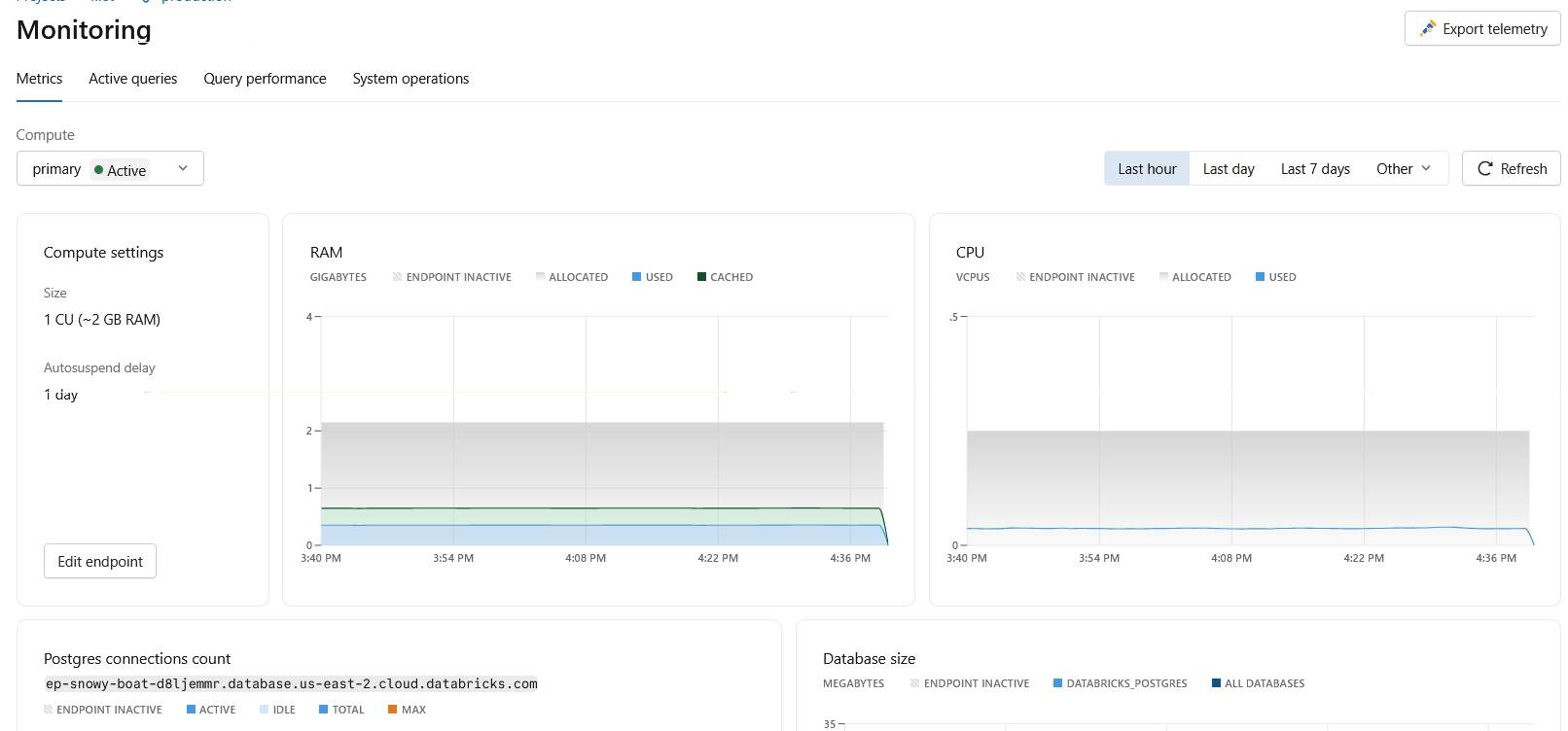
You define a scaling range — for example, 2 to 8 Compute Units (CUs), where each CU provides roughly 2 GB of RAM. Lakebase continuously monitors three signals to decide when to scale:
- CPU load — processor utilization, to ensure adequate processing power
- Memory usage — RAM consumption, to avoid memory constraints
- Working set size — an estimate of frequently accessed data, to optimize cache performance
Compute scales up as demand rises and down as it falls, always within your configured range — and it happens without restarts. Connections stay open and users never notice.
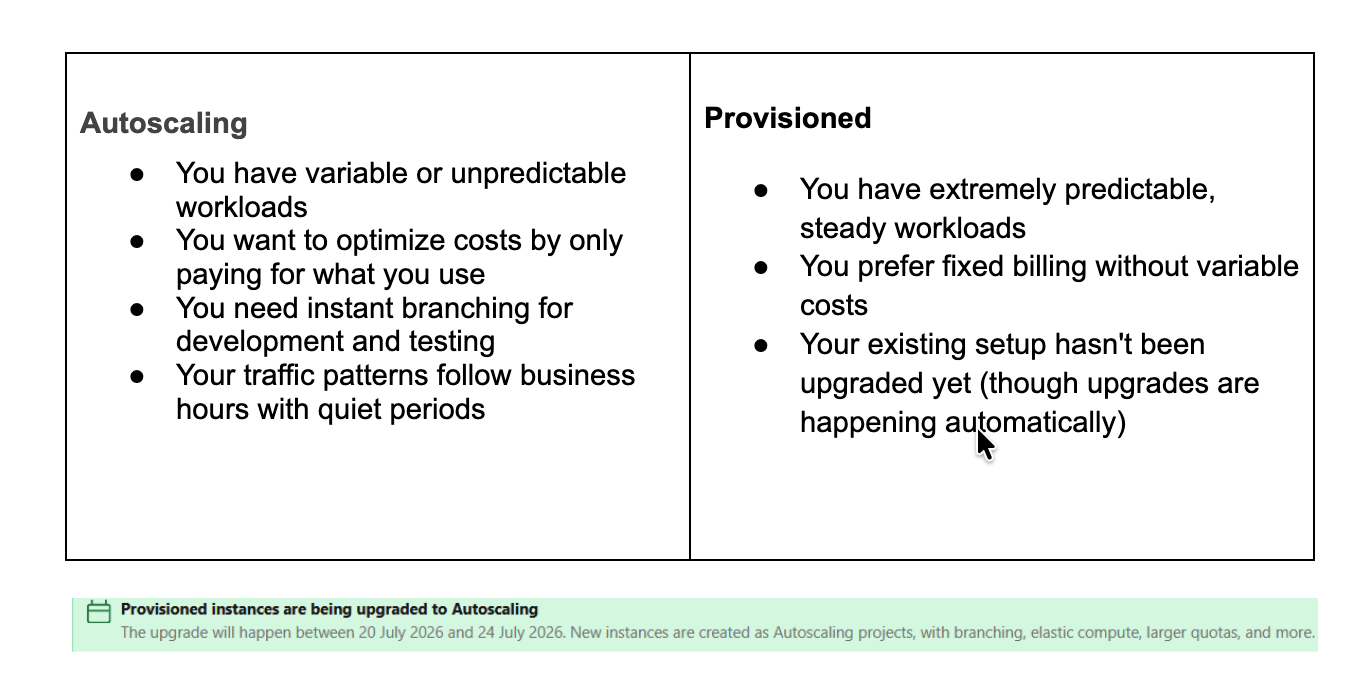
Choosing Between Provisioned and Autoscaling
Scale to Zero: Pay Nothing When You Use Nothing
Like a light that turns off when you leave the room — and back on when you return. After a set idle period (60 seconds to 7 days, your choice), Lakebase pauses compute automatically.
- $0 cost while paused
- Data stays safe and intact
- Connection details don't change
- Wakes up in a fraction of a second on the next request
The Cost Impact
A dev database used 8 hours/day, 5 days/week:
- Always on: ~168 hours billed/week
- With scale-to-zero: ~40 hours billed/week
That's 70%+ savings for dev/staging. Production systems needing instant, constant uptime can simply turn it off.
Autoscaling + Scale to Zero
- Busy: Autoscaling adjusts power to demand
- Idle: Scale-to-zero drops cost to zero
- Traffic returns: Compute restarts at your minimum size, ready to go
Point-in-Time Recovery: Undo Any Mistake
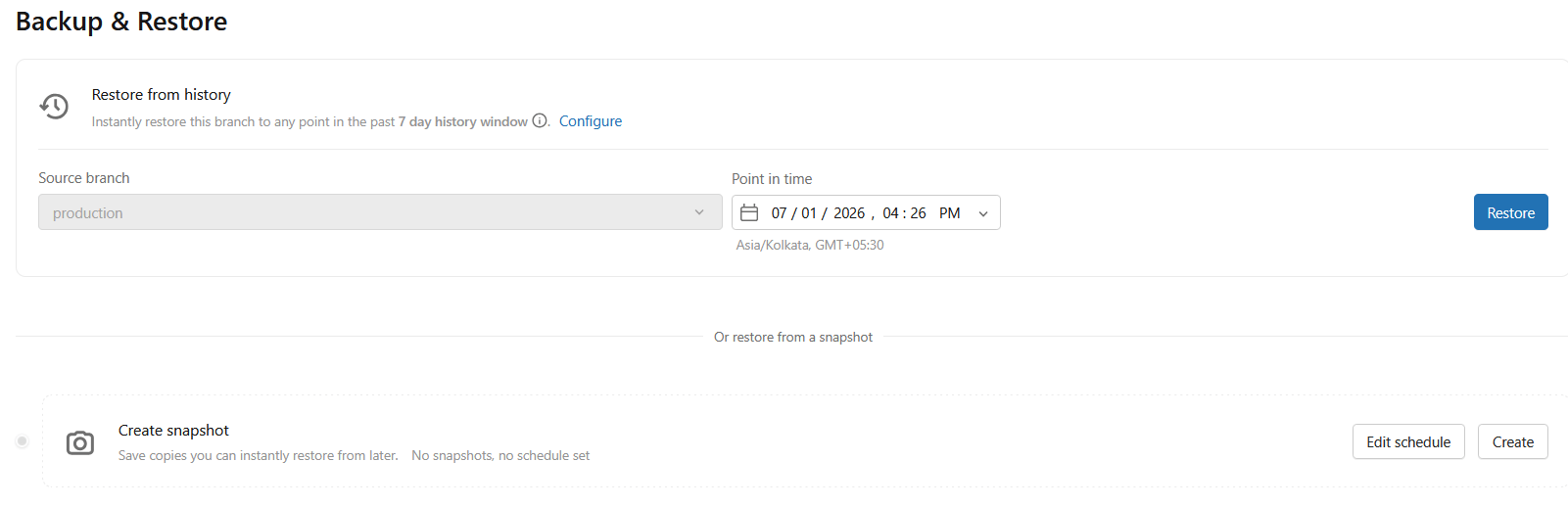
Lakebase offers point-in-time recovery (PITR) down to the millisecond, so you can restore your database to the exact moment before the mistake happened. It's real peace of mind that lets teams move faster and worry less.
Beyond Vectors: Lakebase as the Memory Layer for AI Agents
Because Lakebase runs on standard PostgreSQL, it supports familiar add-ons like pgvector — a tool that lets AI applications store and search data for things like search and recommendations.
- AI agents with persistent memory: store conversation history, embeddings, and state so agents remember context across sessions.
- Retrieval-augmented generation (RAG): store document embeddings, run similarity search, and ground LLM responses in governed data.
- Recommendation engines: power real-time recommendations from user behavior and embeddings.
All of this runs on governed data, in a secure environment, with unified access controls — AI applications that are both intelligent and enterprise-ready.
Lakebase isn't just "Postgres for your app" — it's positioned as the operational database for AI agents: the place agents read and write state, not just a place to store vector embeddings for search. For teams building agentic applications, this is arguably Lakebase's most important use case.
Conclusion
For years, organizations have accepted complex pipelines, duplicated infrastructure, and stale data as the unavoidable cost of building data-driven applications. Lakebase challenges that assumption by bringing operational and analytical workloads together on a single storage foundation, eliminating unnecessary data movement and enabling teams to build faster, operate on real-time data, and innovate from a single source of truth.
With general availability, support for millions of database launches every day, Lakebase is no longer just a vision—it's a production-ready foundation for the next generation of data applications. As operational and analytical systems continue to converge, Lakebase points toward a future where moving data becomes the exception, not the architecture Hence The future of data isn't about moving it—it's about building where it already lives. (Strong, memorable, and aligns with Lakebase's vision.)
If you're interested in exploring more Databricks solutions, visit our Databricks page.
For any queries please reach out to support@astreait.com