What Is an Account Plan?
Imagine you are a salesperson managing a big corporate client. You need to keep track of everything such as how much business you are doing with them, what deals are open, how often you are winning, and what your strategy is to grow the relationship.
Salesforce Sales Account Plan is a place in Salesforce where you capture your strategy, your targets, and your progress for a key customer. Think of it like a business report card but one that you actively use to plan your next move, not just review the past.
Simple enough until your customer is not a small company.
The Problem: Big Companies Have Multiple Accounts
Large corporate clients are not just one entity in Salesforce. A company might have a parent account at the top with several child accounts underneath it representing different divisions or business units, like Manufacturing, Energy, and Digital, etc.
Each of those child accounts has its own deals, its own activity, and its own data stored separately in Salesforce.
So your account plan is for the whole group parent and all its children. But when you open the parent account in Salesforce, you only see the deals and metrics for that one record. The child accounts are invisible unless you open each one manually.
This creates a frustrating gap. When your manager asks "how much pipeline do we have across this whole group this quarter?", you would have to open every child account one by one, add up the numbers yourself, and hope you did not miss anything.
That is not account planning. That is just wasting time.
What We Built to Solve It
We built an Apex solution that is backend code in Salesforce that collects data from the parent account and all its direct child accounts, then calculates every KPI in one efficient pass.
Here is how it works in plain terms.
First, it finds the parent account from the Account Plan. The solution starts with the Account Plan record ID, looks up which Account it belongs to, and uses that as the starting point.
Second, it collects all child accounts under that parent. It fetches every account that sits directly beneath the parent all the divisions and subsidiaries in that one layer.
Third, it fetches all the opportunity data in one query. Instead of asking Salesforce a separate question for every metric, it brings back all the relevant deals for the parent and all child accounts in a single call.
Fourth, it calculates everything from that one batch of data. All the counting, adding, and percentage calculations happen in memory without any additional queries. Fast, clean, and within Salesforce's limits.
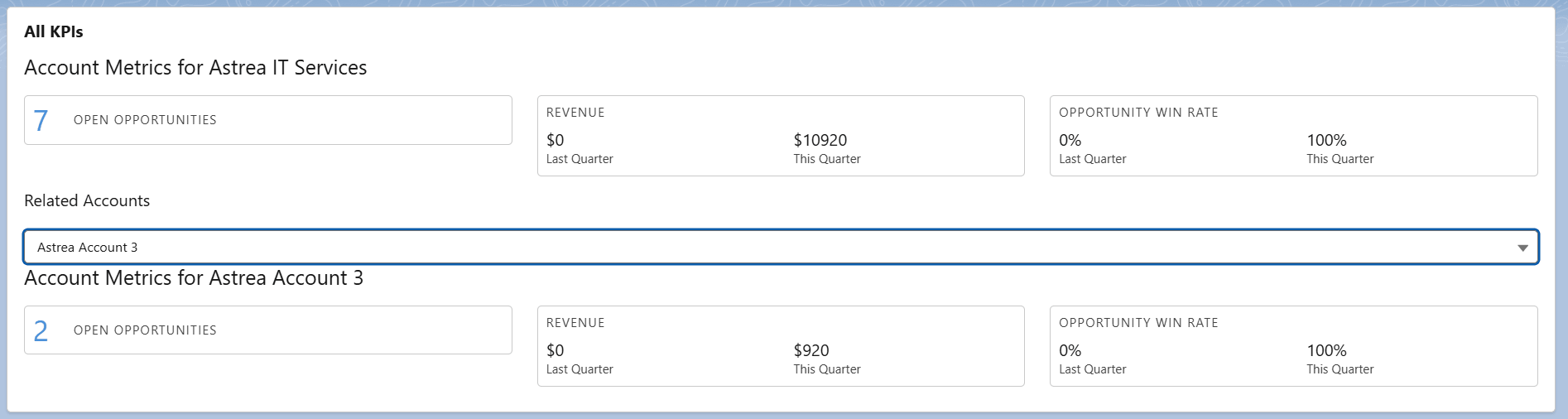
The result is a set of KPIs that shows up at the top of your account plan page:
- How many deals are currently open across the parent and all child accounts
- How much revenue was won this quarter
- How much revenue was won last quarter
- What percentage of deals were won this quarter
- What percentage of deals were won last quarter
All of these updates automatically every time you open the page. No manual work. No reports to refresh. No numbers to add up yourself.
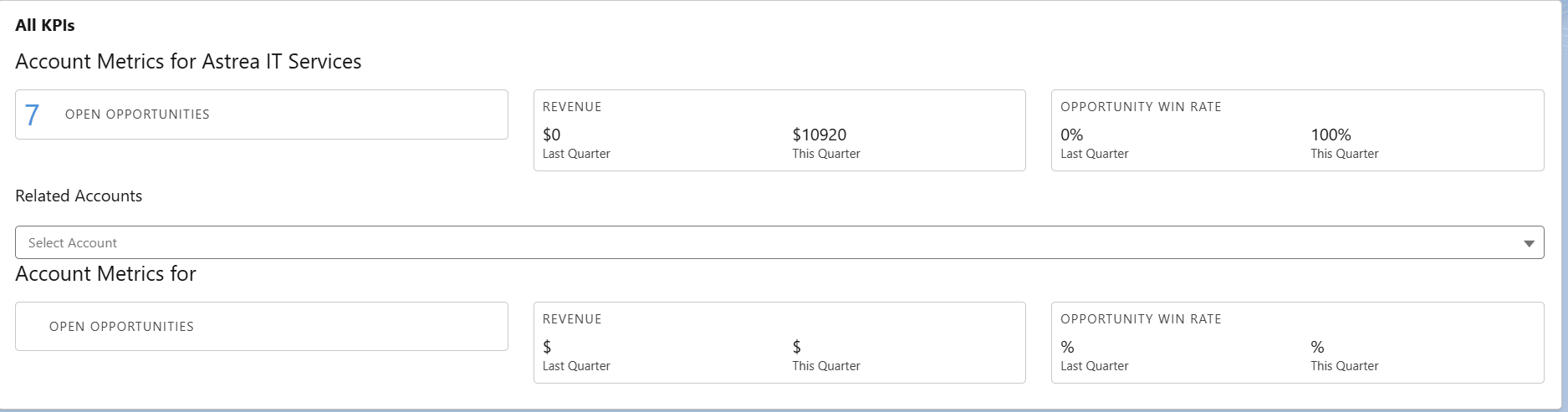
This is how the dashboard looks like. The first screenshot shows the consolidated view of the parent account by rolling up the data from all the child accounts. The second screenshot shows the data for a specific child account that can be selected from a picklist.
The Benefits
You see the full picture across the group. Because the solution includes both the parent account and every child account, the numbers reflect the true commercial activity across the entire account family, not just one record.
It is safe and stable. By keeping queries to a minimum, it works reliably regardless of how many child accounts are in the group. No risk of the page crashing or timing out.
It stays up to date automatically. If a new child account gets added under the parent, it is included in the calculation the next time someone opens the account plan. No one needs to update a report or change a setting.
It saves time for everyone. Sales people get their numbers instantly without hunting across multiple accounts. Reps get a reliable view without waiting for someone to compile a spreadsheet and do not have to maintain complex reports or rollup fields.
The data is always live. Because the calculation runs fresh every time the page loads, what you see reflects exactly what is in Salesforce right now.
Conclusion
Managing a corporate client with multiple child accounts in Salesforce should not mean opening every account record individually and doing the maths yourself. The data is all there — it just needs to be pulled together and shown in one place.
By building a solution that collects data from the parent and all its direct child accounts, and calculates every KPI efficiently in a single pass, sales teams get accurate and instant numbers at the top of their account plan — without any manual effort.
This is the foundation of a practical account plan in Salesforce. Once this layer works correctly, everything else — filtering by individual child accounts, mapping stakeholder relationships, building contact org charts — can be added on top with confidence.
If you're interested in exploring more Salesforce solutions, visit our Sales Cloud page.
For any queries please reach out to support@astreait.com