In the manufacturing sector, Sales Agreements are the backbone of revenue predictability. They map out long-term, scheduled product commitments between manufacturers and their accounts. However, a persistent challenge plagues sales operations and account teams: delayed feedback on volume drift.
Without complex ERP integrations or heavy middleware like MuleSoft, actual order volumes logged in Salesforce often drift far below planned schedules without anyone noticing until end-of-month or end-of-quarter reconciliations. By the time an Account Manager realizes an account is 30% behind pace, the revenue is lost, production schedules are disrupted, and excess inventory is sitting in warehouses.
In this guide, we will walk through how to build a Native Volume Variance Alerting Engine using Salesforce Manufacturing Cloud, Data Cloud, and Slack —completely ERP-free and MuleSoft-free.
The Core Challenge: The Silent Volume Leakage
When operating natively inside Salesforce, account managers work with a critical record in Manufacturing Cloud:
- Sales Agreement Schedules (SalesAgreementProductSchedule): Each schedule line holds the planned quantity, the baseline a customer committed to purchase during a specific timeframe (e.g., Monthly/Quarterly), and the actual quantity calculated from the orders placed against the agreement.
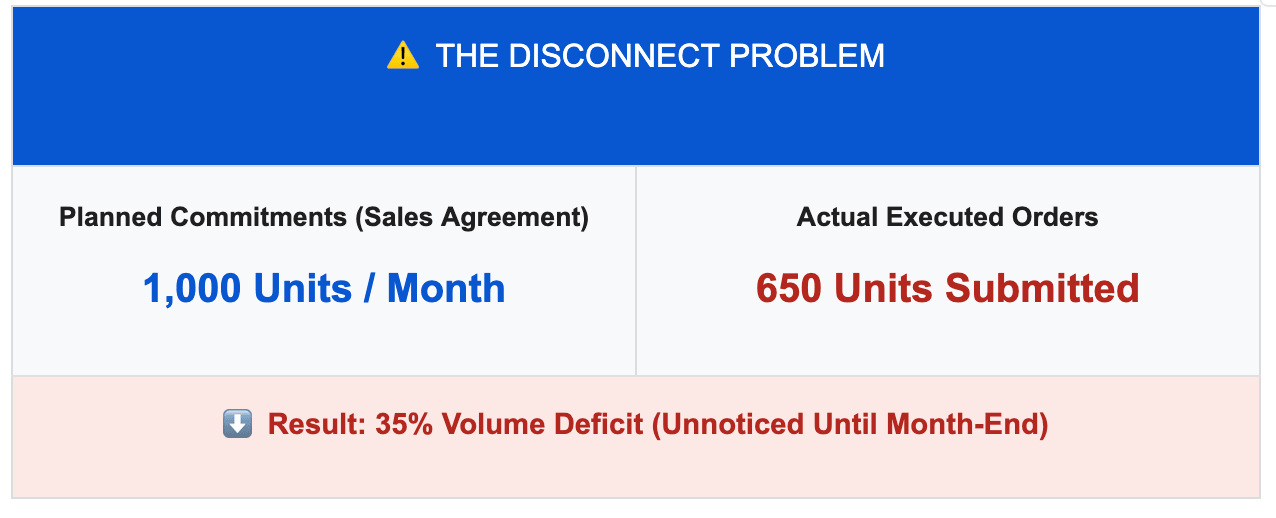
When actual order volume significantly lags behind planned schedules, three critical problems arise:
- Unplanned Inventory Carrying Costs: Products held for the account consume warehouse space.
- Forecasting Distortions: Downstream Advanced Account Forecasting models rely on inaccurate demand projections.
- Missed Intervention Windows: Account Managers miss the window to renegotiate terms or incentivize volume pickup before the agreement period expires.
Solution Architecture: Native Data Cloud & Slack Integration
By leveraging Data Cloud alongside native Salesforce Flow and Slack, we can calculate volume variance dynamically and alert account leads promptly inside inside their workspace
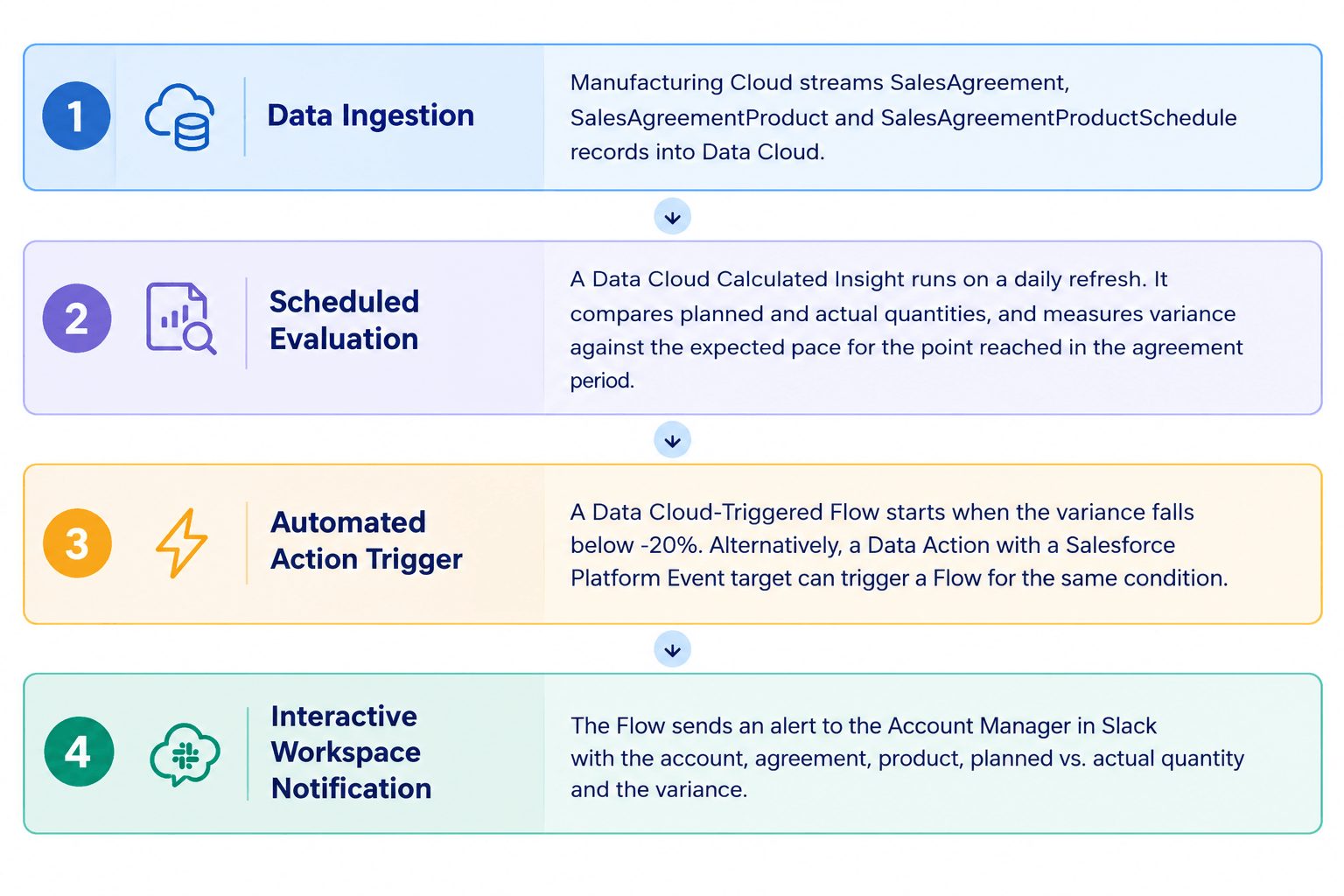
Key Components Used
- Manufacturing Cloud: Stores SalesAgreement, SalesAgreementProduct and SalesAgreementProductSchedule records, including the planned and actual quantities on each schedule.
- Salesforce Data Cloud: Ingests agreement, product and schedule data, and runs a scheduled Calculated Insight that evaluates performance against the expected pace.
- Data Cloud Data Action & Flow: Triggers a business process when variance breaches the defined threshold (e.g., negative variance greater than 20%), and looks up the account, owner and product details for the alert.
- Slack App for Salesforce: Delivers alerts directly to the responsible Account Manager.
Step-by-Step Implementation Guide
Step 1: Ingest Manufacturing Cloud Data into Data Cloud
Subtitle: Connect core agreement and schedule objects
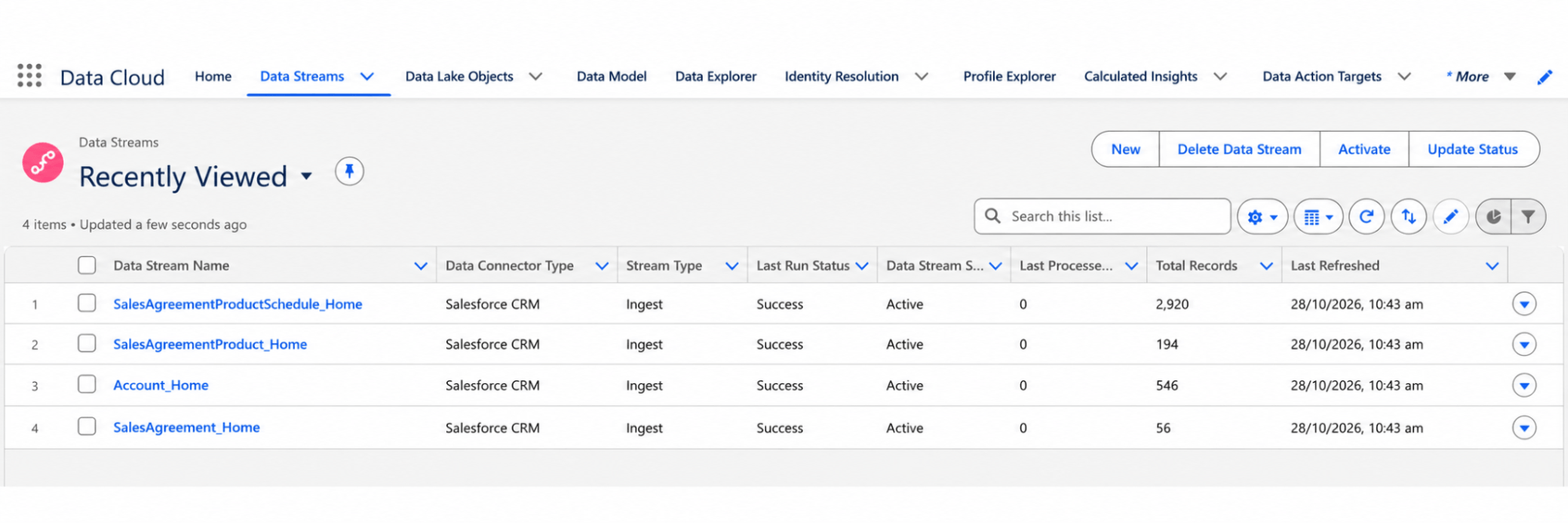
Start by ensuring your Manufacturing Cloud standard objects are mapped into Data Cloud Data Model Objects (DMOs).
- In Data Cloud, navigate to Data Streams and create streams for:
- SalesAgreement
- SalesAgreementProduct
- SalesAgreementProductSchedule
- Map these fields to their respective Data Model Objects (DMOs) in Data Cloud, ensuring relationships are established via SalesAgreementId and AccountId.
- The three objects link to each other as follows, and the Calculated Insight in Step 2 joins them on these fields:
- SalesAgreementProductSchedule → SalesAgreementProduct, via SalesAgreementProductId
- SalesAgreementProduct → SalesAgreement, via SalesAgreementId
Step 2: Create the Volume Variance Calculated Insight
Subtitle: Build pace-based variance formulas in Data Cloud
Write a Data Cloud Calculated Insight (CI) to compare actual quantities against the quantity expected so far in the agreement period. Comparing against the full-period plan would flag every account early in the period, so the plan is scaled to the day reached.
Expected Quantity = Planned Quantity × (Days Passed ÷ Days in Period) Variance = (Actual Quantity − Expected Quantity) ÷ Expected Quantity
The result is stored as a ratio (for example, -0.43 means 43% behind pace), and the Flow converts it to a percentage for display.
Use the following SQL syntax in Data Cloud's Calculated Insight Builder:
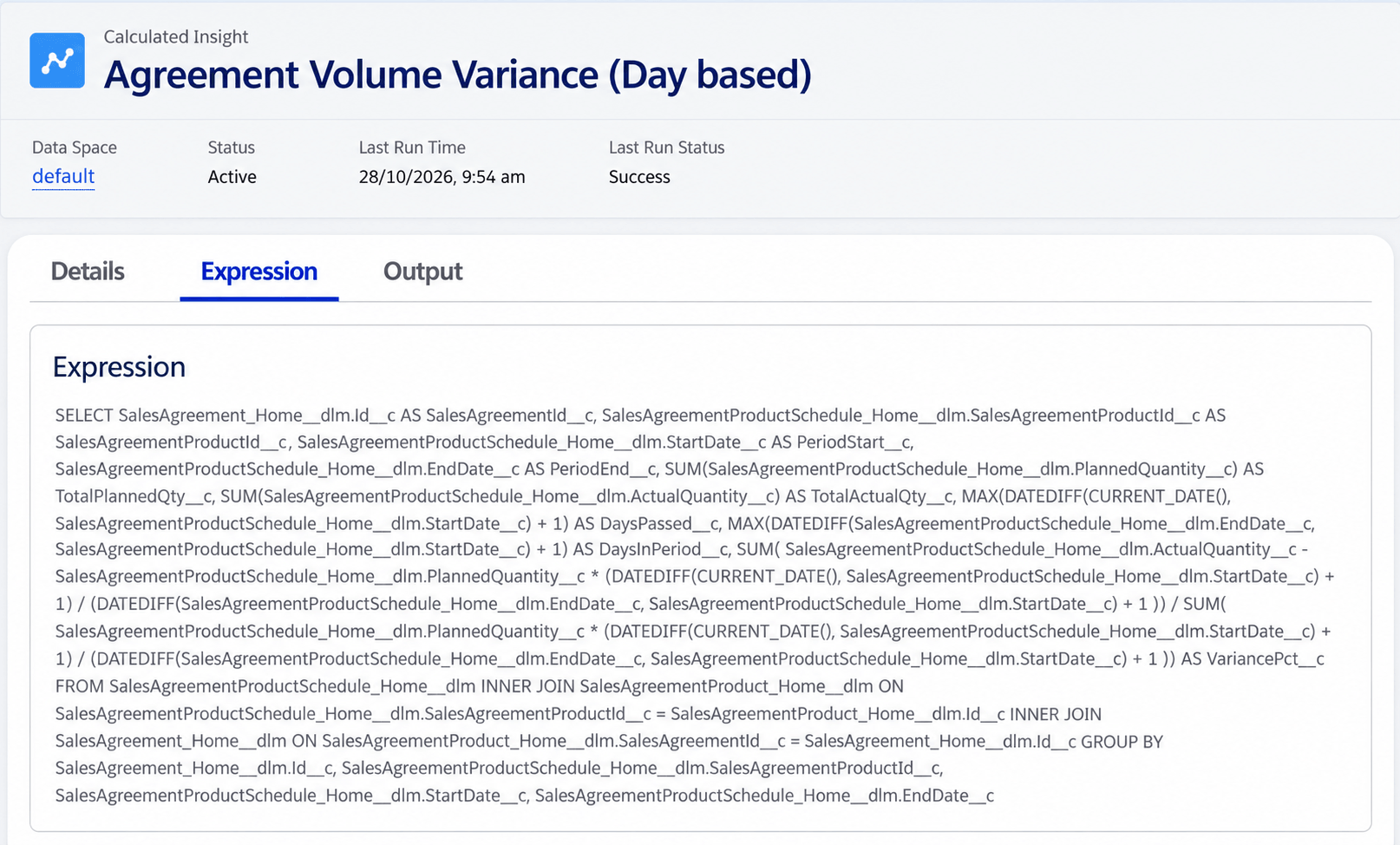
Set the insight to refresh once a day, early in the morning, so the flow reads fresh numbers.
Step 3: Configure the Data Cloud Data Action & Flow
Subtitle: Set trigger thresholds for volume breaches
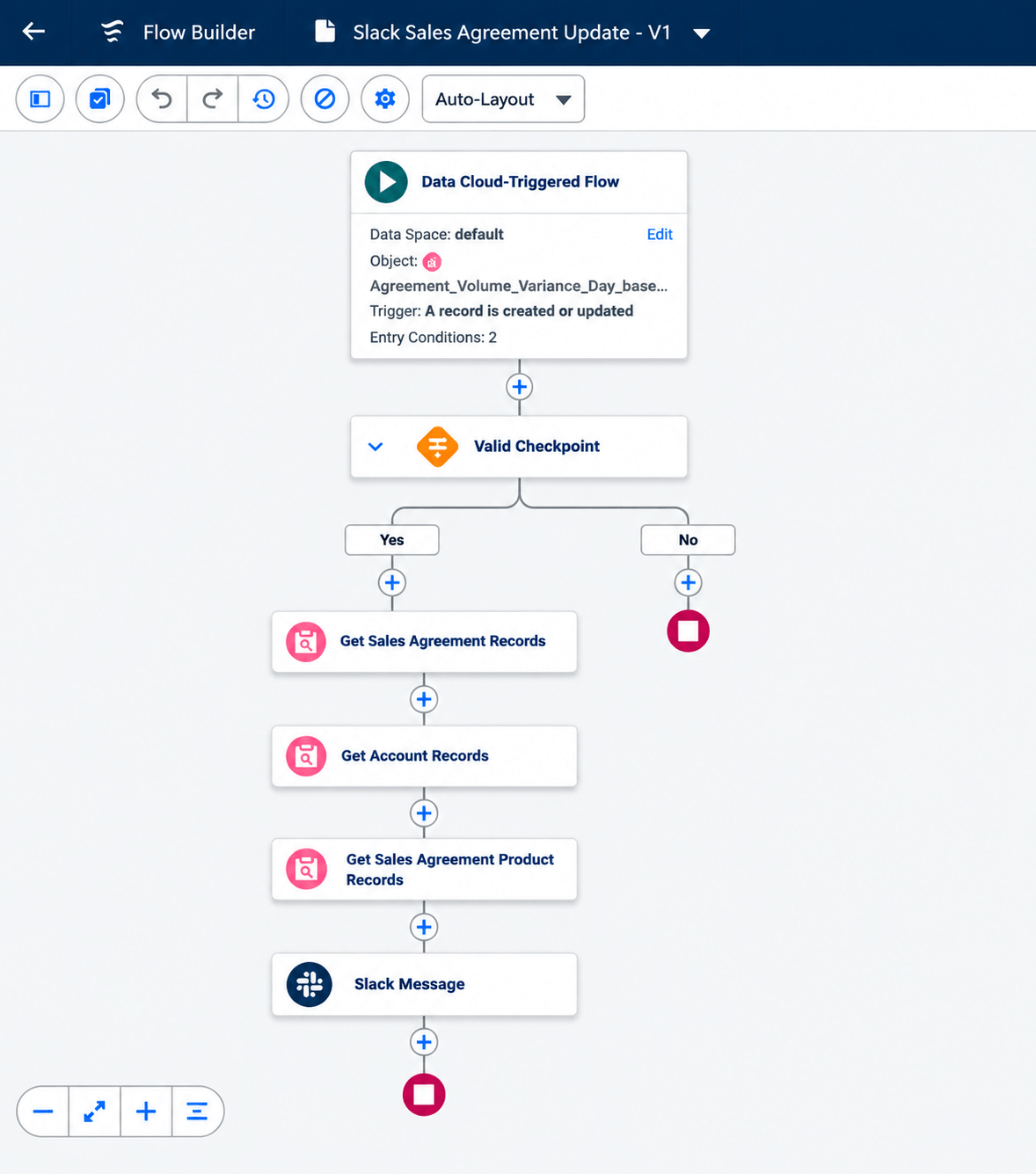
Once the Calculated Insight is active, create a Data Cloud-Triggered Flow that runs whenever a schedule line shows significant underperformance. The flow creates the Data Action and its target for you.
- In Flow Builder, create a Data Cloud-Triggered Flow. Choose the data space and select the Calculated Insight as the object, with the trigger set to “A record is created or updated”.
- Add entry conditions: VariancePct is less than or equal to -0.2 (a variance of 20% behind pace), and DaysPassed is greater than or equal to 1.
- Add a Decision so the alert goes out only while the period is open and on a checkpoint day (every 5th day of the period):
- DaysPassed is less than or equal to DaysInPeriod
- MOD(DaysPassed, 5) = 0
- Look up the Sales Agreement, the Account, the Account Owner (to get the email) and the product name.
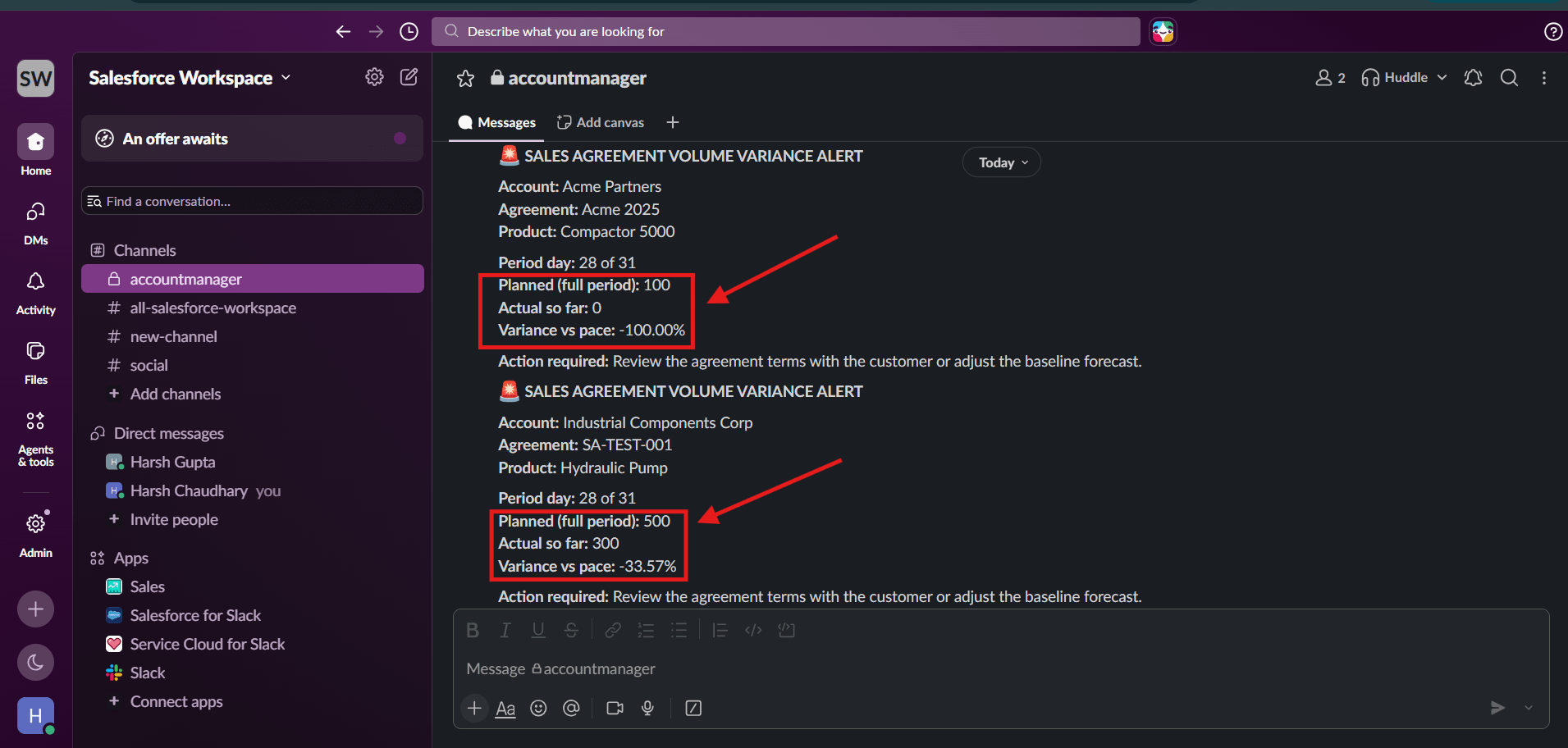
- Format the alert message with:
- Account Name & Agreement Name
- Product Name
- Planned vs. Actual Volume numbers
- Variance Percentage (the stored ratio × 100)
Step 4: Deliver Actionable Notifications via Slack
Subtitle: Alert reps directly in their daily workflow
Using the Slack action from the Slack App for Salesforce, send the alert from the Flow directly to the Account Manager, or to a dedicated account channel.
Business Value & ROI
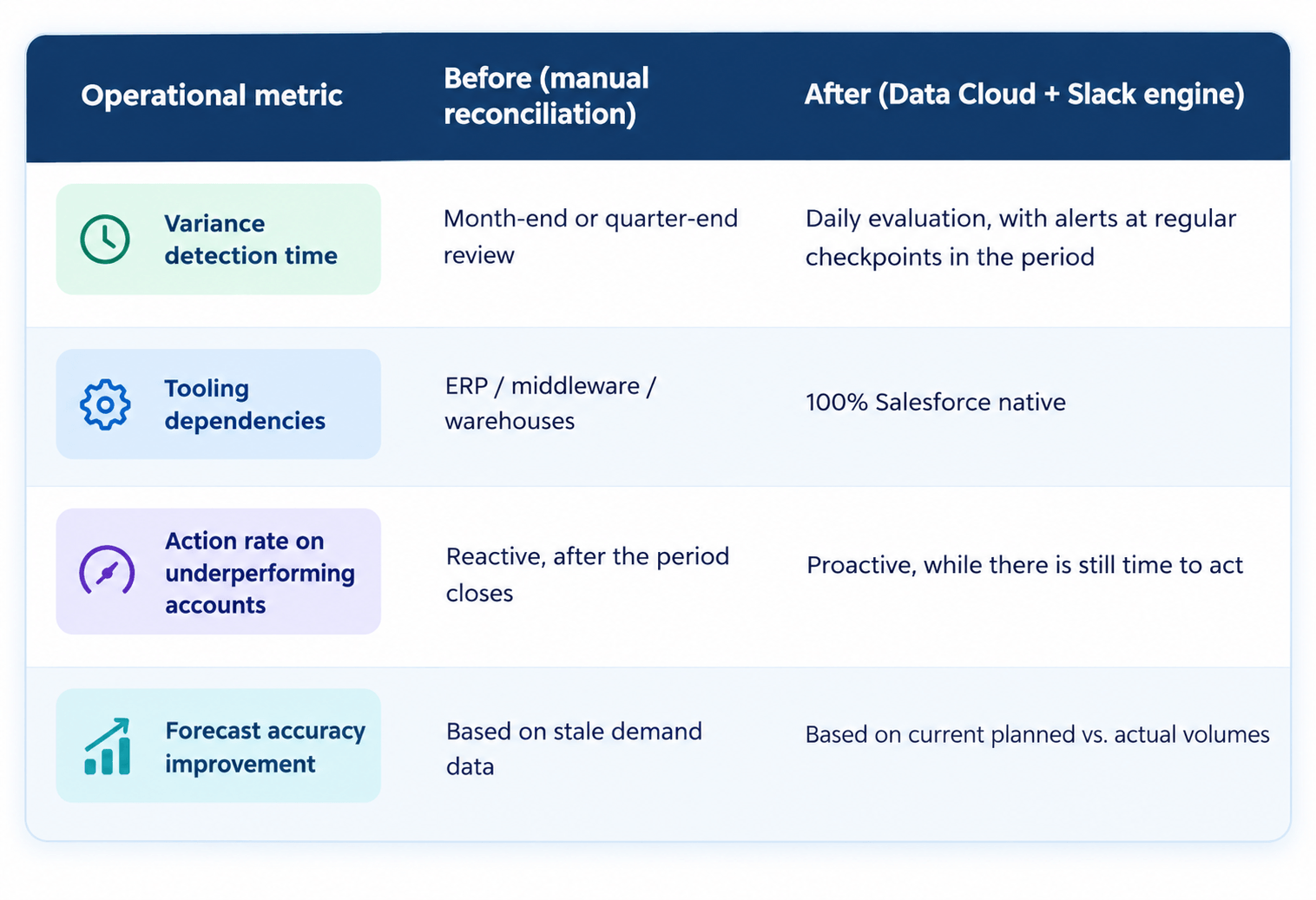
By automating variance detection natively using Data Cloud and Slack, manufacturing organizations achieve:
Summary
You don’t need an ERP or custom integration middleware to build proactive monitoring inside Salesforce Manufacturing Cloud. By connecting Manufacturing Cloud data into Data Cloud and delivering notifications straight to Slack, account teams can protect revenue and maintain accurate demand planning before month-end surprises occur.
To explore the broader capabilities and architecture of Salesforce Data Cloud, visit our Salesforce Data Cloud page.