1. Introduction
Organizations commonly use Salesforce to manage events, registrations, and participants, while digital tickets are often handled by separate ticketing platforms.
This creates a disconnected workflow:
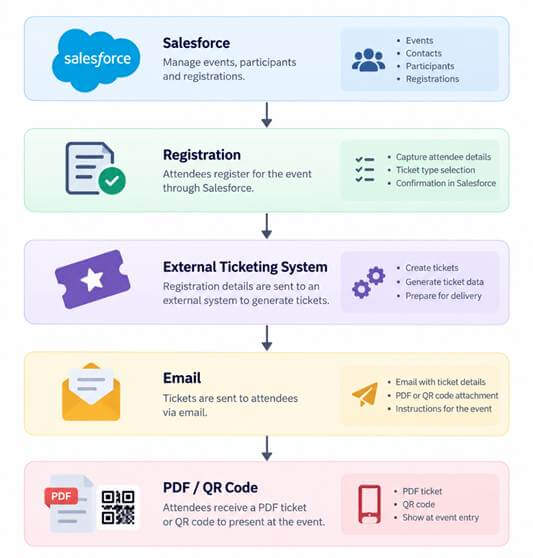
A more integrated approach is to use Salesforce as the central platform for creating and managing digital event tickets.
This project explores a Salesforce-to-Google Wallet integration that allows organizations to create event ticket templates, generate individual participant tickets, and distribute them through Google Wallet.
The solution combines Salesforce, Lightning Web Components, Apex, Named Credentials, External Credentials, JWT, and Google Wallet APIs.
2. The Problem
Traditional ticketing workflows can introduce several challenges:
- Event and participant data may be split across multiple systems.
- Tickets may be delivered as PDFs or email attachments.
- Administrators have limited control over ticket design from Salesforce.
- Creating customized tickets for different events can require additional development.
- Ticket information and Salesforce participant records may not have a direct relationship.
The objective of this project was therefore to create a more centralized solution where Salesforce can manage the complete ticket lifecycle.
Proposed approach
Instead of:
Salesforce → External Ticketing System → PDF
the solution introduces:
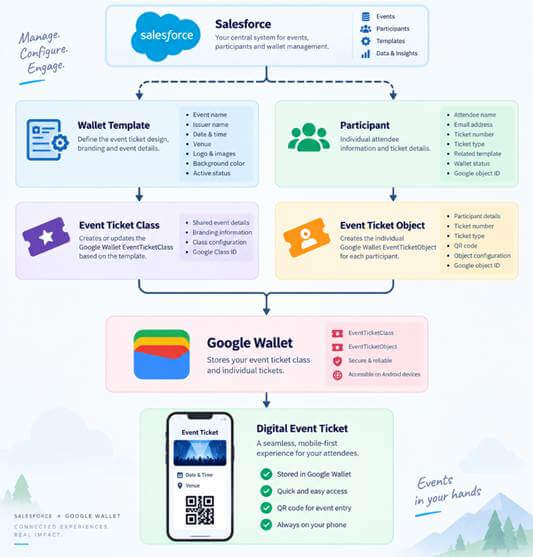
Salesforce → Google Wallet → Digital Event Ticket
3. Solution Overview
The solution uses two main Salesforce objects:
Wallet Template
Stores common event and branding information:
- Event name
- Event date/time
- Venue
- Logo
- Hero image
- Background color
- Issuer
- Wallet type
Event Participant
Stores individual ticket information:
- Participant name
- Ticket number
- Ticket type
- Wallet status
- Wallet URL
- Google Wallet Object ID
The relationship is:
One Wallet Template → Many Event Participants
This separation allows event information to be maintained centrally while each participant receives an individual ticket.
4. High-Level Architecture
The solution is divided into four major layers:
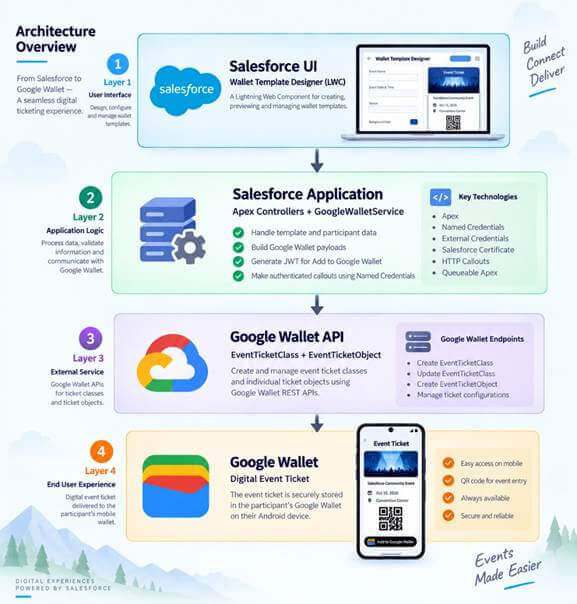
Layer 1 — Salesforce UI
A custom Lightning Web Component called Wallet Template Designer provides the administrator interface.
Layer 2 — Salesforce Application
Apex controllers and GoogleWalletService handle:
- Data processing
- Validation
- Google Wallet payload creation
- JWT generation
- API communication
Layer 3 — Google Wallet API
Google Wallet APIs manage:
- EventTicketClass
- EventTicketObject
Layer 4 — Google Wallet
The final ticket is stored on the participant's mobile device.
5. Salesforce Wallet Template Designer
One of the main features developed for this solution is the Wallet Template Designer.
It is implemented as a Lightning App Page using LWC.
Administrators can:
- Create a new template.
- Select an existing template.
- Configure event information.
- Configure branding.
- Add images.
- Select the background color.
- Preview the ticket.
- Save the template.
- Publish the template to Google Wallet.
The live preview updates on the client side, so changing a field does not trigger a Google API call.
Only the publishing action communicates with Google Wallet.
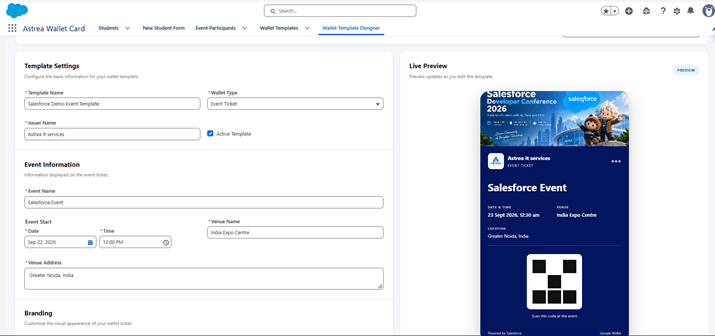
Wallet Template Designer provides a Salesforce-native interface for configuring and previewing digital event tickets.
6. Salesforce to Google Wallet Mapping
A key concept in the integration is the distinction between Class and Object.
EventTicketClass
Represents common event information.
For example:
- Event name
- Event date
- Venue
- Branding
- Logo
- Hero image
- Background color
EventTicketObject
Represents an individual participant's ticket.
For example:
- Participant
- Ticket number
- Ticket type
- QR code
The relationship can be represented as:
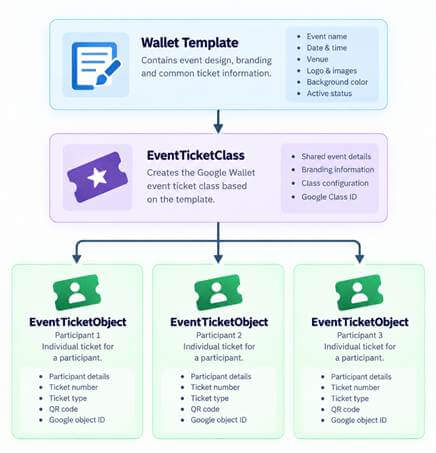
This model allows many participants to share the same event configuration while maintaining individual ticket information.
7. Salesforce Integration Components
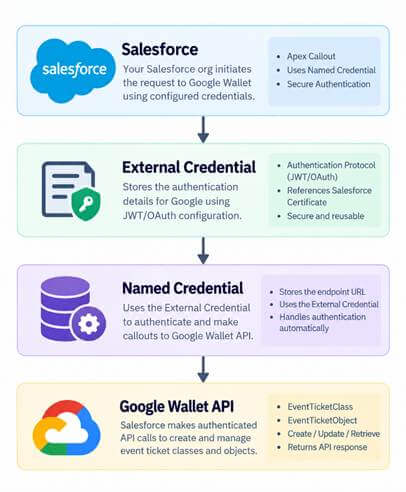
The integration uses standard Salesforce integration technologies.
Named Credential
The Google Wallet API endpoint is configured through a Salesforce Named Credential.
External Credential
The External Credential manages the authentication configuration.
Salesforce Certificate
A Salesforce certificate is used for JWT signing.
Apex
Apex handles the integration logic and REST API communication.
JWT
A signed JWT is generated when creating the Google Wallet Save-to-Wallet URL.
The overall authentication flow is:
8. Creating the Google Wallet Ticket
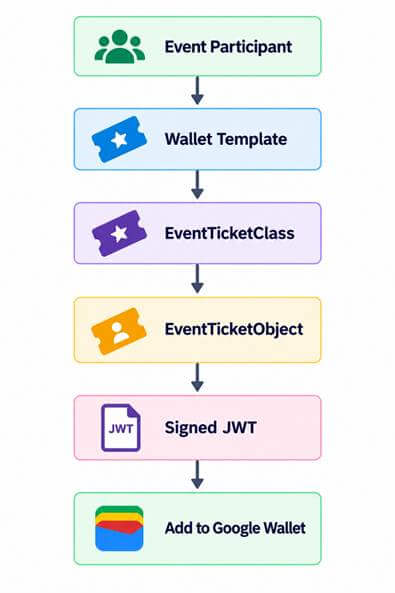
When a participant needs a ticket, Salesforce follows this flow:
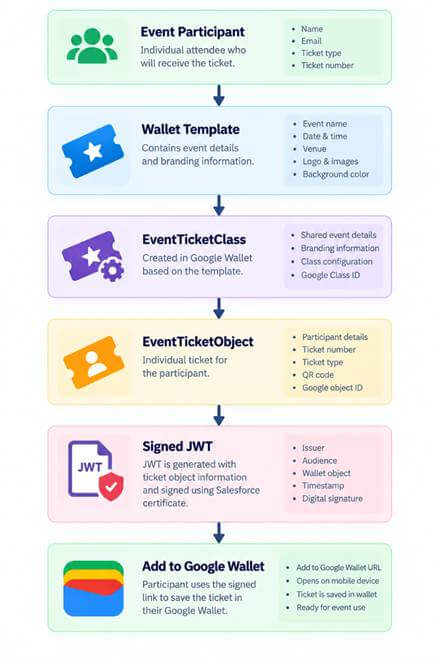
The participant-specific object contains information such as the ticket number and ticket type.
The QR code can use the ticket number as its value, creating a foundation for future event check-in functionality.
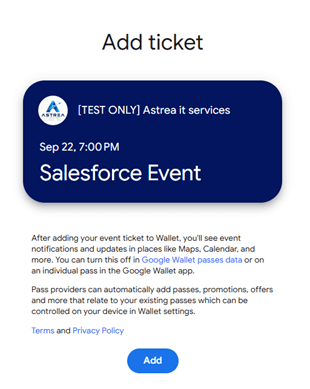
9. Add to Google Wallet
After the individual ticket object is created, Salesforce generates a signed JWT.
The JWT contains information required by Google Wallet, including:
- Issuer
- Audience
- Wallet type
- Wallet type
- Timestamp
- Origin
- Ticket object
The final Save-to-Wallet URL is generated from the signed JWT.
The participant can then use the generated link to add the ticket to Google Wallet.
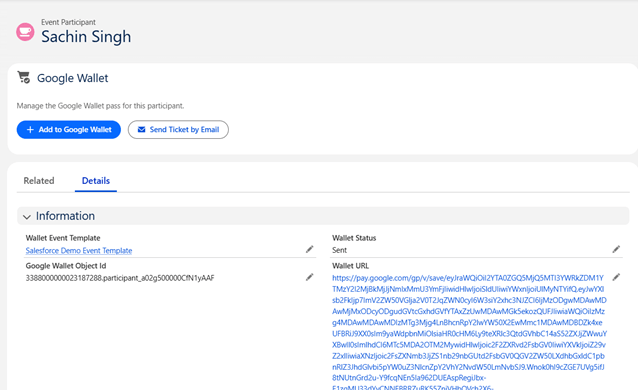
10. Email Ticket Delivery
The solution also supports sending the wallet ticket through email.
The workflow is:
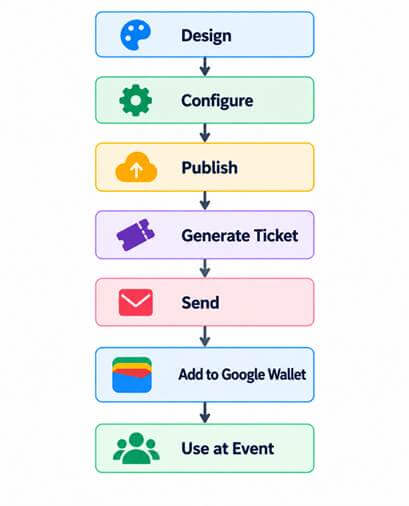
The email contains the ticket information and an Add to Google Wallet button.
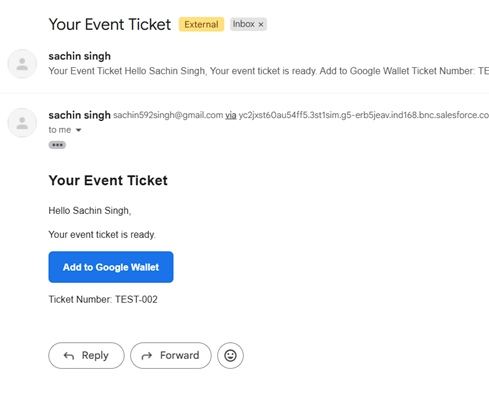
This provides a simple end-user experience without requiring participants to manually navigate through Salesforce.
11. Google Wallet Result
After adding the ticket, the participant can access the event ticket directly through Google Wallet.
The ticket contains information such as:
- Event name
- Date and time
- Venue
- Branding
- Participant information
- QR code
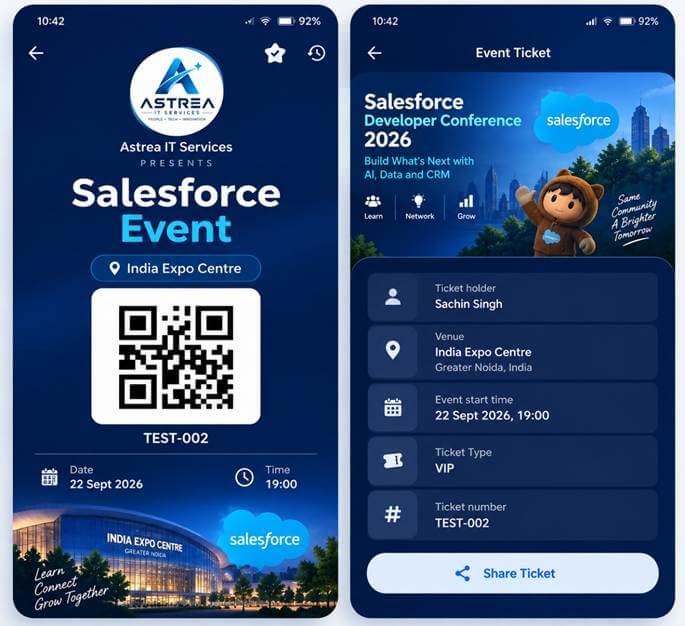
This demonstrates the complete journey from Salesforce data to a mobile digital ticket.
12. Future Enhancements
The current implementation provides the foundation for a broader digital wallet platform.
Potential future enhancements include:
Apple Wallet
Add support for Apple Wallet passes alongside Google Wallet.
Multiple Wallet Types
Support additional pass types such as:
- Generic Pass
- Boarding Pass
- Loyalty Card
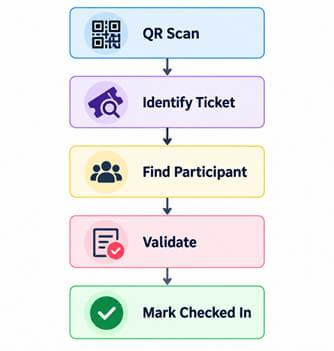
QR Check-In
Use the ticket QR code to identify participants and update their Salesforce check-in status.
Template Versioning
Allow administrators to maintain and manage different versions of a wallet template.
Analytics
Track:
- Tickets generated
- Tickets sent
- Wallet additions
- Check-ins
- Failed deliveries
Managed Package
The long-term goal is to package the solution so that it can be installed and configured in other Salesforce organizations.
13. Conclusion
This project demonstrates how Salesforce can be used as the central platform for managing digital event tickets.
By combining Salesforce Custom Objects, LWC, Apex, Named Credentials, External Credentials, JWT, and Google Wallet APIs, the solution connects event management with a modern mobile ticketing experience.
The architecture separates shared event information from participant-specific ticket data, making the solution reusable and scalable.
The current journey is:
The next phase will focus on strengthening asynchronous publishing, adding publishing status tracking, implementing QR-based check-in, expanding wallet support, and moving toward a reusable managed package.
To explore more Salesforce integration use cases, automation strategies, and best practices, visit our comprehensive Salesforce Integrations Expertise page.