1. Introduction
Salesforce provides sales teams with detailed information about opportunities, including deal amounts, stages, expected close dates, and customer activities. However, identifying which opportunities require immediate attention can be challenging when information is spread across multiple objects and records.
Opportunity health scoring helps address this challenge by analyzing opportunity characteristics, historical progression, and sales activities to estimate the likelihood of winning a deal. It can also help sales representatives understand the factors influencing a prediction and identify appropriate follow-up actions.
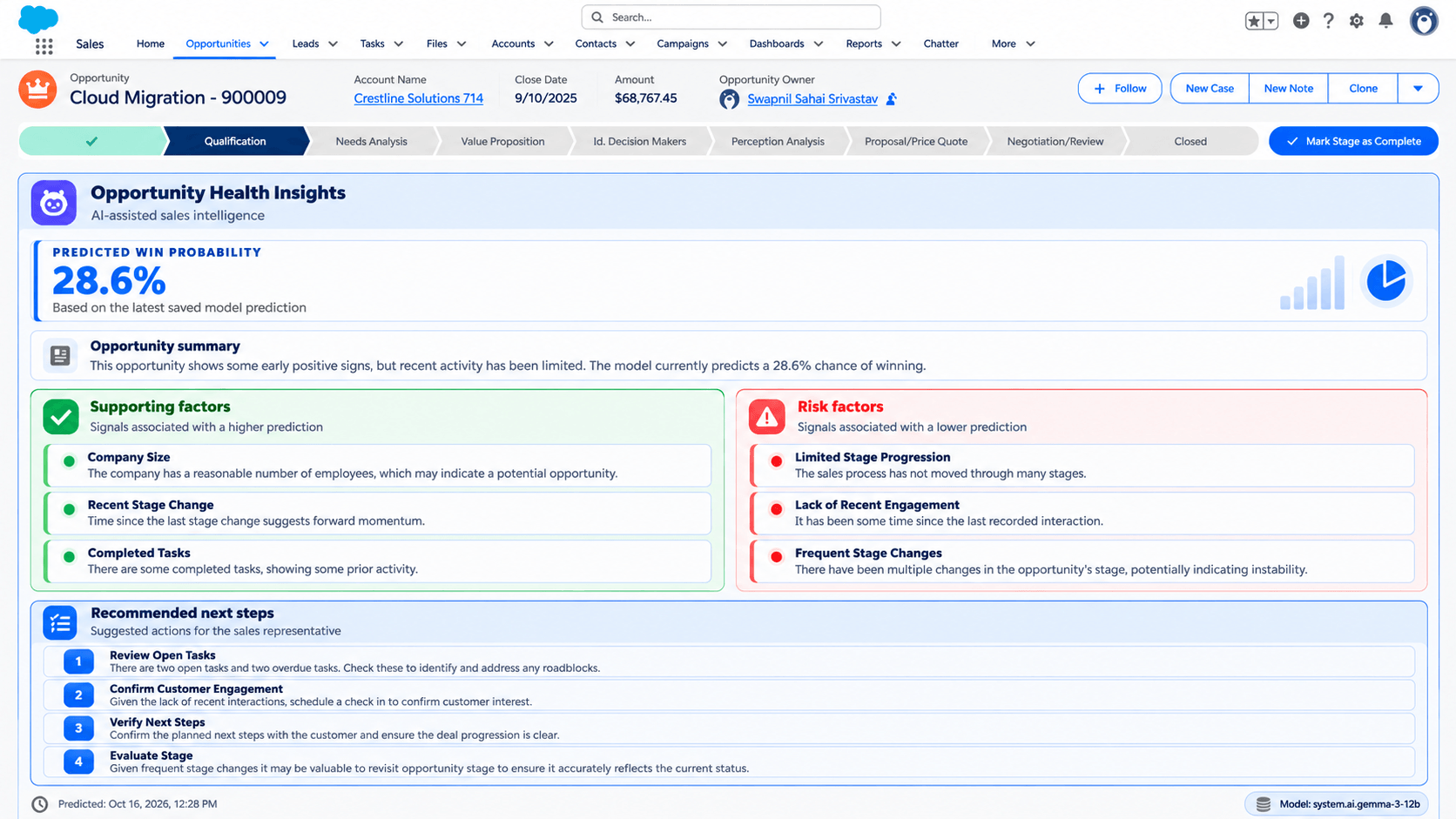
This POC demonstrates how Databricks and Salesforce can work together to build an end-to-end opportunity health scoring solution. Databricks handles data processing, machine learning, explainability, and AI-generated insights, while Salesforce remains the primary interface for managing opportunities and accessing the results.
The solution combines predictive analytics with natural-language explanations and recommendations, making the output easier for sales teams to interpret and act upon.
2. Solution Architecture
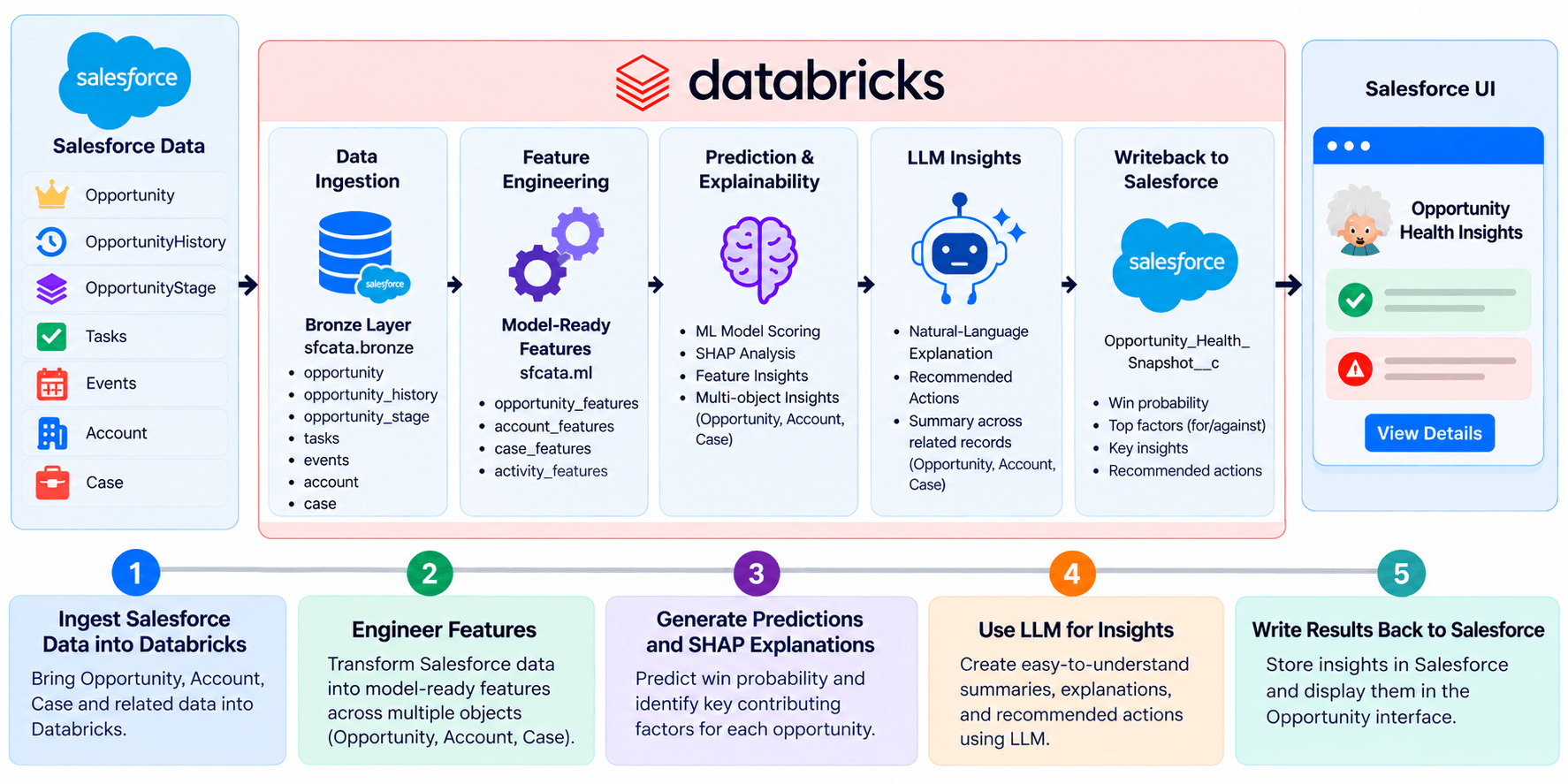
The solution follows a pipeline that transforms Salesforce data into actionable sales insights.
The main components include:
- Salesforce: Provides Opportunity, OpportunityHistory, OpportunityStage, Task, Event, Account and Case data.
- Databricks Delta tables: Store ingested data, engineered features, predictions, and explanations.
- Machine learning and MLflow: Train, evaluate, track, and register the opportunity prediction model.
- SHAP: Identifies the features contributing positively or negatively to individual predictions.
- Databricks AI Gateway and LLMs: Generate natural-language explanations and recommended actions.
- Salesforce REST API: Writes predictions and explanations back to Salesforce.
- Lightning Web Components (LWC): Displays the results directly on Salesforce Opportunity records.
The workflow follows five main stages:
- Ingest Salesforce data into Databricks.
- Engineer features from opportunity information and related activities.
- Generate win predictions and calculate SHAP explanations.
- Use an LLM to generate summaries and recommended actions.
- Write the results back to Salesforce and display them in the Opportunity interface.
3. Salesforce Data Ingestion and Feature Engineering
The first step was to ingest the Salesforce data required for opportunity analysis into Databricks.
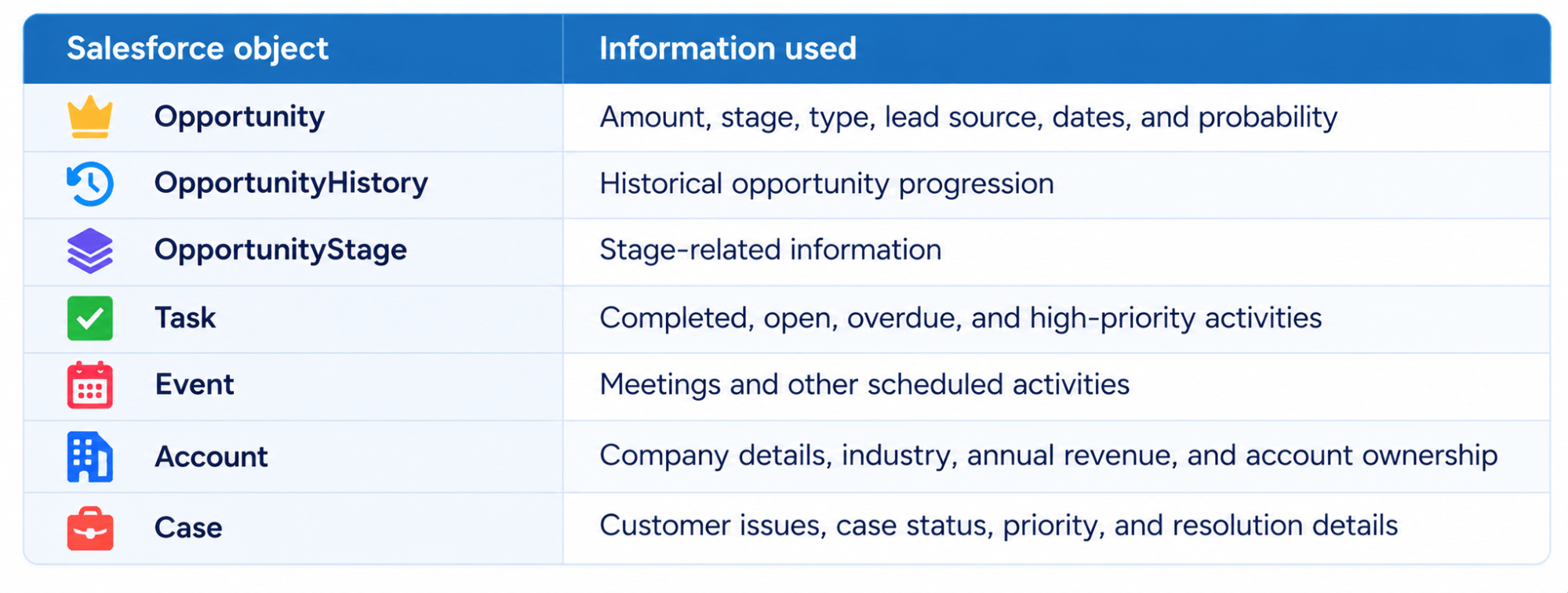
Opportunity records provide the core information about each deal, including its amount, type, lead source, current stage, probability, and expected close date. However, these fields alone do not necessarily capture the full picture of sales activity.
Several related objects provide additional context about its progression and sales activities.
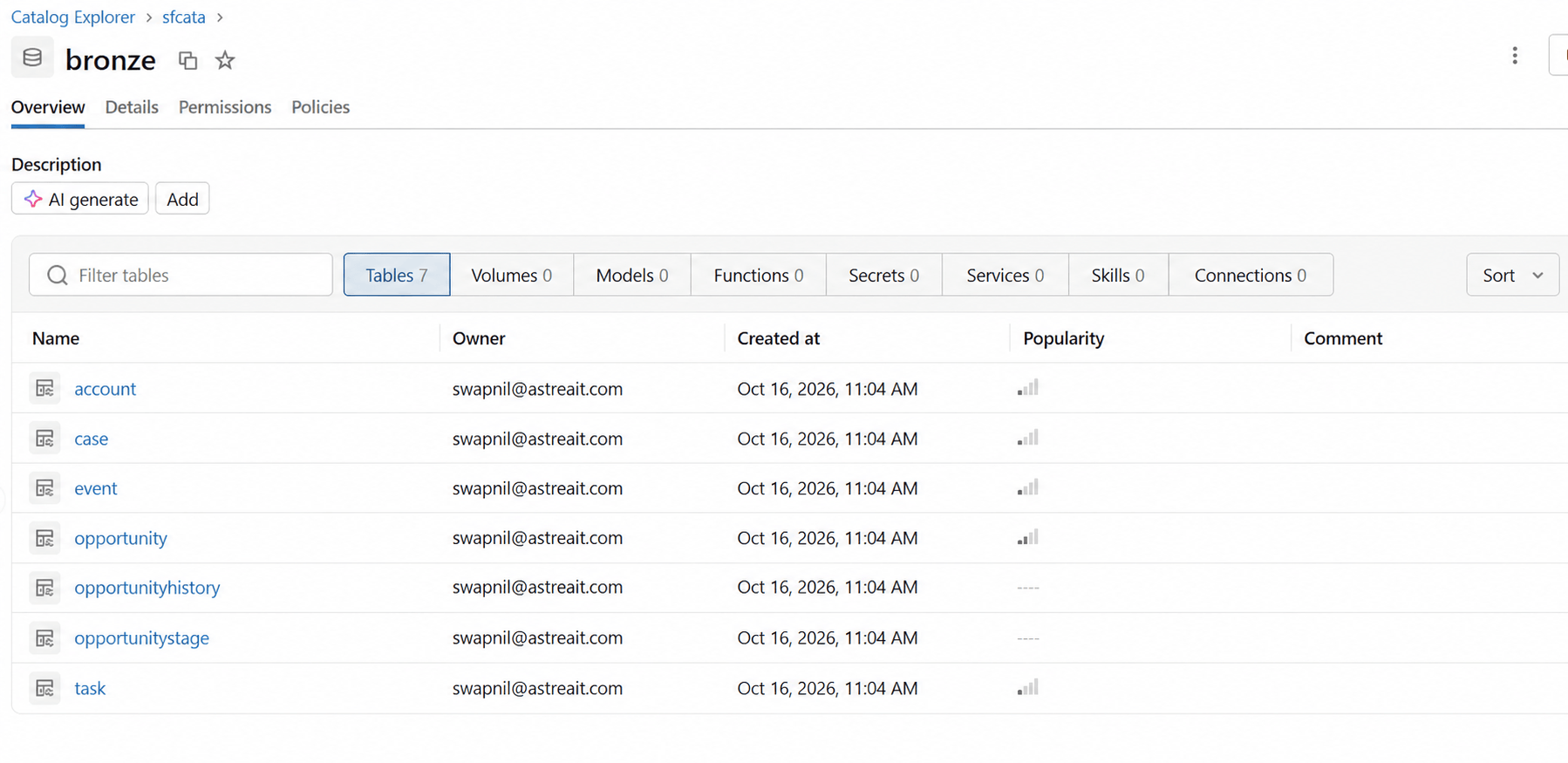
The ingested data is available in the bronze schema.
This approach makes it possible to analyze opportunities alongside their associated sales activities rather than treating each deal as an isolated record.
4. Feature Engineering: Converting CRM Records into Model Inputs
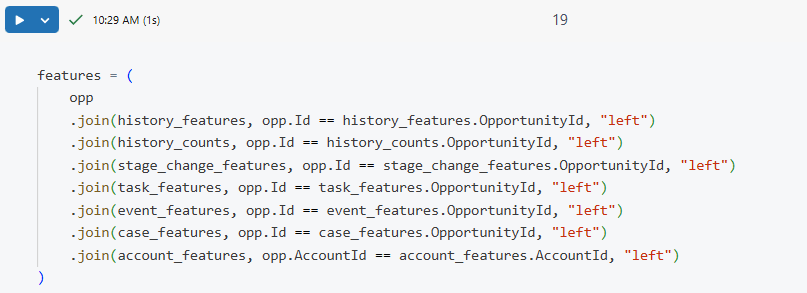
Raw Salesforce records cannot always be used directly by a machine learning model. They must first be transformed into a consistent set of features that capture relevant information about each opportunity, its historical progression, associated sales activities, and the health of the customer account.
The notebook 01_opportunity_feature_engineering combines data from Opportunities, OpportunityHistory, Tasks, Events, Accounts, and Cases to build a comprehensive feature set for training the model.
The features fall into four main categories:
- Opportunity characteristics: Opportunity type, lead source, amount, stage at the prediction point, opportunity age, days to close, and product-related indicators.
- Historical progression: Number of historical stage records, distinct stages, stage changes, and time since the last stage change, providing insights into how an opportunity has progressed over time.
- Sales activities: Total, completed, open, high-priority, and overdue Tasks; recent task counts; task completion ratios; Event counts; meeting duration; and time since the last recorded activity.
- Account health and customer support: Account annual revenue, number of employees, industry, rating, customer status, active status, and customer priority. Case-related features include total cases, open cases, high-priority cases, escalated cases, recent case counts, and time since the last case. These features help capture the broader customer context and potential support issues associated with an opportunity.
Combining these features allows the model to evaluate an opportunity using not only its current state and sales activity, but also the characteristics of the associated account and its customer support history. Where related Tasks, Events, or Cases are unavailable, the feature-engineering process is designed to handle missing activity data so that opportunities can still be scored.
The resulting feature table is stored in opportunity_features.
To reduce data leakage, training uses a defined prediction snapshot and excludes identifiers, outcome labels, and information that would only become available after the prediction point. Historical and activity-based features are calculated using information available at that snapshot, helping the model learn from data that would realistically be available when making a prediction.
5. Machine Learning Model training and evaluation
The next step is to estimate the likelihood of winning each opportunity using a supervised classification model.
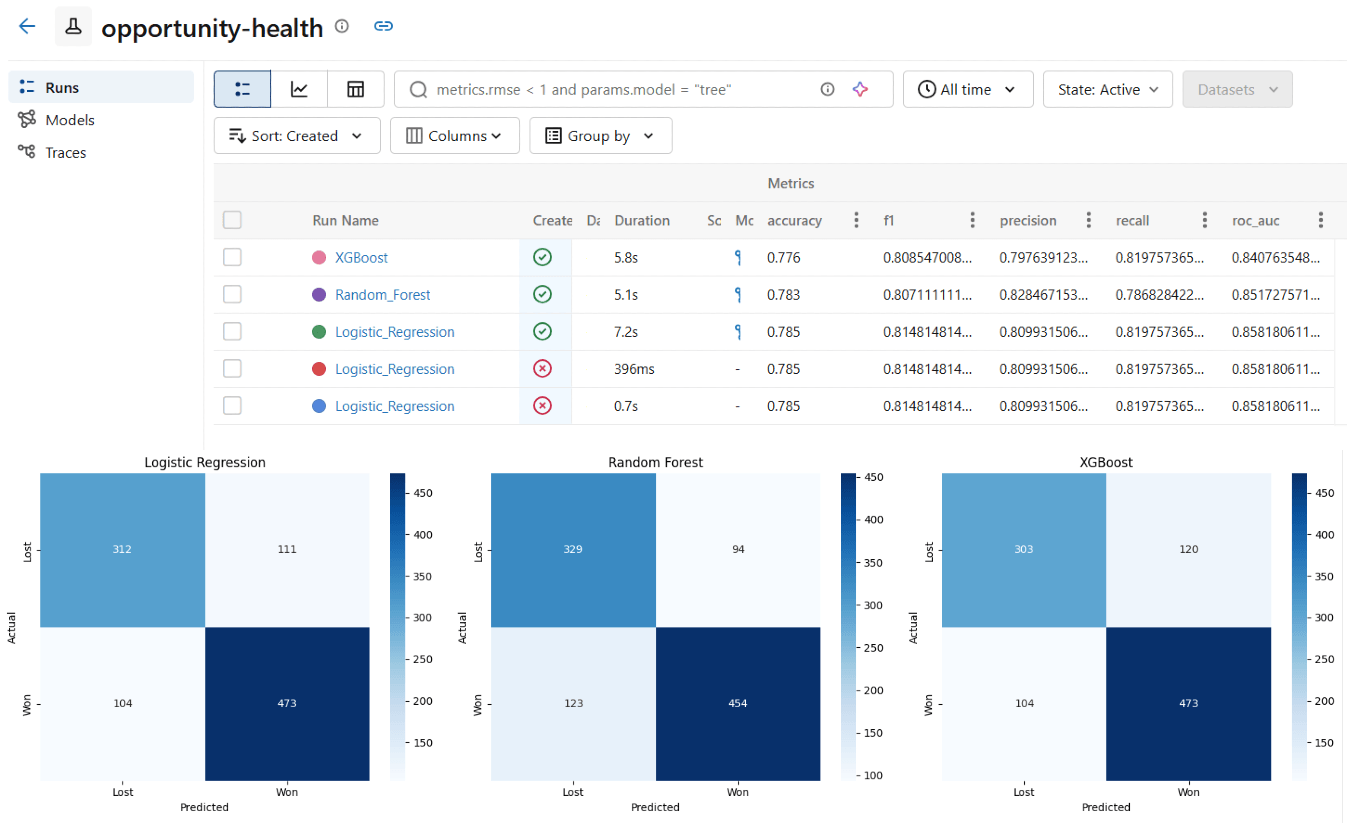
Several algorithms were evaluated during model development, including Logistic Regression, Random Forest, and XGBoost. Their performance was compared using metrics such as accuracy, precision, recall, F1-score, and ROC-AUC.

The selected model was tracked with MLflow and registered in Unity Catalog as opportunity_health_model.
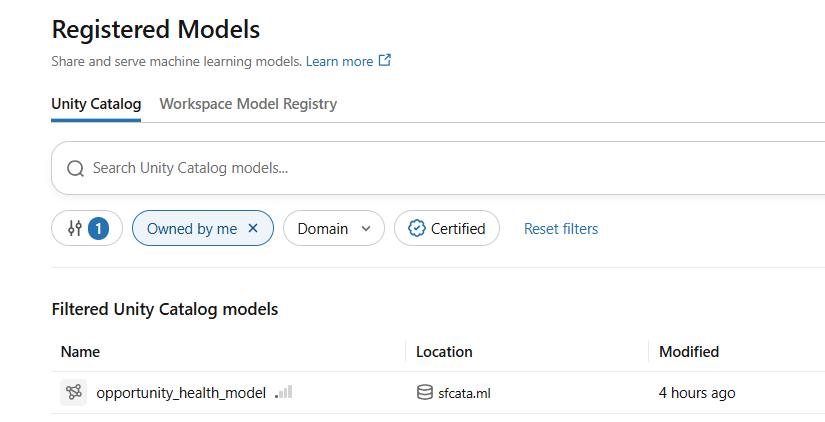
The registered model allows the scoring process to load a specific model version without retraining it during every execution.
Note: The model is currently trained on sample synthetic data, as only a limited number of real opportunities were available. Its predictions may behave differently when applied to real-world sales data. As more actual opportunity records and outcomes become available, the model can be further evaluated and improved.
6. Scoring Real Opportunities
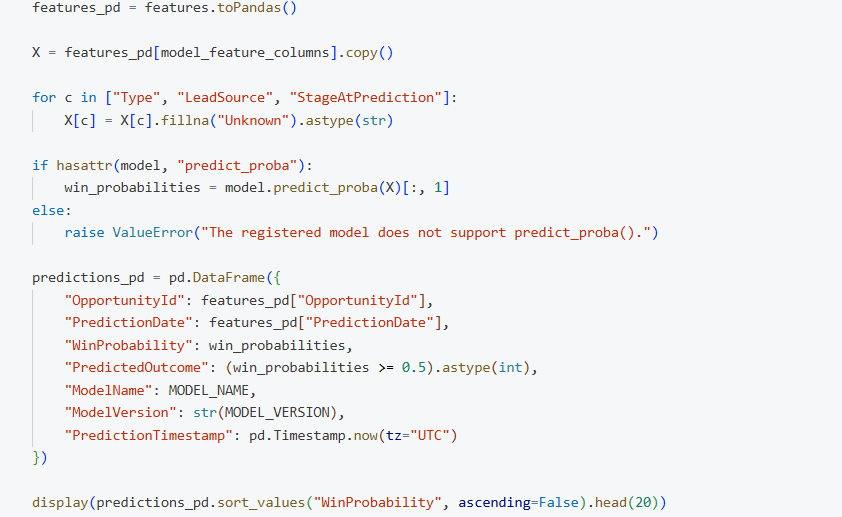
After training and registering the model, the next step was to apply it to the available Salesforce Opportunity data.
The notebook 03_opportunity_scoring_and_shap loads the registered model, processes the engineered features, and generates win probabilities for eligible open opportunities.
The resulting predictions are stored in Databricks Delta tables and passed to the subsequent explainability and AI-generation steps.
This separation between model training and scoring also makes the pipeline easier to maintain: model development can happen independently, while the operational workflow reuses the registered version.
7. Making Predictions Explainable with SHAP
A predicted win probability provides a useful starting point, but sales representatives also need to understand the factors influencing the result.
The POC uses SHAP (SHapley Additive exPlanations) to calculate feature contributions for individual predictions.
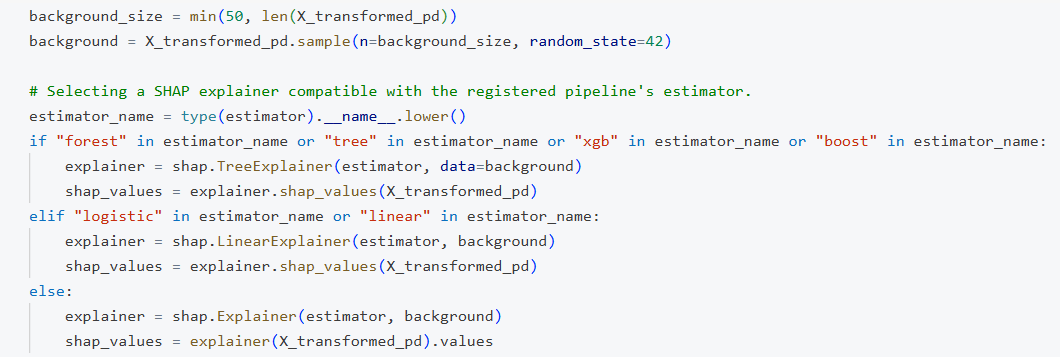
SHAP identifies how each feature contributes to the model output relative to a baseline. Positive contributions move the prediction toward the positive class, while negative contributions move it in the opposite direction. In this POC, the positive class represents a won opportunity.
For example, activity-related features such as meeting time or completed tasks may support a prediction, while opportunity age or overdue work may contribute negatively. The actual direction and strength of each factor depend on the individual opportunity and the model output.
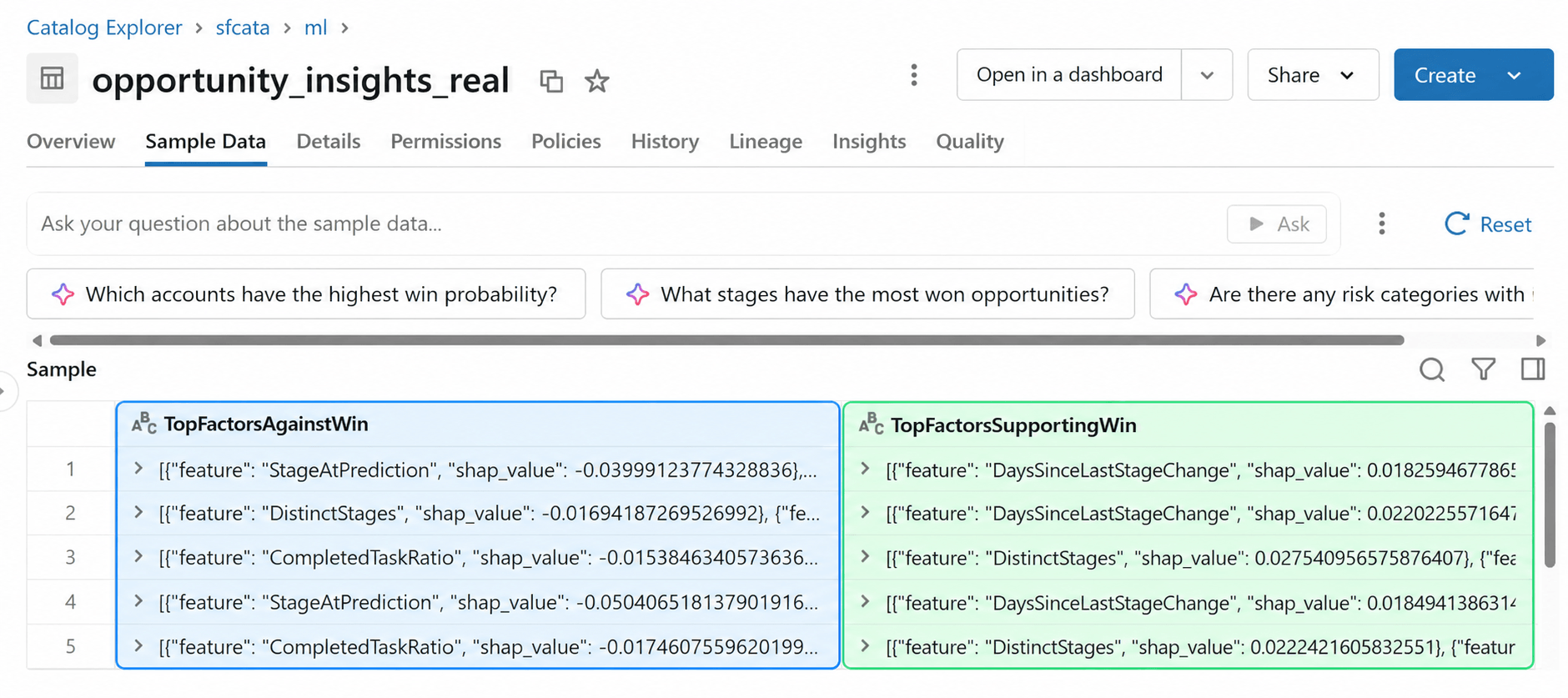
The pipeline groups the contributions by their original features and identifies the strongest factors supporting and opposing each prediction. These results are stored in opportunity_shap_explanations_real.
SHAP therefore provides a structured foundation for explaining the model's behavior before generating a natural-language interpretation.
8. Generating Natural Language Insights with LLM
SHAP provides structured feature contributions, but interpreting these values directly may not be convenient for a sales representative.
To make the results more accessible, the POC uses LLM(gemma-3-12b in our case) through the Databricks AI Gateway to generate natural-language explanations and recommended actions.
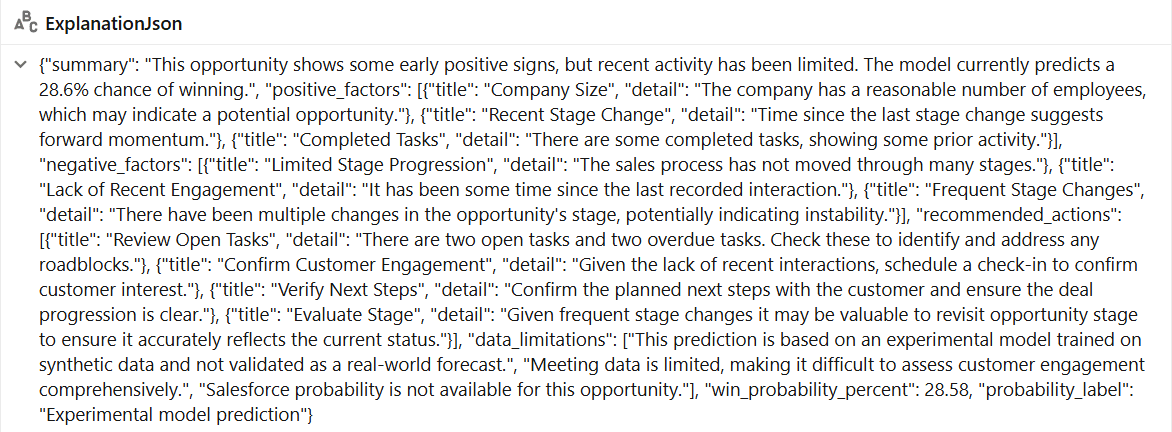
The LLM receives the prediction and relevant structured information from the scoring and explainability process. It produces a JSON-formatted response containing five sections:
- Summary: A concise explanation of the opportunity's prediction.
- Positive factors: Signals associated with a higher predicted likelihood of winning.
- Negative factors: Signals associated with a lower predicted likelihood of winning.
- Recommended actions: Suggested next steps for the sales representative.
- Data limitations: Relevant gaps or limitations in the available information.
The explanations are stored in opportunity_llm_explanations_real.
Using a structured JSON response makes it easier to parse the output and display each section independently in the Salesforce interface.
This combination of SHAP and an LLM provides two complementary capabilities: SHAP supplies model-grounded feature contributions, while the LLM turns structured information into readable explanations and actionable recommendations.
9. Salesforce Writeback
To make the insights available to sales representatives, the POC writes the predictions and explanations back to Salesforce rather than requiring users to access Databricks separately.
A custom Salesforce object, Opportunity_Health_Snapshot__c, was created to store the generated results.
The object includes the following fields:
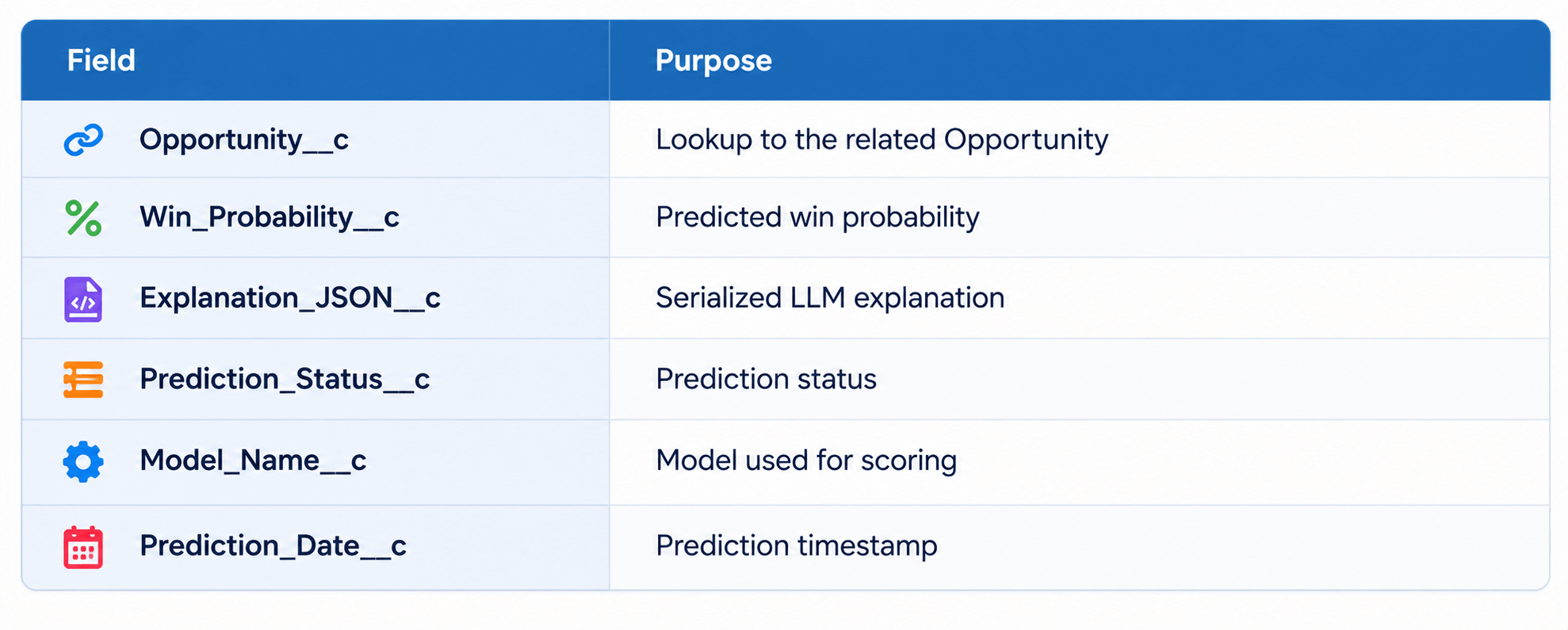
The notebook 04_salesforce_writeback reads successful explanation records and uses the Salesforce API to create or update the corresponding snapshots.
Before writing a record, the process checks whether a snapshot already exists for the Opportunity. Existing records are updated; otherwise, a new snapshot is created. This allows subsequent executions to refresh the saved insights without creating duplicate snapshots.
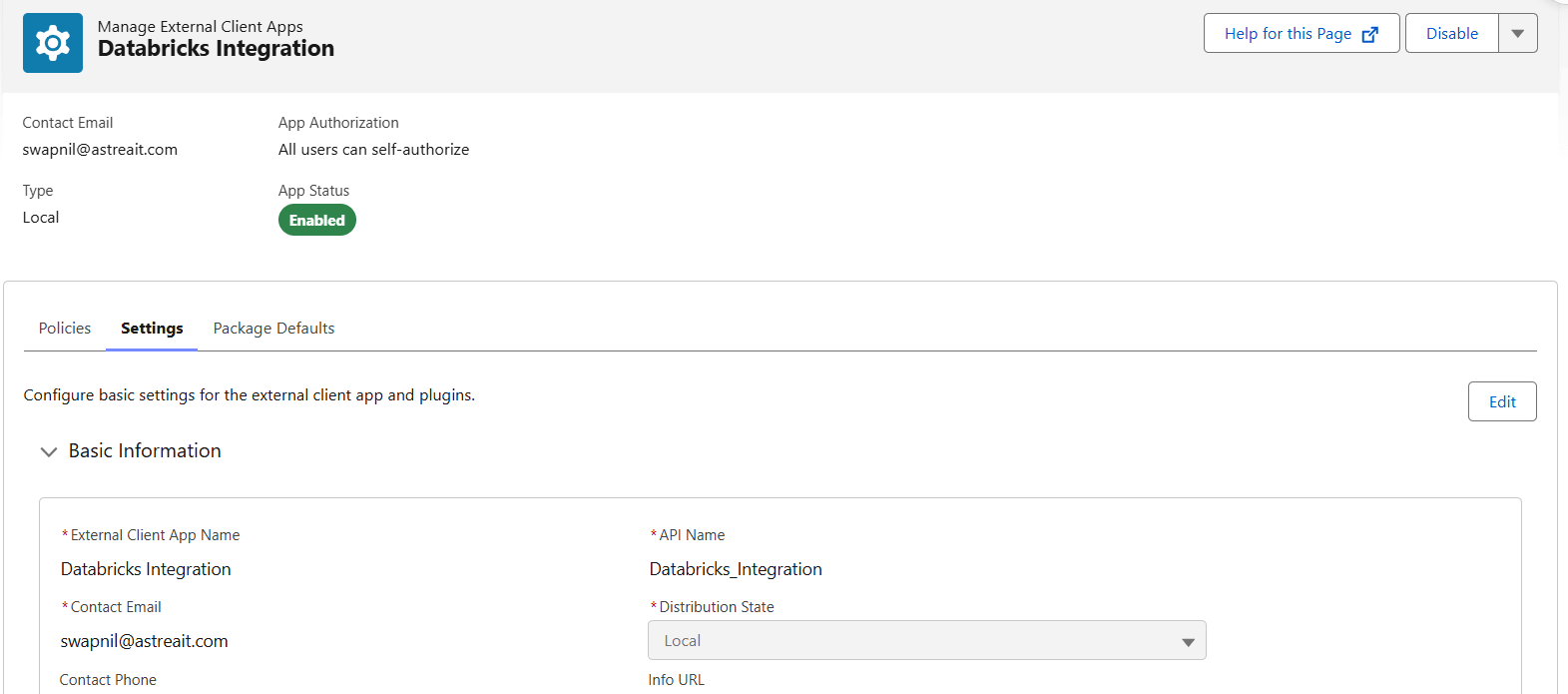
An External Client App is configured in Salesforce to enable secure OAuth 2.0 authentication for server-to-server integration. The app provides a Client ID and Client Secret, and its OAuth policies and permitted scopes are configured to allow API access for the designated integration user. These credentials are stored securely in a Databricks secret scope salesforce-writeback, rather than being hardcoded into the notebook.
The Databricks writeback notebook retrieves the OAuth credentials from the secret scope and requests an access token from Salesforce. Using this token, it accesses the Salesforce REST API to write opportunity health predictions and AI-generated explanations back to salesforce.
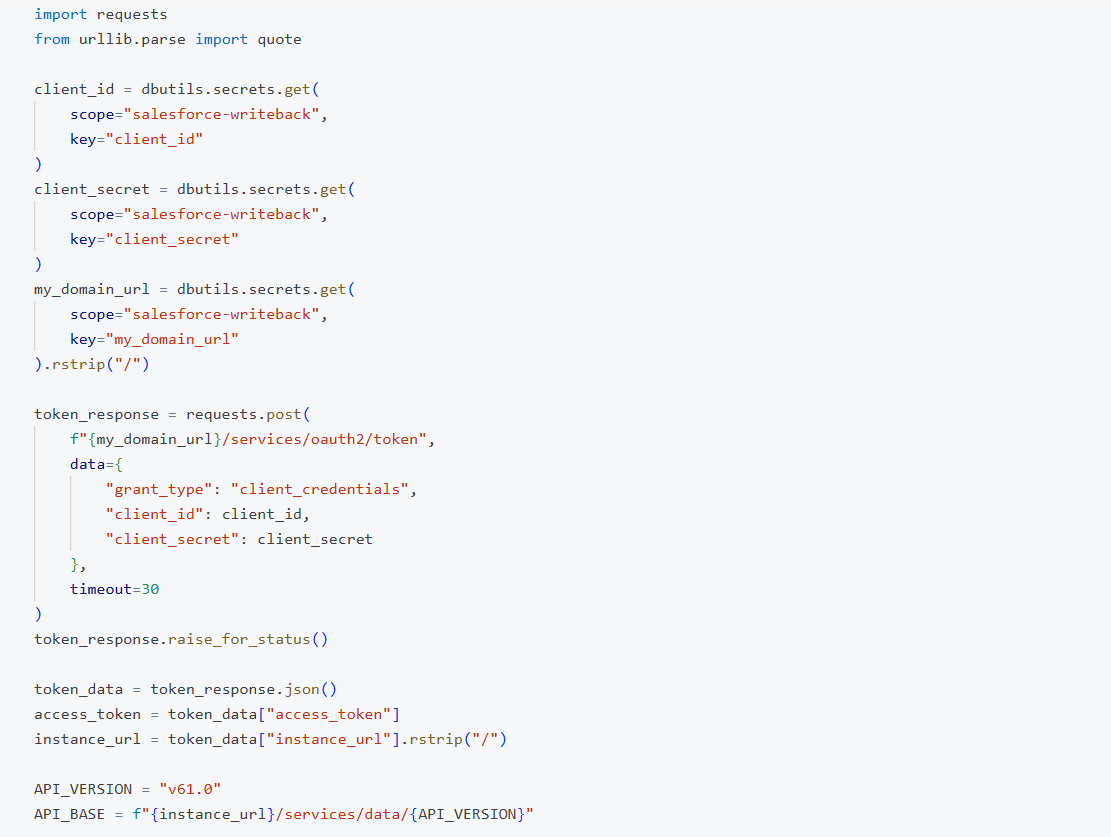
Before writing, the notebook checks for existing snapshots using the related Opportunity ID, updating an existing record or creating a new one as appropriate. This allows the writeback process to be rerun without unnecessarily creating duplicate snapshots.
10. Displaying Insights with a Lightning Web Component
The final step is to make the generated insights available directly within the Salesforce Opportunity record.
A custom Lightning Web Component named opportunityHealthInsights was developed for this purpose.
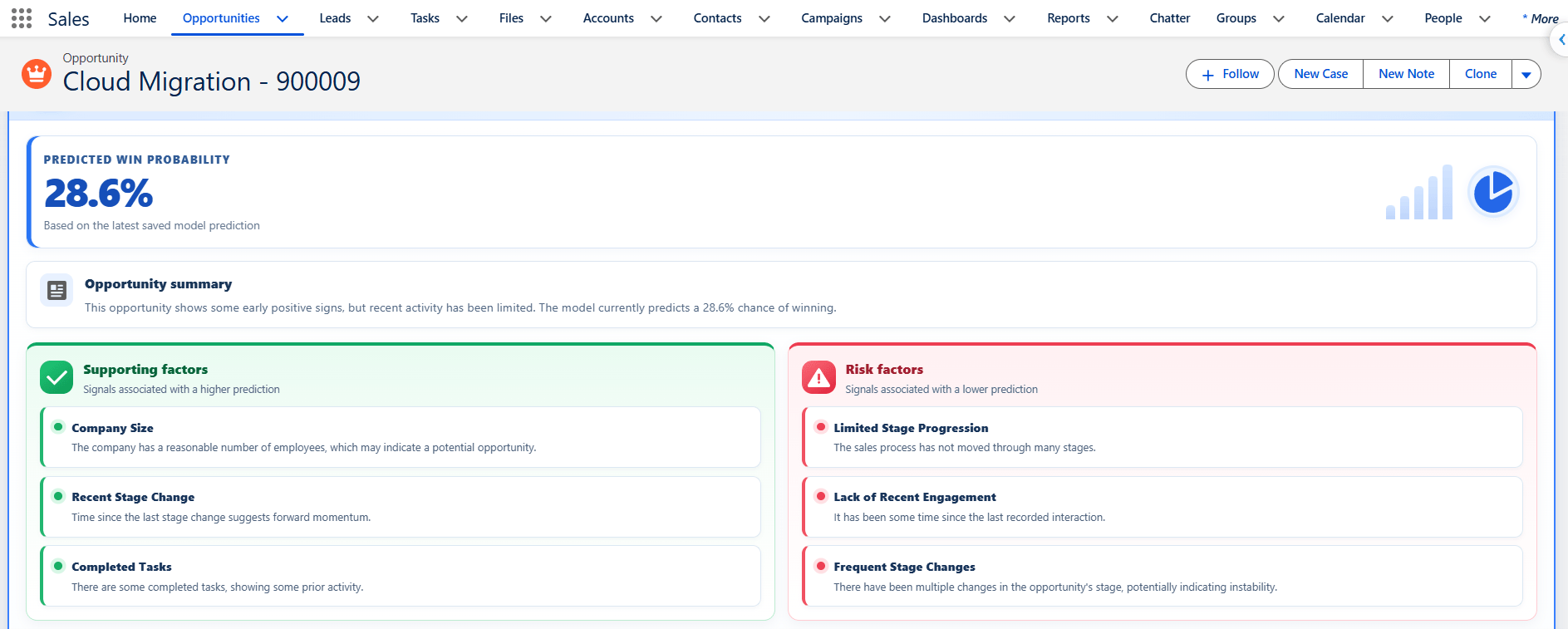
The component retrieves the latest saved snapshot through the Apex controller OpportunityHealthInsightsController. It parses the explanation JSON and displays the information in a structured dashboard.
The interface includes:
Predicted win probability: Highlights the model's estimate at the top of the component.
Opportunity summary: Presents a concise natural-language interpretation of the prediction.
Supporting factors and risk factors: Displays the factors associated with higher and lower predictions in separate panels, with a short explanation for each factor.
Recommended next steps: Presents suggested actions in a numbered list for easier reference.
Prediction metadata: Shows the prediction timestamp and model name.
The component also handles loading, error, and empty states, allowing it to respond appropriately when a snapshot is unavailable or the saved explanation cannot be parsed.
This integration brings the complete workflow back to the system where sales representatives manage their work. They can review the prediction, understand the contributing factors, and consider recommended actions without manually querying Databricks tables.
11. Automating the Workflow with Databricks Jobs
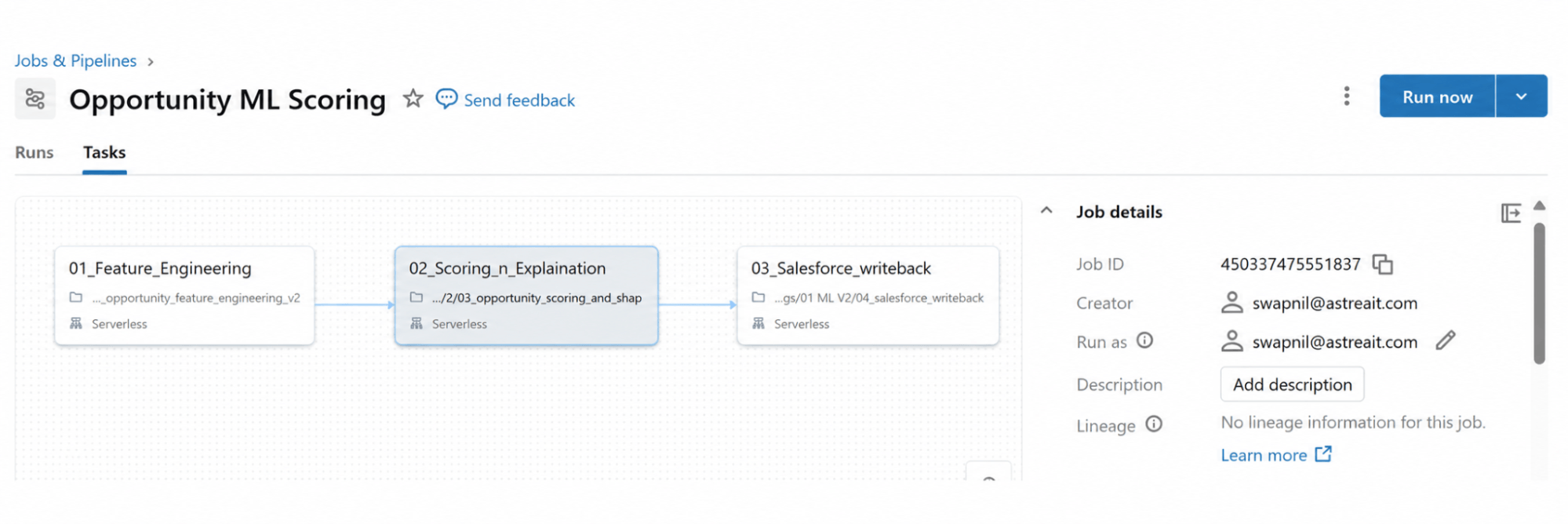
To make the solution repeatable, the notebooks are orchestrated using a Databricks Job.
The job dependencies ensure that feature engineering completes before scoring begins, and that Salesforce writeback starts only after scoring and explanation generation succeed. The daily schedule should be configured to run after the Salesforce ingestion pipeline completes. A manual job run should be tested first to verify the feature refresh, prediction generation, explanation processing, and Salesforce updates.
Once validated, the scheduled workflow can keep the Opportunity Health Snapshot records refreshed as new Salesforce data becomes available.
12. Next Steps with Astrea IT
Improving opportunity management requires more than tracking sales stages. By combining historical CRM data, sales activities, machine learning, and AI-generated insights, organizations can better understand opportunity health and identify deals that may need attention.
At Astrea IT Services, we bring Salesforce CRM data and Databricks Lakehouse capabilities together to build predictive analytics solutions that help sales teams assess win probability, understand the factors influencing predictions, and take informed action directly within Salesforce.
Looking to make your Salesforce data more actionable?
Reach out to our engineering team to explore an AI-Powered Opportunity Health Scoring Solution tailored to your organization's sales processes.
If you're interested in exploring more Databricks solutions, visit our Databricks Page or Contact Us.