Why declarative pricing sometimes needs a little code
Salesforce Revenue Cloud (now branded Agentforce Revenue Management) prices most deals without a single line of code. Pricing procedures, decision tables, price adjustment matrices and formula-based pricing cover list prices, volume tiers, attribute-based discounts, proration and contract pricing.
But real pricing teams eventually hit a rule the engine cannot express on its own. The price depends on a number that lives outside Salesforce and changes every day. Or finance wants a guardrail that looks at the finished price and reacts to it.
That is exactly what Apex hooks in procedure plans are for. In this post we walk through a real-world use case: adding a live metal surcharge to quote lines and enforcing a margin floor, using one Apex prehook and one Apex posthook. The heavy lifting still happens in the declarative pricing procedure; Apex only does the parts that need code.
How the pricing engine works, and where Apex plugs in
Apex runs inside a procedure plan, before or after the pricing procedure, and talks to the engine only through the transaction context. Four building blocks matter:
- Pricing procedure – an ordered stack of pricing elements (list price, volume discount, attribute discount, formula, rounding) that produces the price waterfall for each line.
- Context definition – the in-memory model of the quote or order (header, lines, attributes) that pricing reads and writes. Custom fields join it through context tags.
- Procedure plan – the orchestrator that decides which procedures run, in which order, for a transaction.
- Apex hook – a section of type Apex inside the procedure plan. A prehook runs before pricing; a posthook runs after it.
Salesforce positions prehooks for adjusting inputs such as product attributes before pricing, and posthooks for reacting to the priced result. The feature arrived in the Summer '25 release and needs the Revenue Cloud Advanced license.
The Apex API lives in the RevSignaling namespace:
| Type | Role |
|---|---|
| RevSignaling.SignalingApexProcessor | Interface your hook class implements; one method, execute() |
| RevSignaling.TransactionRequest | Input; carries ctxInstanceId, the ID of the live transaction context |
| RevSignaling.TransactionResponse | Output; a status and an optional message |
| RevSignaling.TransactionStatus | SUCCESS or FAILED |
| Context.IndustriesContext | Reads the context with queryTags() and writes it with updateContextAttributes() |
The key mental model: a hook never updates Quote Line Item records. It reads and writes the in-memory context, and Revenue Cloud persists the result.
The use case: a live metal surcharge with a margin floor
Our example customer is an industrial equipment manufacturer selling steel and aluminium enclosures. Each product carries two configurable attributes: Material (Steel, Aluminium) and Weight (kg).
Their pricing rule has three parts:
- Start from the price book list price and apply the usual volume and partner discounts.
- Add a metal surcharge per unit: weight × today's market rate for that metal. The rate comes from the company's commodity price service and moves daily.
- Never let a line go below 15% margin over standard cost. Lines that do are flagged for approval, not silently blocked.
Steps 1 and 3's arithmetic are easy declaratively. What the engine cannot do on its own:
- Fetch today's rate from an external system at the moment a rep configures the quote. A decision table would need someone to re-upload rates every morning.
- Inspect the final net price after every discount has run, compare it to cost and set a review flag on the line.
Those two gaps map neatly to one prehook and one posthook.
Solution design
The design keeps Apex thin: the prehook fetches a number, the declarative procedure turns it into price, and the posthook checks the outcome.
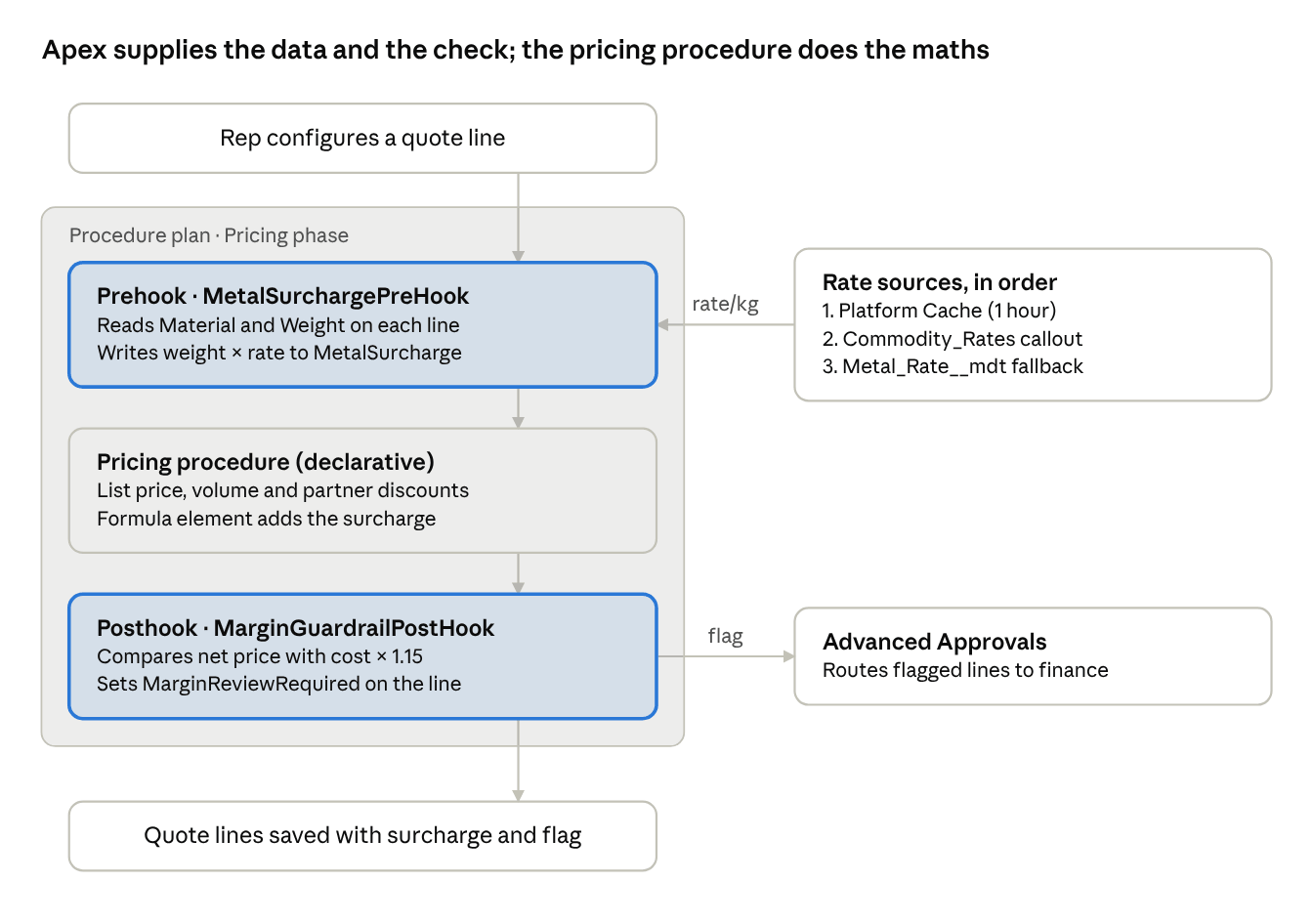
solution architecture · 2 Apex hooks around 1 pricing procedure
The two highlighted sections are custom Apex; everything between them stays configurable by an admin. The surcharge is stored on its own field, so it shows as a separate step in the price waterfall rather than being buried in the unit price.
Step-by-step implementation
Six steps take this from an empty org to a working surcharge and guardrail. Screenshots are from our sandbox.
Step 1: Turn on procedure plan orchestration
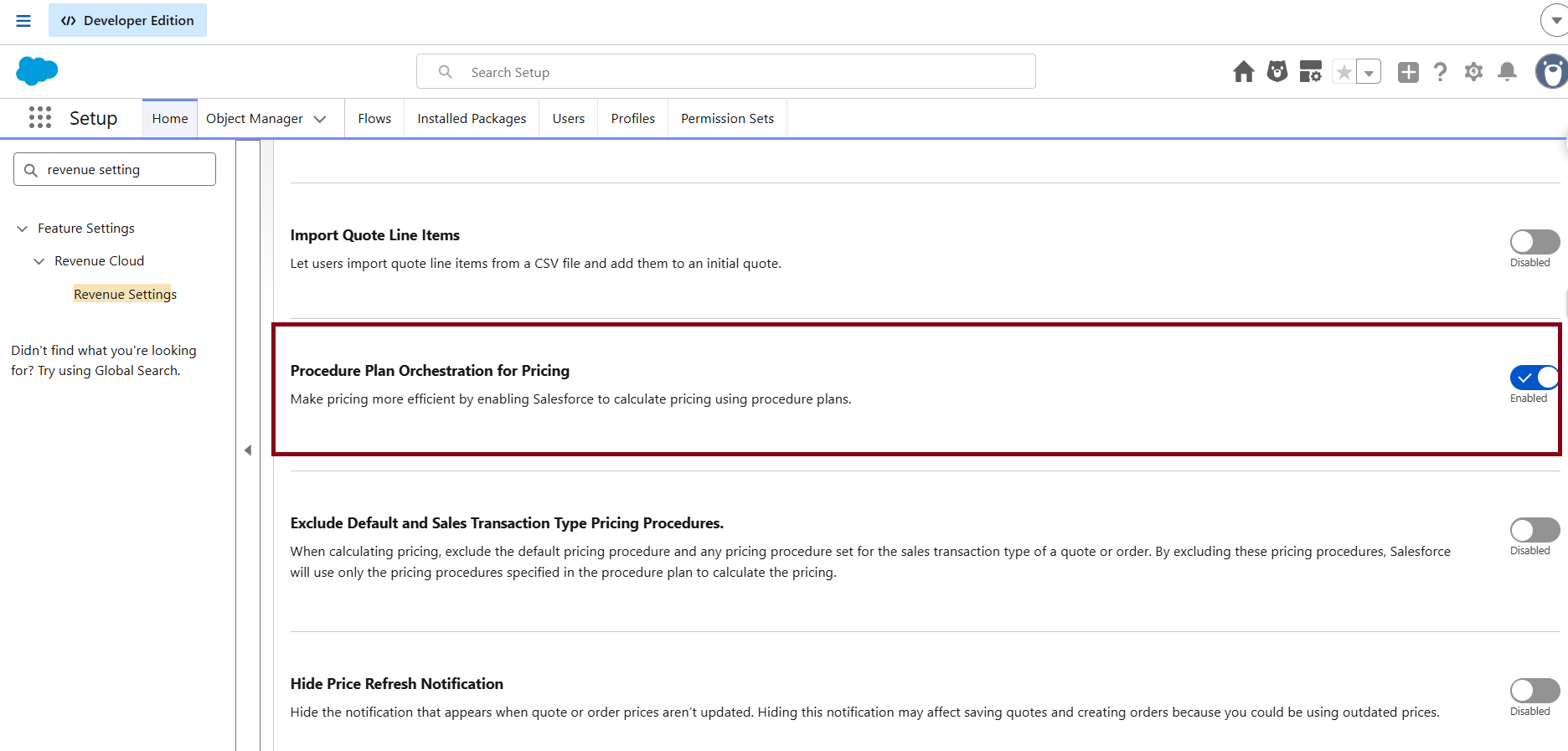
In Setup, open Revenue Settings and switch on Procedure Plan Orchestration for Pricing. Salesforce's guidance for Apex hooks is to leave Exclude Default and Sales Transaction Type Pricing Procedures switched off.
Step 2: Add the fields and extend the context
Create three custom fields:
| Object | Field | Type | Context tag |
|---|---|---|---|
| Quote Line Item (and Order Product) | Metal_Surcharge__c | Currency | MetalSurcharge |
| Quote Line Item (and Order Product) | Margin_Review_Required__c | Checkbox | MarginReviewRequired |
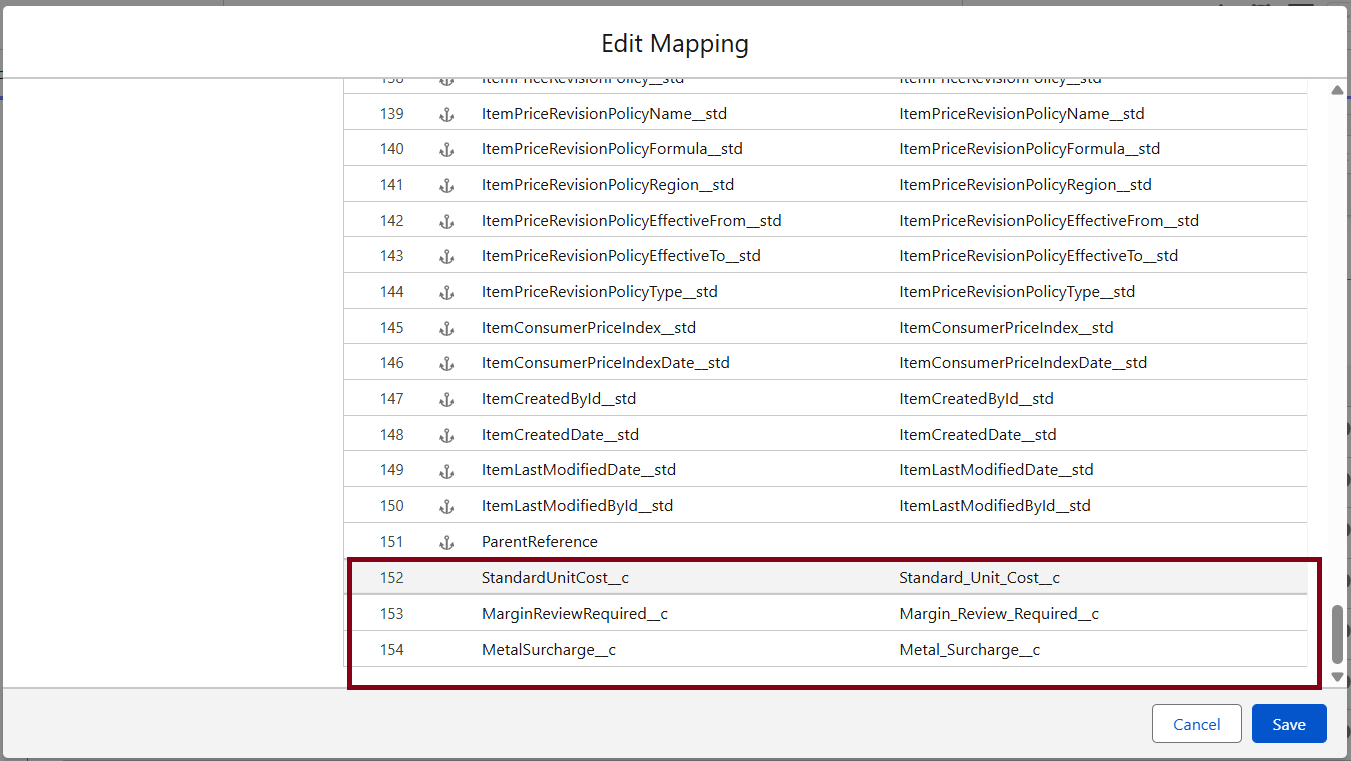
| Product | Standard_Unit_Cost__c | Currency | StandardUnitCost |
Then extend the Sales Transaction context definition, add the three attributes on the line node, and map them to the fields. Apex can only read and write what the context knows about.
Step 3: Prepare the external rate source
- A Named Credential called Commodity_Rates pointing at the commodity price service.
- A Platform Cache org partition called Pricing, so we call the service once an hour, not once per quote.
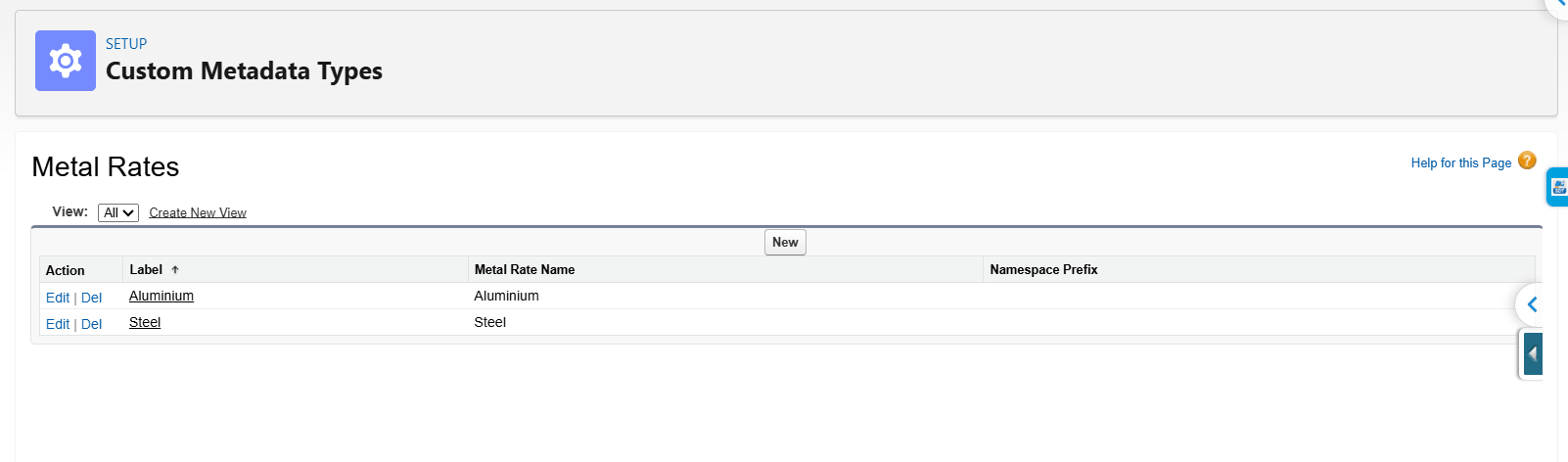
- A Custom Metadata Typ Metal_Rate__mdt (Material__c, Rate_Per_Kg__c) holding the last approved rates as a fallback.
Step 4: Write the prehook
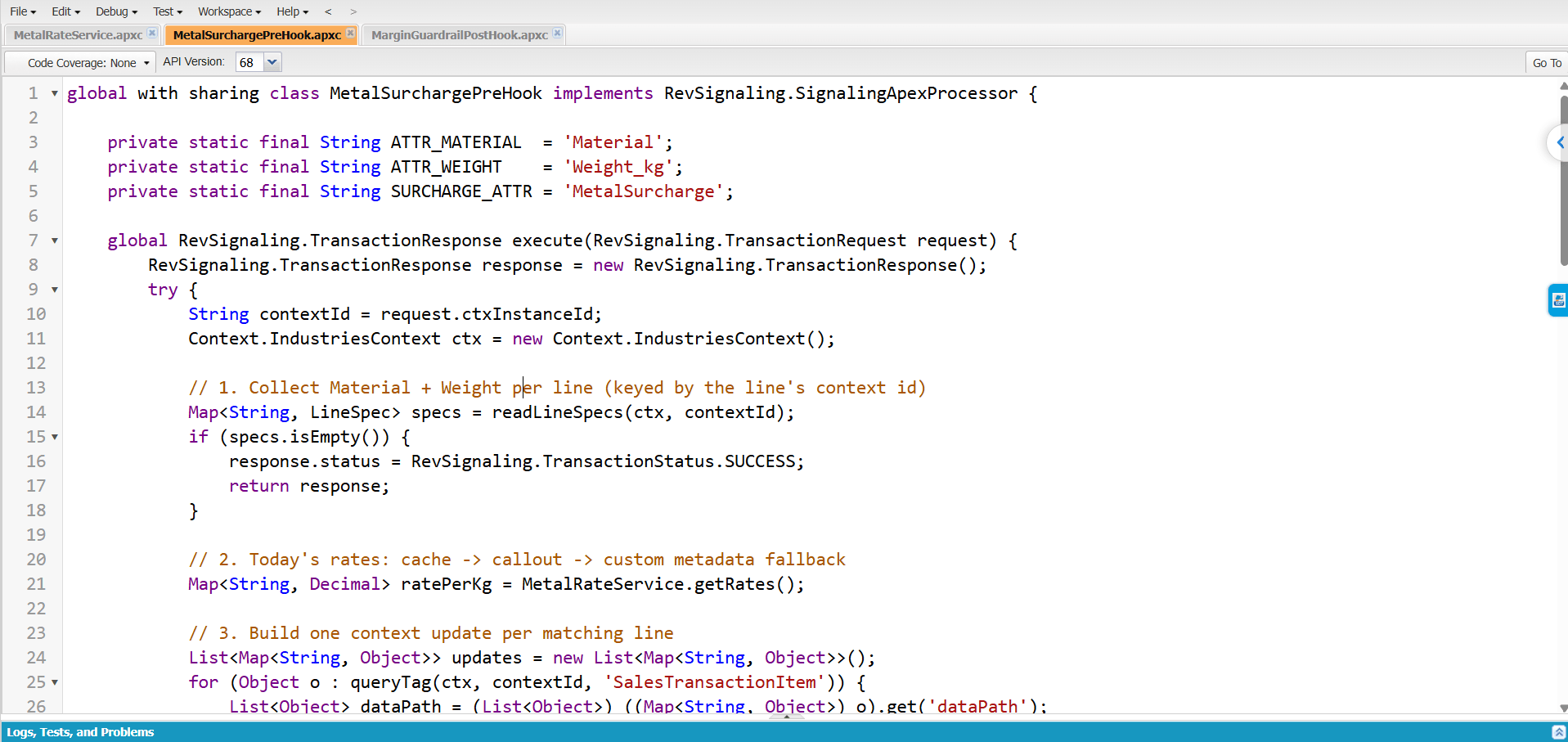
The prehook reads each line's Material and Weight attributes, gets today's rate per kg, and writes weight × rate into the MetalSurcharge context attribute.
global with sharing class MetalSurchargePreHook implements RevSignaling.SignalingApexProcessor {


    private static final String ATTR_MATERIAL  = 'Material';
    private static final String ATTR_WEIGHT    = 'Weight_kg';
    private static final String SURCHARGE_ATTR = 'MetalSurcharge';


    global RevSignaling.TransactionResponse execute(RevSignaling.TransactionRequest request) {
        RevSignaling.TransactionResponse response = new RevSignaling.TransactionResponse();
        try {
            String contextId = request.ctxInstanceId;
            Context.IndustriesContext ctx = new Context.IndustriesContext();


            // 1. Collect Material + Weight per line (keyed by the line's context id)
            Map<String, LineSpec> specs = readLineSpecs(ctx, contextId);
            if (specs.isEmpty()) {
                response.status = RevSignaling.TransactionStatus.SUCCESS;
                return response;
            }


            // 2. Today's rates: cache -> callout -> custom metadata fallback
            Map<String, Decimal> ratePerKg = MetalRateService.getRates();


            // 3. Build one context update per matching line
            List<Map<String, Object>> updates = new List<Map<String, Object>>();
            for (Object o : queryTag(ctx, contextId, 'SalesTransactionItem')) {
                List<Object> dataPath = (List<Object>) ((Map<String, Object>) o).get('dataPath');
                LineSpec spec = null;
                for (Object p : dataPath) {
                    if (specs.containsKey(String.valueOf(p))) { spec = specs.get(String.valueOf(p)); break; }
                }
                if (spec == null || spec.weightKg == null || spec.material == null) continue;


                Decimal rate = ratePerKg.get(spec.material.toLowerCase());
                if (rate == null) continue;


                dataPath.remove(0); // drop the context id, keep the node path
                updates.add(new Map<String, Object>{
                    'nodePath'   => new Map<String, Object>{ 'dataPath' => dataPath },
                    'attributes' => new List<Object>{ new Map<String, Object>{
                        'attributeName'  => SURCHARGE_ATTR,
                        'attributeValue' => (spec.weightKg * rate).setScale(2)
                    }}
                });
            }


            // 4. One write back to the context
            if (!updates.isEmpty()) {
                ctx.updateContextAttributes(new Map<String, Object>{
                    'contextId' => contextId,
                    'nodePathAndAttributes' => updates
                });
            }
            response.status = RevSignaling.TransactionStatus.SUCCESS;
        } catch (Exception e) {
            response.status  = RevSignaling.TransactionStatus.FAILED;
            response.message = 'Metal surcharge could not be calculated: ' + e.getMessage();
        }
        return response;
    }


    private class LineSpec { String material; Decimal weightKg; }


    private static Map<String, LineSpec> readLineSpecs(Context.IndustriesContext ctx, String contextId) {
        Map<String, LineSpec> specs = new Map<String, LineSpec>();
        for (Object o : queryTag(ctx, contextId, 'SalesTransactionItemAttribute')) {
            Map<String, Object> tags = (Map<String, Object>) ((Map<String, Object>) o).get('tagValue');
            String name   = (String) tagVal(tags, 'Attribute');
            String value  = (String) tagVal(tags, 'AttributeValue');
            String parent = (String) tagVal(tags, 'SalesTransactionItemAttrParent');
            if (parent == null || value == null) continue;


            if (!specs.containsKey(parent)) specs.put(parent, new LineSpec());
            if (name == ATTR_MATERIAL) specs.get(parent).material = value;
            if (name == ATTR_WEIGHT)   specs.get(parent).weightKg = Decimal.valueOf(value.split(' ')[0]);
        }
        return specs;
    }


    private static List<Object> queryTag(Context.IndustriesContext ctx, String contextId, String tag) {
        Map<String, Object> out = ctx.queryTags(new Map<String, Object>{
            'contextId' => contextId, 'tags' => new List<String>{ tag }
        });
        List<Object> rows = (List<Object>) ((Map<String, Object>) out.get('queryResult')).get(tag);
        return rows == null ? new List<Object>() : rows;
    }


    private static Object tagVal(Map<String, Object> tags, String key) {
        if (tags == null || !tags.containsKey(key)) return null;
        return ((Map<String, Object>) tags.get(key)).get('tagValue');
    }
}
The rate lookup sits in its own class so it can be cached, mocked in tests and reused elsewhere:
public with sharing class MetalRateService {


    private static final String CACHE_KEY = 'local.Pricing.metalRates';


    public static Map<String, Decimal> getRates() {
        Map<String, Decimal> rates = (Map<String, Decimal>) Cache.Org.get(CACHE_KEY);
        if (rates != null) return rates;


        try {
            HttpRequest req = new HttpRequest();
            req.setEndpoint('callout:Commodity_Rates/v1/rates?metals=steel,aluminium');
            req.setMethod('GET');
            req.setTimeout(5000);
            HttpResponse res = new Http().send(req);
            if (res.getStatusCode() == 200) {
                rates = new Map<String, Decimal>();
                Map<String, Object> body = (Map<String, Object>) JSON.deserializeUntyped(res.getBody());
                for (String metal : body.keySet()) {
                    rates.put(metal.toLowerCase(), Decimal.valueOf(String.valueOf(body.get(metal))));
                }
                Cache.Org.put(CACHE_KEY, rates, 3600); // one hour
                return rates;
            }
        } catch (Exception e) {
            System.debug(LoggingLevel.WARN, 'Rate callout failed, using fallback: ' + e.getMessage());
        }
        return fallbackRates();
    }


    private static Map<String, Decimal> fallbackRates() {
        Map<String, Decimal> rates = new Map<String, Decimal>();
        for (Metal_Rate__mdt r : Metal_Rate__mdt.getAll().values()) {
            rates.put(r.Material__c.toLowerCase(), r.Rate_Per_Kg__c);
        }
        return rates;
    }
}
The fallback is not optional. Salesforce supports callouts from Apex hooks only when pricing is triggered from the UI or the Place Sales Transaction API, not from Apex or Flow, and not with Double Persist mode on. In those paths the callout throws, and the hook quietly prices from the last approved rates instead.
Step 5: Write the posthook
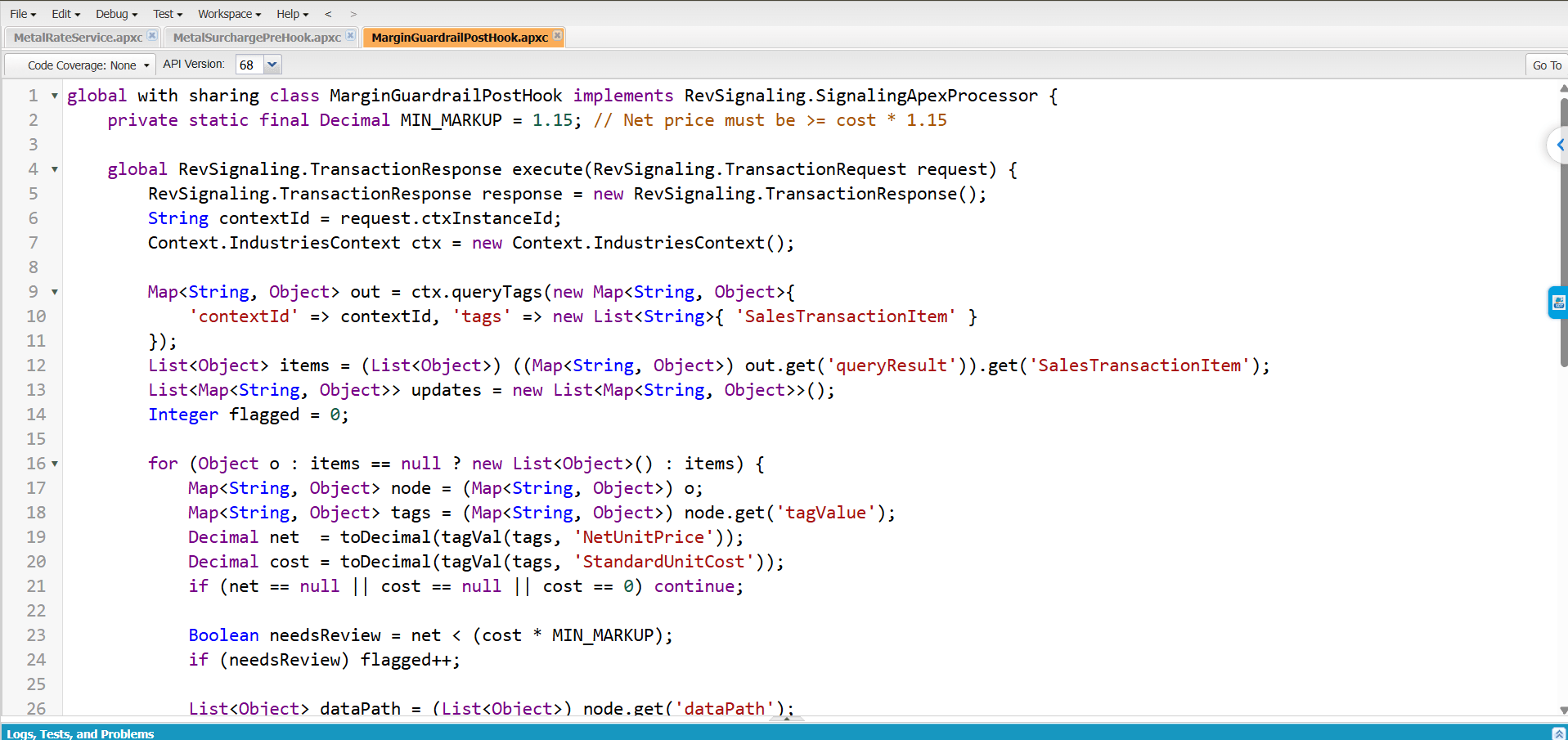
The posthook runs after every discount has been applied. It compares each line's net unit price with 115% of standard cost and sets the review flag.
global with sharing class MarginGuardrailPostHook implements RevSignaling.SignalingApexProcessor {


    private static final Decimal MIN_MARKUP = 1.15; // net price must be >= cost x 1.15


    global RevSignaling.TransactionResponse execute(RevSignaling.TransactionRequest request) {
        RevSignaling.TransactionResponse response = new RevSignaling.TransactionResponse();
        String contextId = request.ctxInstanceId;
        Context.IndustriesContext ctx = new Context.IndustriesContext();


        Map<String, Object> out = ctx.queryTags(new Map<String, Object>{
            'contextId' => contextId, 'tags' => new List<String>{ 'SalesTransactionItem' }
        });
        List<Object> items = (List<Object>) ((Map<String, Object>) out.get('queryResult')).get('SalesTransactionItem');


        List<Map<String, Object>> updates = new List<Map<String, Object>>();
        Integer flagged = 0;
        for (Object o : items == null ? new List<Object>() : items) {
            Map<String, Object> node = (Map<String, Object>) o;
            Map<String, Object> tags = (Map<String, Object>) node.get('tagValue');
            Decimal net  = toDecimal(tagVal(tags, 'NetUnitPrice'));
            Decimal cost = toDecimal(tagVal(tags, 'StandardUnitCost'));
            if (net == null || cost == null || cost == 0) continue;


            Boolean needsReview = net < cost * MIN_MARKUP;
            if (needsReview) flagged++;


            List<Object> dataPath = (List<Object>) node.get('dataPath');
            dataPath.remove(0);
            updates.add(new Map<String, Object>{
                'nodePath'   => new Map<String, Object>{ 'dataPath' => dataPath },
                'attributes' => new List<Object>{ new Map<String, Object>{
                    'attributeName' => 'MarginReviewRequired', 'attributeValue' => needsReview
                }}
            });
        }


        if (!updates.isEmpty()) {
            ctx.updateContextAttributes(new Map<String, Object>{
                'contextId' => contextId, 'nodePathAndAttributes' => updates
            });
        }
        response.status  = RevSignaling.TransactionStatus.SUCCESS;
        response.message = flagged + ' line(s) below margin floor';
        return response;
    }


    private static Object tagVal(Map<String, Object> tags, String key) {
        if (tags == null || !tags.containsKey(key)) return null;
        return ((Map<String, Object>) tags.get(key)).get('tagValue');
    }


    private static Decimal toDecimal(Object v) {
        return v == null ? null : Decimal.valueOf(String.valueOf(v));
    }
}
The hook flags rather than blocks. Returning FAILED would stop the rep mid-quote; a flag lets Advanced Approvals route the deal to finance instead.
Step: 6 Wire the hooks into the procedure plan
- In Setup, open Procedure Plan Definitions and select the plan used for quotes.
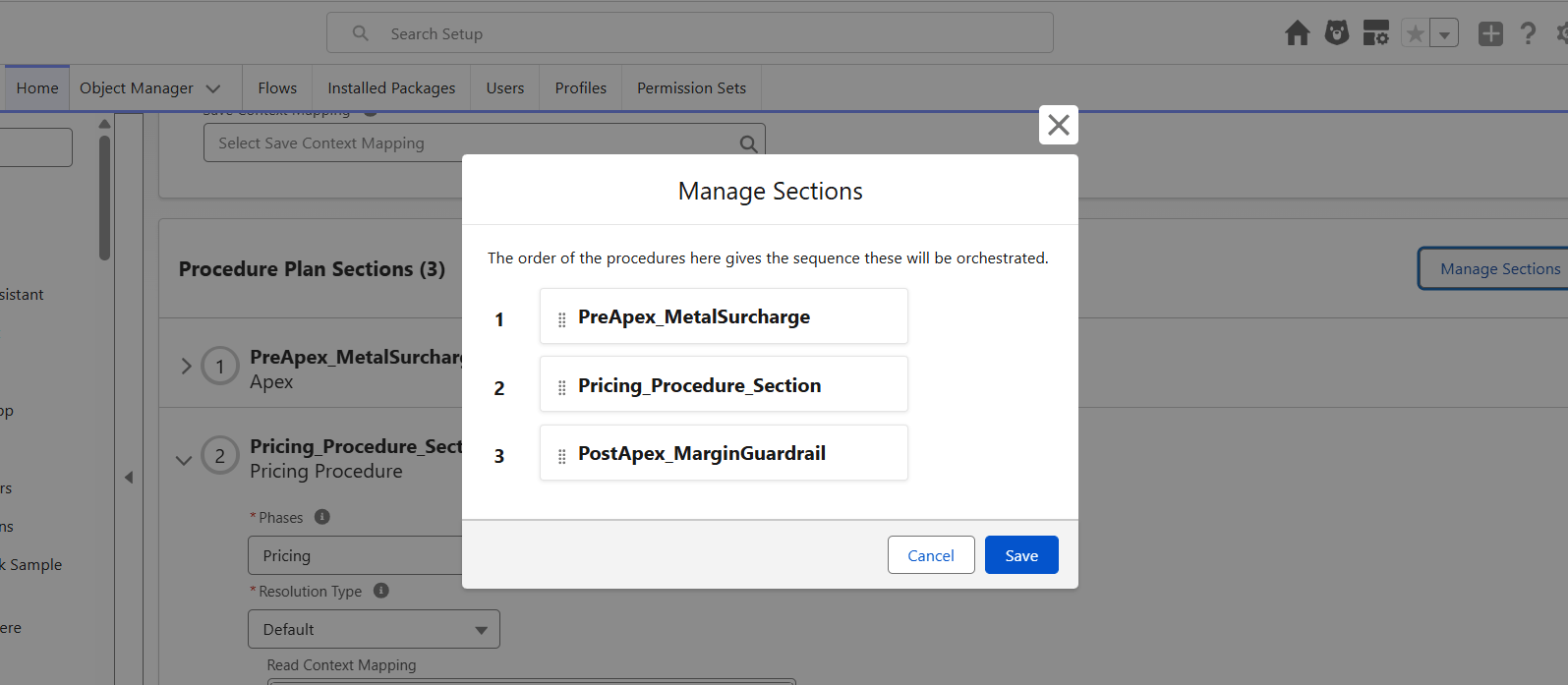
- Under Procedure Plan Sections, select Add, choose Standard, name it PreApex_MetalSurcharge and set Section Type to Apex.
- Expand the section, set Phases to Pricing and Resolution Type, to Default, enter MetalSurchargePreHook and save.
- Repeat for PostApex_MarginGuardrail with MarginGuardrailPostHook.
- Use Manage Sections to place the prehook above the pricing procedure section and the posthook below it.
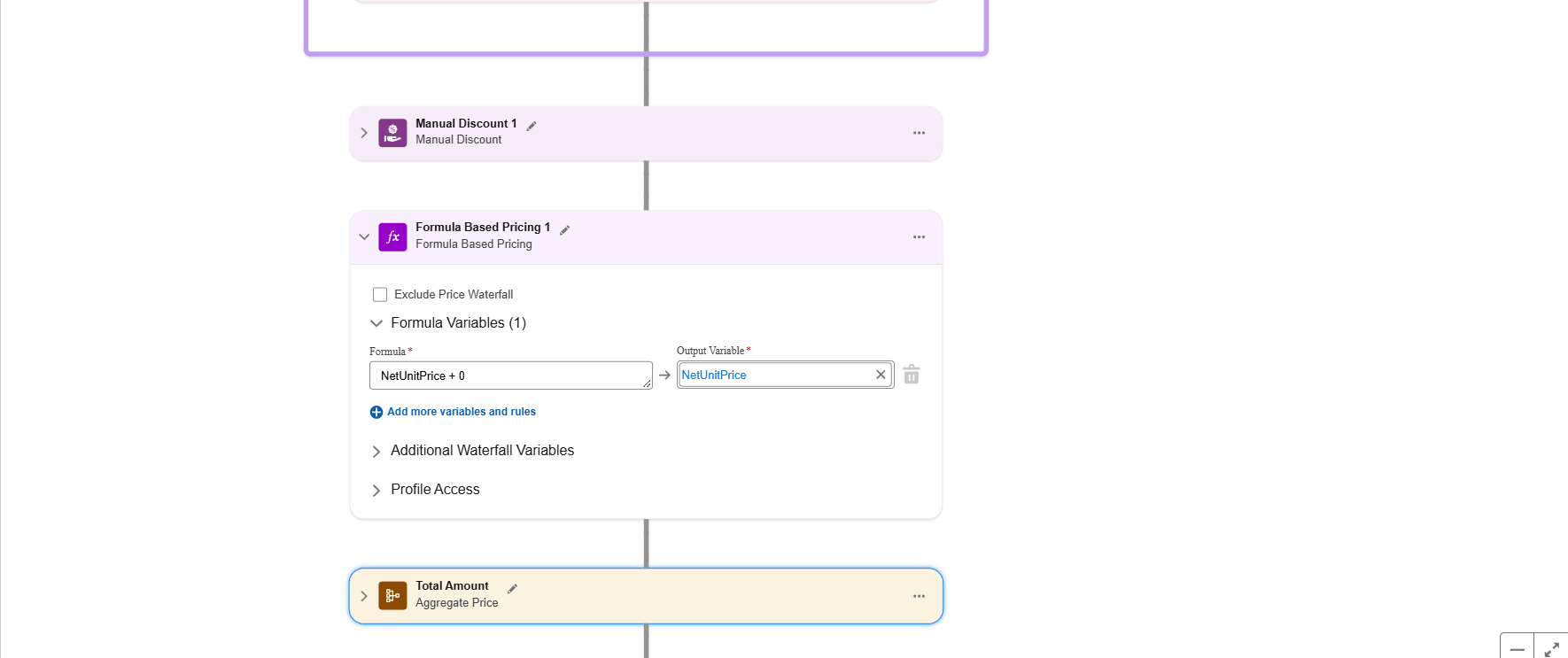
- In the pricing procedure, add a formula-based pricing element after the discount elements that adds the MetalSurcharge value to the unit price, so the surcharge appears as its own step in the price waterfall.
With the Revenue Management process type, an Apex section must be the first or last element of the plan, which is exactly the shape we need.
Developer note: context tag names can differ between orgs and releases. Before relying on NetUnitPrice or the custom tags, run the hook once with
System.debug(JSON.serializePretty(out)) and confirm the exact names in the debug log.
Testing and results
We test the logic in isolation first, then end to end on a real quote.
Unit tests. Context.IndustriesContext needs a real context to run, so we follow the pattern Salesforce recommends: wrap queryTags() and updateContextAttributes() behind a small interface, inject a mock in tests, and assert on the update payload the hook builds. MetalRateService gets an HttpCalloutMock for the success path and a forced exception for the fallback path. That covers three cases: rate from callout, rate from cache, and rate from custom metadata.
End-to-end. On a sandbox quote, we add two lines:
| Line | Material | Weight | Rate used | Expected surcharge |
| Enclosure A | Steel | 40 kg | [rate on test day] | 40 × rate |
| Enclosure B | Aluminium | 25 kg | [rate on test day] | 25 × rate |
We then add a deep manual discount on Enclosure B so its net price drops below cost × 1.15, and check that only that line is flagged.
The result: reps see today's surcharge on every quote without anyone uploading rates, finance sees every below-floor line before it ships, and the price waterfall still explains every number.
Best practices and pitfalls
- Fetch in Apex, calculate in the procedure. Let the hook supply a number; let a pricing element do the maths. The price waterfall then explains the surcharge to reps and auditors.
- No DML inside a hook. Salesforce does not support DML in procedure plan hooks because it can leave the transaction context stale. Write to the context; let Revenue Cloud persist it.
- Always have a fallback for callouts. Callouts fail in Apex- or Flow-triggered pricing and with Double Persist mode on. Cache, then fall back to approved values.
- Watch heap size. Hooks run under normal Apex governor limits. Query only the tags you need; large quotes with full-context queries can hit heap errors.
- Prefer flags over failures. Return FAILED only when the quote truly must not be priced. A failure stops the rep; a flag starts an approval.
- Keep hooks first or last. With the Revenue Management process type, Apex sections must sit at the start or end of the plan.
- Design for testability. Wrap the context API behind an interface from day one; it is the only practical way to unit test hooks.
The constraints above are all from Salesforce's Apex hooks documentation, which is worth bookmarking.
Conclusion
Apex hooks let Revenue Cloud handle the pricing rules that declarative tools alone cannot: live external data before pricing, and business guardrails after it. Used well, they stay small; the pricing procedure keeps doing the calculation and the waterfall stays transparent.
The same pattern fits many other scenarios: customer-specific prices from an ERP, freight estimates from a logistics API, FX-adjusted cost floors, or partner-tier checks against an external system.
Astrea IT Services helps companies design and implement Salesforce Revenue Cloud, from pricing procedures and procedure plans to migrations from Salesforce CPQ. If your pricing has a rule that does not fit the box, talk to our team.
To explore more tutorials, implementation guides, and best practices related to Salesforce CPQ and revenue management, visit our Salesforce CPQ page.