Why your reps are quoting the wrong price
In most US B2B companies, the price a customer actually pays does not live in Salesforce. It lives in the ERP: NetSuite, SAP S/4HANA, Oracle or Microsoft Dynamics. Contract prices, GPO tiers, customer-specific SKUs and negotiated rebates are all maintained there by the pricing or contracts team.
Salesforce Revenue Cloud (now Agentforce Revenue Management) quotes from its own price books. When those two systems disagree, reps either quote list price and get corrected by finance later, or they keep a spreadsheet open next to Salesforce. Both cost deals.
Copying every contract price into Salesforce is the usual workaround, and it rarely survives contact with reality: nightly syncs lag, tables grow into the millions of rows, and nobody trusts them.
This post shows a cleaner approach. With Apex hooks in procedure plans, , Revenue Cloud asks the ERP for the customer's contract price at the moment it is needed: when a rep adds a line to a quote, and when they browse the product catalog. The ERP stays the single source of truth, and Revenue Cloud stays the place reps work.
Two places a price is calculated, and both accept Apex
Revenue Cloud prices a product in two moments, and each is driven by its own procedure plan:
| Moment | Procedure plan | What the rep sees |
|---|---|---|
| Rep adds or edits a quote line | Sales transaction (quote/order) plan | Unit price and net price on the line |
| Rep browses or searches the catalog | Product Discovery plan | Price shown on each product card |
Both plans can contain Apex sections. An Apex section runs a class that implements RevSignaling.SignalingApexProcessor. It reads the in-memory transaction context, changes values, and hands control back to the pricing engine. For Product Discovery, Salesforce notes that the order of Apex and Pricing sections decides how prices are applied, and a plan can hold several of each.
If you read our previous post on metal surcharges, one thing has changed since: Salesforce now recommends Context.IndustriesContext.leanerQueryTags() over queryTags(). It returns flat tag values instead of nested maps, so hooks use less heap and CPU on large quotes. tSalesforce's best-practices page. asks teams to move existing hooks to it where possible. All code in this post uses it.
The use case: a medical supply distributor with GPO contract pricing
Our example is a US distributor of medical and surgical supplies selling to hospitals and clinics. Most customers buy through a group purchasing organization (GPO), and each GPO contract sets its own price per SKU, often tiered by quantity. On top of that, large health systems negotiate customer-specific prices.
All of this is maintained in NetSuite, which exposes a pricing endpoint: send a customer number plus a list of SKUs and quantities, get back the contract price for each.
The business asks for four things:
- When a rep adds a line to a quote, the unit price is the customer's contract price from NetSuite, not the Salesforce list price.
- If NetSuite has no contract price for a SKU, the price book price applies.
- If NetSuite is slow or down, the rep can still quote. The line shows where its price came from, so finance knows what to double-check.
- When the rep browses the catalog for that customer, the product cards show the same contract price.
None of this is possible declaratively: the price only exists in another system, and it depends on who is buying and how many. That is the gap an Apex hook fills.
Solution design
One Apex hook per pricing path, both calling one shared ERP client, so the catalog and the quote always ask the ERP the same question.
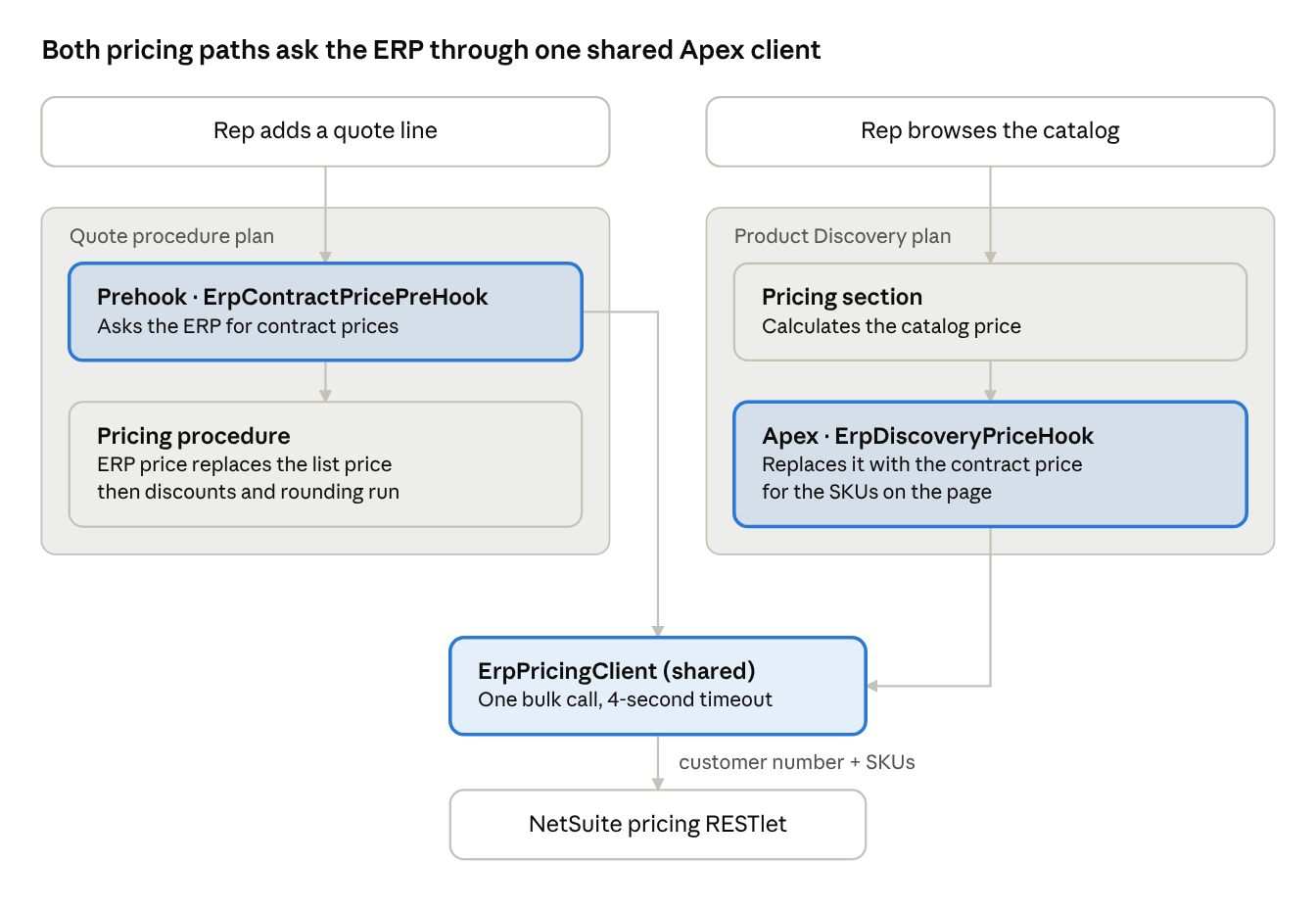
Solution design: 2 procedure plans, 1 shared ERP client
On the quote, the hook runs before pricing, so discounts and rounding apply to the contract price. In the catalog, it runs after pricing, so the ERP value is what the rep sees. Highlighted boxes are custom Apex; everything else is standard configuration.
Step-by-step implementation
Seven steps: five for the quote, two to carry the same price into the catalog. Screenshots are from our sandbox.
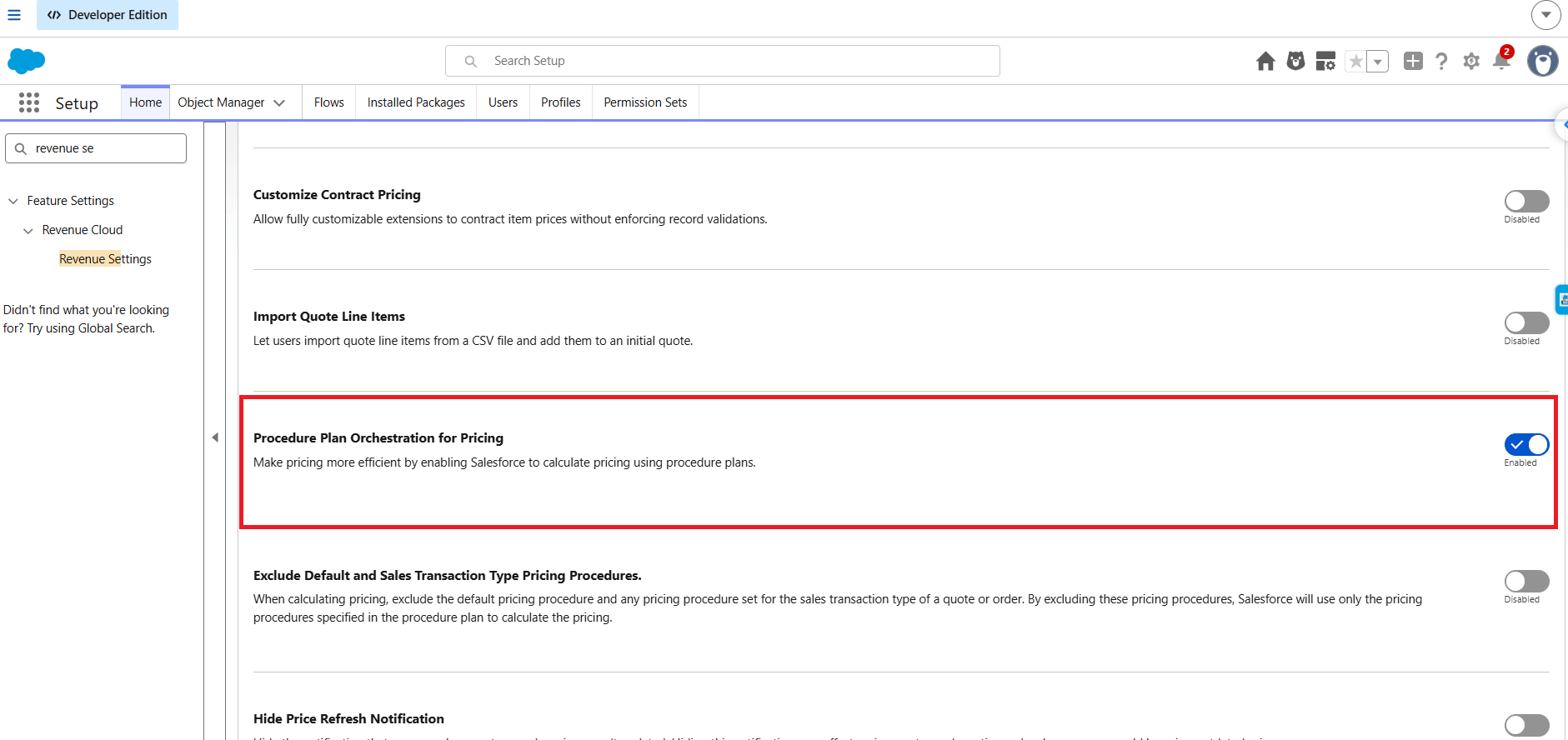
Step 1: Turn on procedure plan orchestration
In Setup, open Revenue Settings, switch on Procedure Plan Orchestration for Pricing, and leave Exclude Default and Sales Transaction Type Pricing Procedures off.
Step 2: Add fields and extend the context
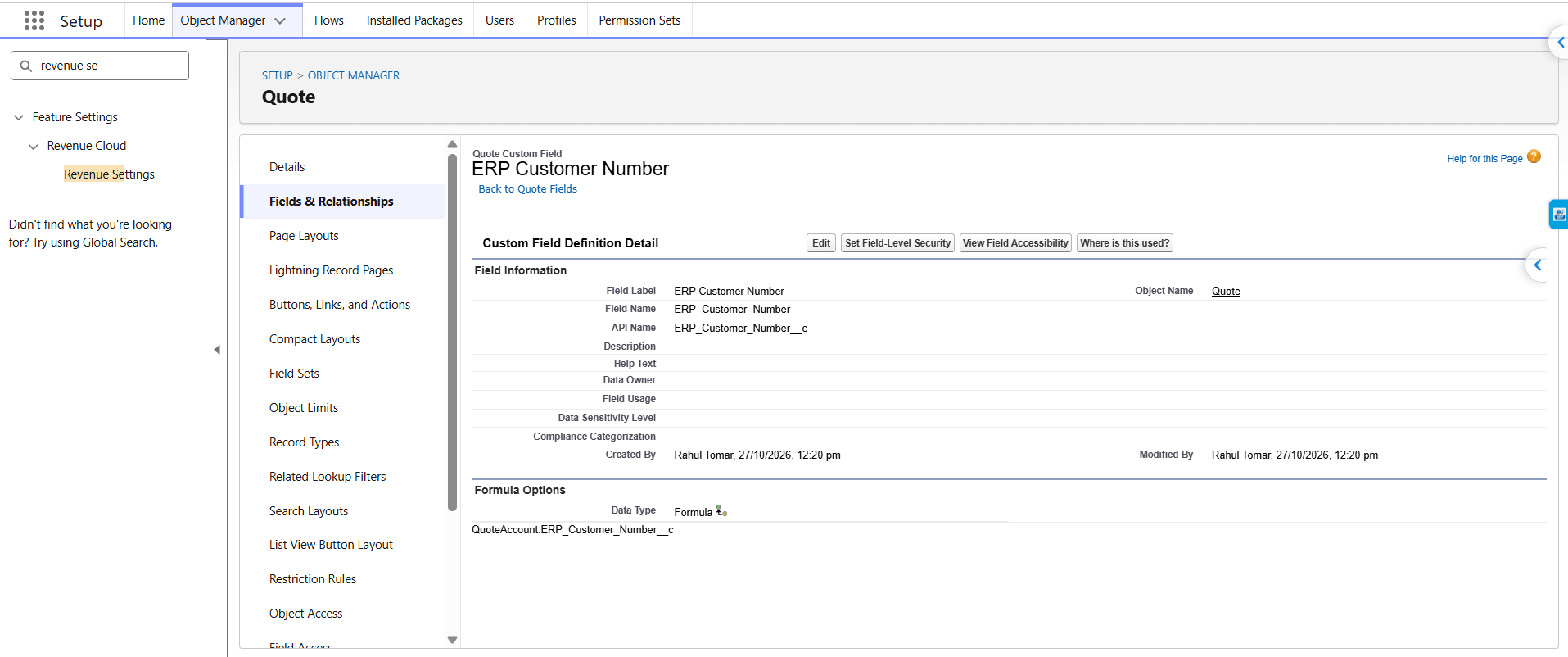
| Object | Field | Type | Context tag | Level |
|---|---|---|---|---|
| Account | ERP_Customer_Number__c | Text | (source only) | n/a |
| Quote | ERP_Customer_Number__c | Formula: Account.ERP_Customer_Number__c | ErpCustomerNumber | Header |
| Quote Line Item | ERP_Contract_Price__c | Currency | ErpContractPrice | Line |
| Quote Line Item | Price_Source__c | Picklist: ERP Contract, Price Book, Price Book (ERP unavailable) | PriceSource | Line |
Extend the Sales Transaction context definition with these tags and map them to the fields. Add the same line fields to Order Product if quotes convert to orders.
Step 3: Connect to the ERP
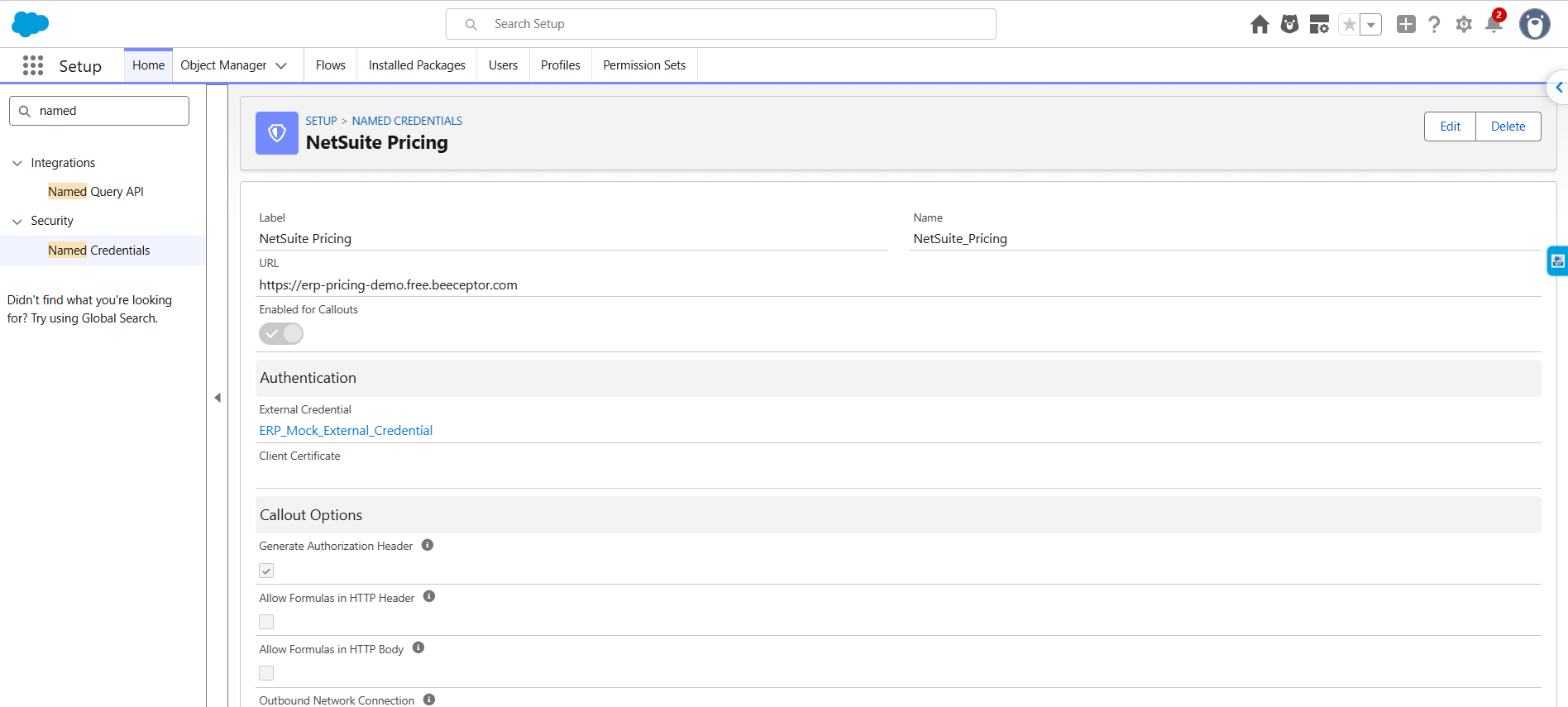
Create an External Credential and a Named Credential called NetSuite_Pricing to connect to the ERP using OAuth 2.0 or token-based authentication.
For testing purposes, you can use a free mock API service like Beeceptor to simulate the NetSuite RESTlet and return sample contract prices for test SKUs.
In production, replace the mock endpoint with your actual NetSuite RESTlet or integration layer, such as MuleSoft or Boomi. The Apex code can remain unchanged if the request and response formats stay the same.
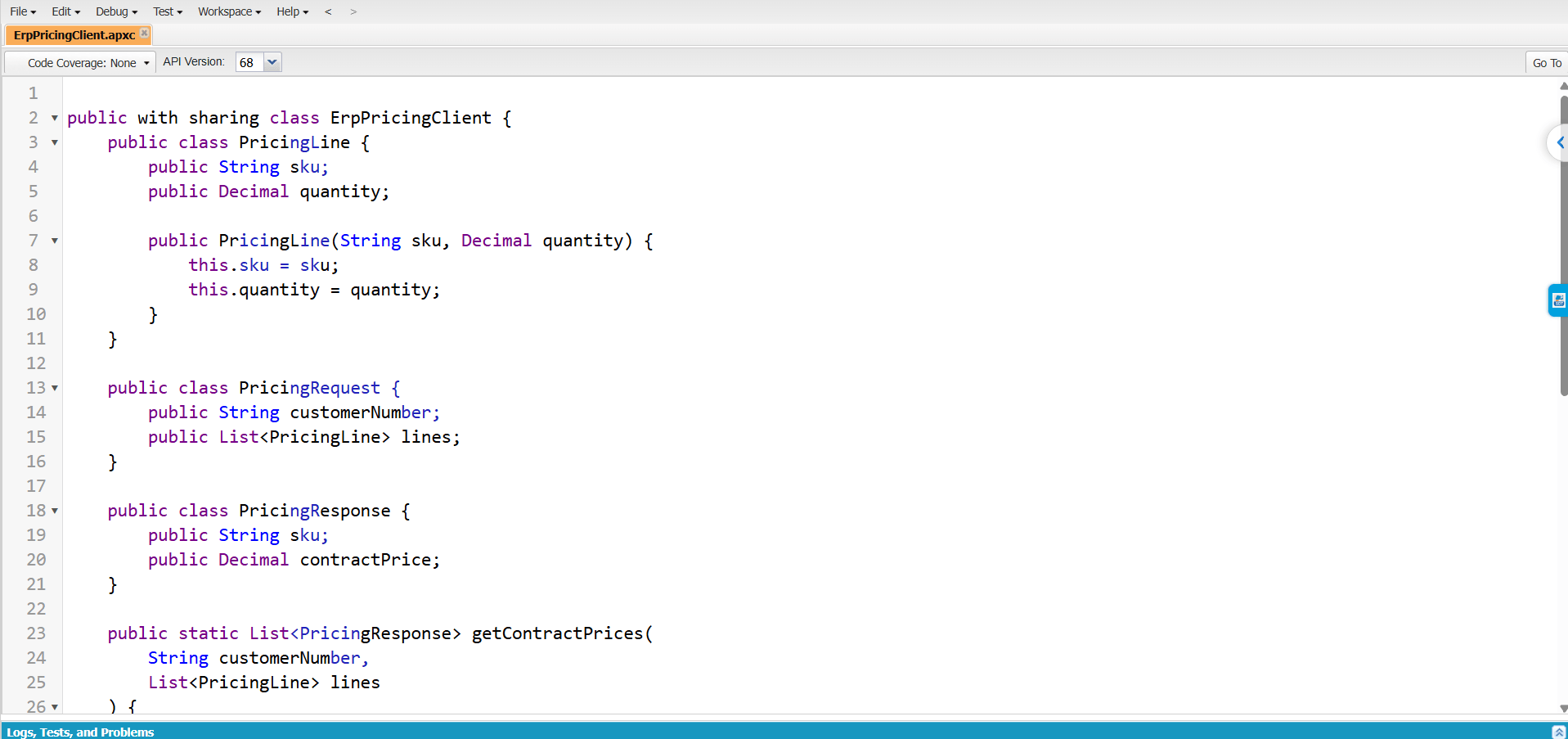
Step 4: Write the ERP client
One class owns the conversation with the ERP. Both hooks in this post call it, so authentication, timeouts and response parsing live in one place.
public with sharing class ErpPricingClient {

    public class ErpUnavailableException extends Exception {}

    public class PriceRequest {
        public String sku;
        public Decimal quantity;
        public PriceRequest(String sku, Decimal quantity) {
            this.sku = sku;
            this.quantity = quantity;
        }
    }


    // Returns contract unit price by SKU. A SKU missing from the map has no contract price.
    public static Map<String, Decimal> getContractPrices(String customerNumber, List<PriceRequest> lines) {
        HttpRequest req = new HttpRequest();
        req.setEndpoint('callout:NetSuite_Pricing/contract-prices');
        req.setMethod('POST');
        req.setHeader('Content-Type', 'application/json');
        req.setTimeout(4000); // reps are waiting; fail fast
        req.setBody(JSON.serialize(new Map<String, Object>{
            'customerNumber' => customerNumber,
            'lines' => lines
        }));


        HttpResponse res;
        try {
            res = new Http().send(req);
        } catch (Exception e) {
            throw new ErpUnavailableException('ERP callout failed: ' + e.getMessage());
        }
        if (res.getStatusCode() != 200) {
            throw new ErpUnavailableException('ERP returned HTTP ' + res.getStatusCode());
        }


        // Expected body: [ { "sku": "SKU-1001", "contractPrice": 12.40 }, ... ]
        Map<String, Decimal> prices = new Map<String, Decimal>();
        for (Object o : (List<Object>) JSON.deserializeUntyped(res.getBody())) {
            Map<String, Object> row = (Map<String, Object>) o;
            if (row.get('contractPrice') != null) {
                prices.put((String) row.get('sku'),
                           Decimal.valueOf(String.valueOf(row.get('contractPrice'))));
            }
        }
        return prices;
    }
}
Step 5: Write the quote prehook
The prehook reads only five tags with leanerQueryTags(), skips deleted lines, makes one callout for the whole quote, and writes the contract price and its source onto each line.
global with sharing class ErpContractPricePreHook
    implements RevSignaling.SignalingApexProcessor {

    private static final String DELETED = 'DELETED';

    global RevSignaling.TransactionResponse execute(
        RevSignaling.TransactionRequest request
    ) {
        RevSignaling.TransactionResponse response =
            new RevSignaling.TransactionResponse();

        response.status = RevSignaling.TransactionStatus.SUCCESS;

        String contextId = request.ctxInstanceId;
        Context.IndustriesContext ctx = new Context.IndustriesContext();

        // 1. Read only the tags we need
        Map<String, Object> out = ctx.leanerQueryTags(
            new Map<String, Object>{
                'contextId' => contextId,
                'tags' => new List<String>{
                    'ErpCustomerNumber',
                    'LineItem',
                    'LineItem$DmlStatus',
                    'ItemProductCode',
                    'LineItemQuantity'
                }
            }
        );

        Map<String, Object> result =
            (Map<String, Object>) out.get('leanerQueryTagResult');

        List<Object> recordsInfo =
            (List<Object>) out.get('recordsInfo');


        String customerNumber = firstValue(
            result,
            'ErpCustomerNumber'
        );


        if (String.isBlank(customerNumber)) {
            return response;
        }

        // 2. Group tag values by line
        Map<String, Line> lines = new Map<String, Line>();

        collect(result, recordsInfo, 'LineItem$DmlStatus', lines);
        collect(result, recordsInfo, 'ItemProductCode', lines);
        collect(result, recordsInfo, 'LineItemQuantity', lines);

        List<ErpPricingClient.PriceRequest> requests =
            new List<ErpPricingClient.PriceRequest>();

        for (Line l : lines.values()) {
            if (l.isActive()) {
                requests.add(
                    new ErpPricingClient.PriceRequest(
                        l.sku,
                        l.quantity
                    )
                );
            }
        }

        if (requests.isEmpty()) {
            return response;
        }

        // 3. Retrieve contract prices from the ERP
        Map<String, Decimal> prices = new Map<String, Decimal>();
        Boolean erpDown = false;


        try {
            prices = ErpPricingClient.getContractPrices(
                customerNumber,
                requests
            );
        } catch (ErpPricingClient.ErpUnavailableException e) {
            erpDown = true;
            System.debug(LoggingLevel.WARN, e.getMessage());
        }

        // 4. Update ERP contract price and price source
        List<Map<String, Object>> updates =
            new List<Map<String, Object>>();


        for (Line l : lines.values()) {
            if (!l.isActive()) {
                continue;
            }

            Decimal price = prices.get(l.sku);

            String source = erpDown
                ? 'Price Book (ERP unavailable)'
                : (price != null ? 'ERP Contract' : 'Price Book');

            updates.add(
                new Map<String, Object>{
                    'nodePath' => new Map<String, Object>{
                        'dataPath' => l.dataPath
                    },
                    'attributes' => new List<Object>{
                        new Map<String, Object>{
                            'attributeName' => 'ErpContractPrice',
                            'attributeValue' => price
                        },
                        new Map<String, Object>{
                            'attributeName' => 'PriceSource',
                            'attributeValue' => source
                        }
                    }
                }
            );
        }

        if (!updates.isEmpty()) {
            ctx.updateContextAttributes(
                new Map<String, Object>{
                    'contextId' => contextId,
                    'nodePathAndAttributes' => updates
                }
            );
        }


        return response;
    }


    // Represents a quote line
    private class Line {
        List<Object> dataPath;
        String sku;
        Decimal quantity = 1;
        String dmlStatus;


        Boolean isActive() {
            return dmlStatus != DELETED && sku != null;
        }
    }


    // Collect tag values and associate them with their line
    private static void collect(
        Map<String, Object> result,
        List<Object> recordsInfo,
        String tag,
        Map<String, Line> lines
    ) {
        List<Object> nodes = (List<Object>) result.get(tag);

        if (nodes == null) {
            return;
        }


        for (Object o : nodes) {
            Map<String, Object> node = (Map<String, Object>) o;
            List<Object> path = new List<Object>();


            for (
                Object i :
                (List<Object>) node.get('recordIdIndexesForPath')
            ) {
                path.add(
                    ((Map<String, Object>) recordsInfo.get((Integer) i))
                        .get('recordId')
                );
            }


            String key = String.join(path, '/');


            if (!lines.containsKey(key)) {
                Line fresh = new Line();
                fresh.dataPath = path;
                lines.put(key, fresh);
            }


            Line l = lines.get(key);
            Object v = node.get('tagValue');


            if (v == null) {
                continue;
            }

            if (tag == 'ItemProductCode') {
                l.sku = String.valueOf(v);
            } else if (tag == 'LineItemQuantity') {
                l.quantity = Decimal.valueOf(String.valueOf(v));
            } else if (tag == 'LineItem$DmlStatus') {
                l.dmlStatus = String.valueOf(v);
            }
        }
    }

    // Get the first value of a context tag
    private static String firstValue(
        Map<String, Object> result,
        String tag
    ) {
        List<Object> nodes = (List<Object>) result.get(tag);


        if (nodes == null || nodes.isEmpty()) {
            return null;
        }

        Object v = ((Map<String, Object>) nodes[0]).get('tagValue');

        return v == null ? null : String.valueOf(v);
    }
}
Two design choices matter here. First, one bulk callout per quote, never one per line: a 200-line quote would otherwise make 200 HTTP calls. Second, an ERP outage never blocks the rep. The line falls back to the price book and is labeled Price Book (ERP unavailable), which is also what happens when pricing runs from Apex or Flow, where Salesforce does not support callouts from hooks.
Step 6: Use the ERP price in the pricing procedure, and wire the hook
- In the quote pricing procedure, add an assignment (or formula-based) element right after List Price that replaces the list price with ErpContractPrice when it is not blank. Discounts and rounding then run on the contract price as usual.
- Open Procedure Plan Definitions and select the quote plan.
- Add a Standard section named PreApex_ErpContractPrice, set Section Type to Apex, Phases to Pricing, Resolution Type to Default, and enter ErpContractPricePreHook.
- Use Manage Sections to place it first, above the pricing procedure.
Step 7: Show the same price in the product catalog
The catalog uses the Product Discovery procedure plan, which has its own context and tag names. The pattern carries over; the tag names do not.
- Create ErpDiscoveryPriceHook implementing RevSignaling.SignalingApexProcessor, starting from Salesforce's sample "Apex Class for Product Discovery External Pricing" for the discovery tag names.
- Inside it, collect the SKUs on the page, call the same ErpPricingClient.getContractPrices() with a quantity of 1, and write the results back as that sample shows.
- In the Product Discovery procedure plan, add an Apex section after the Pricing section so the ERP value replaces the calculated catalog price instead of being overwritten by it.
Because the ERP client is shared, the catalog and the quote can never disagree about how the ERP was asked.
Developer note: tag names such as ItemProductCode and LineItemQuantity come from Salesforce's documentation, but confirm them in your org's context definition before testing. Also confirm that writing a blank ErpContractPrice clears a previous value; if it does not, write zero and treat zero as "no contract price" in the assignment element.
Testing and results
Unit tests. Mock the ERP with HttpCalloutMock for three cases: contract prices returned, SKU with no contract price, and HTTP 500. Wrap Context.IndustriesContext behind a small interface so the hook's leanerQueryTags() input and updateContextAttributes() payload can be asserted without a live context.
End to end. On a sandbox quote for a test hospital account:
| Scenario | Expected unit price | Expected Price Source |
|---|---|---|
| SKU covered by the GPO contract | NetSuite contract price | ERP Contract |
| SKU not on any contract | Price book price | Price Book |
| Quantity raised into the next GPO tier | Lower tier price from NetSuite | ERP Contract |
| NetSuite endpoint switched off | Price book price | Price Book (ERP unavailable) |
| Same customer, browsing the catalog | Contract price on the product card | n/a |
Best practices and pitfalls
- Use leanerQueryTags() to retrieve only the required tags.
- Skip deleted lines using LineItem$DmlStatus.
- Make one callout per transaction by batching all line items.
- If the ERP is unavailable, fall back to price book pricing and record the price source.
- Keep ERP contract prices as the source of truth.
- Use updateContextAttributes() instead of DML in pricing hooks.
- Set a short timeout (3–4 seconds) to avoid delays.
Most of these come straight from Salesforce's best practices for Apex pricing hooks.
Conclusion
Apex hooks let Revenue Cloud quote the price your ERP actually honors, in the catalog and on the quote, without copying a single contract price into Salesforce. Reps stop second-guessing numbers, finance stops correcting quotes after the fact, and the pricing procedure still handles discounts, rounding and the price waterfall.
The same pattern works for any price that lives elsewhere: distributor cost-plus pricing, dealer net prices, or freight quotes from a logistics API. Astrea IT Services helps US companies implement and extend Salesforce Revenue Cloud, including ERP integrations and migrations from Salesforce CPQ. If your quotes and your ERP disagree, talk to our team.
To explore more tutorials, implementation guides, and best practices related to Salesforce CPQ and revenue management, visit our Salesforce CPQ page.