ServiceNow stays fast only if you stop keeping years of syslog and sysevent in it, but purging too early breaks compliance and blinds SOC analysts. We built a closed loop that offloads those logs to Databricks, confirms every batch landed before ServiceNow may delete anything, and brings the history back into the Incident with one click.
The problem
Enterprise ServiceNow instances write heavy operational and security telemetry into core tables such as syslog and sysevent. Keeping years of it in the instance slows the database and inflates storage cost. Purging it early violates retention requirements and leaves SOC analysts without history during a forensic investigation.
The usual answer is to export logs and hope the export is complete. We wanted a stricter rule: ServiceNow deletes nothing until Databricks proves it holds the data.
Architecture
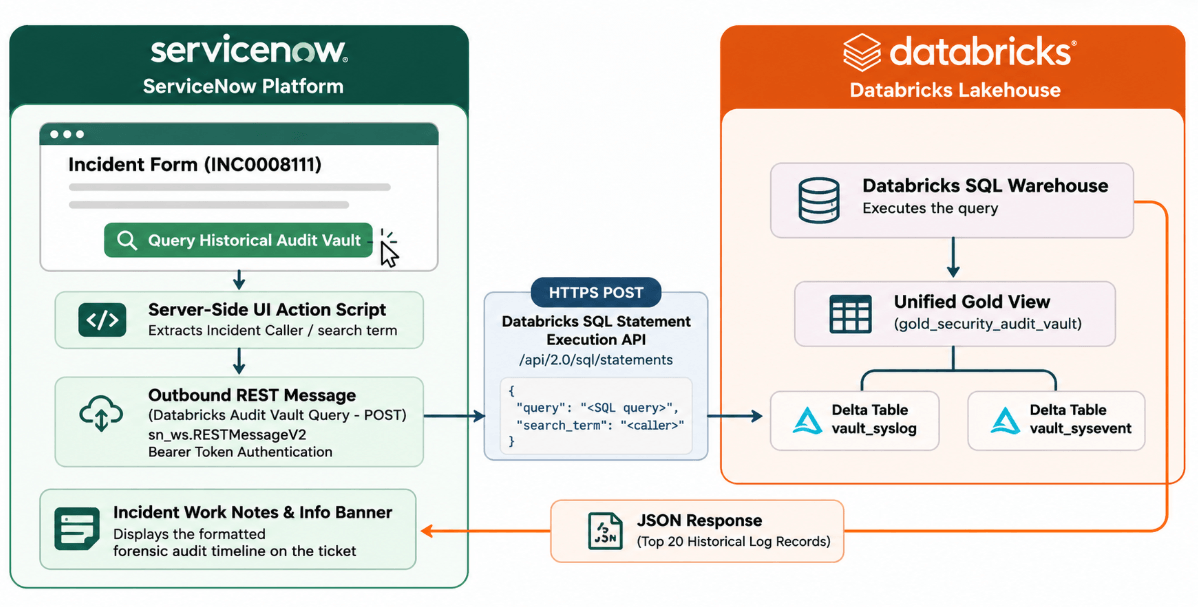
The solution runs in four stages:
- Incremental extraction (Databricks). A PySpark notebook authenticates to ServiceNow with OAuth 2.0, using Databricks Secrets, and pulls only the syslog and sysevent records created since the last checkpoint in main.secops_poc.watermark_control.
- Vault storage (Delta Lake). Each batch is hashed with SHA-256 and appended to the Delta tables vault_syslog and vault_sysevent, with Change Data Feed enabled. A unified SQL view merges both schemas into one searchable layer.
- Verification receipt and purge gate (ServiceNow). After each successful Delta write, Databricks posts a receipt back to a custom ServiceNow table: status, record count, timestamp and batch hash. A scheduled job then computes purge eligibility, bounded by the Databricks-verified watermark.
- On-demand forensic lookup (ServiceNow to Databricks). A button on the Incident form calls the Databricks SQL Statement Execution API, queries the unified view and writes the matches into the Incident's work notes.
A receipt before any purge
Deleting logs from ServiceNow is irreversible. If a pipeline fails silently, the records are gone. So Databricks fingerprints every batch it saves with a SHA-256 hash and sends a receipt to ServiceNow (u_audit_vault_sync_log).
ServiceNow's cleanup job considers only records covered by a verified receipt. In a dry run, the gate flagged 29,212 syslog and 5,056 sysevent records as eligible for cleanup, and no live record was touched.
The receipt is evidence that Databricks acknowledged a batch of a given size. It does not by itself prove the stored data matches the source. A stronger production check recomputes the hash from the vaulted rows and compares it before the receipt is marked verified.

Note on Initial Backfills: In our proof-of-concept, we scoped extraction starting from a specific cutoff date, whereas the dry-run count evaluated all pre-existing records. In production, running an initial full-history backfill ensures the vaulted count and eligible purge count align 1:1.
One view across two log schemas
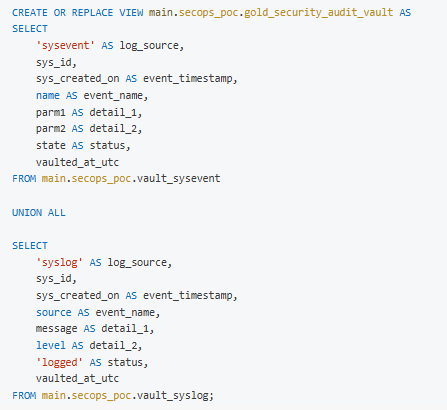
syslog and sysevent use different column names: syslog has source and message, while sysevent has name and parm1. Searching them separately slows an investigation.
In Databricks we line both tables up in a single view, gold_security_audit_vault. It is the final, query-ready layer of a medallion (bronze, silver, gold) design, so ServiceNow runs one simple query across years of history.
One-click lookup inside the Incident
During an incident, analysts lose time switching between ServiceNow and external data platforms. We removed the switch with two pieces:
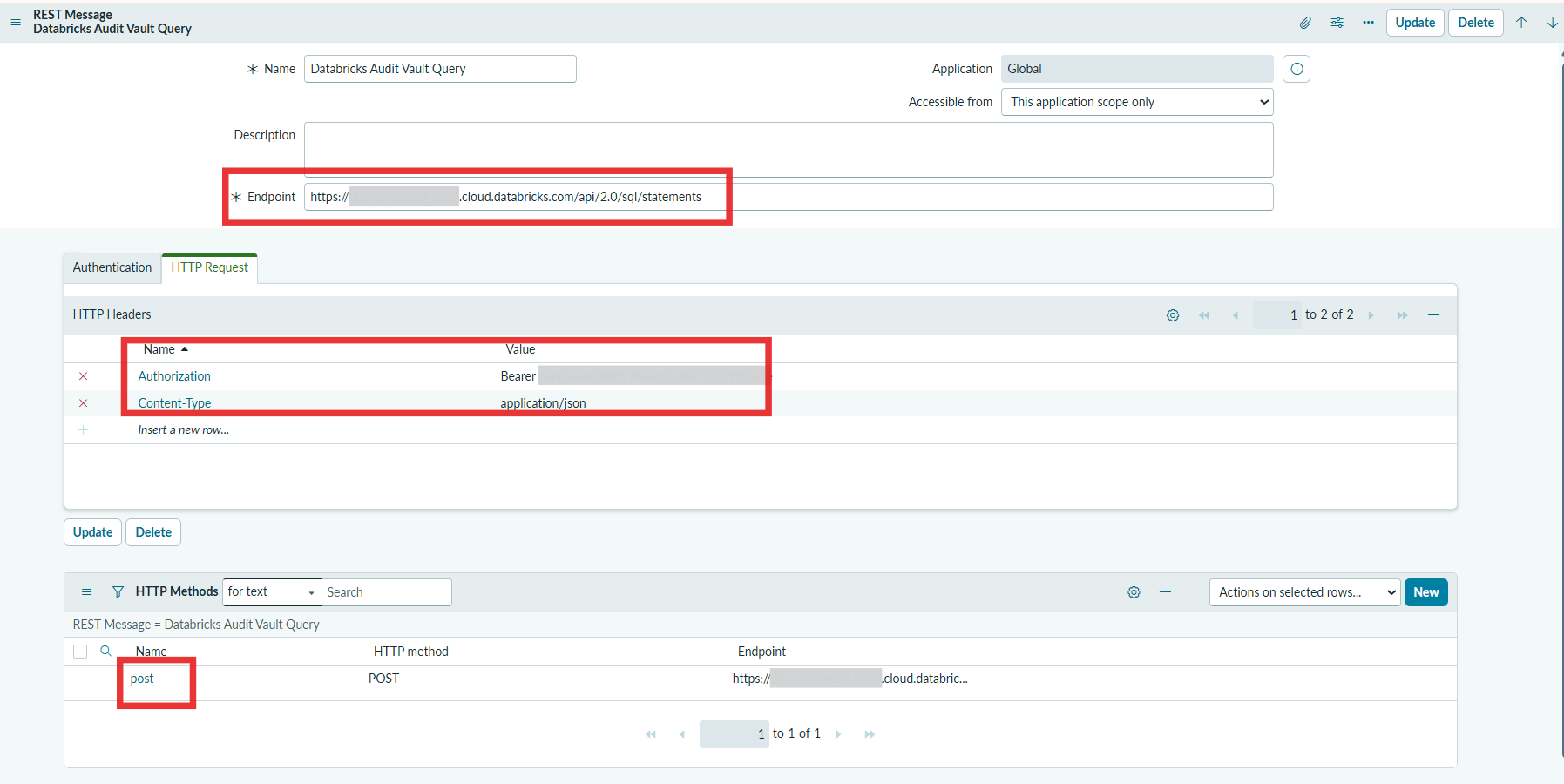
- An Outbound REST Message, Databricks Audit Vault Query, pointing at the Databricks SQL Statement Execution API (/api/2.0/sql/statements). Its post method carries the SQL and a ${search_term} placeholder, with the bearer token in the HTTP headers.
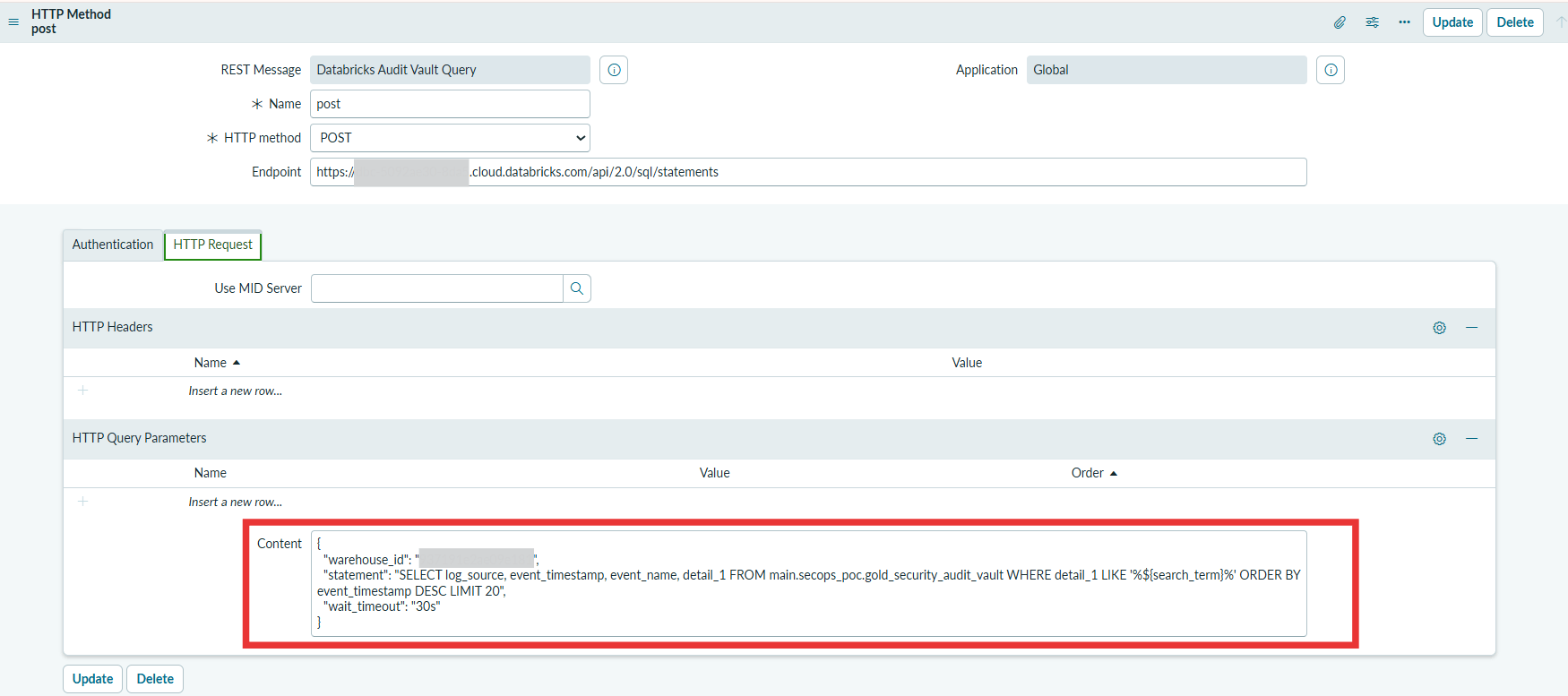
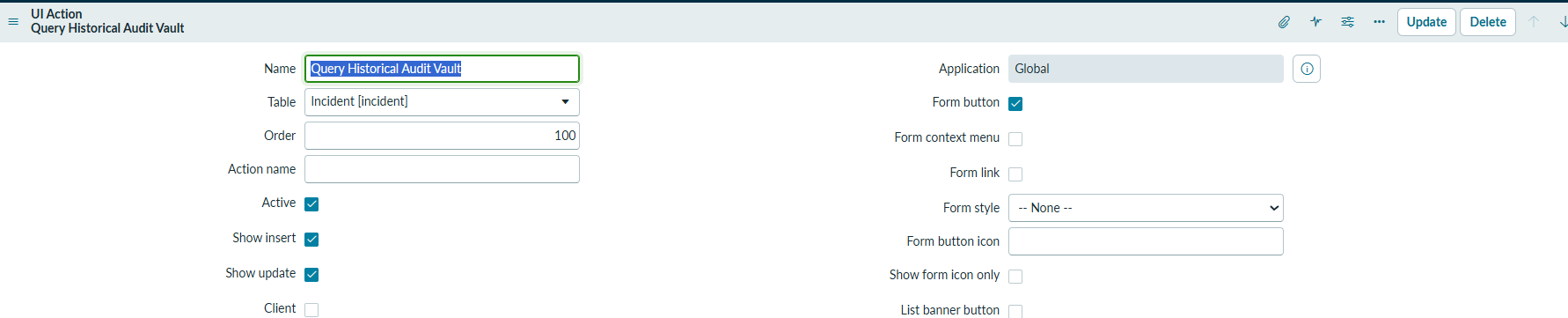
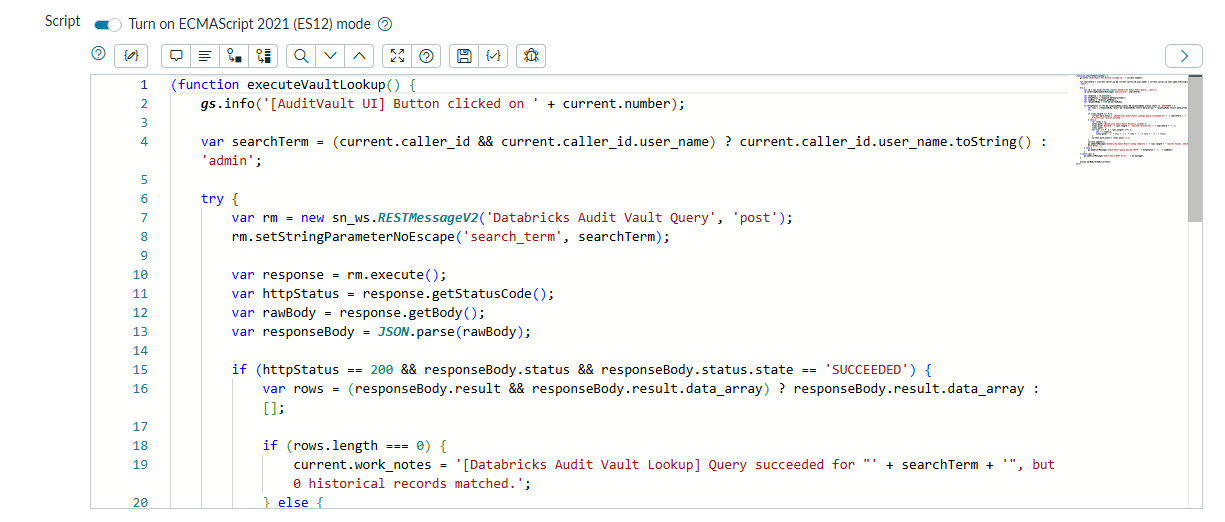
- A server-side UI Action, Query Historical Audit Vault, on the Incident form. On click, a script built on sn_ws.RESTMessageV2 injects the search term, runs the request on the server so the token never reaches the browser, and parses the JSON response.
A small snippet of script added to the UI Action in ServiceNow:
The formatted timeline is posted straight into the Incident's work notes. In the proof of concept, 20 historical records landed in INC0008111 within a few seconds.
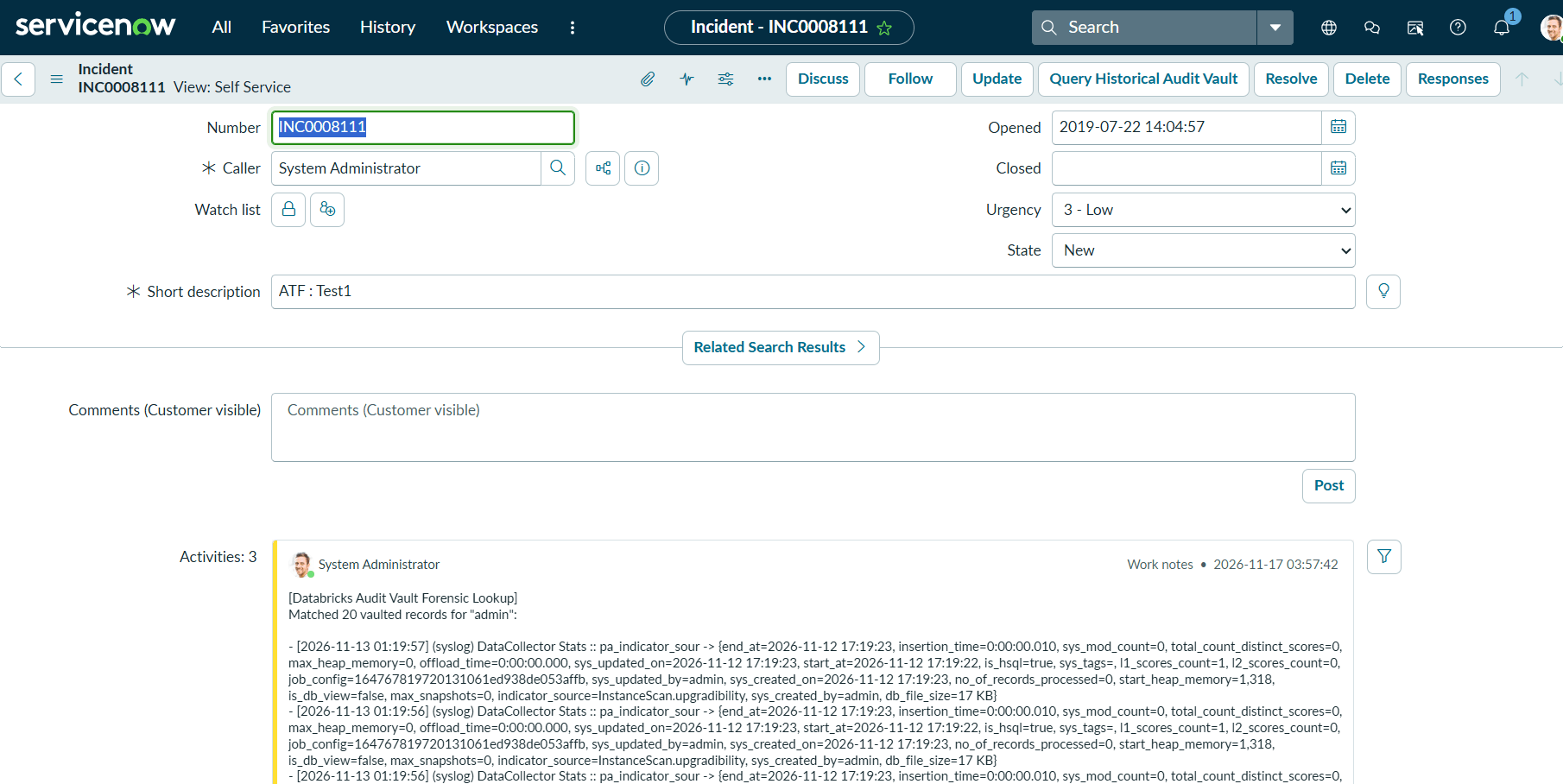
The proof of concept searches on the Incident caller. Production should let analysts search an IP address, session ID or error code, which is where the lookup earns its keep (see the roadmap below).
From proof of concept to production
The proof of concept establishes reliable archival and retrieval. These gaps are worth closing before it protects real audit data:
| Area | In the proof of concept | Production step |
|---|---|---|
| Tamper resistance | Append-only writes, Change Data Feed, SHA-256 batch hashes | Set delta.appendOnly = true, grant the ingestion principal insert and select only, and consider write-once external storage. Until then, call the vault tamper-evident, not tamper-proof. |
| Purge counts | Dry run flagged 29,212 syslog and 5,056 sysevent records; each vaulted batch holds 5,000 | The dry run counted all pre-existing records, while extraction started at a cutoff date. Run a full-history backfill so vaulted and eligible counts match 1:1, and cap eligibility at the verified watermark. |
| Protected tables | Not addressed | ServiceNow's Protected Tables plugin blocks deletes on syslog. Confirm how the purge job works with it. |
| Credentials | Static bearer token in the REST header | Use a Connection and Credential Alias (sys_alias) with an OAuth 2.0 service principal. |
| Search input | Defaults to the Incident caller | Add a client-side prompt through GlideAjax and a client-callable Script Include, so analysts can search any IP, session ID or error code. |
The parameterized request body for the Statement Execution API looks like this:
{
   "warehouse_id": "",
   "statement": "SELECT log_source, event_timestamp, event_name, detail_1 FROM main.secops_poc.gold_security_audit_vault WHERE detail_1 ILIKE :search_term ORDER BY event_timestamp DESC LIMIT 20",
   "parameters": [
    { "name": "search_term", "value": "%203.0.113.7%", "type": "STRING" }
   ],
   "wait_timeout": "30s"
 }
The next step is AI-assisted triage. The lookup query can aggregate the matched events and pass them to a Databricks Foundation Model through ai_query, so analysts get a summary of the timeline alongside the raw lines.
Takeaway
The useful idea here is the gate, not the storage: ServiceNow purges only what Databricks has acknowledged, and the history comes back to the analyst inside the ticket. With immutability controls and a full backfill in place, the same pattern gives you a smaller ServiceNow instance, a defensible retention story and faster forensics.
If you are planning a ServiceNow and Databricks integration and want a second pair of hands, get in touch with the Astrea team.
If you're interested in exploring more Databricks solutions, visit our Databricks page