ServiceNow incidents contain more than structured fields such as incident numbers, priorities, and statuses. Work notes capture troubleshooting steps and operational decisions, while attachments can contain diagnostic reports, screenshots, logs, and supporting documents.
However, this information is not always easy to analyze collectively. Work notes are stored as journal entries, attachments are stored separately from their metadata, and the useful information inside documents may remain inaccessible to conventional reporting.
In this blog, we walk through a hands-on implementation of a ServiceNow-to-Databricks pipeline that extracts incident work notes and attachments, stores them in Unity Catalog Volumes, transforms the data through a Medallion architecture, and prepares it for analytics.
The idea in one line
Extract → Archive → Transform → Analyze.
The objective is to make ServiceNow's unstructured incident content accessible for analytics while preserving the relationship between incidents, work notes, attachments, and extracted document text.
Understanding the challenge
An incident record rarely tells the complete story on its own.
Consider an incident involving an application login failure. The incident description may identify the problem, but the investigation could be documented across several work notes. A screenshot might show the error, and a PDF report could contain additional diagnostic information.
These different content types create several challenges.
- Fragmented information: Incident records, journal entries, and attachment metadata reside in separate ServiceNow tables.
- Binary file handling: Retrieving an attachment's metadata does not retrieve the actual file.
- Limited document visibility: A PDF stored as a binary file cannot be analyzed as ordinary text until its content is extracted.
The goal is not simply to copy records into another platform. It is to build a reusable data foundation where structured and unstructured incident information can be queried together.
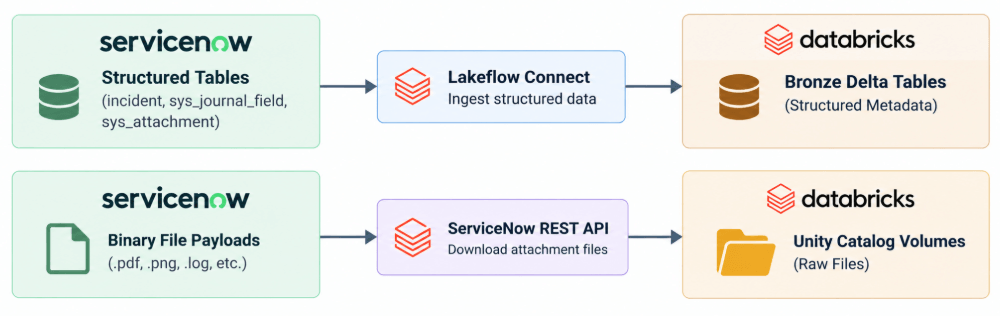
Connecting ServiceNow to Databricks
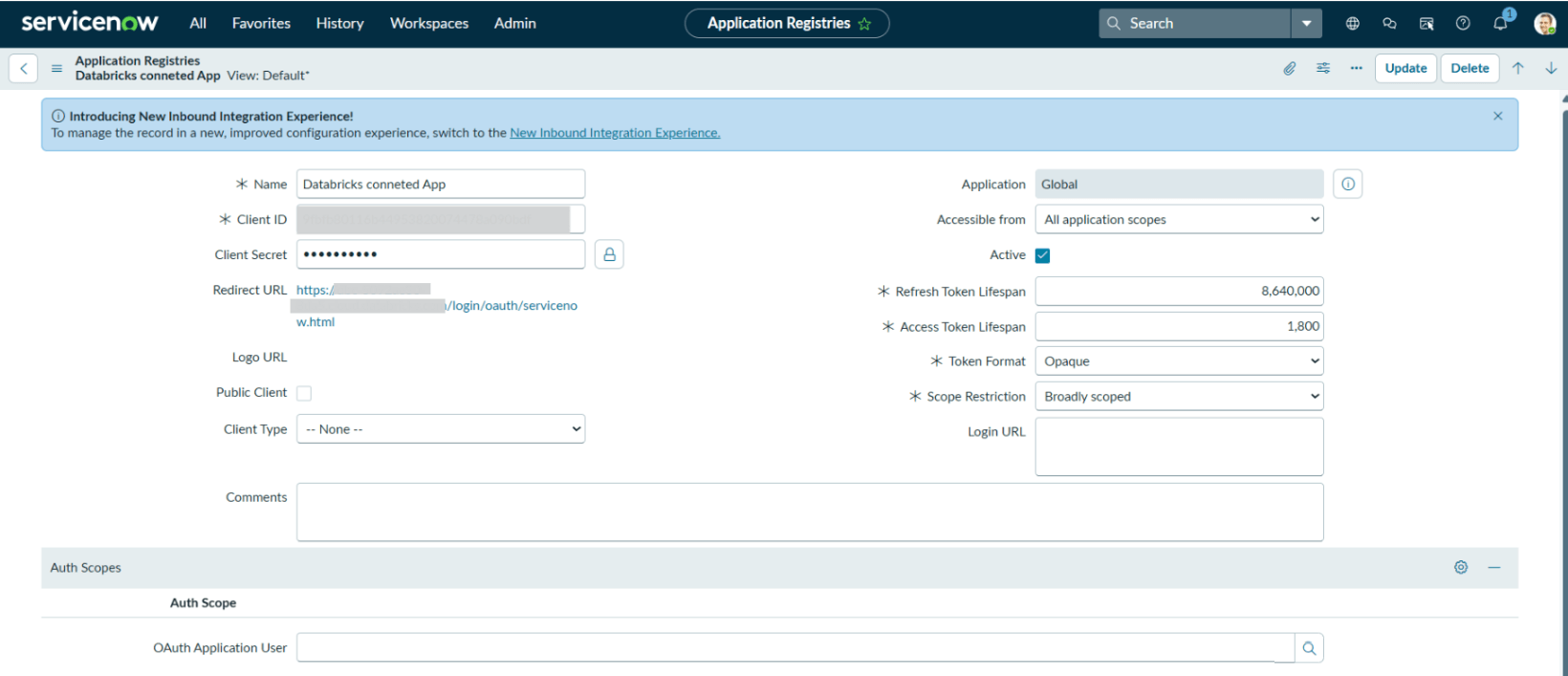
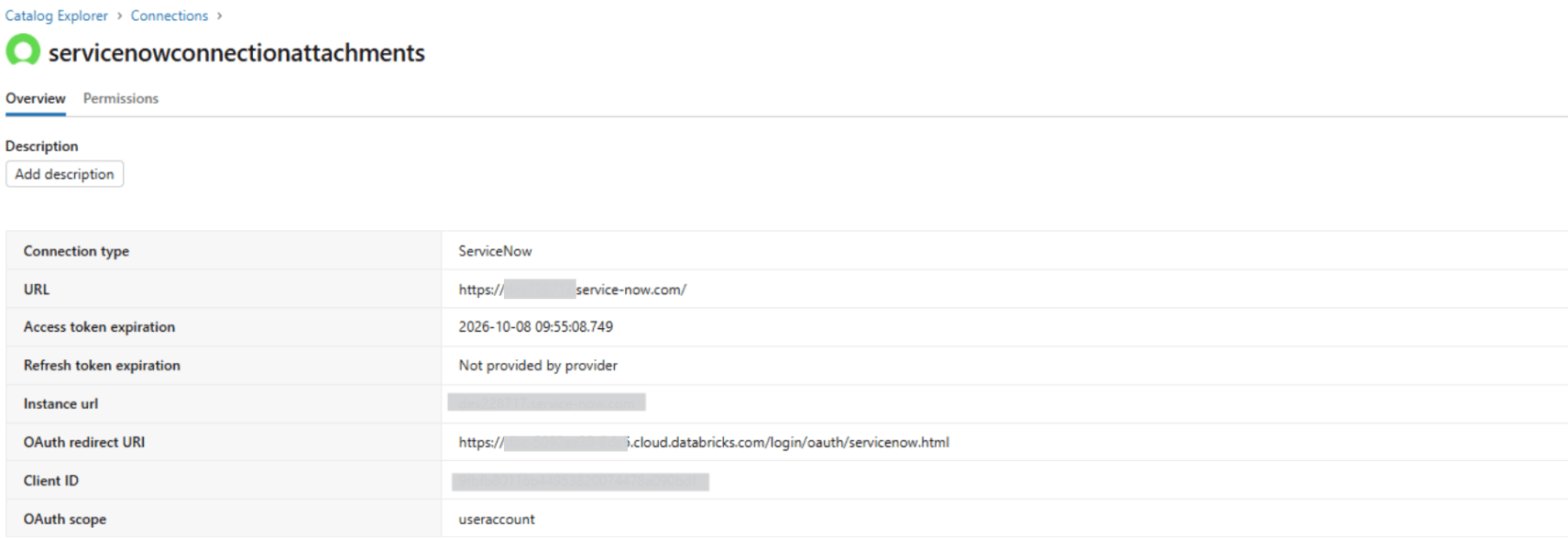
The ServiceNow connector in Databricks was configured using client credentials from an OAuth application created in ServiceNow. These credentials were stored in a Databricks secret scope and used to generate access tokens for authenticated REST API calls.
The ServiceNow integration user was assigned the required roles and permissions required for the Attachment API to work properly. Once authentication was established, a Lakeflow Connect pipeline was configured to ingest structured data from the required ServiceNow tables.
Attachment binaries were retrieved separately through authenticated API calls and stored in Unity Catalog Volumes.
Solution architecture
The implementation uses ServiceNow as the source system and Databricks as the data engineering and analytics platform.
Bronze: Ingest source records and preserve files
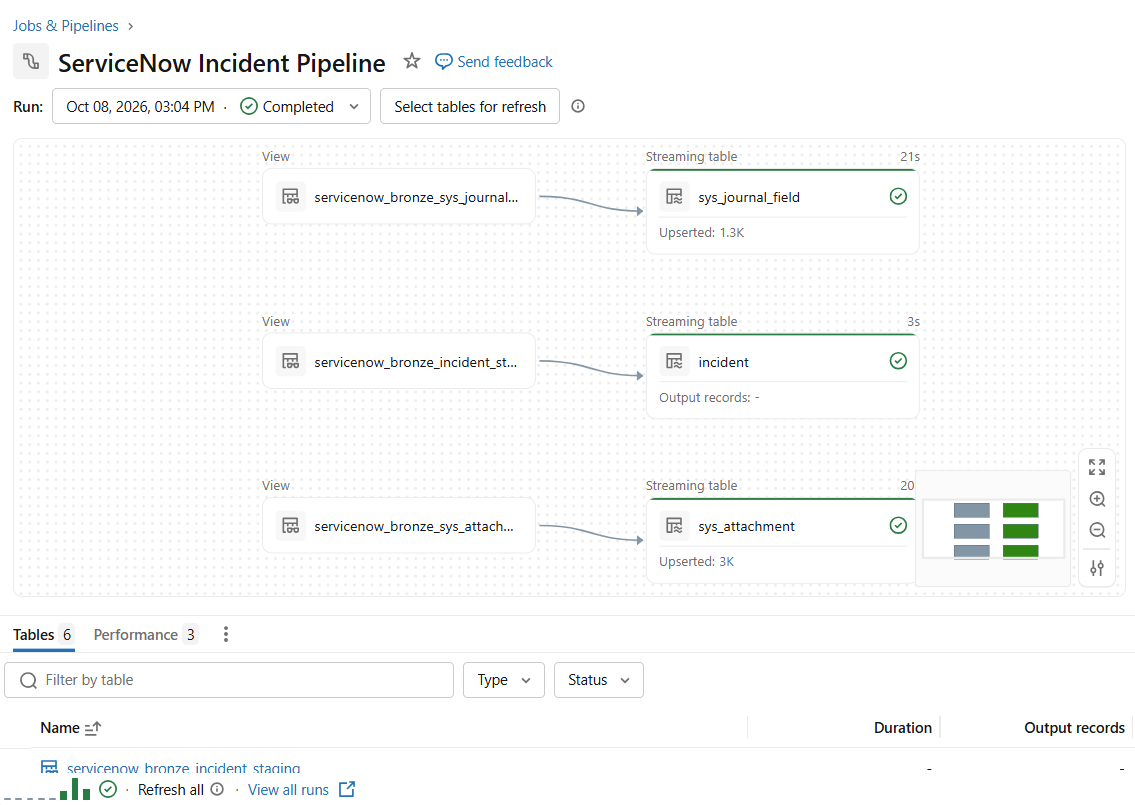
Step 1: Ingest structured data with Lakeflow Connect
Lakeflow Connect ingests structured data from the following ServiceNow tables:
- incident—incident details and identifiers.
- sys_journal_field — journal entries, including work notes.
- sys_attachment — attachment metadata, including filenames, content types, sizes, and parent-record references.
To associate work notes with incidents, the pipeline uses the relationship:
incident.sys_id = sys_journal_field.element_id
This establishes the relationships needed to connect incident records with their associated content.
Step 2: Retrieve attachment metadata
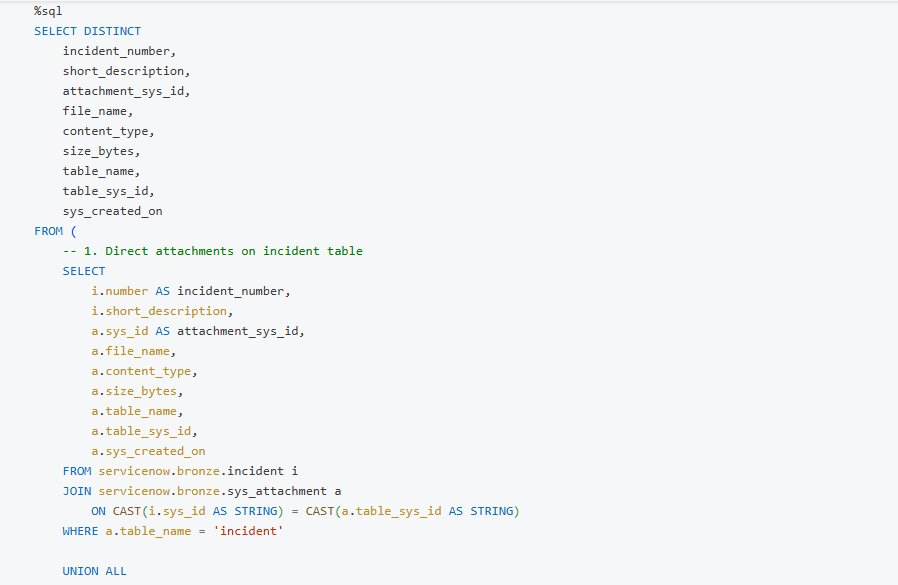
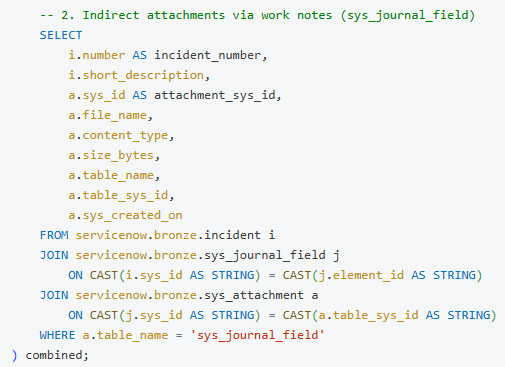
In ServiceNow, attachments uploaded directly to an incident link via table_name = 'incident'. However, attachments uploaded via work notes or journal entries are registered under table_name = 'sys_journal_field'.
To ensure complete data integrity without dropping work-note attachments, we construct a SQL query that unifies direct and indirect attachment relationships:
Step 3: Download the actual attachment binaries
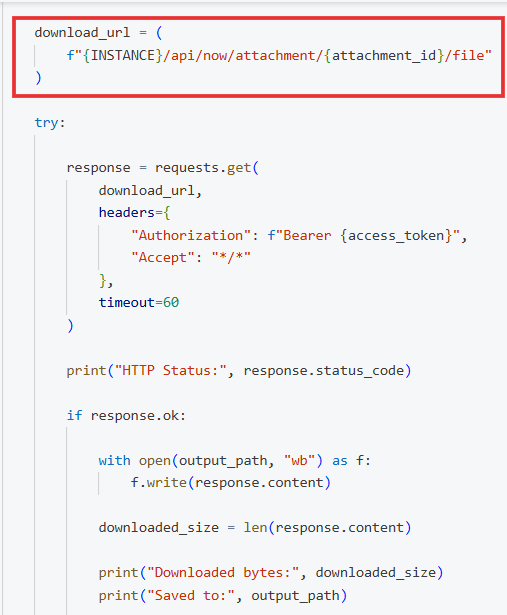
To retrieve file contents, the pipeline calls the ServiceNow Attachment API endpoint:
/api/now/attachment/{attachment_sys_id}/file
The attachment's sys_id identifies the file to download.
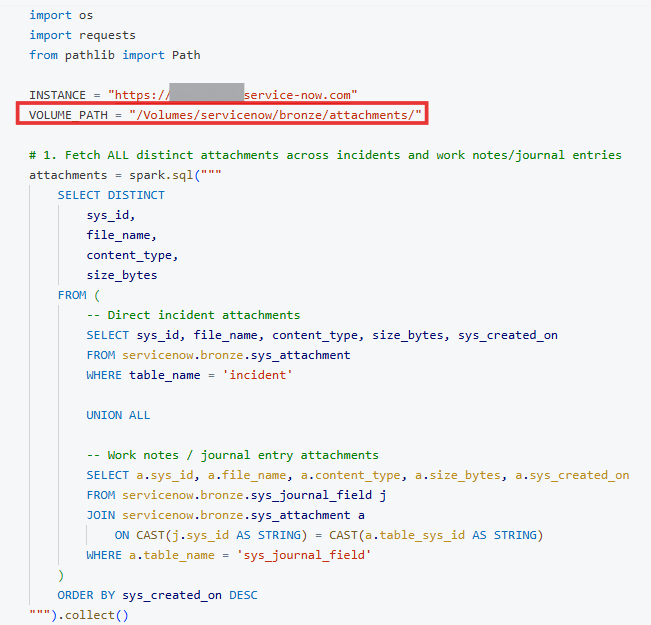
The pipeline writes the downloaded bytes into a Unity Catalog Volume. For this implementation, the Volume path is:
/Volumes/servicenow/bronze/attachments/
An important distinction: Downloading an attachment into Databricks does not automatically remove it from ServiceNow or release ServiceNow storage. Any source-system cleanup must be designed and validated separately.
Production & Scaling Considerations
In this implementation, a sequential loop was used to demonstrate the download process on pilot data volumes. However, for enterprise production pipelines processing thousands of attachments daily, it leads to OOM errors. Leverage PySpark’s mapInPandas to parallelize HTTP requests across Spark worker nodes.
Silver: Connect and transform the data
The Silver layer connects incidents with their work notes and attachment metadata. It also extracts text from supported documents, beginning with PDFs, and organizes the results into queryable datasets.
| Table | Purpose |
|---|---|
| incident_work_notes | Links work notes to incident details |
| incident_attachments | Catalog incident attachments and archive paths |
| attachment_text | Stores the extracted PDF text by attachment and page |
| incident_context | Combines incident details, work notes, and available PDF text |
| incident_content_references | Contains the incident details, paths to the attachments, content type, etc. |
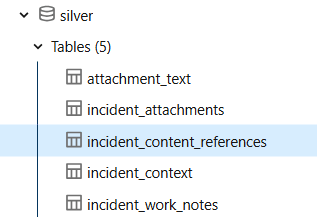
Key Processing Steps in Silver:
- Text & Document Extraction: Standard Python libraries (e.g., PyMuPDF) extract text from PDF document layers. For scanned files or screenshots (.png/.jpg), an Optical Character Recognition (OCR) engine (such as Tesseract or Databricks AI Functions) can be applied.
- PII Sanitization: Diagnostic logs and work notes often contain emails, IP addresses, or credentials. Silver pipeline routines mask sensitive data before feeding downstream AI or analytics models.
Gold: Prepare incident-level analytics
The Gold layer combines incident context, work-note information, attachment metrics, and extracted PDF text into a single analytical dataset.
The table created for this implementation is:
servicenow.gold.incident_insights
It combines the existing incident context with attachment summaries and PDF extraction results.
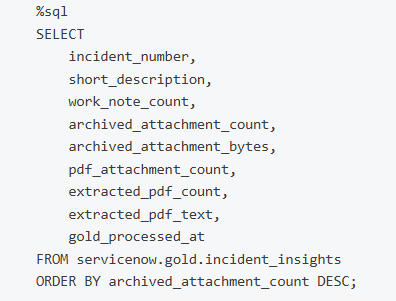
The table includes:
- Incident identifiers and short descriptions.
- Work-note counts and aggregated work-note content.
- Attachment counts and total attachment bytes.
- PDF attachment counts.
- Counts of PDFs with extracted text.
- A processing timestamp.
These metrics provide a foundation for operational reporting without requiring every dashboard query to reconstruct the full data model.
Making the results visible with a Databricks dashboard
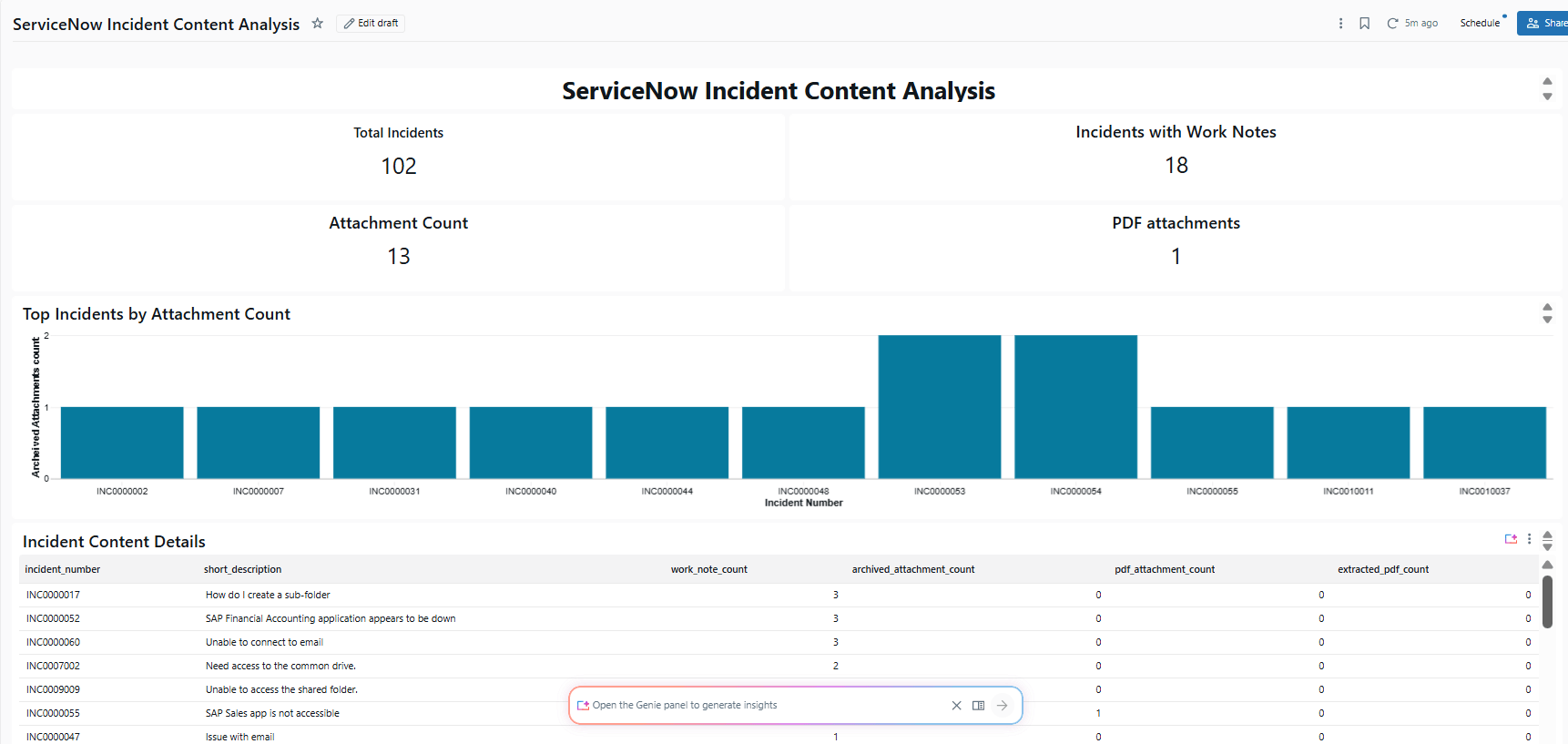
The Gold table, servicenow.gold.incident_insights, provides a consolidated source for a Databricks SQL or AI/BI dashboard.
It enables teams to explore incident work-note availability, attachment volumes, PDF extraction results, and the supporting content associated with each incident.
This makes the pipeline's outputs easier to interpret without repeatedly querying multiple tables or inspecting notebooks.
Validation and Governance
A reliable pipeline must validate more than successful execution.
Key checks include verifying incident and journal relationships, checking downloaded file sizes, confirming extracted text is linked to the correct attachment, and reconciling Gold metrics against Silver data.
Security is equally important. Work notes and attachments may contain sensitive information, so access should be restricted through appropriate Unity Catalog permissions, and credentials should be stored securely.
Future Enhancements
- Enterprise Journal Archival (sys_audit / sys_history_line): In high-retention ServiceNow instances, historical journal entries may be archived out of sys_journal_field. A future Silver layer enhancement can expand the work notes view using a UNION ALL across sys_journal_field, sys_audit, and sys_history_line.
At Astrea IT Services, we continue exploring practical ways to connect enterprise applications with modern data platforms and turn operational data into actionable insights.
If you're interested in exploring more Databricks solutions, visit our Databricks Page.