Every growing B2B company celebrates when a major deal closes in Salesforce. Yet months later, finance teams often discover an uncomfortable truth: the cash actually collected does not match what was promised in the signed contract. Across B2B software and enterprise businesses, up to 2% to 5% of Annual Recurring Revenue (ARR) can silently slip away every year to revenue leakage.
This rarely happens because one tool is broken. It happens in the gaps between three disconnected systems:
- What Was Sold (Salesforce CRM): Contracts, order line items, seat counts, negotiated discounts, and annual price escalators.
- What Was Billed (ERP & Billing): Recurring invoices, payment dates, and approved credit notes.
- What Was Consumed (Product Telemetry): Monthly active users, peak seat counts, and ongoing product logins.
When these three systems do not talk to each other, small handoff gaps quietly drain revenue:
- A Closed-Won deal never makes it to Finance, so the customer is never billed.
- A multi-year contract enters Year 2 with a 5% annual price uplift, but billing keeps charging the Year 1 rate.
- A customer pays for 50 software seats while 95 active users log in every month—with no true-up conversation ever triggered.
- A contract expires with no renewal, yet the customer keeps using the platform for free ("zombie usage").
- A sales rep grants a 28% discount above the 15% policy cap without Deal Desk approval, or ERP accidentally sends duplicate invoices that erode customer trust.
Why Salesforce alone cannot solve this: Salesforce is designed to manage customer relationships, not to crunch millions of raw product usage logs and historical ERP invoices. Pushing all that data into Salesforce quickly hits costly storage limits and slows performance. Meanwhile, manual quarterly spreadsheets are slow, and simplistic variance alerts create false-alarm fatigue, flagging normal 30-day billing grace windows, approved service credits, or valid mid-term contract amendments as "lost money."
1. The Solution: What We Built with RevGuard AI
We built RevGuard AI, an end-to-end Revenue Assurance and Contract Compliance proof of concept (POC) combining Salesforce and Databricks. Databricks handles the heavy lifting behind the scenes by unifying Salesforce contracts, ERP billing records, and product usage telemetry. Once real discrepancies are verified and approved by Finance, RevGuard pushes clear, actionable insights straight back into Salesforce for Account Executives.
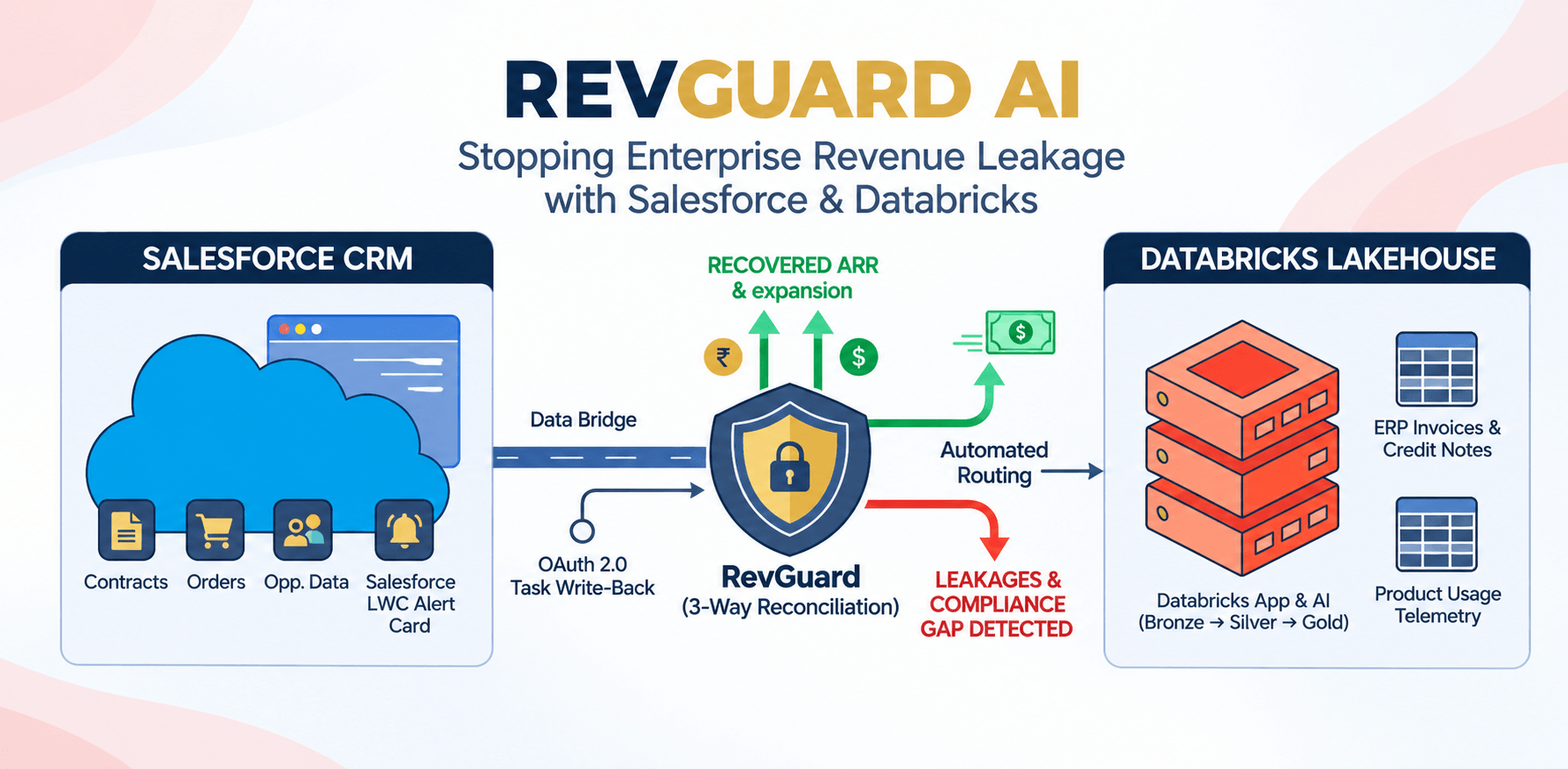
Our design follows one simple rule: "Math Decides, AI Explains, Humans Approve."
- Deterministic Math Decides: Transparent business rules calculate every rupee of expected billing, invoiced actuals, and seat overage—never AI guesswork.
- Guardrailed AI Explains: AI transforms complex cross-system evidence into clear, plain-English audit summaries and answers natural-language questions. All financial figures are sourced from deterministic reconciliation tables, while AI- generated explanations are validated against structured evidence and automated numeric checks before being presented.
- Humans Approve CRM Actions: Finance reviews every finding in a dedicated console and clicks one button to sync verified alerts into Salesforce.
2. How the Core Engine Works
To mirror a real enterprise portfolio without straining a Salesforce org, we modeled multi-product B2B contracts across software seats, analytics add-ons, support plans, and hardware, mid-term contract amendments, varied billing cycles (Monthly, Quarterly, Annual), and 14 realistic scenarios, mixing genuine revenue leaks with tricky false-alarm "confusers."
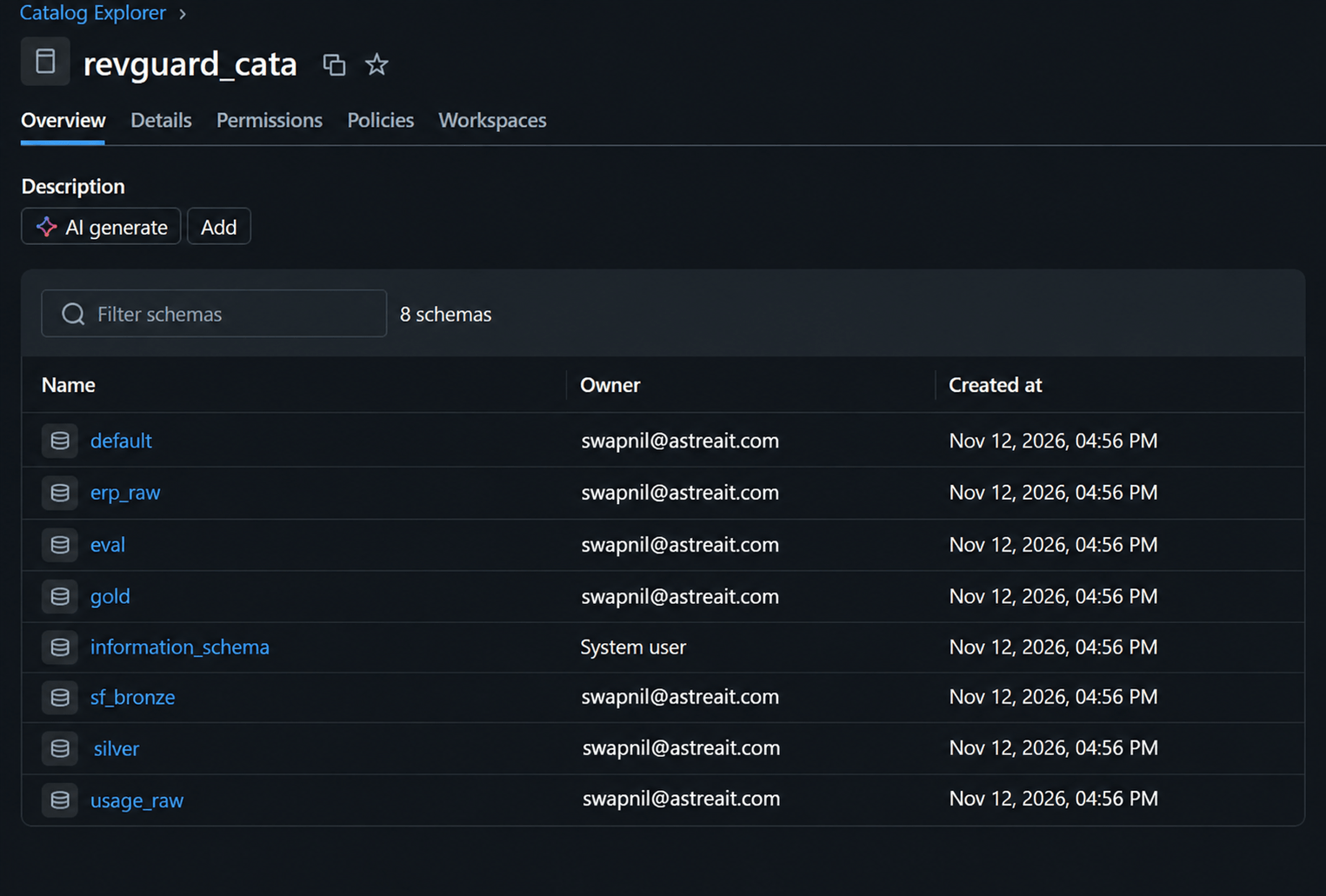
Rather than relying on disconnected scripts, RevGuard AI runs as a continuous, five-stage Lakehouse assembly line inside Databricks Unity Catalog (revguard_cata), transforming raw CRM, billing, and usage logs into verified financial findings, fact-checked AI explanations, and a live conversational agent.
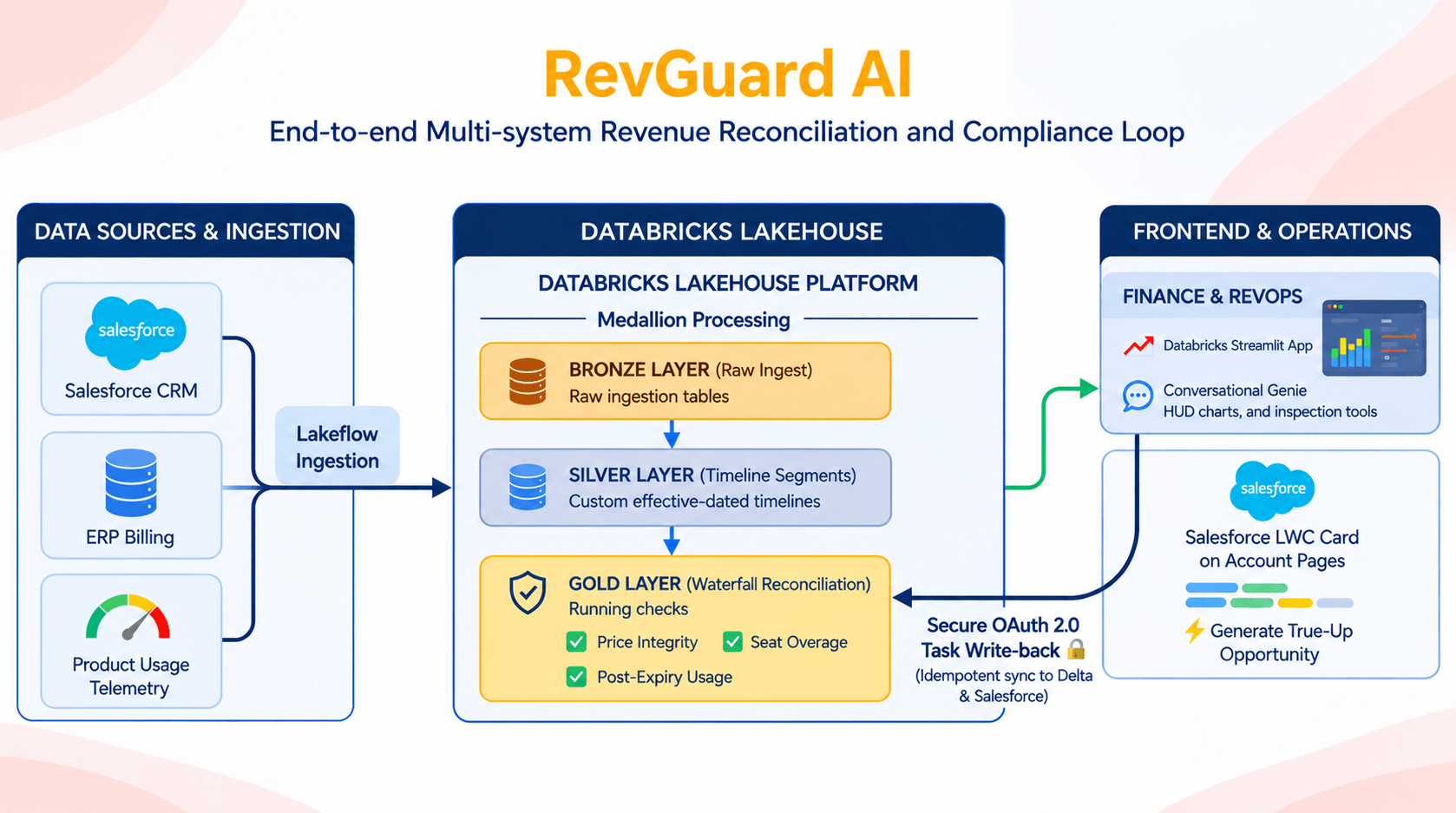
2.1 Bronze Layer: Unifying the Three Sources of Truth
Everything starts by landing raw data from all three operational systems into dedicated Bronze schemas:
- Salesforce CRM (sf_bronze): Ingested automatically via Databricks Lakeflow Connect, capturing standard objects (Account, Contract, Order, OrderItem, Opportunity, Product2, PricebookEntry, and User) and isolating POC records cleanly by creation date.
- ERP Billing (erp_raw): Captures customer masters, sales orders, recurring invoices, payment receipts, and credit notes, including realistic real-world messiness such as missing Salesforce order references and slight customer name variations.
- Product Telemetry (usage_raw) & Ground-Truth Benchmark (eval): Ingests monthly active user and peak seat consumption logs (entitlement_usage_monthly), alongside a hidden ground-truth table (eval.planted_issue) used strictly to grade accuracy without ever touching the pipeline logic.
2.2 Silver Layer: Identity Resolution & Effective-Dated Timelines (ETL Pipeline)
Before comparing dollars, a Lakeflow Declarative (ETL) SQL Pipeline cleans and aligns the data in revguard_cata.silver using two practical patterns:
- Cross-System Identity Resolution (ref_account): Maps Salesforce Accounts to ERP Customers and Product Tenants using exact external IDs first, with automated fallback matching on normalized company names whenever ERP records lack a CRM link.
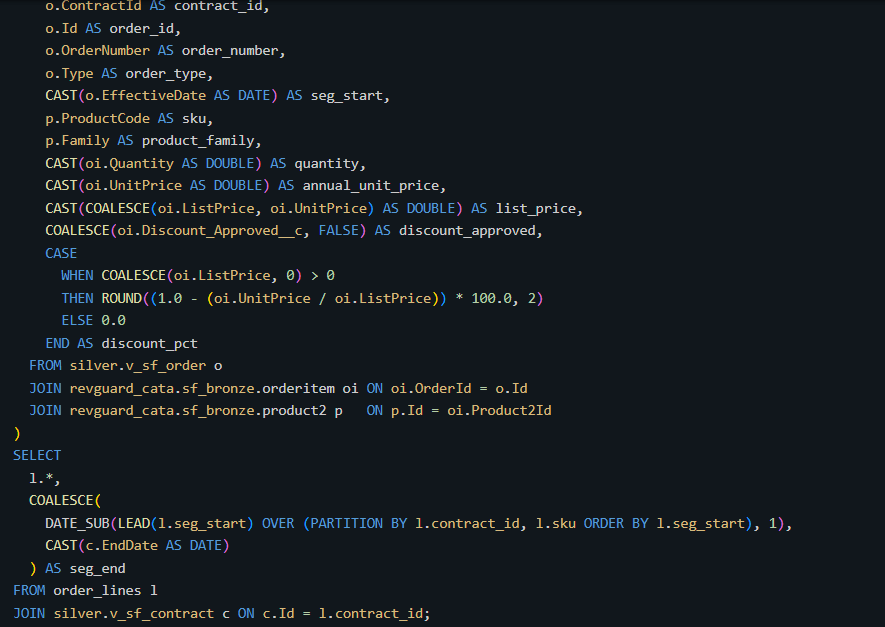
- Effective-Dated Term Segments (contract_term_segments): Because real B2B contracts change mid-year, RevGuard models mid-term changes natively as Salesforce Amendment Order records (Type = 'Amendment'). A single SQL LEAD() window function partitioned by (contract_id, sku) slices every contract into clean, non-overlapping active date ranges, automatically handling seat upgrades, downgrades, and mid-term SKU cancellations.
2.3 Gold Layer: The 7-Step Reconciliation Waterfall & Compliance Rules
In revguard_cata.gold, the ETL pipeline turns active contract timelines into audit-ready financial intelligence across two parallel tracks:
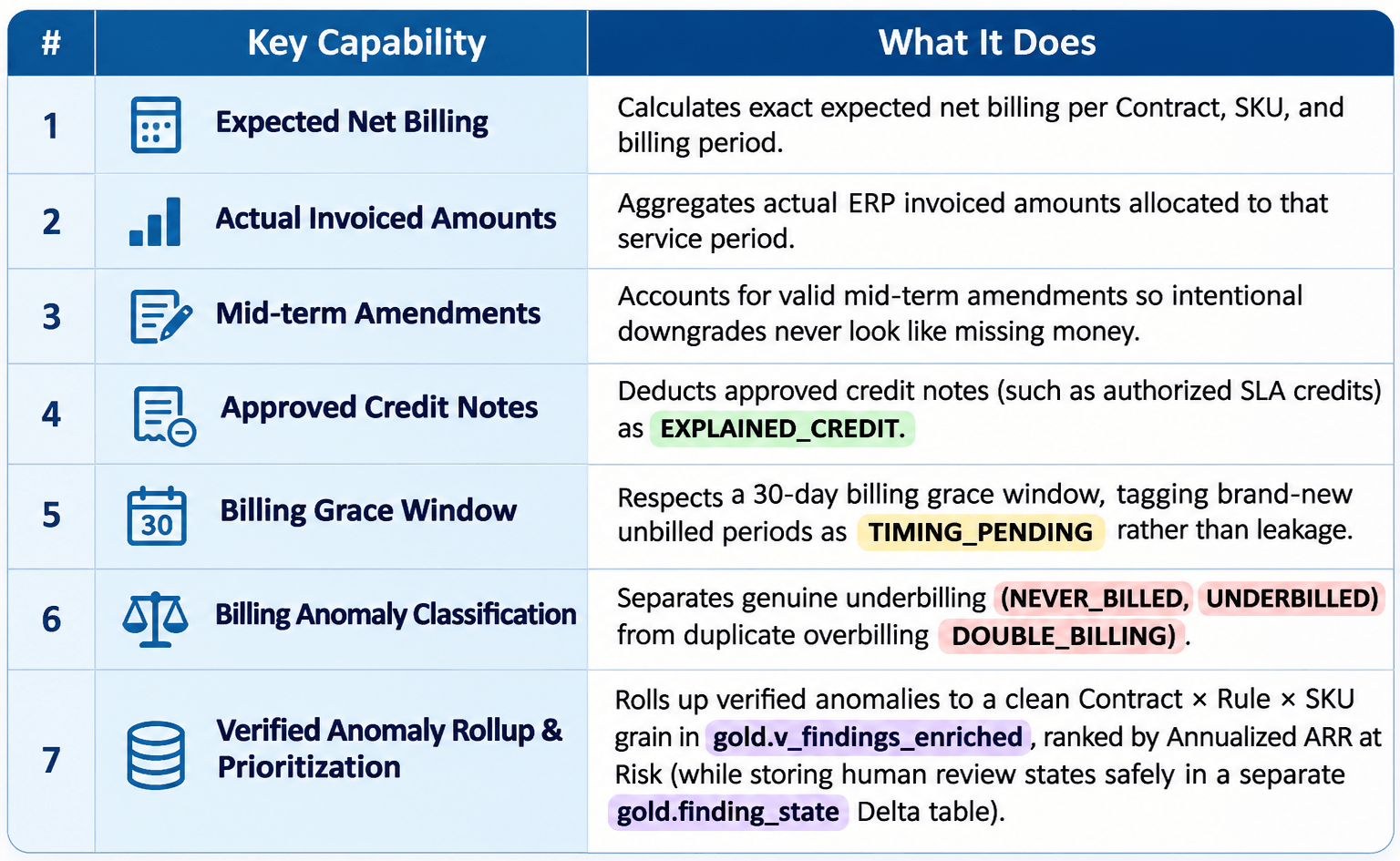
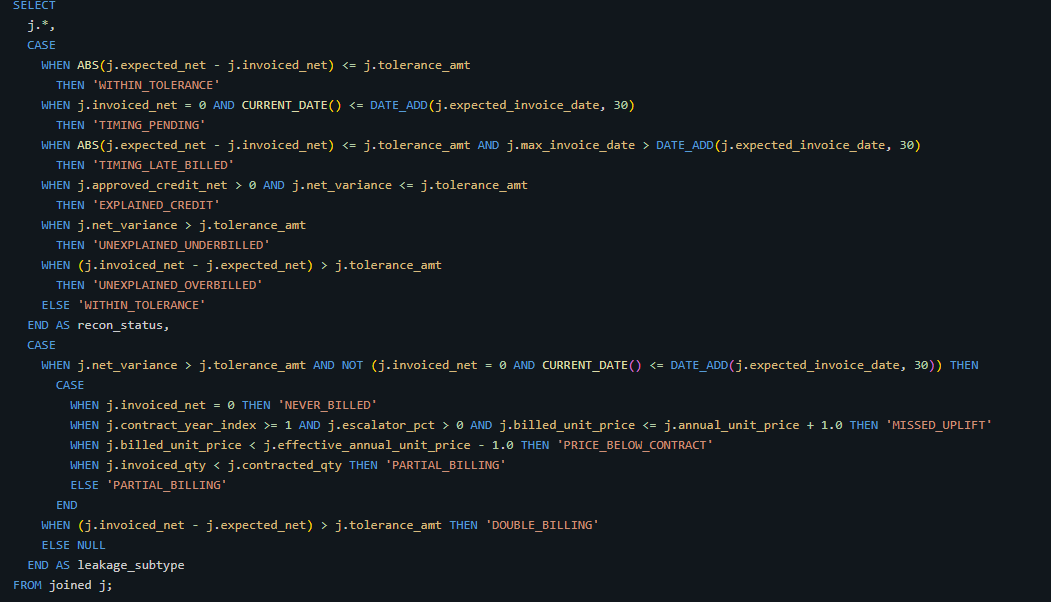
A) The 7-Step Billing Reconciliation Waterfall (gold.billing_reconciliation): RevGuard expands each active contract slice into an expected_billing_schedule (automatically compounding agreed Year 2+ annual price uplifts), matches ERP invoices using a 3-tier waterfall, and runs a 7-step check that separates real cash loss from everyday operational noise:
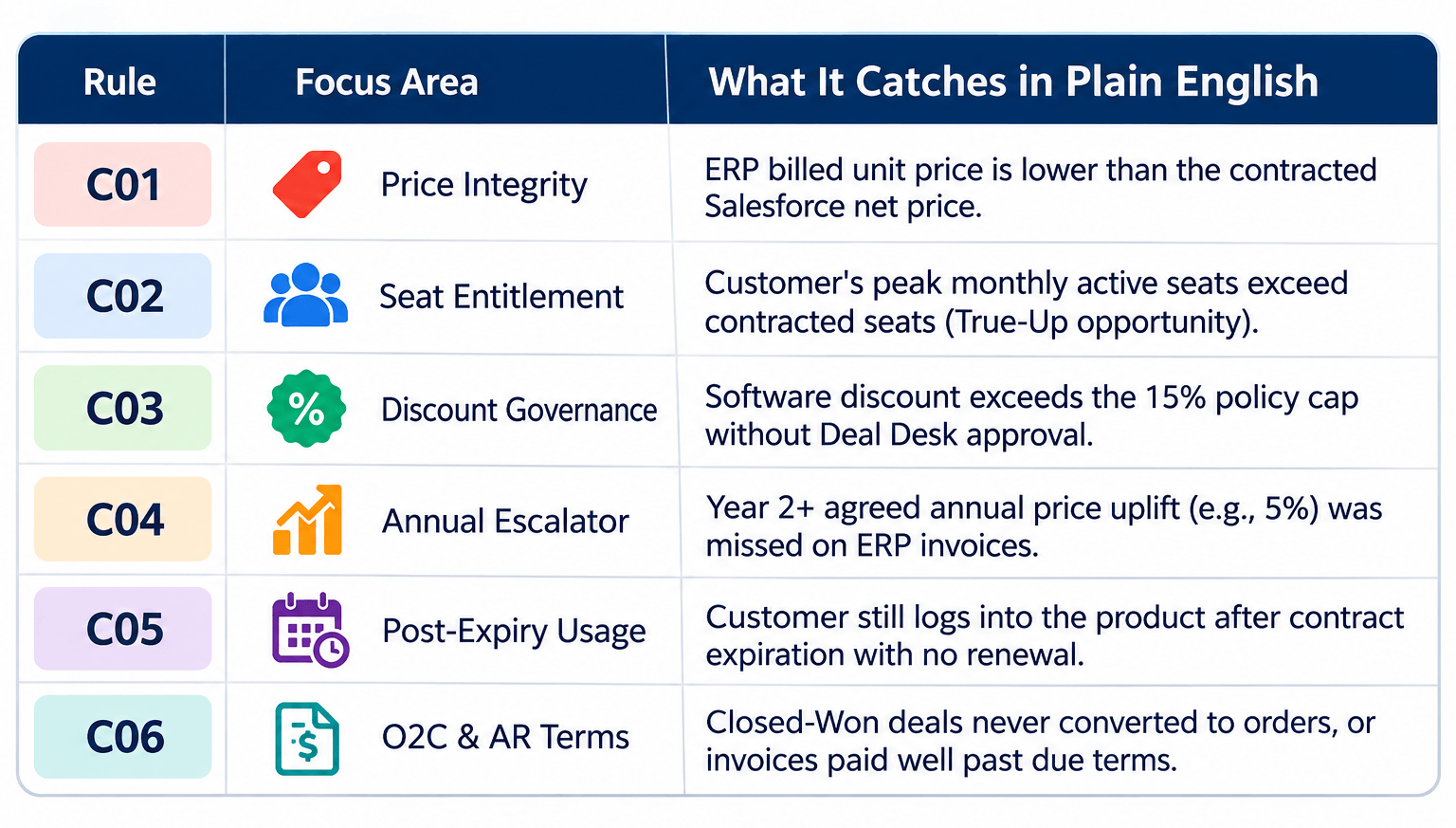
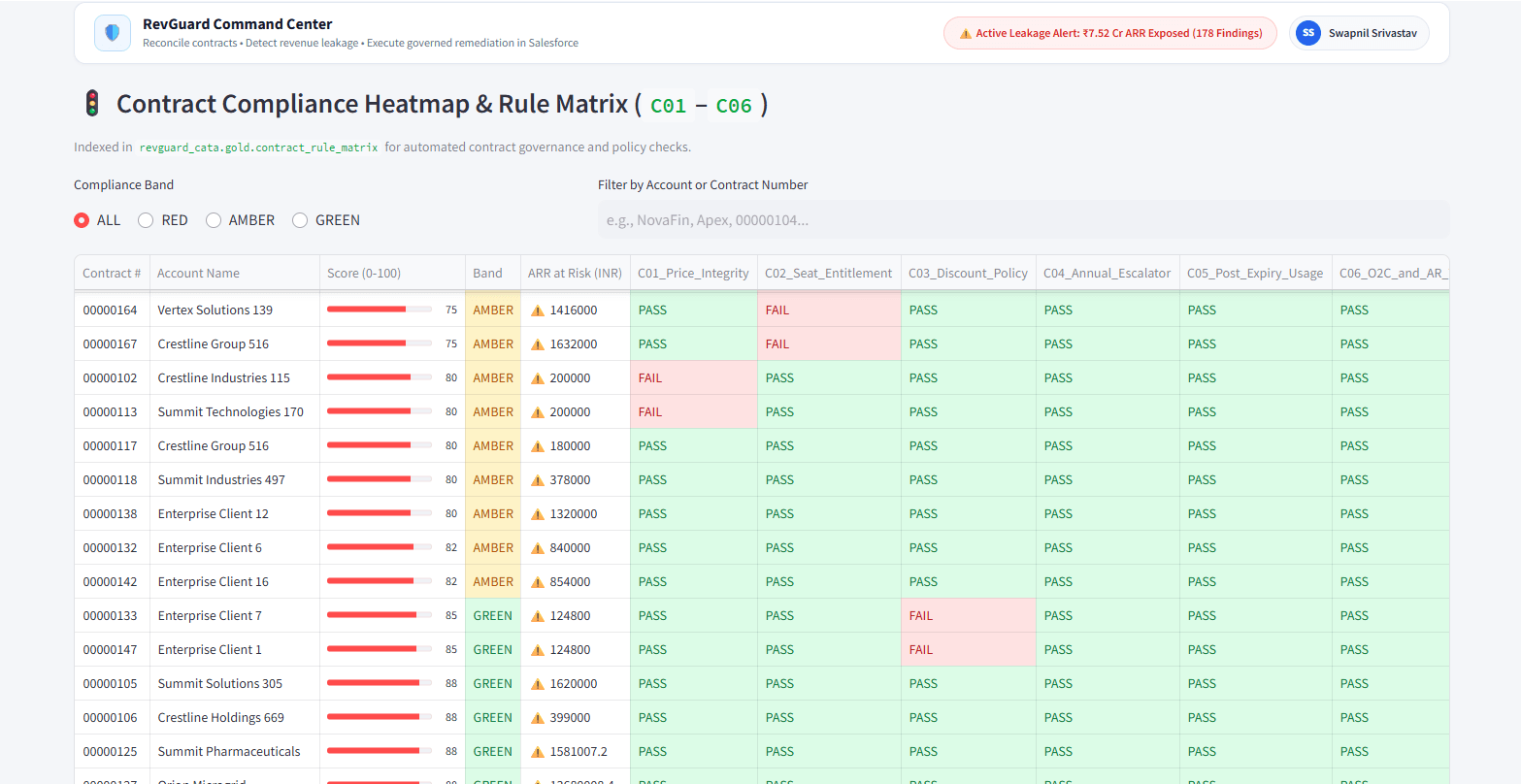
B) Six Automated Commercial Compliance Rules : Alongside invoice reconciliation, RevGuard audits every contract against six commercial governance rules and assigns each contract a 0–100 Compliance Score (GREEN, AMBER, or RED) in gold.contract_compliance_score:
2.4 Guardrailed AI Explanations (ai_query)
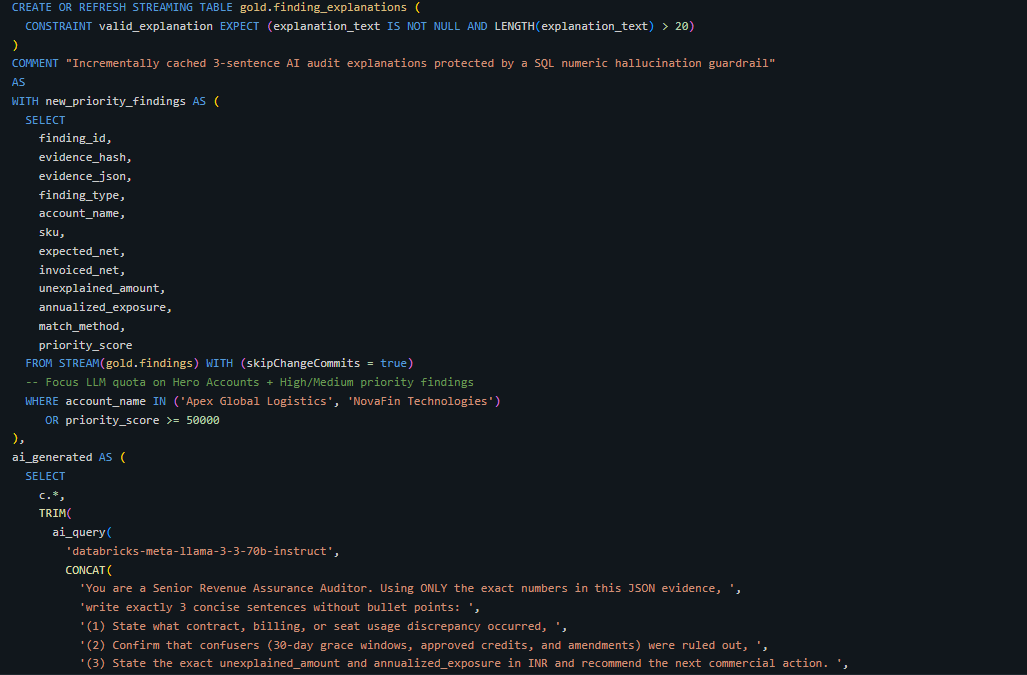
Numbers alone don't tell a busy Finance manager or Account Executive why an alert fired. Once the Gold tables finish updating, an enrichment step invokes Databricks Foundation Models (databricks-meta-llama-3-3-70b-instruct) via ai_query to write a concise, 3-sentence AI Auditor Summary for each finding, explaining the discrepancy, confirming which confusers were ruled out, and recommending the next commercial step.
2.5 Governed Unity Catalog Tools & Mosaic AI Agent Registration
Finally, to let Finance and RevOps ask follow-up questions in plain English without writing SQL, we turned the Gold layer into a live conversational analyst:
- Six Governed Unity Catalog SQL Tools : We created six reusable SQL table functions, search_findings, get_compliance_scorecard, get_contract_reconciliation, get_entitlement_vs_usage, calculate_trueup_quote, and draft_trueup_email.
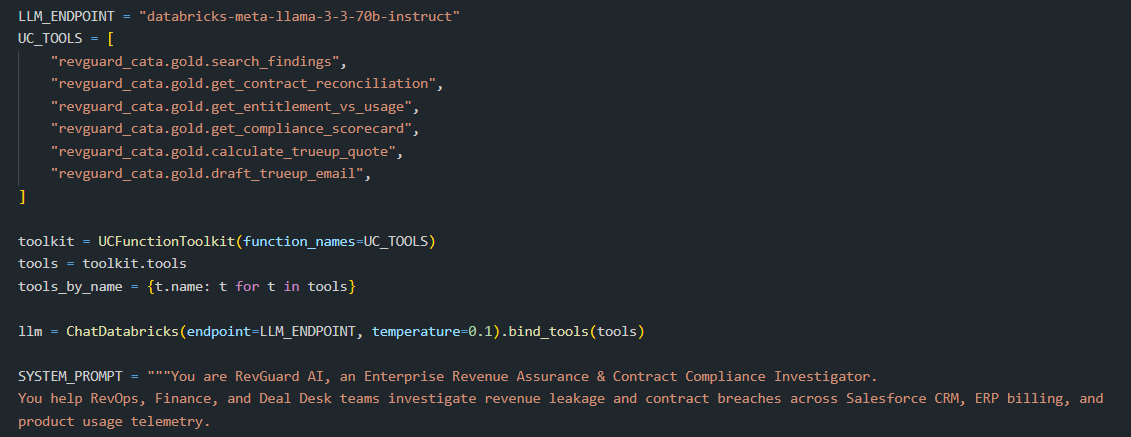
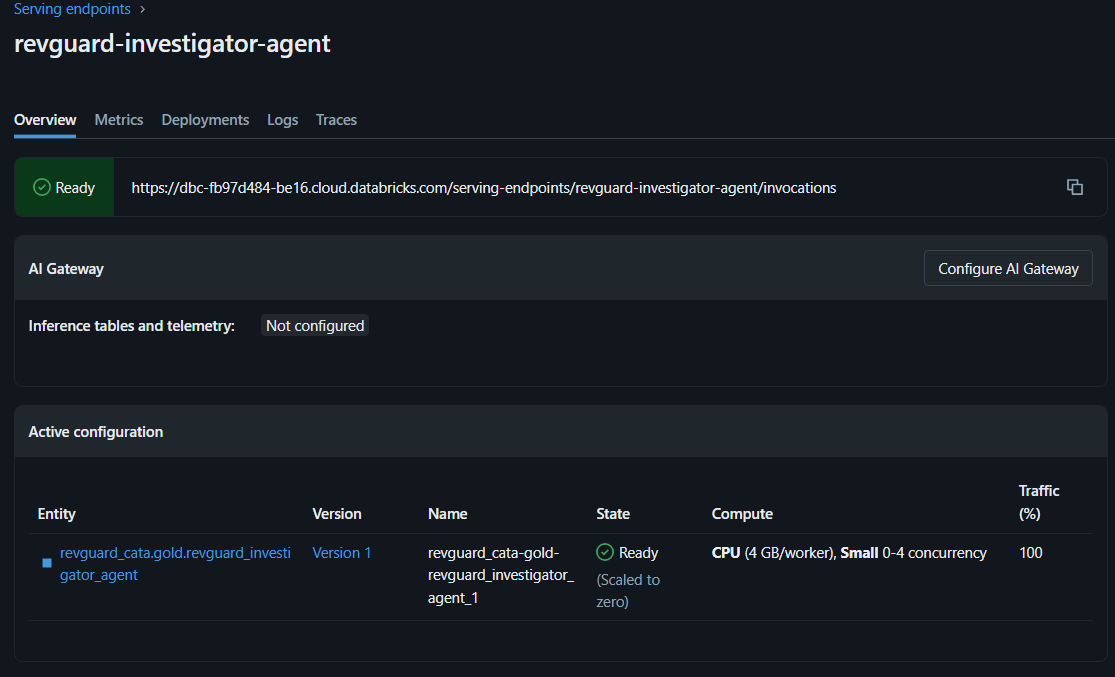
- MLflow ChatAgent Packaging & Unity Catalog Registration: Using UCFunctionToolkit and Llama 3.3 70B, we wrapped those six tools inside an MLflow ChatAgent, logged and registered it directly in Unity Catalog, and deployed it to a Databricks Model Serving endpoint (revguard-investigator-agent).
2. How the Core Engine Works
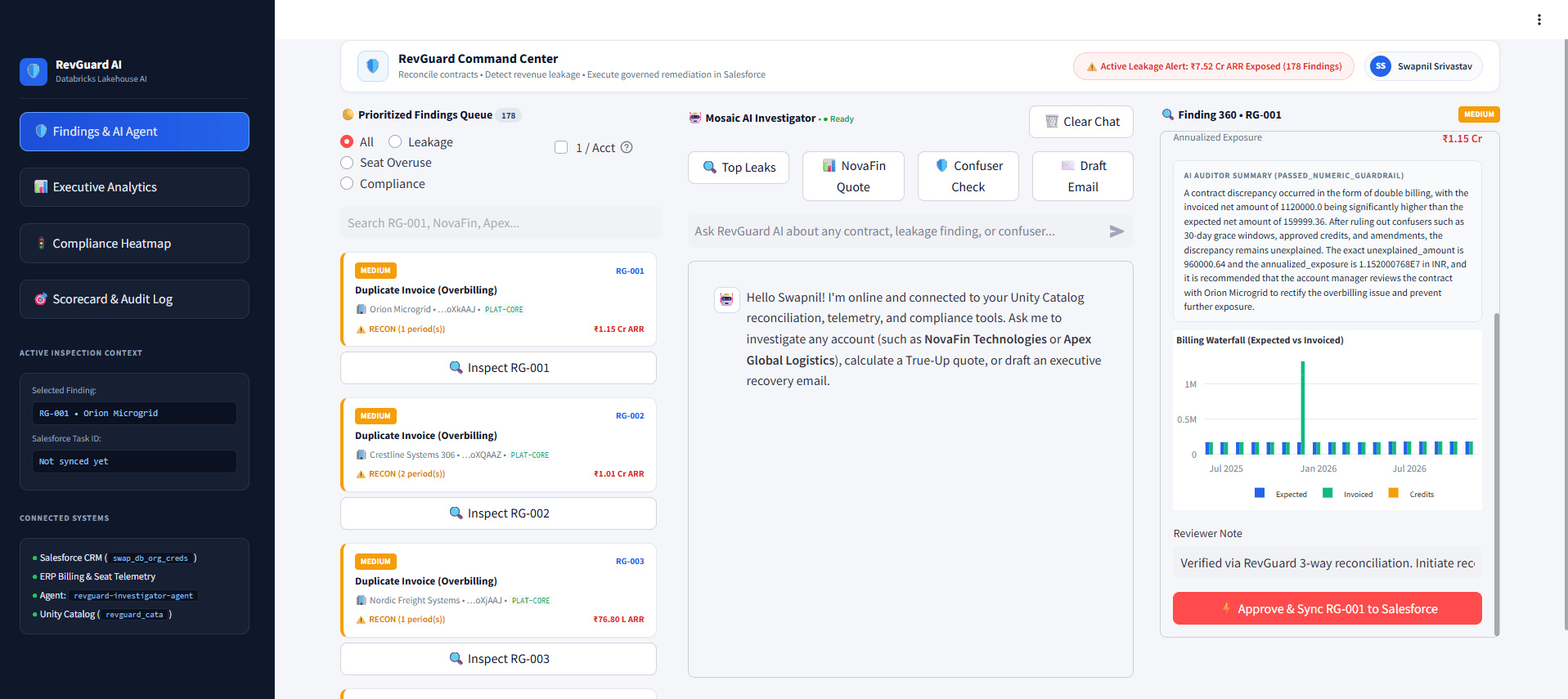
Instead of making Finance teams run database queries, we built an interactive web app inside Databricks—the RevGuard Command Center—organized into four focused tabs:
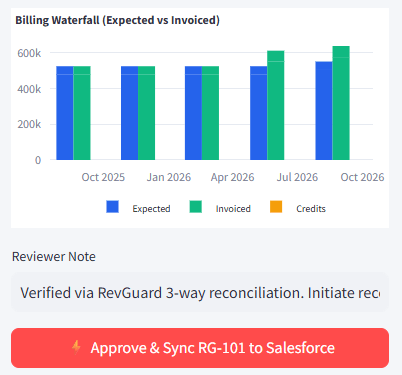
- Findings & AI Agent : On the left sits the Prioritized Findings Queue, ranked by ARR at risk with category filters, search, and a "1 per Account" toggle. The center hosts the live Mosaic AI Investigator. Clicking any finding opens the Finding 360 panel on the right, showing Contract and SKU details, Expected vs. ERP Invoiced totals, the guardrailed AI Auditor Summary, a visual Billing Waterfall Chart, and the Approve & Sync to Salesforce governance button.
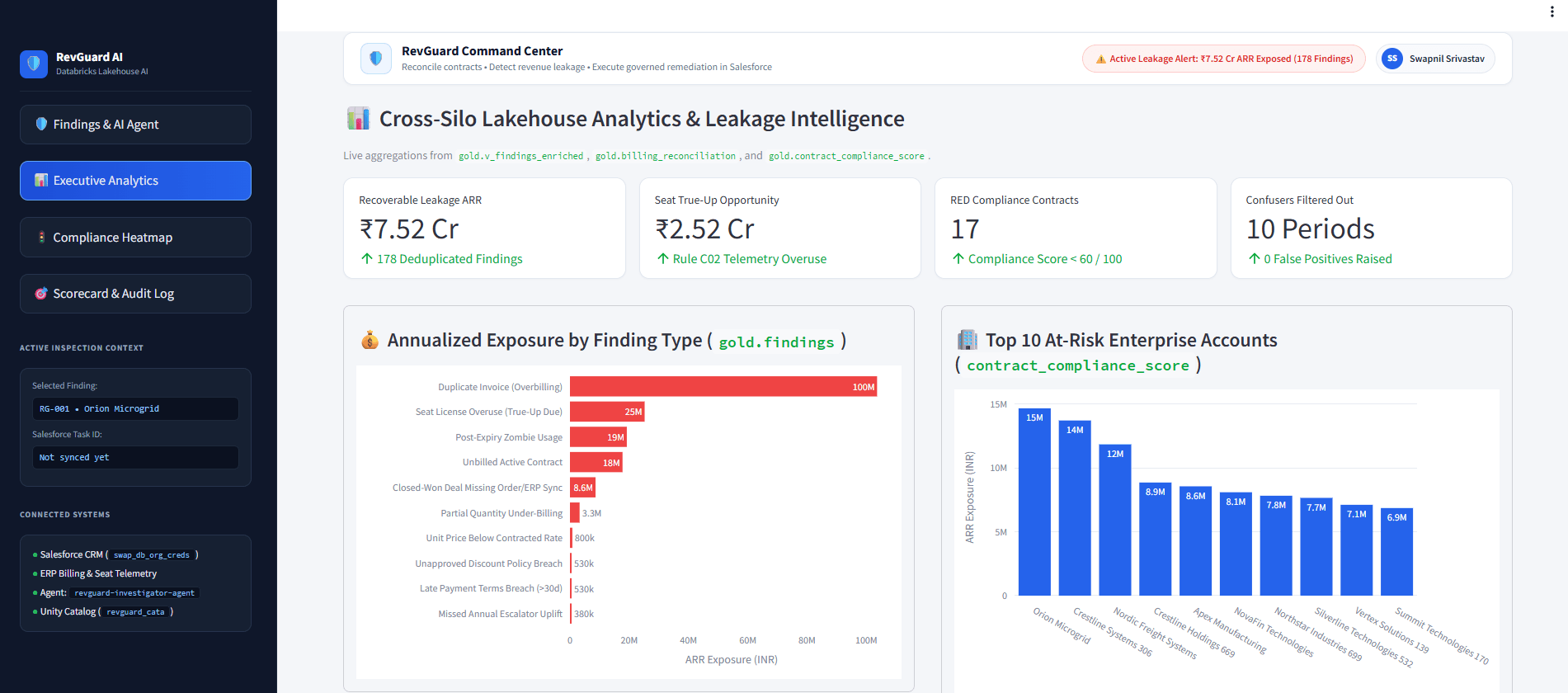
- Executive Analytics: Gives leadership four headline KPI cards (Recoverable Leakage ARR, Seat True-Up Opportunity, RED Contracts, and Confusers Filtered Out) plus bar charts breaking down exposure by finding type and top at-risk accounts.
- Compliance Heatmap: Displays a color-coded matrix of every contract across compliance rules, with RED / AMBER / GREEN filters and 0–100 score bars so RevOps can spot multi-rule breaches instantly.
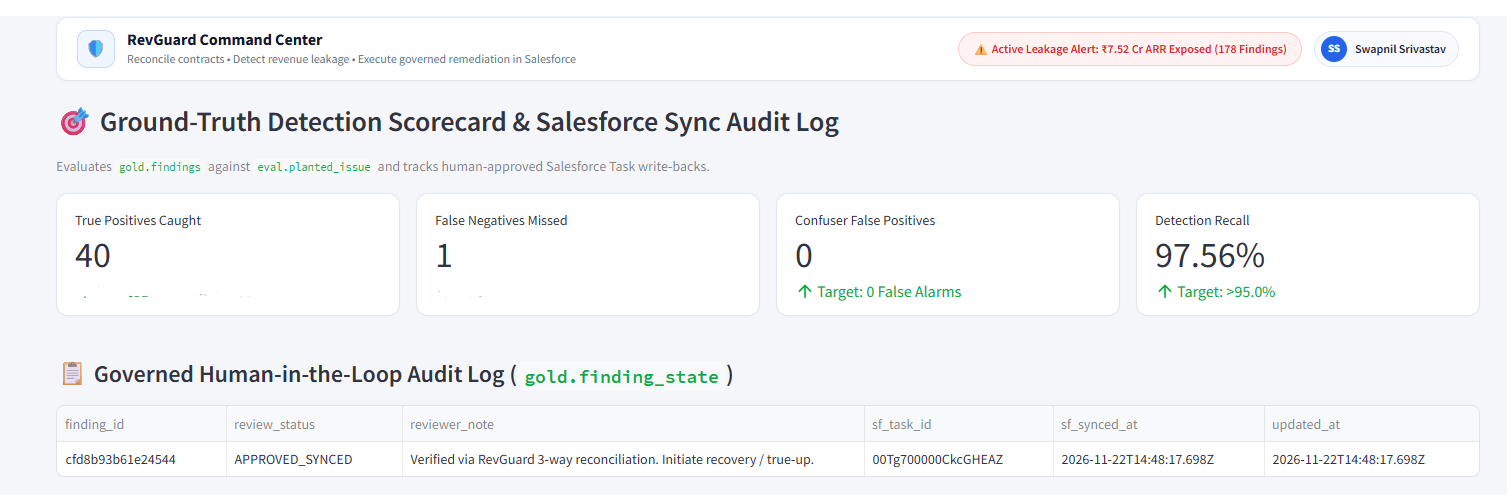
- Scorecard & Audit Log: Grades the engine against a hidden ground-truth benchmark, followed by a permanent audit log of every human-approved Salesforce sync and Task ID.
4. The Mosaic AI Investigator Agent
Dashboards highlight what is wrong, but investigating why usually means exporting spreadsheets and doing manual math. The embedded Mosaic AI Investigator eliminates that friction by letting Finance and RevOps ask questions in plain English. Rather than guessing from memory, the agent calls a suite of live, governed Unity Catalog tools behind the scenes:
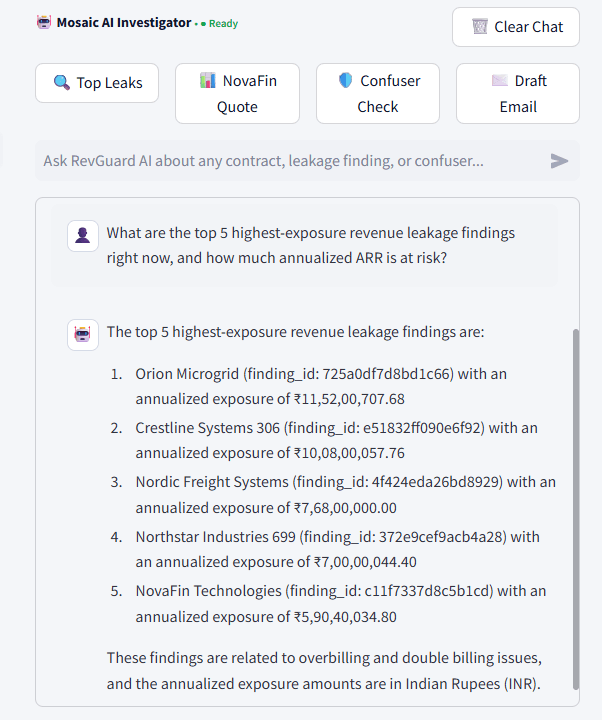
- Portfolio Triage & Compliance Lookup: Ranks top revenue leaks and pulls any contract's 0–100 score and exact compliance rule breaches.
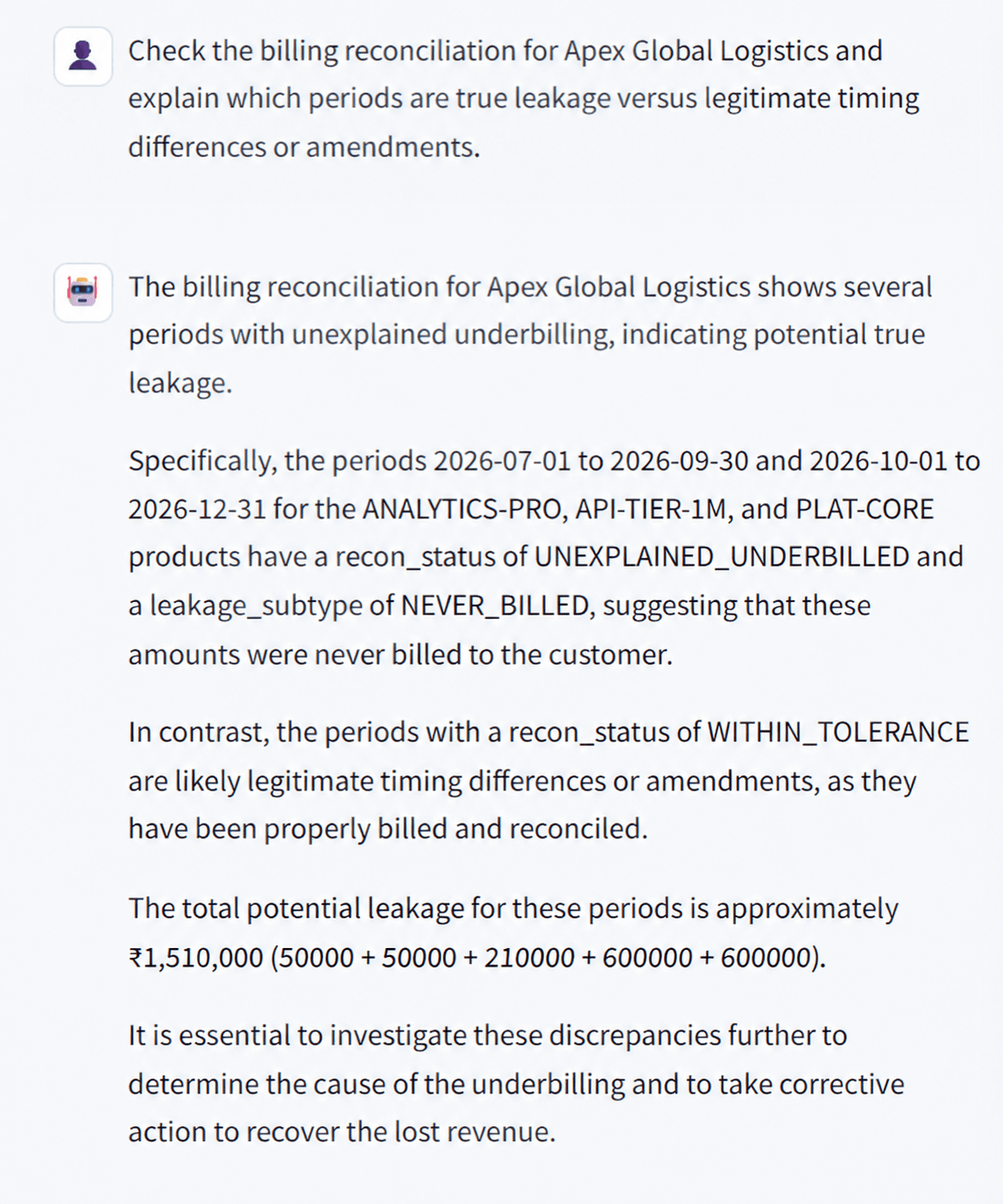
- Billing Waterfall & Confuser Explainer: Breaks down period-by-period invoices to prove which gaps are true leakage versus grace periods, credits, or amendments.
- Seat Telemetry & True-Up Quote Calculator: Checks monthly peak seat usage against contracted seats and calculates exact add-on seat counts and annualized INR True-Up quotes.
- Executive Email Drafter: Writes a ready-to-send recovery or expansion email for the Account Owner grounded strictly in verified figures.
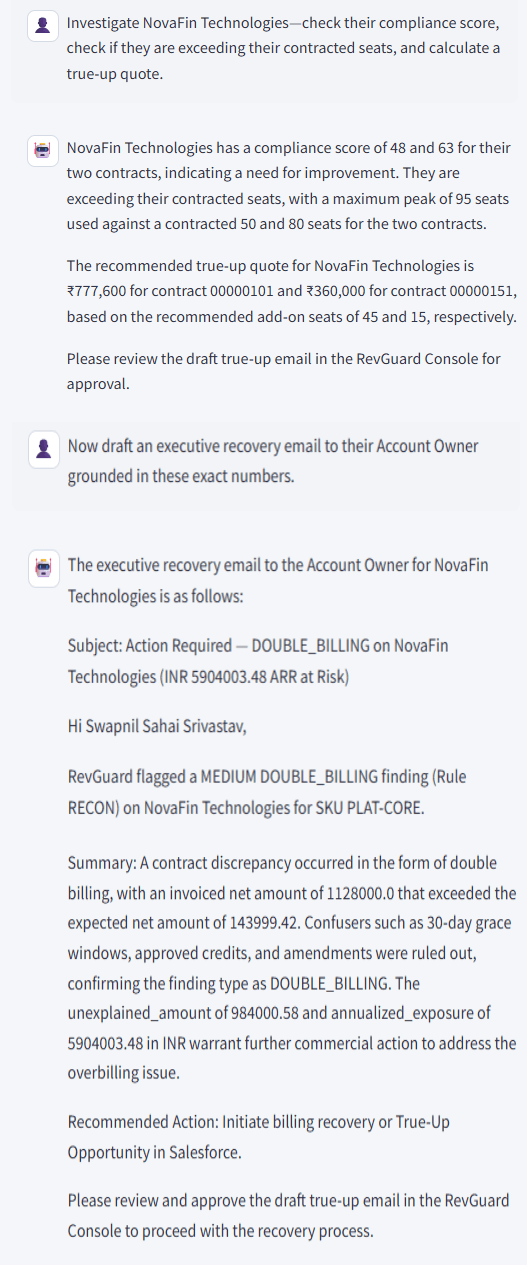
Built for everyday usability and safety: Users can ask by Account Name ("NovaFin Technologies"), Contract Number ("00000170"), or Salesforce ID. The agent supports multi-turn conversation memory, so you can investigate an account first and follow up with "Now draft an email to their owner" without repeating context—and includes one-click shortcut buttons (Top Leaks, Confuser Check, Draft Email). Crucially, the agent is read-only: it investigates and recommends, while humans retain sole authority to push updates to Salesforce.
5. Closing the Loop in Salesforce: The Sales Rep Experience
Insights only create revenue when they reach Account Executives where they already work—inside Salesforce. When Finance clicks Approve & Sync to Salesforce in Databricks, RevGuard connects securely via OAuth 2.0 and performs three duplicate-safe updates: creates or updates a prioritized Audit Task assigned to the Account Owner, updates the Contract with its Compliance Band and structured summary, and stamps the Account with its Compliance Score and Unbilled ARR at Risk. On both Account and Contract record pages, a custom Salesforce Lightning Web Component (RevGuard Revenue Assurance Card) brings that data to life:
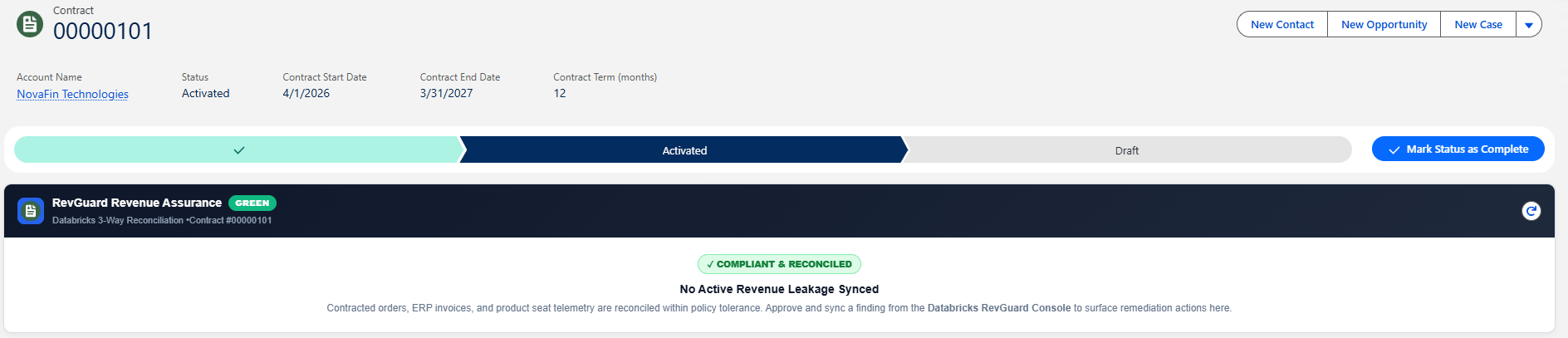
- Healthy State: Shows a clean GREEN — Compliant & Reconciled banner when contracts, billing, and usage align.
- Active Risk State: Switches to a RED or AMBER card displaying Annualized ARR at Risk, Compliance Score, a 3-Way Billing Comparison bar, a red Lakehouse Seat Telemetry bar (e.g., Peak Active vs. Contracted Seats), and the verified AI Auditor Summary.
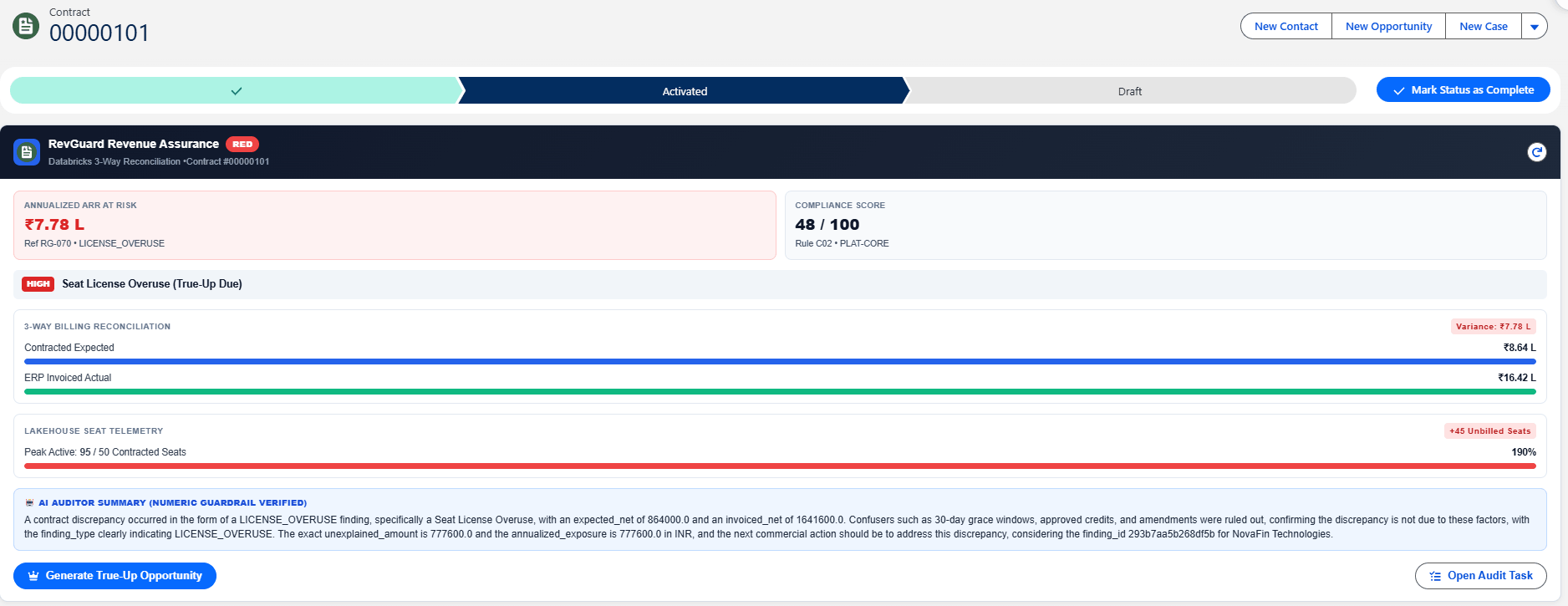
- Two One-Click Actions: Clicking Generate True-Up Opportunity automatically spins up a pre-filled expansion Opportunity (protected against accidental duplicate clicks) and opens it immediately; clicking Open Audit Task jumps straight to the rep's assigned follow-up task.

6. Next Steps with Astrea IT
Eliminating enterprise revenue leakage requires more than periodic spreadsheet audits and reactive invoice checks. By bringing Salesforce contracts and order lines, ERP invoices, credit notes, and product usage telemetry together on Databricks, organizations can detect unbilled revenue earlier, prioritize discrepancies based on ARR at risk, and recover lost revenue more efficiently.
At Astrea IT Services, we combine Salesforce CRM and Databricks Lakehouse capabilities to build AI-powered revenue assurance solutions that help teams investigate billing gaps, verify contract compliance, identify seat true-up opportunities, and execute human-approved recovery actions directly within Salesforce.
Looking to make your revenue assurance and contract compliance smarter and more proactive?
Reach out to our engineering team to explore an AI-Powered Revenue Assurance & Contract Compliance Solution tailored to your organization's needs. Contact Us
If you're interested in exploring more Databricks solutions, visit our Databricks page.