Documents are the lifeblood of Salesforce. Every day, invoices, contracts, resumes, onboarding forms, and compliance sheets are uploaded across various business processes. While Salesforce handles file storage efficiently, the real challenge begins after the upload.
Most organizations still rely heavily on manual document review. Teams spend countless hours opening PDFs, scanning Word documents, and parsing Excel sheets just to extract information or find specific details. This manual dependency slows down operations and creates a poor user experience.
To solve this problem, We’ve built an Intelligent Document Processor directly inside Salesforce using Lightning Web Components (LWC), JavaScript-based file parsing libraries, and Salesforce AI.
The core idea was simple:
- Upload documents directly inside Salesforce.
- Extract document content in real time.
- Ask questions about the uploaded files.
- Generate contextual, AI-powered responses instantly.
Instead of treating documents as static attachments, this solution transforms them into interactive, searchable, and conversational data.
Why Traditional File Processing in Salesforce is Difficult
At first glance, processing files inside Salesforce sounds straightforward: a user uploads a file, the system extracts the content, and the data is analyzed. However, handling complex files server-side in Salesforce introduces several technical roadblocks:
- Apex Heap Size Limitations: Large PDFs and Excel files can quickly consume heap memory. This is especially problematic when processing multi-page PDFs, handling raw binary data, or performing synchronous parsing.
- No Native Support for File Parsing: Salesforce does not provide out-of-the-box utilities for extracting raw text from PDFs, DOCX, or XLSX files, often forcing developers to rely on third-party API integrations.
- Performance & User Experience: The traditional approach—uploading the document, sending it to the server, processing asynchronously, and waiting for a response—creates unnecessary latency and a clunky user experience.
The Core Strategy: Shifting to Client-Side Processing
Instead of relying heavily on Apex and hitting server-side limits, we moved the document parsing logic to the client side using JavaScript libraries directly inside the LWC.
This approach dramatically reduces server load, improves UI responsiveness, and completely bypasses Apex heap size limitations. Once the raw text is extracted in the browser, it is passed to Salesforce AI, allowing users to interact with their documents conversationally.
Solution Architecture & User Flow
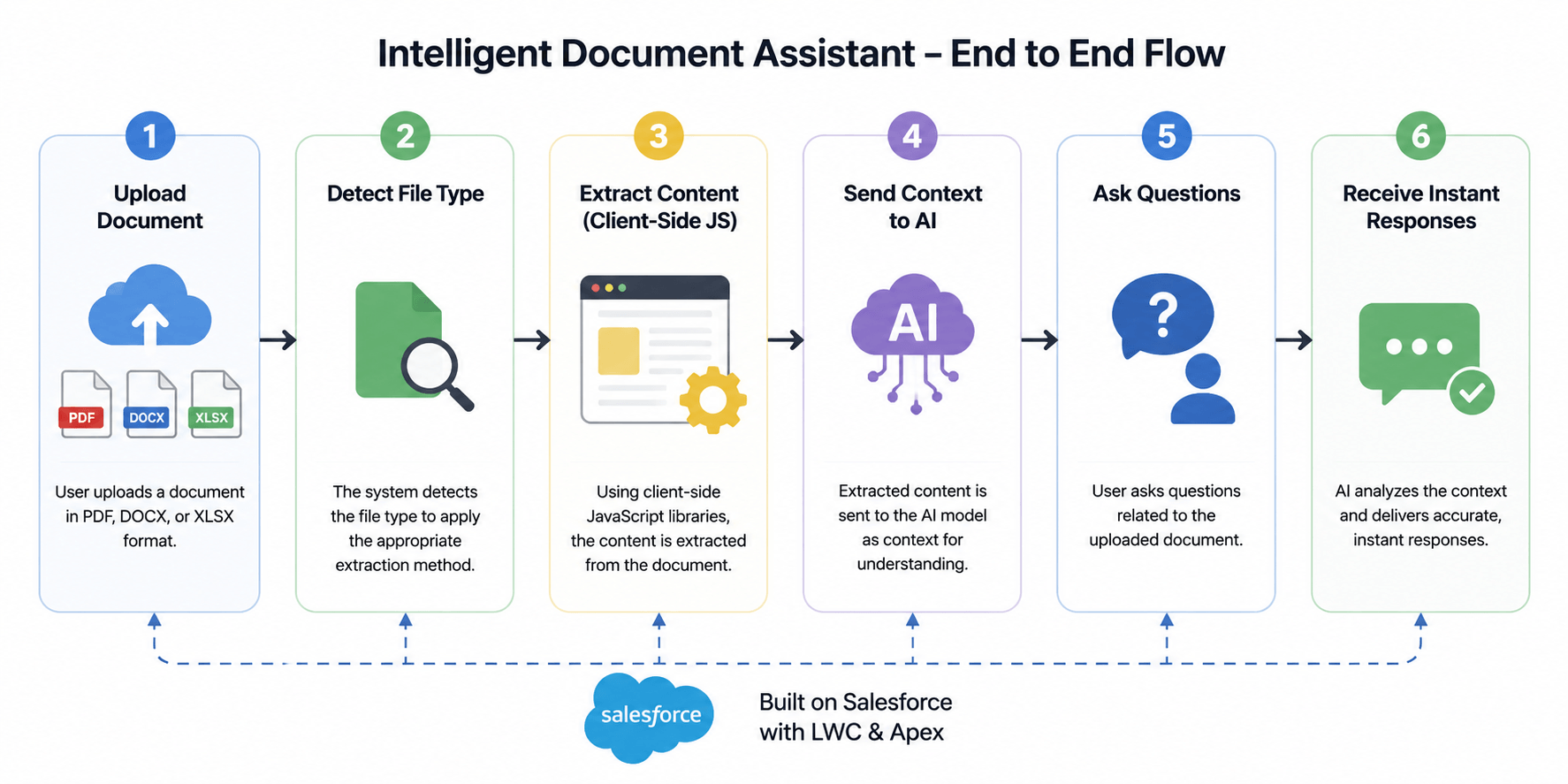
The application follows a streamlined, six-step execution flow:
1. Upload Document
The process starts when a user uploads a document inside Salesforce. The application currently supports PDF, DOCX, and XLSX files.
2. Detect File Type
Once uploaded, the system automatically identifies the file type and routes it to the appropriate parsing library.
3. Extract Content Using Client-Side JavaScript
The document content is extracted directly inside the browser using JavaScript libraries integrated with LWC. This client-side approach helps reduce server-side processing and avoids Apex heap size limitations.
4. Send Context to Salesforce AI
After extraction, the processed document content is sent to Salesforce AI as contextual input for intelligent response generation.
5. Ask Questions About the Document
Users can interact with the uploaded document conversationally by asking questions related to its content.
6. Receive Instant AI Responses
Finally, Salesforce AI generates contextual responses based on the uploaded document and displays them directly inside the chat interface.
Supported File Types & Extraction Libraries
The current MVP supports three major file formats, each utilizing a dedicated JavaScript library for client-side extraction.
1. Processing PDFs with pdf.js
PDF extraction was implemented using pdf.js, a powerful library developed for rendering and extracting content directly in the browser.
It reads multi-page PDFs and extracts text page-by-page entirely client-side. This makes it a perfect fit for LWC, minimizing Apex dependencies and delivering lightning-fast extraction.
2. Processing Word Documents with Mammoth.js
For DOCX files, we used Mammoth.js library.
Mammoth is designed specifically to extract clean, raw text from Microsoft Word documents while ignoring unnecessary formatting complexity. Since AI models care about textual data rather than styling, this provides highly accurate and readable input for the AI.
3. Processing Excel Files with SheetJS
Spreadsheet processing was handled using SheetJS library, the industry standard for reading spreadsheet data in JavaScript.
It easily reads XLSX files, accesses workbook sheets, and converts complex row/column structures into plain text, making tabular data completely AI-readable.
AI-Powered Conversational Experience
After extraction, the document content is sent to Salesforce AI.
Users can then ask questions such as:
- “Summarize this document”
- “What is the invoice amount?”
- “What technologies are mentioned in this resume?”
- “What is the contract renewal date?”
The AI responds based on the uploaded document content, creating a conversational document experience directly inside Salesforce.
For AI integration and response generation, Salesforce AI Models were used, where the extracted document content is combined with the user query before being sent to the AI model. This helps the model generate more contextual and accurate responses based on the uploaded document.
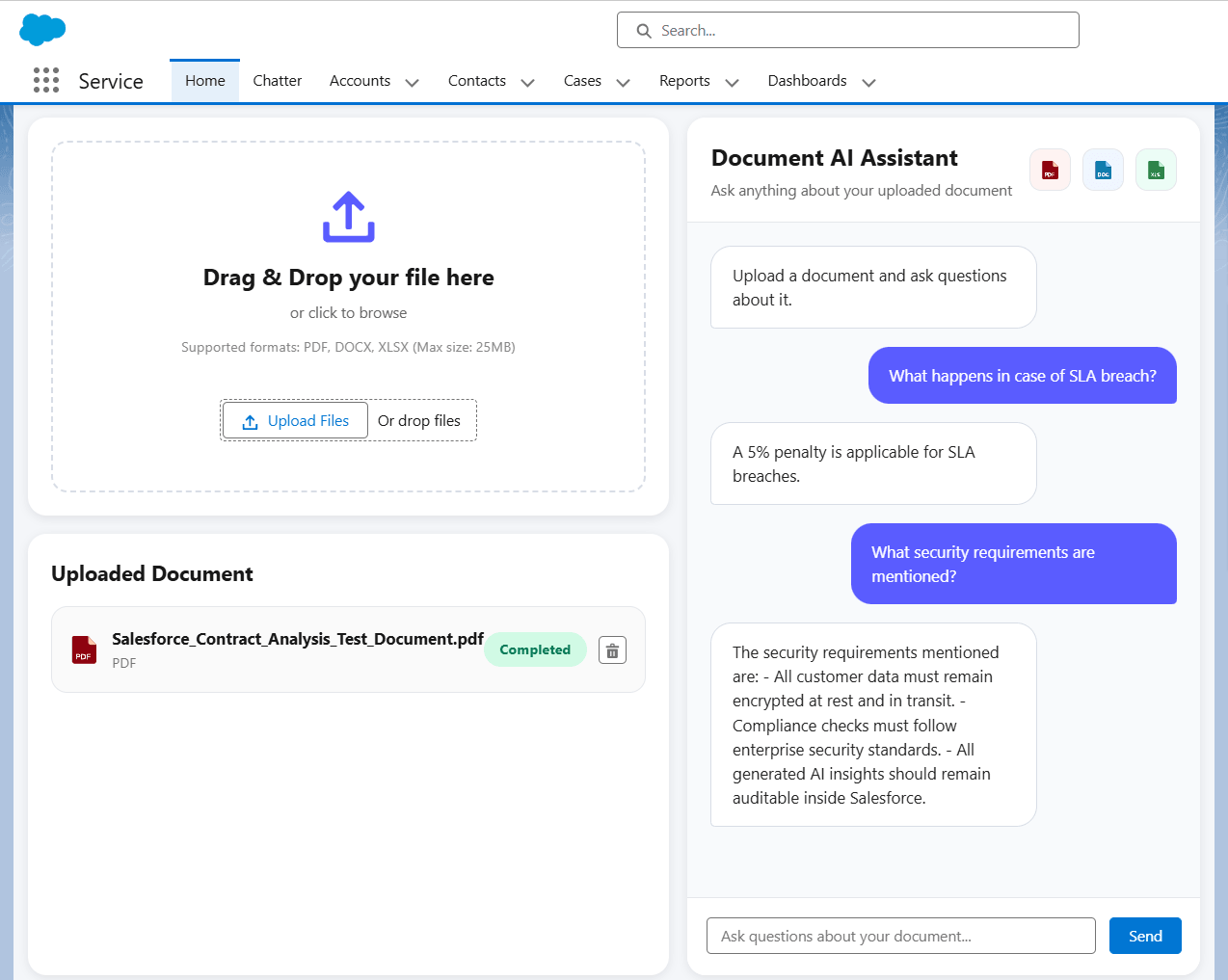
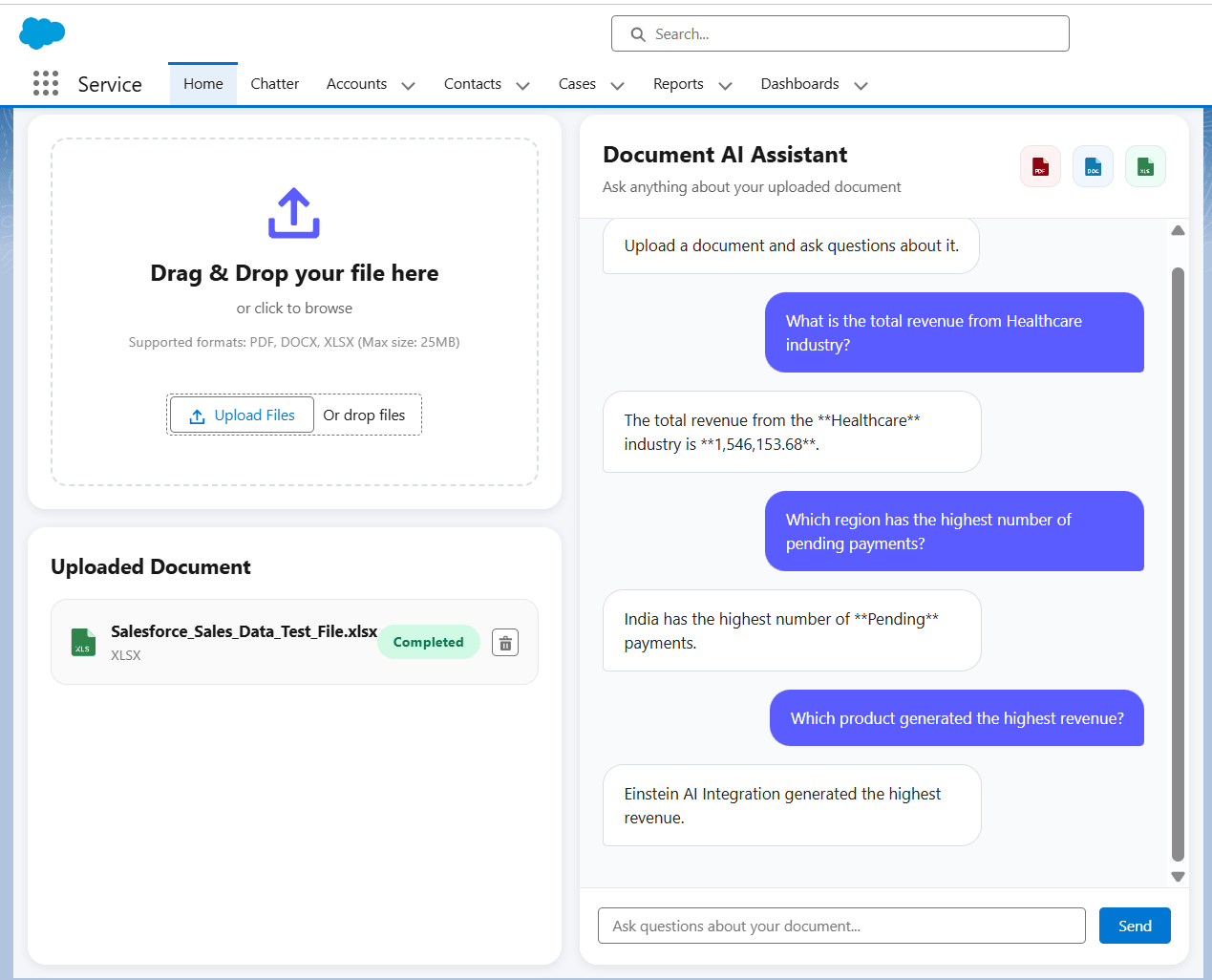
Seeing the Intelligent Document Processor in Action
The Intelligent Document Processor allows users to upload PDF, DOCX, and XLSX files directly inside Salesforce and interact with the extracted content conversationally using AI.
Once a document is uploaded, the system automatically detects the file type, extracts the content client-side using JavaScript libraries, and sends the processed context to Salesforce AI for intelligent response generation.
Potential Business Use Cases
- Contract Intelligence
Sales and legal teams can quickly analyze agreements, extract renewal dates, identify important clauses, and summarize lengthy contracts. - Resume Screening
Recruiters can upload resumes and instantly ask questions related to skills, experience, certifications, or technologies. - Invoice & Financial Processing
Finance teams can extract invoice totals, vendor information, payment due dates, and validate financial records conversationally. - Customer Support & Case Resolution
Support agents can upload troubleshooting documents or logs and ask contextual questions directly inside Salesforce. - Sales Data Analysis
Business users can upload spreadsheets and generate quick insights using conversational AI instead of manually analyzing rows and columns.
Current Limitations
The current implementation is designed as an MVP and still has a few practical limitations:
- Large documents may increase AI token usage and response latency
- Scanned or image-based PDFs currently do not support OCR extraction
- Very large Excel sheets may introduce noisy or repetitive context
- AI responses are limited to the extracted document context only
Conclusion
Traditional document handling inside Salesforce is often limited to file storage and manual review. By combining Lightning Web Components, JavaScript-based document extraction, and Salesforce AI, documents can become intelligent, searchable, and conversational.
This approach reduces server-side processing while delivering a faster and more interactive user experience directly inside Salesforce. As Salesforce AI capabilities continue to evolve, intelligent document processing can become a strong foundation for smarter enterprise workflows and AI-driven automation.
For any queries please reach out to support@astreait.com