Introduction:
Ampscript is a scripting language used in Salesforce Marketing Cloud that allows you to personalize and customize your email messages, landing pages, and other digital marketing assets. It provides dynamic content, data manipulation, conditional logic, and integration capabilities. Here are five code samples to demonstrate the power and functionality of Ampscript:
1. Personalization and Dynamic Content:
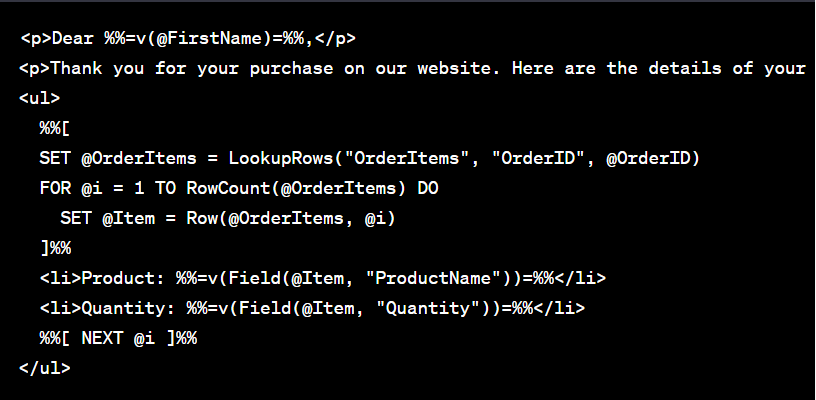
In this example, Ampscript is used to personalize the email by retrieving the recipient's first name and displaying order details dynamically based on the OrderItems data extension.
2. Data Manipulation and Transformation:

Here, Ampscript calculates the discounted price by applying a 10% discount to the total price and formats the values as currency.
3. Conditional Logic:

Ampscript allows you to add conditional statements to display different content based on conditions, such as the product category. This enables personalized messaging based on customer preferences.
4. Retrieve and Display External Data:
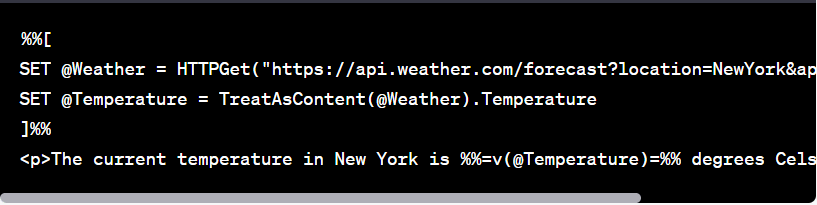
The second statement is getting cut off in the image above. It is: SET @Weather = HTTPGet("https://api.weather.com/forecast?location=NewYork&apiKey=YOUR_API_KEY")
In this example, Ampscript uses the HTTPGet function to retrieve weather data from an external API. The data is then parsed and displayed in the email, providing real-time information to the recipient.
In many scenarios, Marketing Cloud needs to integrate with external systems such as CRM platforms, third-party services, or external data providers. Salesforce Marketing Cloud provides a robust set of APIs contacts, and automate campaigns programmatically. These APIs enable seamless integration between Marketing Cloud and other enterprise systems.
5. List and Data Extensions Manipulation:
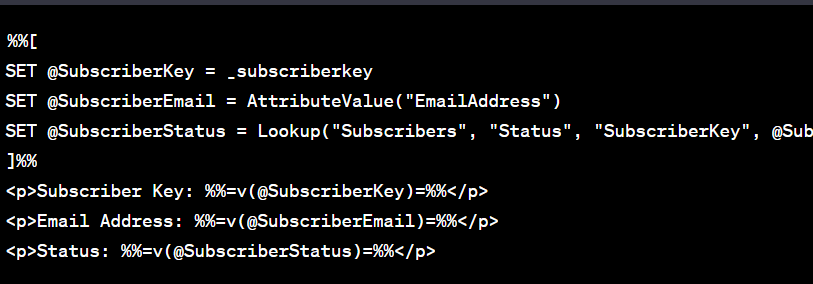
Here, Ampscript retrieves subscriber information from the "Subscribers" data extension and assigns it to variables. This allows you to personalize and display subscriber details within your email content.
Managing subscriber data efficiently is an important part of Salesforce Marketing Cloud implementations. Many organizations use Marketing Cloud SFTP to securely transfer large volumes of data between external systems and Marketing Cloud. This allows businesses to import subscriber lists, export campaign data, and automate file-based integrations.
Ampscript empowers marketers to create dynamic and personalized experiences by leveraging data, conditional logic, and external integrations. It enhances the effectiveness of email marketing campaigns, landing pages, and other digital assets, ultimately driving engagement and conversions.
Salesforce Marketing Cloud provides a powerful ecosystem for digital marketing automation, including tools for personalization, data integration, API connectivity, and campaign management. Marketers and developers can leverage these capabilities to build highly scalable and personalized customer engagement strategies. To explore more tutorials, implementation guides, and best practices related to Salesforce Marketing Cloud, visit our Salesforce Marketing Cloud page.