Introduction
Ask an LLM about public knowledge and it will usually do well. Ask about your company's policies, product catalog, or contracts, and it has no direct access to that information—it wasn't trained on your data.
Retrieval-Augmented Generation (RAG) solves this by giving the model relevant information at query time, with vector search providing the retrieval layer. Together, they enable AI systems to work with an organization's documents and data while grounding answers in actual sources.
In this post, we'll break down vector search and RAG, see how they fit together, and build the complete pipeline on Databricks. We'll use an AI agent that validates vendor invoices against company policy as a practical example, but the same pattern applies to internal wikis, contracts, support tickets, product manuals, and compliance documents.
The problem: LLMs don't know what they weren't told
LLMs have two fundamental limitations when it comes to your organization's data:
- They don't know what changed after training — new products, updated policies, or recent support tickets.
- They don't know your private data — internal documents were never part of their training data.
Ask an LLM, “What's our policy on invoices over $15,000?” and it may admit it doesn't know or, worse, provide a plausible but incorrect answer. Neither works for a business process where accuracy matters.
Retraining the model isn't a practical solution: it's expensive, slow, and becomes outdated as soon as your documents change. Instead, RAG gives the model access to the relevant documents at query time, so it can generate answers based on current, actual information.
What is Vector Search?
Vector search finds text based on semantic similarity, rather than matching exact words.
For example, a policy might say “purchases exceeding $15,000 require CFO sign-off,” while a user asks “what's the threshold for large expenses?” A keyword search may miss the connection, but vector search recognizes that the two statements have similar meaning.
It does this using embeddings — numerical representations of text that capture its meaning. An embedding model converts each piece of text into a vector, placing semantically related content close together in a high-dimensional space.
When a query is made, it is converted into the same type of vector, and the system retrieves the nearest vectors from the index. In other words, vector search turns semantic search into a similarity problem in vector space.
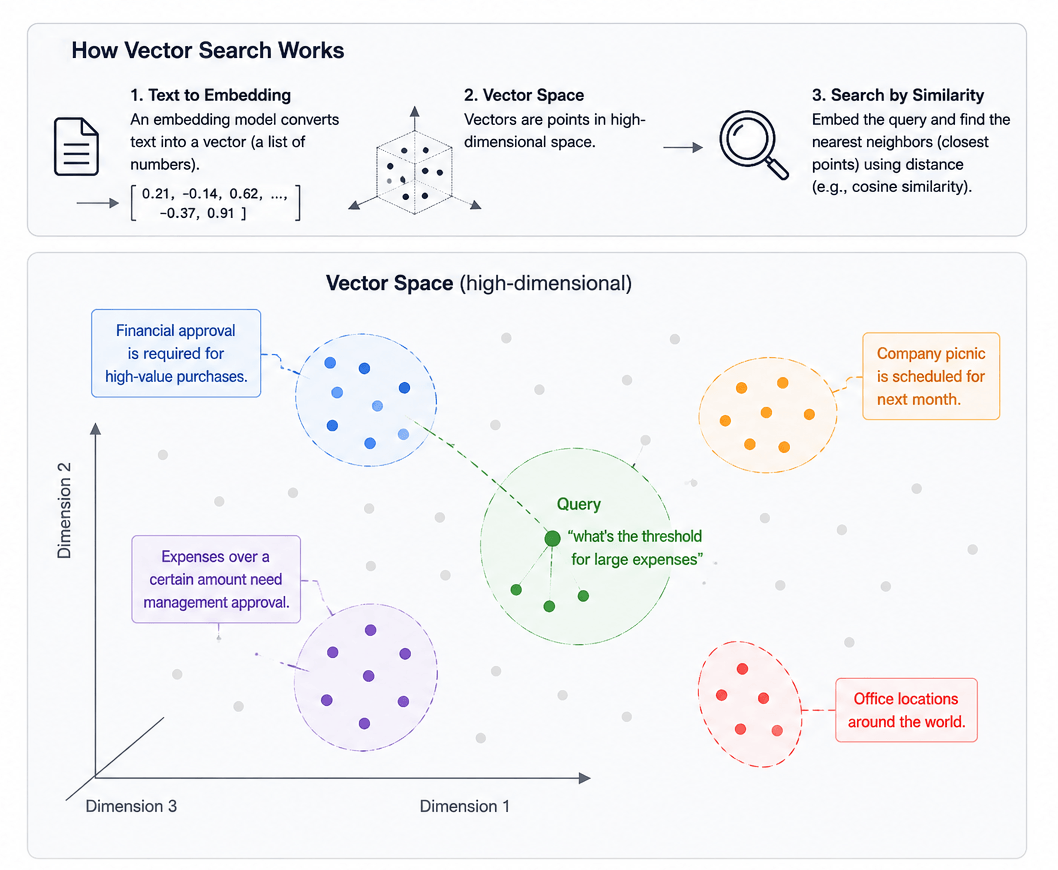
This is why vector search is often called semantic search — it retrieves based on meaning, not string matching.
What is RAG, and how does it use Vector Search?
Retrieval-Augmented Generation is an architecture pattern with three steps:
- Retrieve— given a user's question, use vector search to pull the most relevant chunks of text from a knowledge base.
- Augment— insert those retrieved chunks into the prompt sent to the LLM, alongside the original question.
- Generate— the LLM answers using the retrieved material as grounding context, rather than relying solely on its training data.
Vector search is specifically the retrieval half of that pipeline. It's the mechanism that finds the five most relevant paragraphs out of a hundred-page document in milliseconds — something an LLM can't do on its own, since you generally can't fit an entire knowledge base into a single prompt.
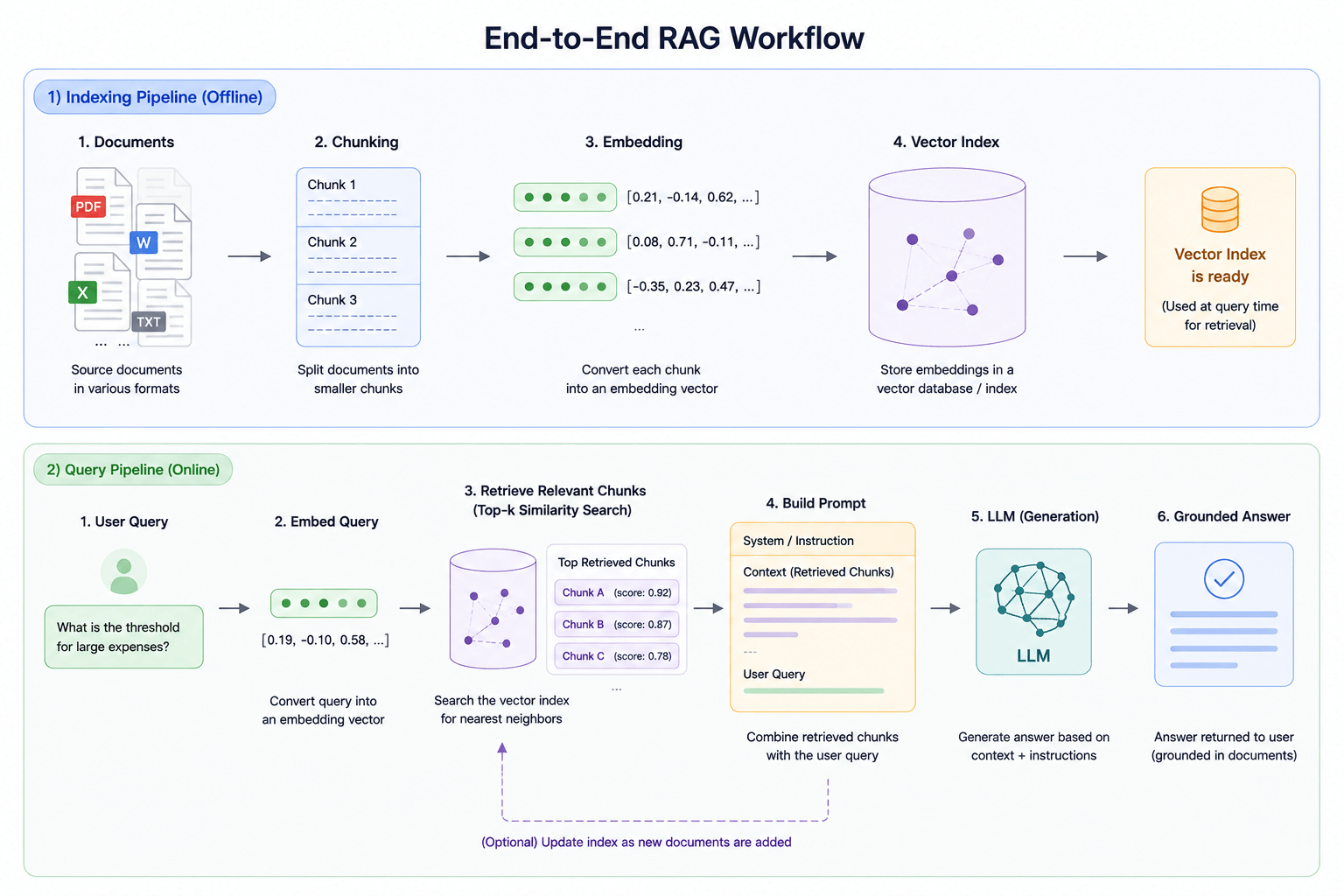
The payoff: answers that are grounded in real, current source material, with a traceable link back to exactly which document or clause produced them. This matters enormously for anything involving compliance, policy, or decisions someone might need to justify later.
Where this fits in a real business process
RAG shows up anywhere an organization needs an AI system to reason over its own written knowledge rather than general internet knowledge:
- Customer support— answering questions grounded in actual product documentation, not generic troubleshooting advice.
- Legal and compliance— checking a contract or process against an internal policy or playbook.
- Internal knowledge search— surfacing the right internal wiki page or runbook instead of a generic answer.
- Financial operations— validating that a transaction, invoice, or expense complies with company rules.
To make this concrete, we built an internal example around that last category: an AI agent that validates vendor invoices against a company's Accounts Payable policy.
Case study: An invoice validation agent
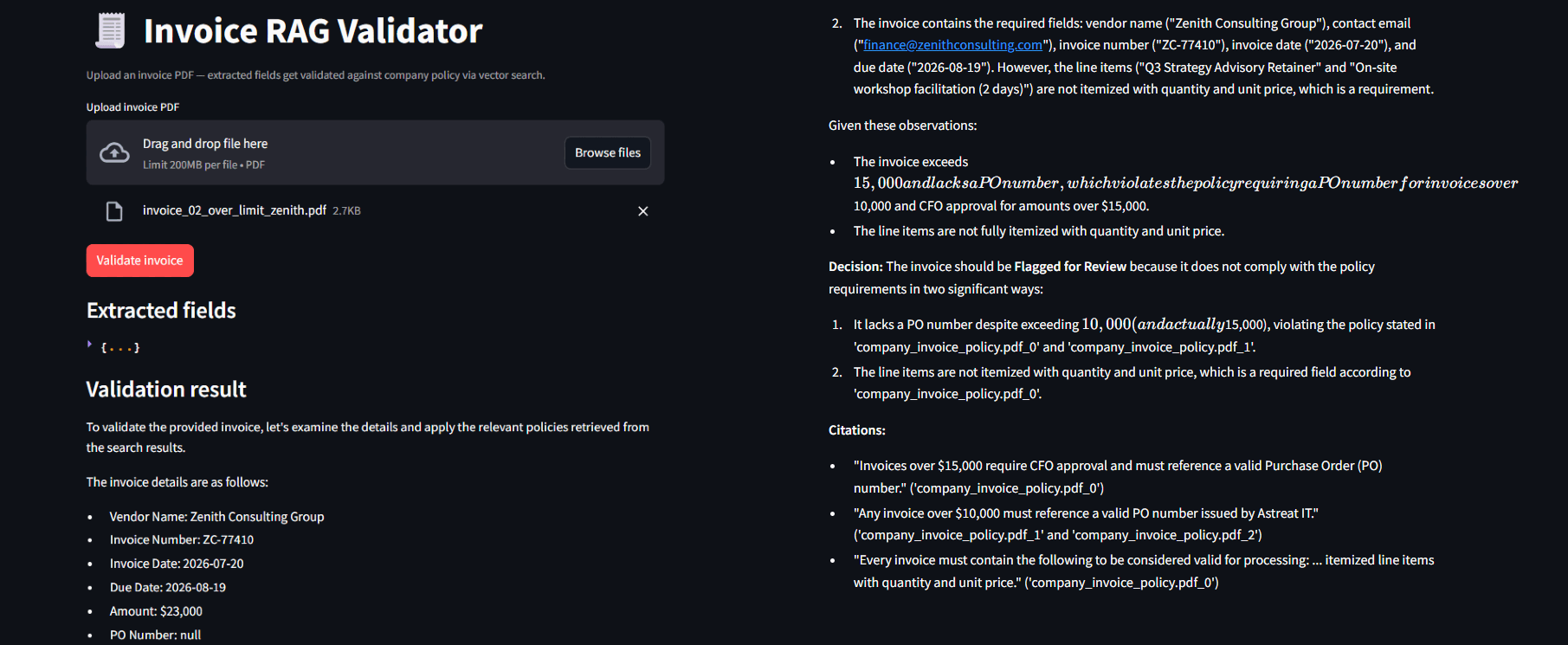
The idea is simple to describe and genuinely useful in practice: upload an invoice PDF, and an AI agent checks it against a company's AP policy — spending thresholds, required fields, approved vendor lists, purchase order requirements — and decides whether to approve it, flag it for human review, or reject it as incomplete, citing the exact policy clause behind the decision.
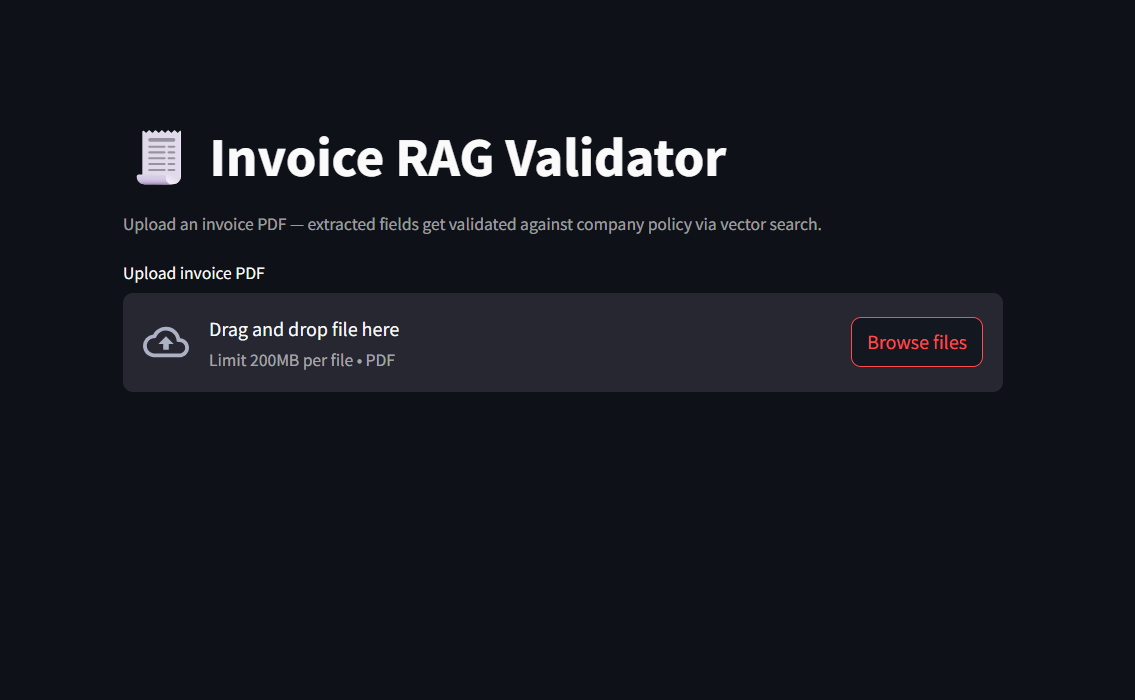
This is a good illustration of why grounding matters. Ask an LLM in isolation "is a $23,000 invoice with no purchase order okay to pay?" and it can only guess at what's reasonable. With RAG in place, the agent retrieves the organization's actual rule — for example, "invoices over $15,000 without a PO must be flagged for manual review" — and cites it directly. The decision becomes traceable and auditable, not a plausible-sounding hallucination.
The rest of this post walks through how a pipeline like this gets built on Databricks, using this project as the running example.
Implementing RAG on Databricks
Databricks' managed vector search product is called AI Search (previously "Vector Search" — same underlying mechanics, newer name). Here's the pipeline end to end.
1. Land your source documents
Documents start in a Unity Catalog Volume . For our invoice agent, this held the company's AP policy PDF; in another use case, it might hold product manuals, contracts, or a support knowledge base.
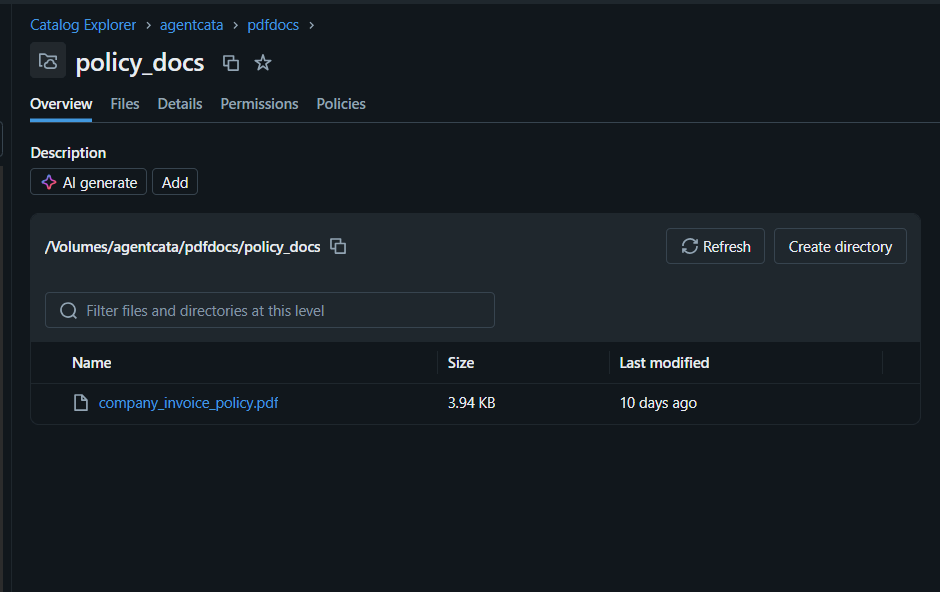
Documents start in a Unity Catalog Volume . For our invoice agent, this held the company's AP policy PDF; in another use case, it might hold product manuals, contracts, or a support knowledge base.
2. Chunk the documents
LLMs and vector indexes work with limited context windows, so documents need to be split into smaller, overlapping pieces before they're embedded:
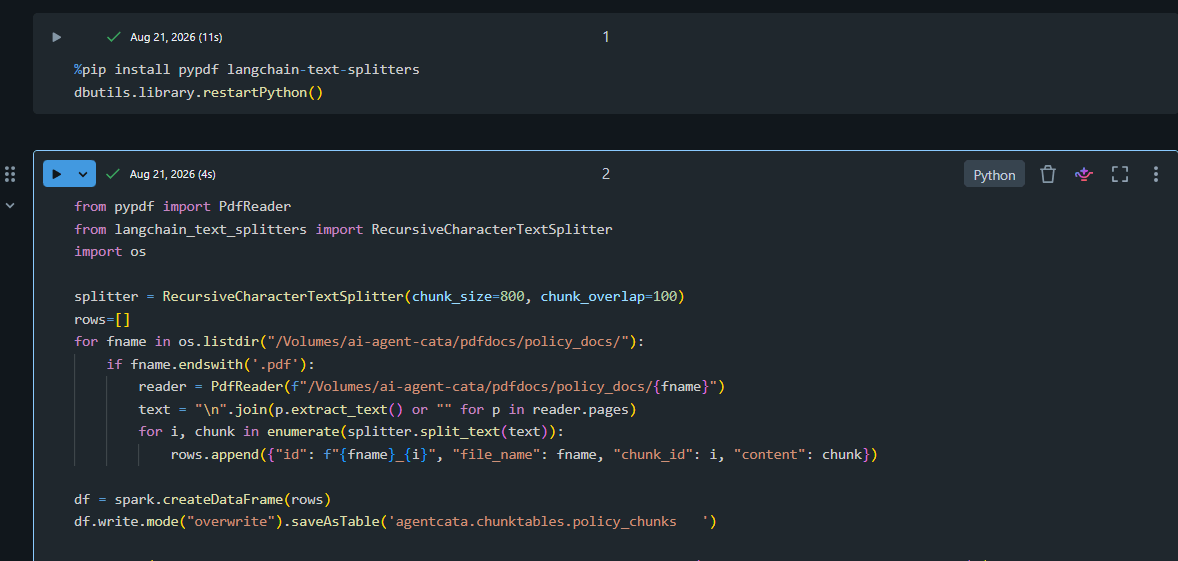
chunk_overlap keeps a bit of shared text between consecutive chunks, so a sentence that straddles a boundary doesn't lose context. The right chunk size is workload-dependent — too small and you lose surrounding context a clause depends on; too large and irrelevant text dilutes what gets embedded, hurting retrieval precision. This is usually worth tuning empirically rather than guessing once and moving on.

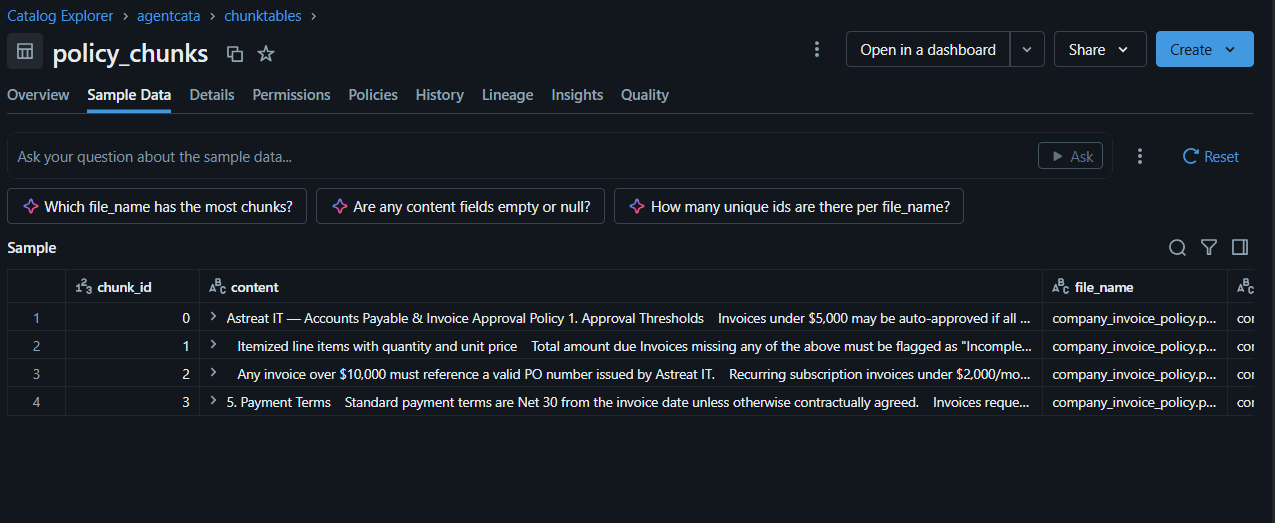
Change Data Feed needs to be enabled on the resulting table — it's what lets the vector index sync incrementally as the table changes, rather than requiring a full manual re-index:
3. Create an AI Search endpoint
Before an index can exist, it needs somewhere to actually run — an AI Search endpoint is the compute layer that serves your index and handles queries against it. This is a one-time setup step per endpoint; multiple indexes can share the same endpoint later if needed.
From Compute → AI Search → Create endpoint
- Give it a name.
- Choose an endpoint type/size based on expected query volume — a small endpoint is plenty for prototyping or a single moderate-traffic use case.
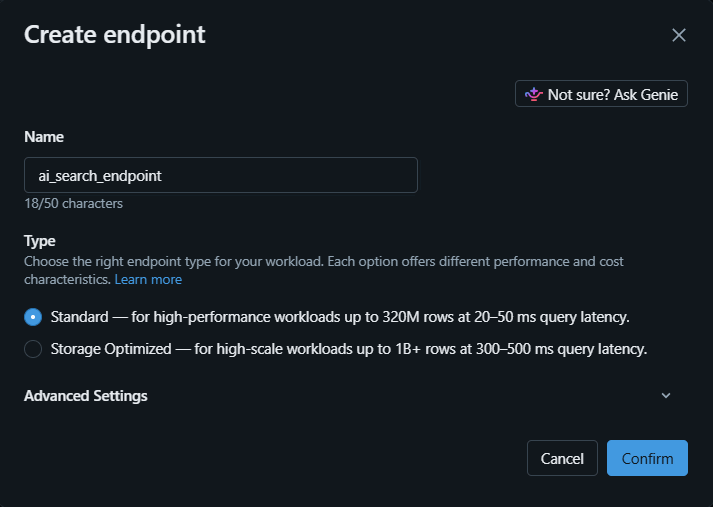
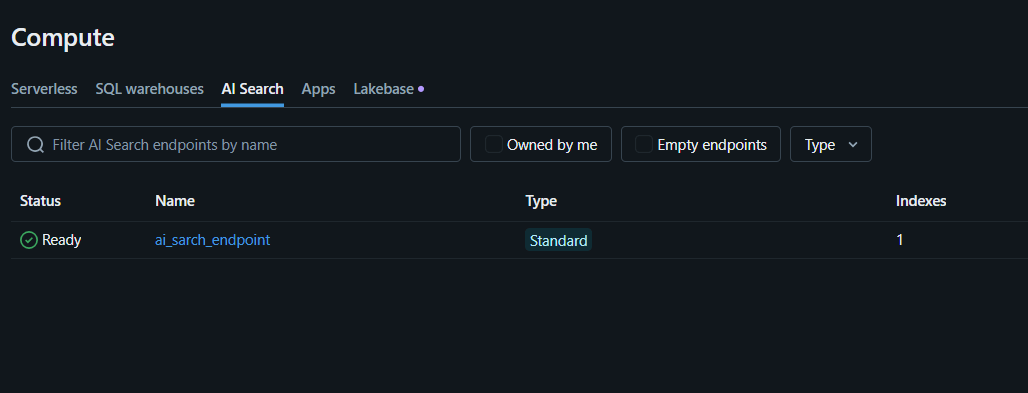
It takes a few minutes to provision. Once it shows as ready, it's ready to host one or more indexes.
4. Create the vector index
With an endpoint in place, this is where Databricks' managed embedding pipeline takes over — no separate embedding model to host, version, or maintain.
From Catalog Explorer → your chunked table → Create → AI Search index:
- Endpoint: the one created in the previous step
- Primary key: the chunk's unique ID
- Embedding source column: the chunk text
- Embedding model: a Databricks-hosted model (e.g. databricks-gte-large-en)
- Sync mode: Triggered (re-syncs on demand) or Continuous (syncs automatically as source data changes), depending on how often the underlying documents update
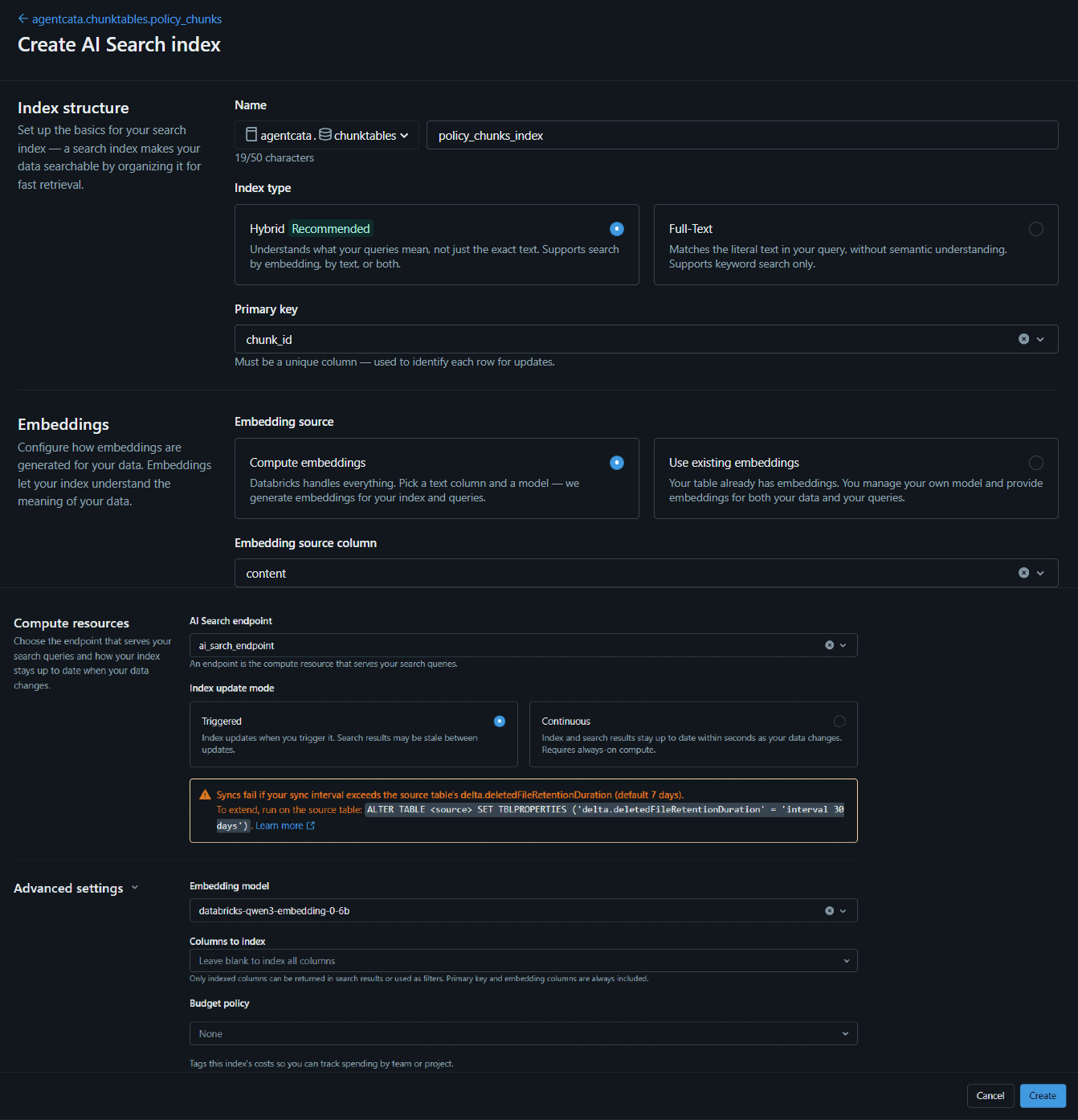
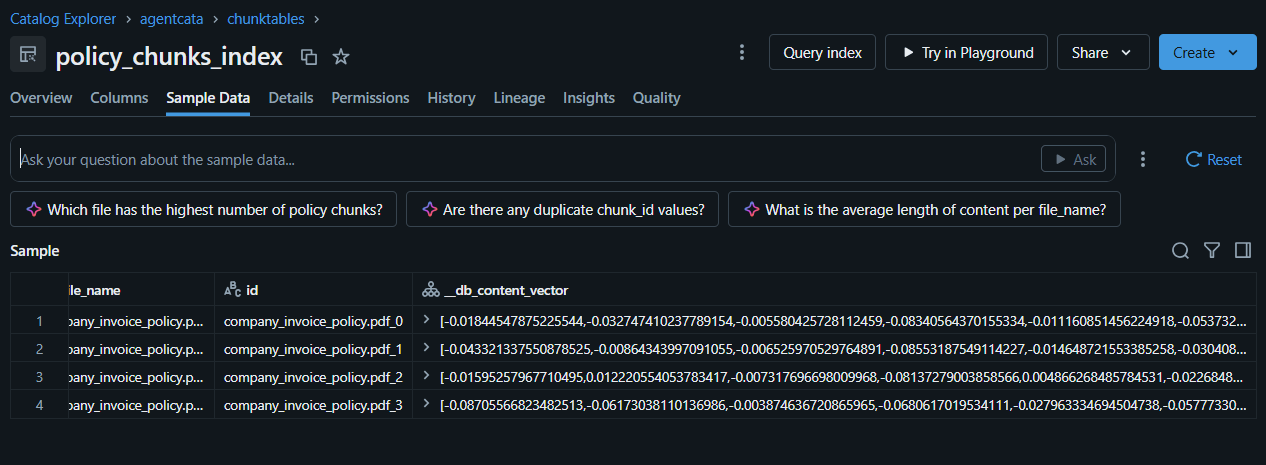
Once created, every row in the source table is automatically embedded and indexed — and any future rows get picked up on the next sync, with no manual embedding management required.
5. Prototype conversationally in Playground
Databricks' Playground lets you attach a vector index as a tool to an LLM and chat with it directly, with no code — the fastest way to iterate on prompt wording and confirm the retrieval tool is actually being invoked correctly.
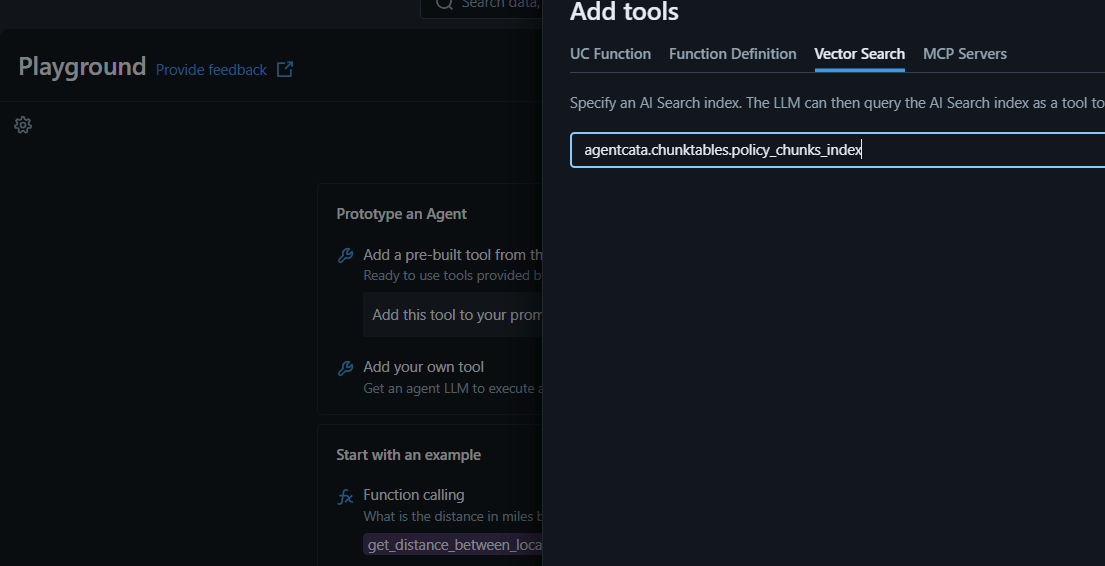
For the invoice agent, this step is where we iterated on the validation logic itself — testing different invoice scenarios and refining the system prompt until the reasoning consistently cited the right policy clause for each type of violation.
6. Turn the prototype into a deployable agent
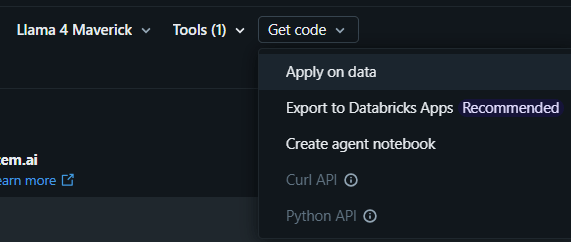
Playground's Get code option generates a starter notebook that packages the tested prompt and tool into an agent, ready to be logged as an MLflow model:
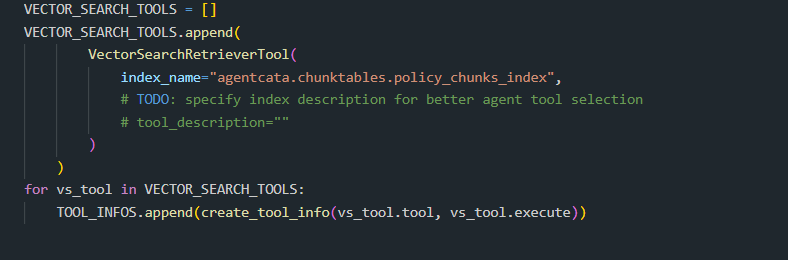
The generated code includes a tool-calling loop that lets the LLM invoke the retrieval tool as many times as it needs before producing a final answer — this is what turns a one-shot RAG lookup into something closer to autonomous reasoning: the model decides when and what to search for based on the question in front of it.
7. Log, register, and deploy through the notebook
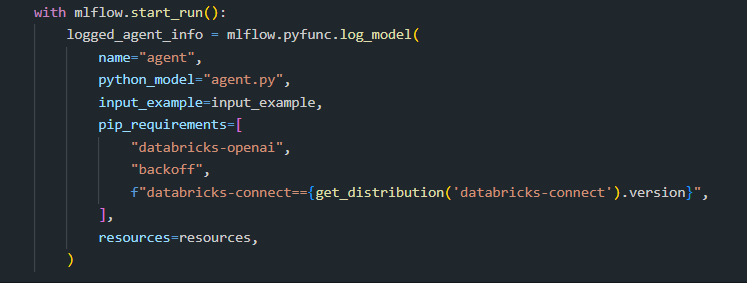
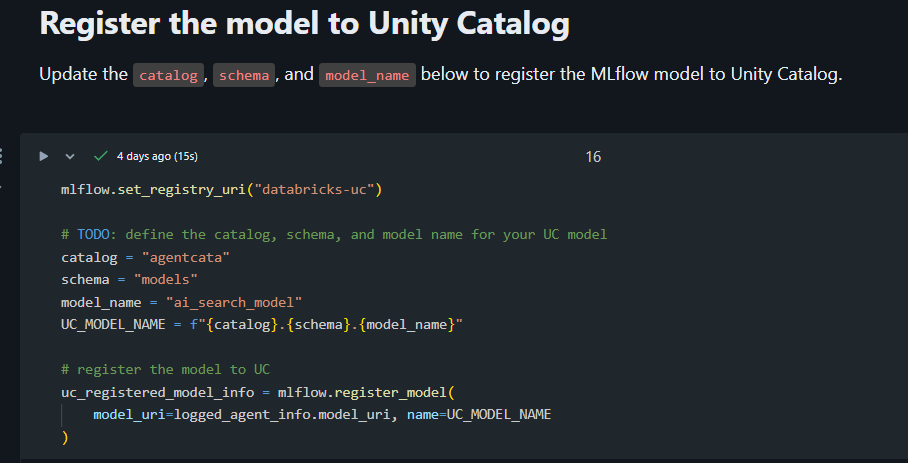
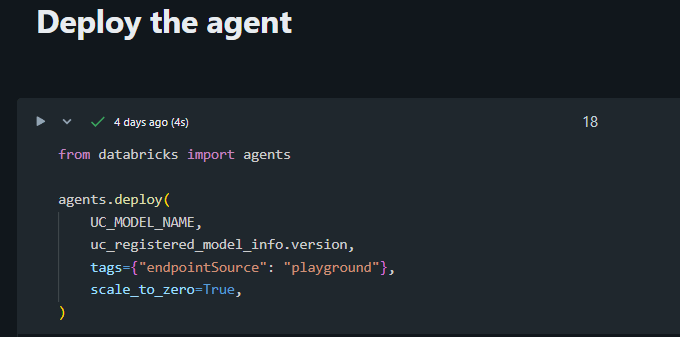
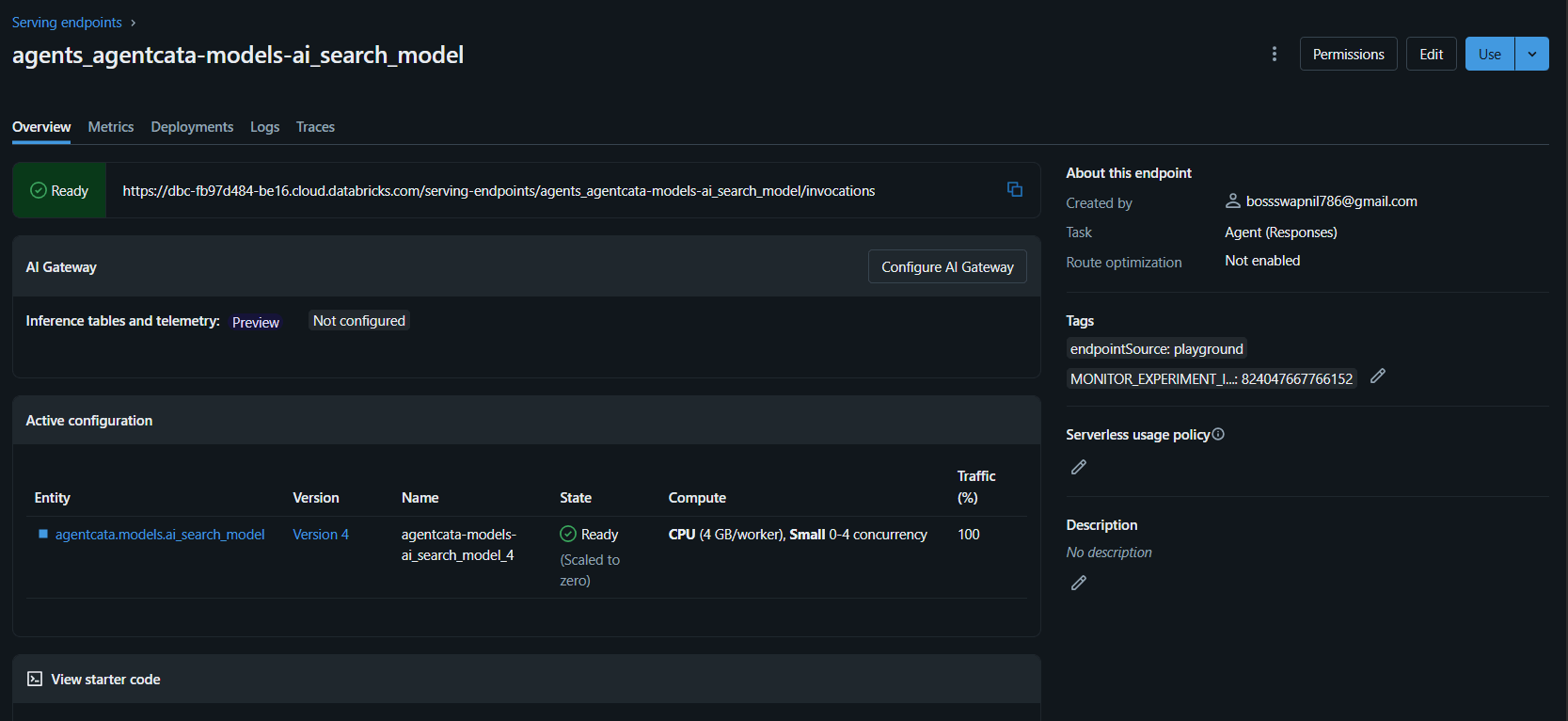
Three distinct steps, each with a specific job: log_model packages the code and dependencies; register_model adds it to Unity Catalog as a governed, versioned asset; agents.deploy provisions a live Model Serving endpoint. Re-running these after an edit to the agent's code creates a new version under the same model and updates the same endpoint — iteration doesn't leave behind a trail of duplicate deployments.
8. Put it in front of real users
The deployed agent is a REST endpoint at this point — from here, it can be called from any application. For the invoice validator, we built a lightweight upload interface where a user drops in a PDF, the system extracts structured fields, and the agent returns its validation decision with reasoning.
Conclusion
Vector search provides the retrieval layer by finding information based on meaning, while RAG uses that retrieved context to generate grounded responses. Together, they give LLMs a practical way to work with an organization's own data without relying solely on what the model learned during training.
If you're interested in exploring more Databricks solutions, visit our Databricks page.