1. Introduction
Salesforce Marketing Cloud Engagement (SFMC) has traditionally been used by organizations for email marketing, customer journeys, segmentation, automation, transactional messaging, and campaign management.
Marketing Cloud Next introduces a more Salesforce-native approach where marketing execution is closely connected with Salesforce CRM and Data 360.
The migration from SFMC to Marketing Cloud Next should therefore not be treated as a simple data or asset migration.
Instead, organizations should look at the migration as a transformation:
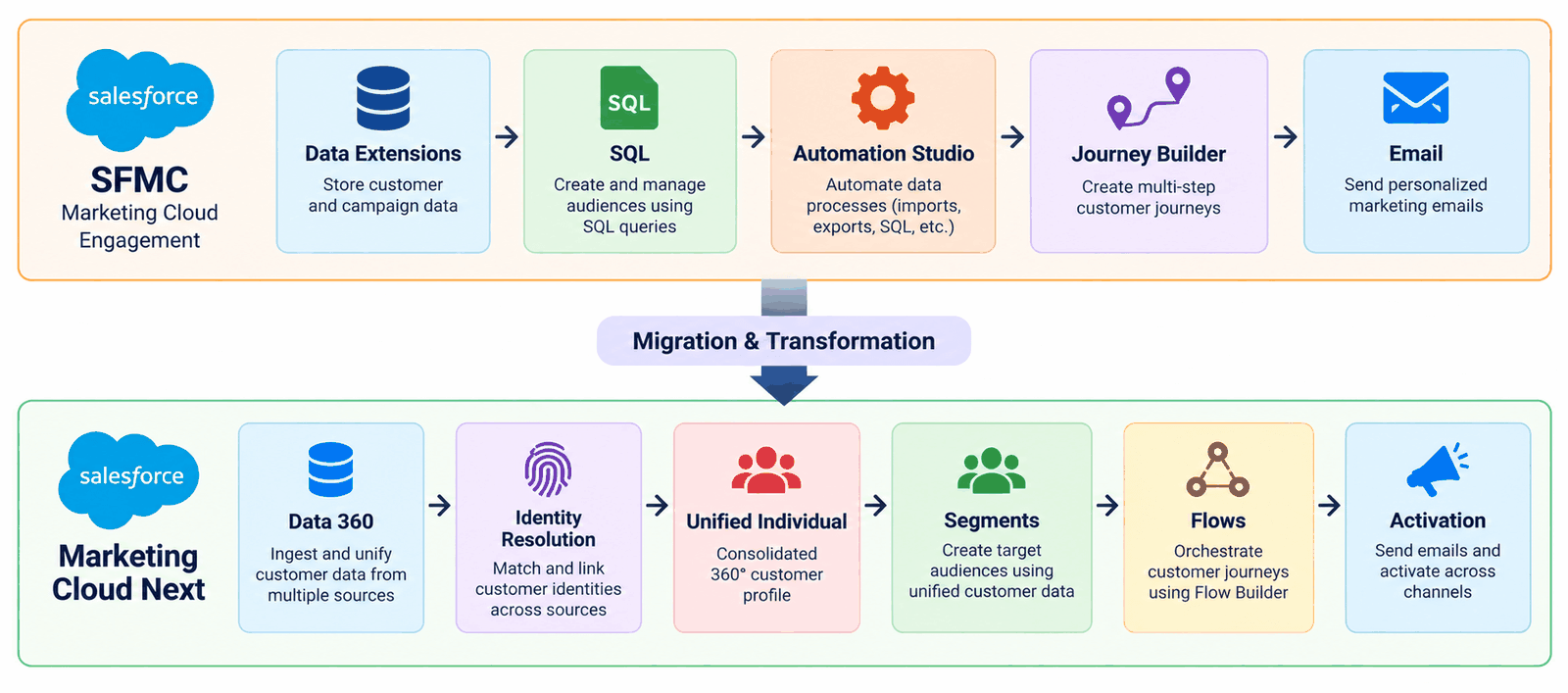
Figure 1: Migration overview: SFMC components and their Marketing Cloud Next equivalents
The objective is not to copy every existing SFMC component into Marketing Cloud Next. The objective is to preserve the required business capabilities while redesigning them using the target platform's architecture.
Note: Marketing Cloud Next is evolving quickly. Feature names, availability and limits referenced in this guide should be verified against the current Salesforce documentation and release notes before the migration design is finalized.
2. SFMC vs Marketing Cloud Next
Before beginning the migration, it is important to understand that SFMC and Marketing Cloud Next have different architectural approaches.
| Area | SFMC / Marketing Cloud Engagement | Marketing Cloud Next |
|---|---|---|
| Customer data | Data Extensions, Subscribers, Contacts (Marketing Cloud-specific data structures) | Salesforce CRM + Data 360 (standardized Data 360 data model) |
| Identity | Subscriber Key / Contact Key (primarily key-based matching) | Individual + Unified Individual, resolved through Data 360 Identity Resolution |
| Segmentation | SQL, Filters, Data Extensions | Data 360 Segments |
| Journey orchestration | Journey Builder | Flow Builder / Marketing Flows |
| Automation | Automation Studio | Salesforce Flow and platform automation |
| Email content | Content Builder | Marketing Cloud Next email and content authoring (capabilities evolving; verify current feature set) |
| Consent | Publication Lists and subscriber mechanisms | Communication Subscriptions and consent model |
| CRM integration | Synchronized data / integrations | Salesforce-native architecture |
| API | Marketing Cloud Engagement APIs | Marketing Cloud Next / Salesforce platform APIs |
| Business Units | Enterprise / Business Unit structure | Marketing Cloud Next Business Units |
Important: These are conceptual mappings, not always one-to-one technical replacements.
3. The Most Important Migration Principle
The biggest mistake in an SFMC migration is:
"Let's copy everything from SFMC into Marketing Cloud Next."
Instead, the migration should follow:
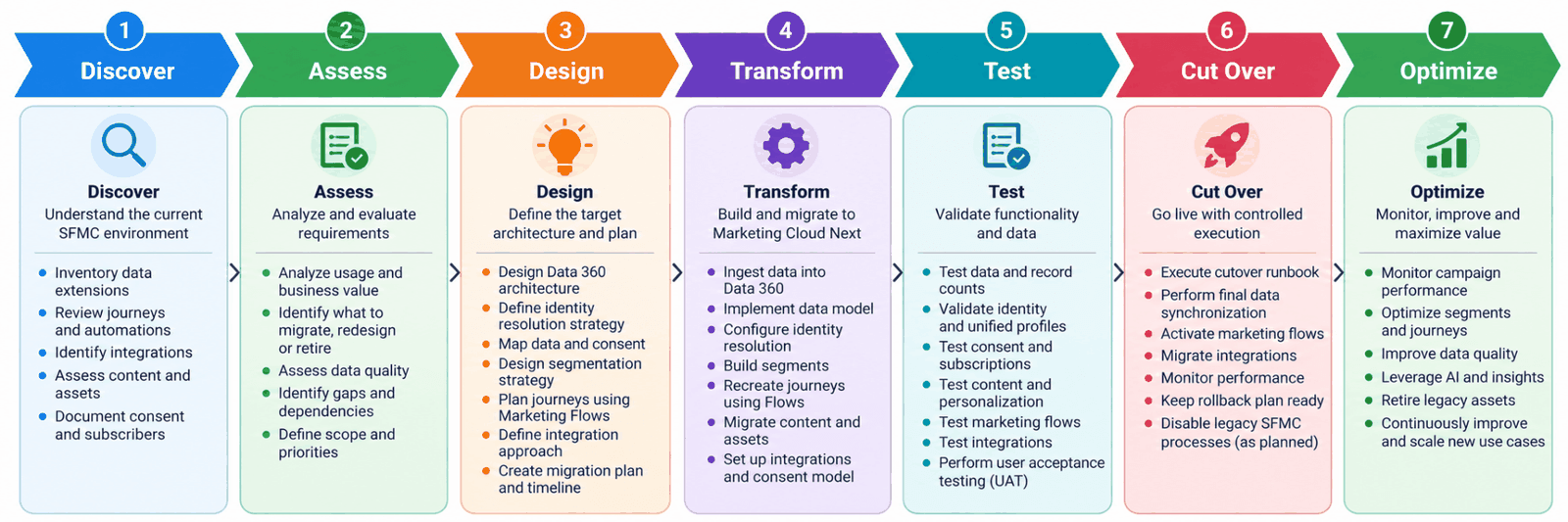
Figure 2: Migration lifecycle: Discover, Assess, Design, Transform, Test, Cut Over, Optimize
For every SFMC component, ask:
- Is it still required?
- What business problem does it solve?
- Does Marketing Cloud Next have a native capability for it?
- Does the implementation need to be redesigned?
- Can the process be simplified?
- Can legacy technical debt be removed?
- Is historical data actually required?
This prevents the new platform from becoming a copy of the old architecture.
4. Migration Architecture
A simplified migration architecture can be represented as:
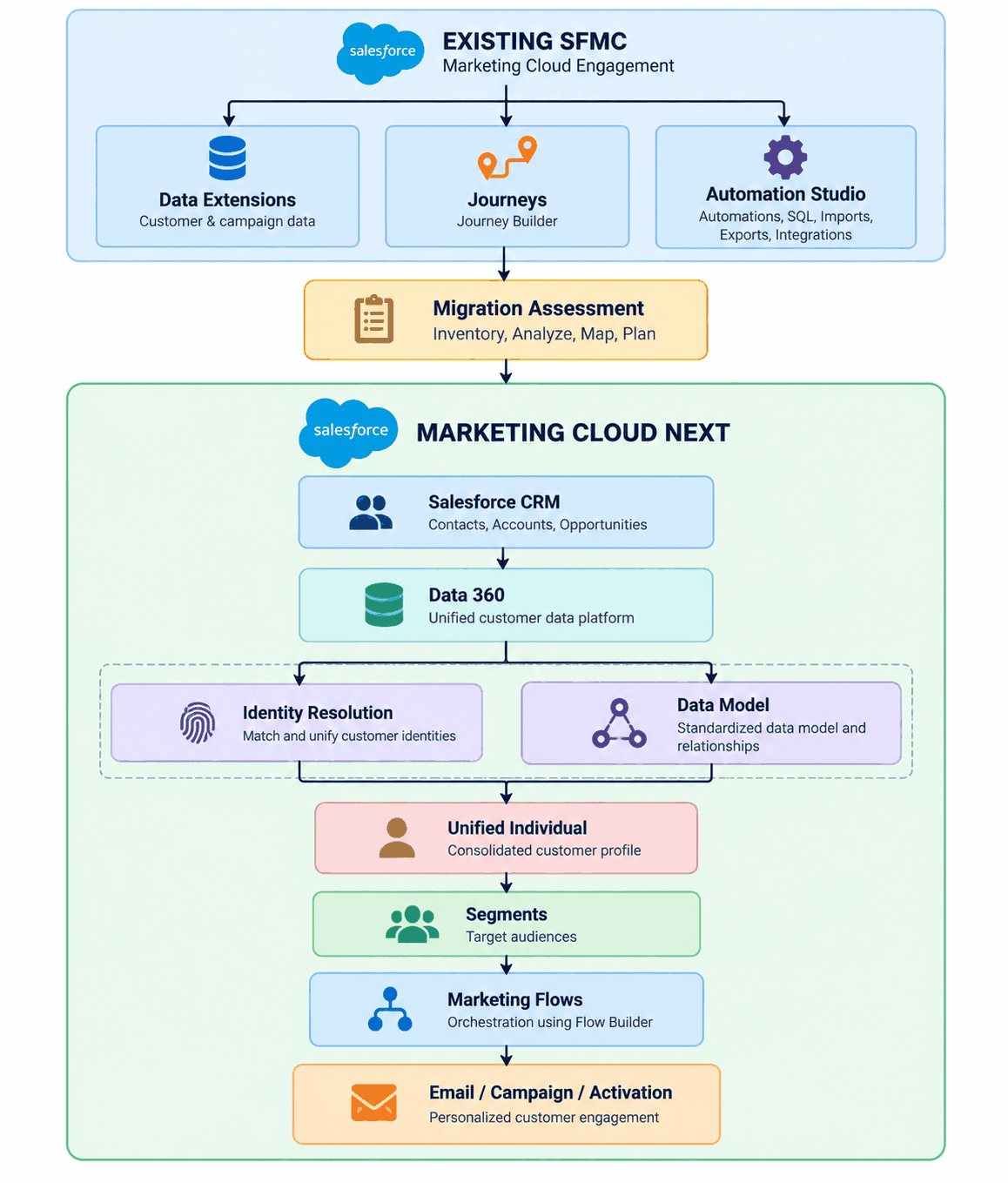
Figure 3: High-level migration architecture from SFMC to Marketing Cloud Next
5. Phase 1 — Discovery and Assessment
Before changing anything in the production environment, create a complete inventory of the existing SFMC implementation.
The inventory should include:
Data
- Data Extensions
- Shared Data Extensions
- Sendable Data Extensions
- Synchronized Data Extensions
- Subscriber records
- Contact records
- Contact Keys / Subscriber Keys
- Data Extension relationships
- Historical data
- Suppression data
Automation
- Automation Studio automations
- SQL Query Activities
- Import Activities
- Export Activities
- File Transfer Activities
- Script Activities
- Scheduled automations
- Error-handling processes
Journeys
- Journey Builder journeys
- Entry Sources
- Decision Splits
- Wait Activities
- Email Activities
- SMS Activities
- API Activities
- Update Contact activities
- Goals
- Exit criteria
- Re-entry settings
Content
- Email templates
- Content Blocks
- Dynamic Content
- Images
- Personalization
- CloudPages
- Forms
- Preference centers
Consent
- Publication Lists
- Unsubscribe rules
- Suppression lists
- Email subscription status
- SMS consent
- Preference management
Integrations
- APIs
- Installed Packages
- OAuth credentials
- Middleware
- External applications
- CRM integrations
- Data warehouse integrations
- File-based integrations
Create a Migration Inventory
A migration inventory should be created before development starts.
| SFMC Component | Business Purpose | Usage | Target Capability | Action |
|---|---|---|---|---|
| Customer DE | Customer data | High | Data 360 | Migrate |
| SQL Query | Audience creation | High | Data 360 Segment | Redesign |
| Journey Builder | Welcome journey | High | Marketing Flow | Redesign |
| Automation Studio | CRM update | Medium | Salesforce Flow | Redesign |
| Publication List | Newsletter consent | High | Communication Subscription | Migrate |
| Old Email | Historical campaign | Low | Not migrated (archive only) | Archive |
| CloudPage | Preference center | High | Target preference capability | Redesign |
Each component should be classified as:
Migrate
Redesign
Replace
Retire
Archive
Definitions: Migrate = move with minimal change. Redesign = keep the business need but implement it with target-native capabilities. Replace = substitute a different capability or tool. Retire = decommission with no replacement. Archive = keep a read-only copy outside the platform.
6. Phase 2 — Target Data Architecture
One of the biggest differences between SFMC and Marketing Cloud Next is the data architecture.
In SFMC, organizations commonly build marketing processes around Data Extensions.
A typical architecture might look like:
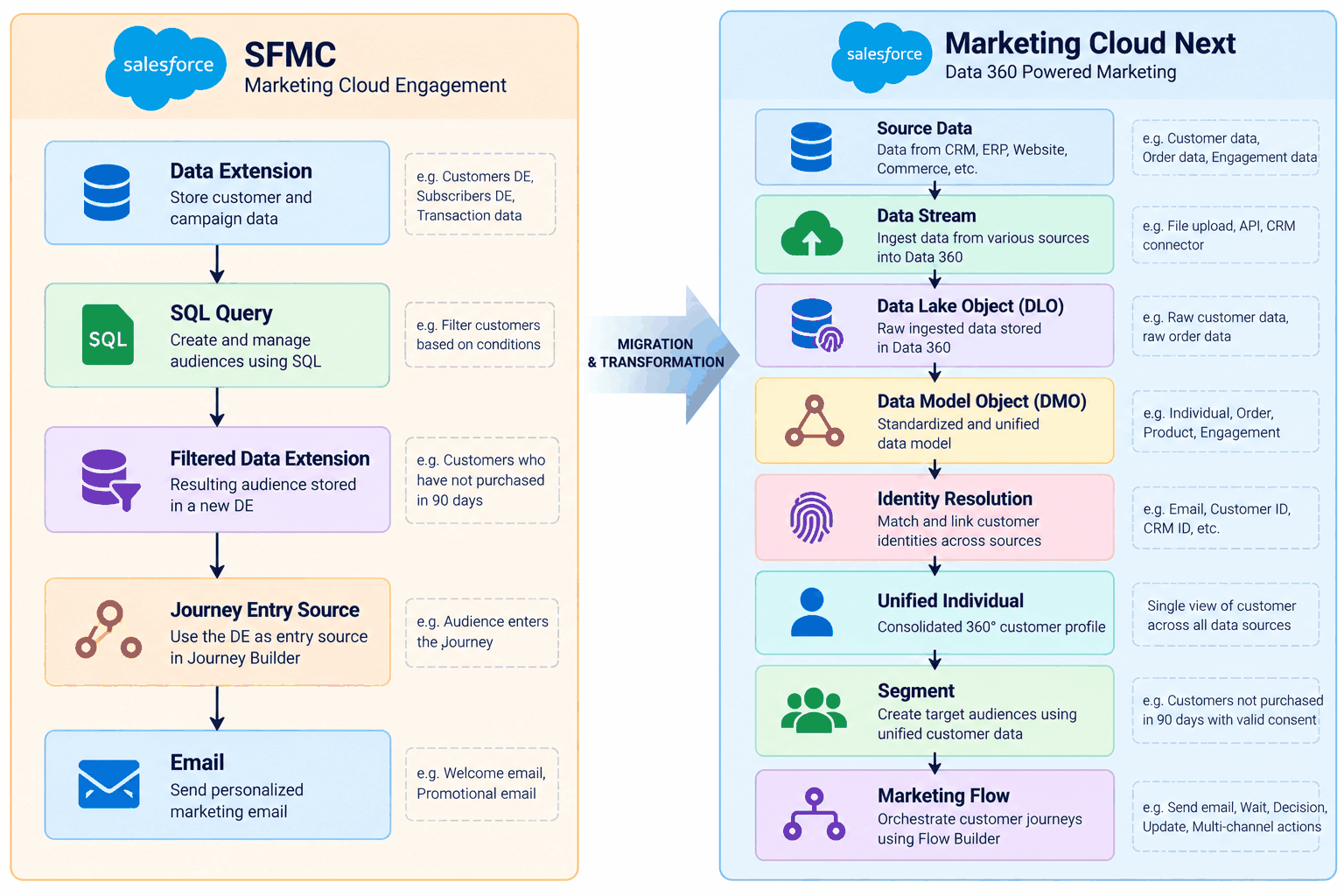
Figure 4: Typical SFMC data architecture
Data Streams
Data Streams are used to bring data into Data 360 from supported sources.
During migration, identify the original SFMC data source.
For example:
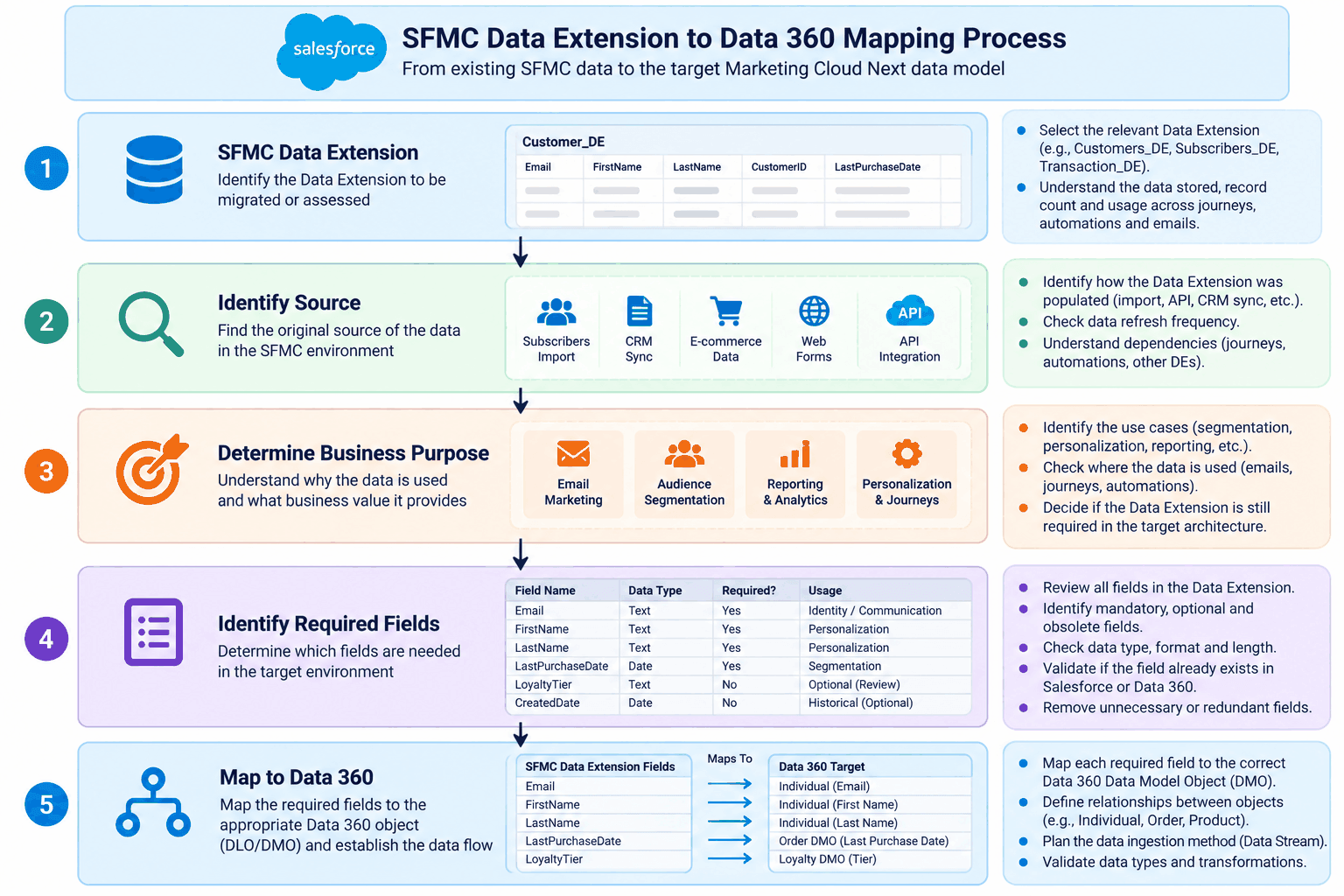
Figure 5: Mapping SFMC data sources to Data 360 Data Streams
Do not automatically migrate every field.
Instead, determine:
- Which fields are required?
- Which fields are used for segmentation?
- Which fields are used for personalization?
- Which fields are used for reporting?
- Which fields are obsolete?
- Which fields already exist in Salesforce?
Data Lake Objects and Data Model Objects
Data 360 provides a data architecture that separates ingested source data from standardized business data.
Data Lake Object (DLO): the storage container for data as it is ingested from a source. It generally mirrors the structure of the source.
Data Model Object (DMO): a standardized, business-oriented object (for example Individual or Sales Order) to which source data is mapped, so it can be used consistently for identity resolution, segmentation and activation.
A simplified model is:
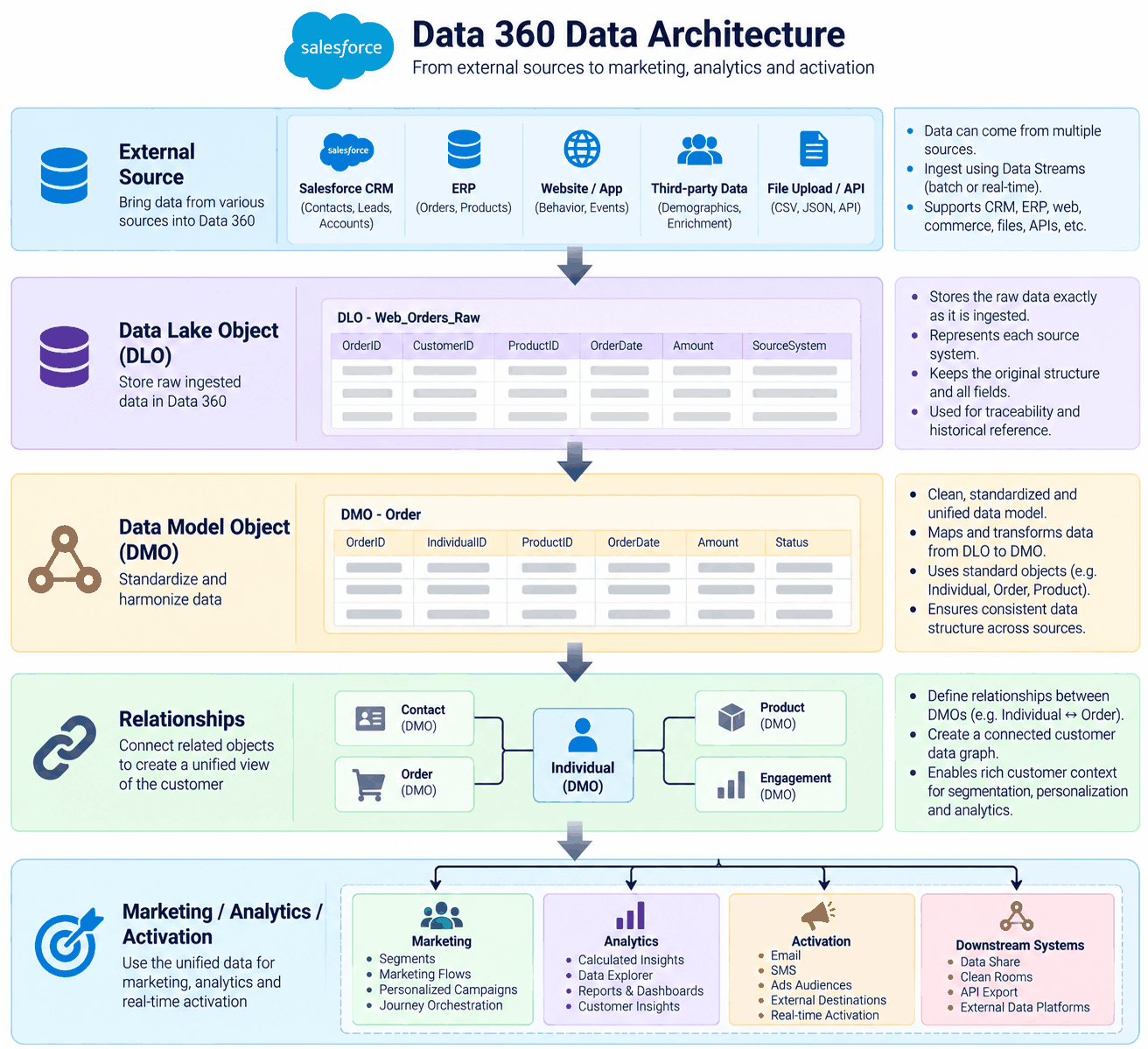
Figure 6: Data Lake Objects and Data Model Objects in Data 360
This is important because the target architecture should not simply recreate hundreds of SFMC Data Extensions.
Instead, related data should be modeled according to its business meaning.
For example:
Customer → Orders → Products → Website Engagement → Email Engagement → Consent
Identity Resolution
Identity is one of the most important parts of the migration.
In SFMC, organizations frequently rely on:
- Subscriber Key
- Contact Key
- Email Address
- Customer ID
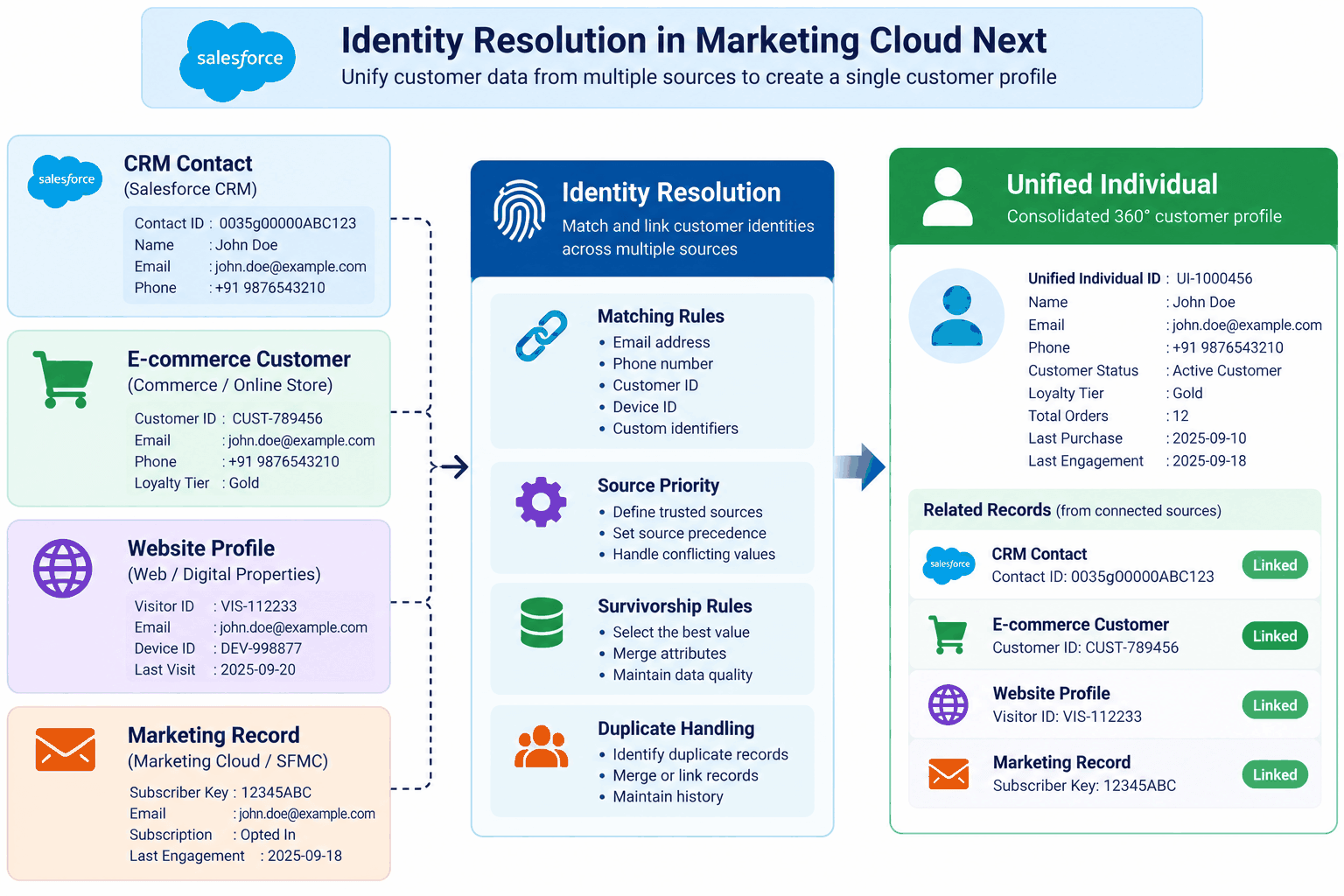
Figure 7: Identity Resolution in Marketing Cloud Next
Marketing Cloud Next and Data 360 introduce a broader identity model.
The migration team should define:
- Source identifiers
- Matching rules
- Identity rules
- Source priority
- Survivorship rules
- Duplicate handling
- Lead-to-contact relationships
Never assume that an email address should automatically become the universal identity key.
Unified Individual
The Unified Individual represents the unified customer identity created from related source records.
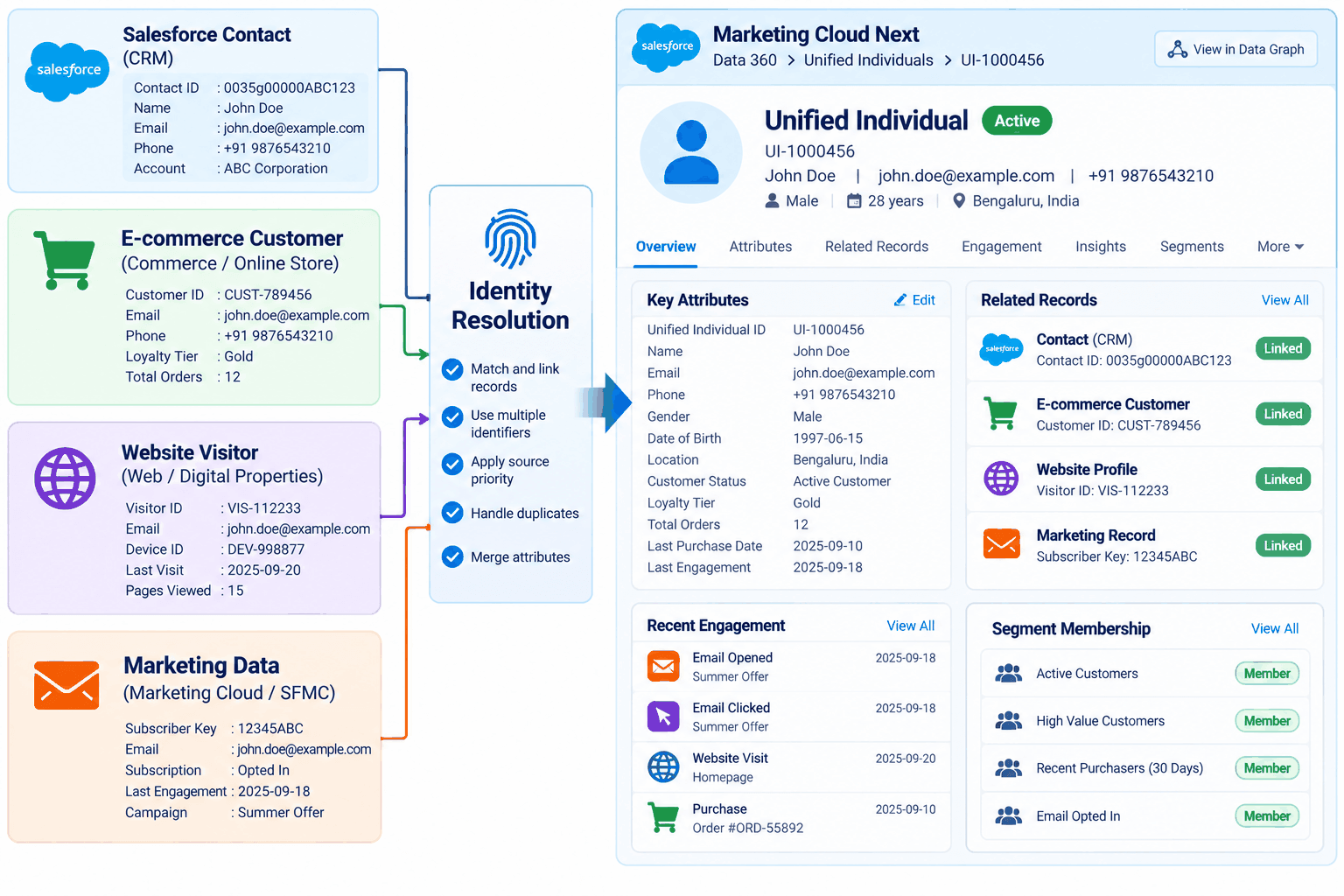
Figure 8: Unified Individual profile
A Unified Individual profile typically consolidates attributes such as:
- Names
- Email addresses
- Phone numbers
- Customer IDs
- Addresses
- Other marketing-relevant attributes (for example loyalty tier or purchase summary), subject to data-governance and privacy policies
Data Graph
Data Graphs can provide the data context required by marketing experiences.
A simplified relationship could be:
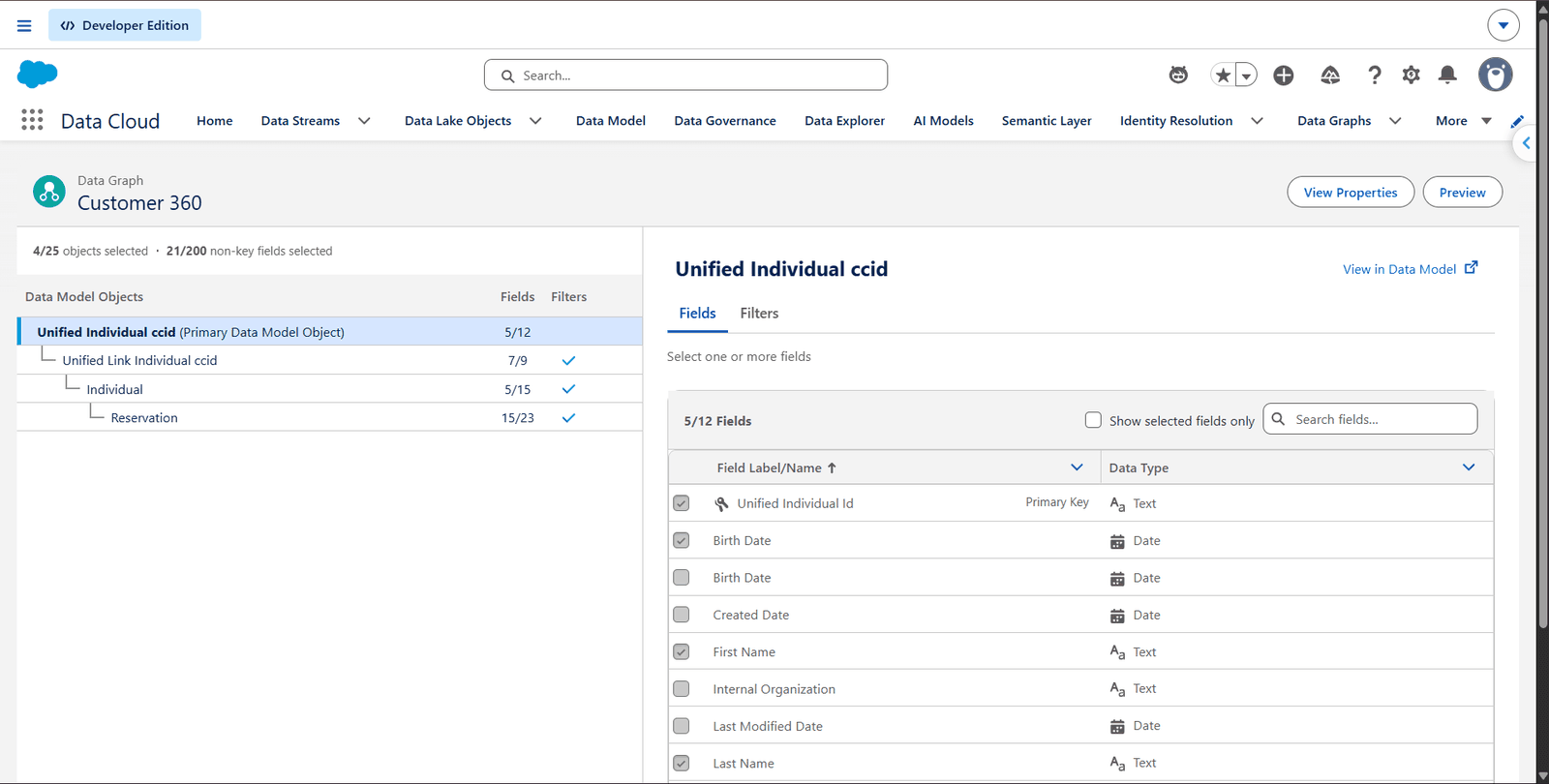
Figure 9: Data Graph relationships
This becomes particularly useful when designing personalization and decision logic.
For example:
Find customers who purchased Product A, have made no purchase of any kind in the last 90 days, and have valid email consent.
The required information can come from the unified data architecture rather than from a collection of manually maintained Data Extensions.
7. Phase 3 — Segmentation Migration
SFMC organizations commonly use:
- Data Extensions
- SQL Queries
- Filters
- Lists
- Subscriber attributes
Marketing Cloud Next introduces Data 360-based segmentation.
The migration should therefore focus on business logic, not SQL syntax.
For example, an SFMC audience might be:
SELECT CustomerID
FROM Customers
WHERE LastPurchaseDate < DATEADD(day,-90,GETDATE())
AND EmailOptIn = 'True'
The target requirement is:
Customers who have not purchased in the last 90 days and have valid email consent.
That business requirement can then be redesigned using the target segmentation architecture.
Segmentation Best Practice
Do not migrate SQL queries one-to-one without evaluating whether the query is still necessary.
For every SQL query, ask:
- Is it creating an audience?
- Is it transforming data?
- Is it calculating a metric?
- Is it preparing data for another process?
- Is it simply compensating for an old data model?
Then select the appropriate target capability.
Possible target patterns include:
- Data 360 Segment
- Data Transform
- Calculated Insight
- Flow
- Salesforce automation
- Data integration
8. Phase 4 — Consent and Preference Migration
Consent should be treated as a separate migration workstream.
In SFMC, consent may be represented using:
- All Subscribers
- Publication Lists
- Unsubscribe status
- Suppression lists
- Subscriber attributes
- SMS subscriptions
Marketing Cloud Next introduces communication subscriptions and a more Salesforce-native consent model.
The six questions shown in Figure 10 are:
- Who has consent?
- For which channel?
- For which communication purpose?
- From which source was consent captured?
- When was consent obtained?
- What is the current status?
Test at least:
- New opt-in
- Opt-out
- Resubscribe
- Global unsubscribe
- Channel-specific unsubscribe
- Suppression
- Existing consent
- Conflicting consent sources
The migration should answer:
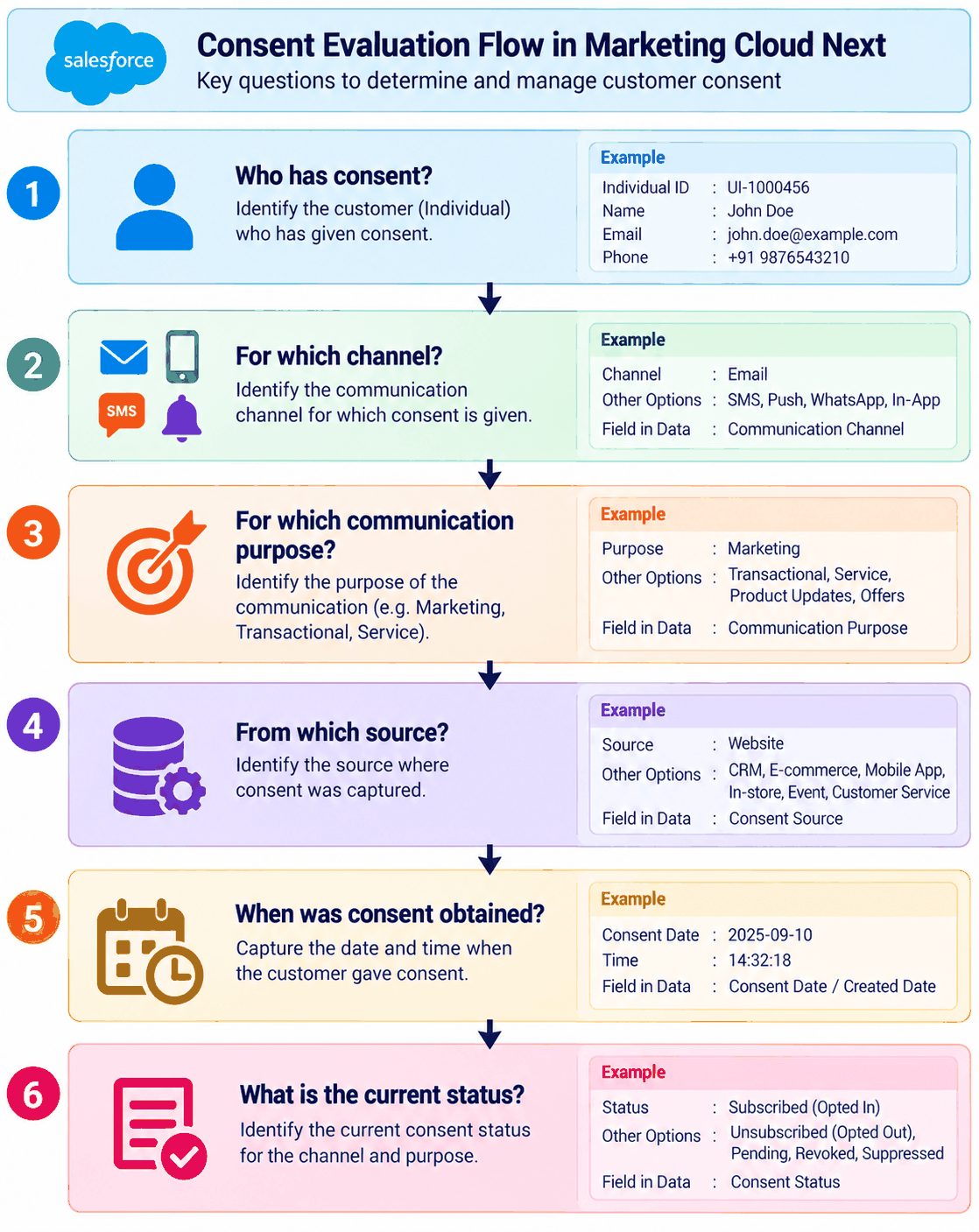
Figure 10: Consent evaluation flow in Marketing Cloud Next
9. Phase 5 — Email and Content Migration
Email migration should include:
- Email templates
- Content blocks
- Images
- Personalization
- Dynamic content
- Sender information
- Reply handling
- Links
- Tracking parameters
- Unsubscribe links
Do not migrate unused content simply because it exists in Content Builder.
Use an asset classification:
Used frequently     → Migrate
Used occasionally   → Review
Unused              → Archive
Duplicate           → Consolidate
Obsolete            → Retire
Note: Review means a business owner decides whether the asset is migrated or retired. Consolidate means merging duplicates into one asset and then migrating it. Final actions map to Migrate, Redesign, Replace, Retire or Archive.
Personalization Migration
Personalization is another area where teams should avoid copying old logic blindly.
An SFMC email might use subscriber attributes or Data Extension fields:
%%FirstName%%
%%LoyaltyTier%%
%%LastPurchaseDate%%
During migration, determine where those attributes exist in the target data model.
The new flow should use the appropriate customer data available through the target architecture.
Scripted content: SFMC content that relies on AMPscript, Server-Side JavaScript (SSJS) or Guide Template Language (GTL) will not port directly. Inventory these scripts, document the business logic they implement (lookups, conditional content, formatting) and redesign it using target-native personalization and data access. Treat script-heavy emails and CloudPages as high-effort items in the plan.
Always test:
- Existing customers
- New customers
- Missing values
- Multiple related records
- Duplicate identities
- Invalid data
- Dynamic content conditions
10. Phase 6 — Email Deliverability and Sender Setup
Sender reputation does not automatically transfer from one platform to another. Plan deliverability as its own workstream rather than an afterthought. Review:
- Sending domains and From addresses
- SPF, DKIM and DMARC authentication for the new sending setup
- Link, image and tracking domains
- IP strategy (dedicated or shared) and a warm-up plan if sending IPs change
- Bounce, complaint and suppression data carried over from SFMC
- Send-volume ramp-up, starting with the most engaged audiences
- Monitoring of bounce rates, complaint rates and inbox placement in the first weeks
Important: Do not change sending domains or IPs and move all traffic on the same day. Move in stages and monitor reputation at each step.
11. Phase 7 — Journey Builder to Marketing Flow
Journey migration is usually one of the most important migration activities.
An SFMC journey might look like:
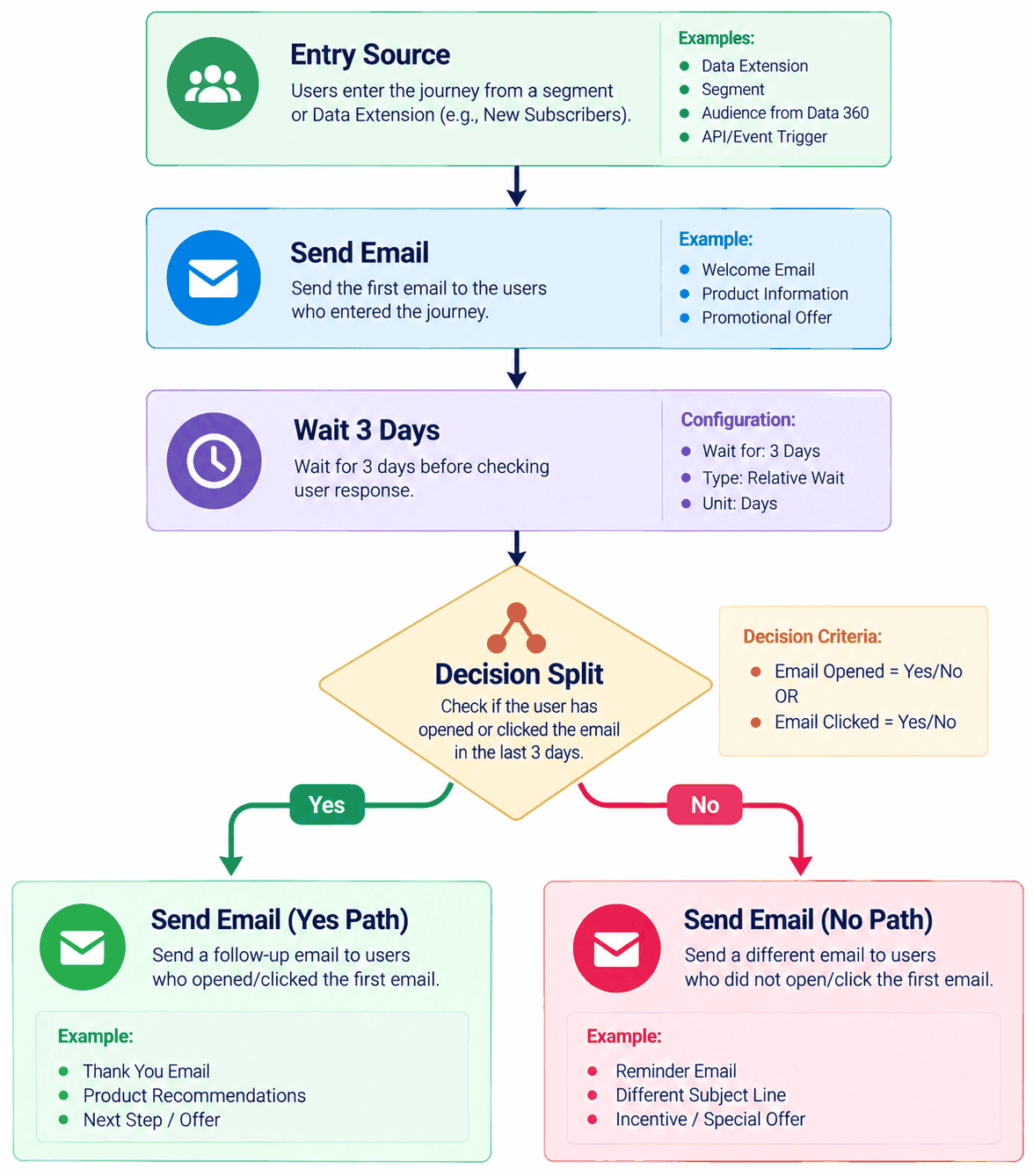
Figure 11: Example SFMC journey
In Marketing Cloud Next, the business process can be redesigned using Flow Builder/marketing flows and the target data/segmentation architecture.
Do Not Rebuild Journeys Step-by-Step Without Assessment
For every journey, document:
Entry
- Who enters?
- Why do they enter?
- How often can they enter?
Decision Logic
- What conditions are evaluated?
- What customer data is required?
Timing
- How long are customers waiting?
- Are waits based on business hours?
- Are there scheduled sends?
Communication
- Email?
- SMS?
- Other channels?
Exit
- What removes the customer?
- What happens after conversion?
Re-entry
- Can the same customer enter again?
- Under what conditions?
Then redesign the journey using the target architecture.
Journey Migration Example
SFMC
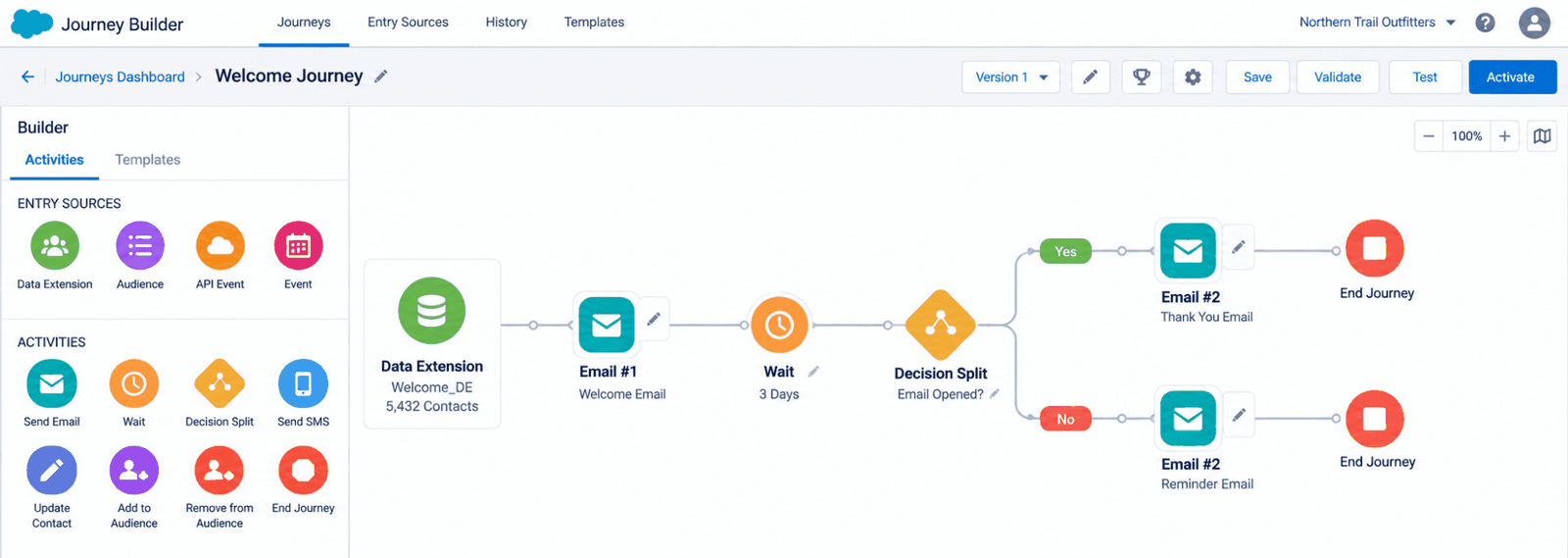
Figure 12: Journey example in SFMC
Marketing Cloud Next
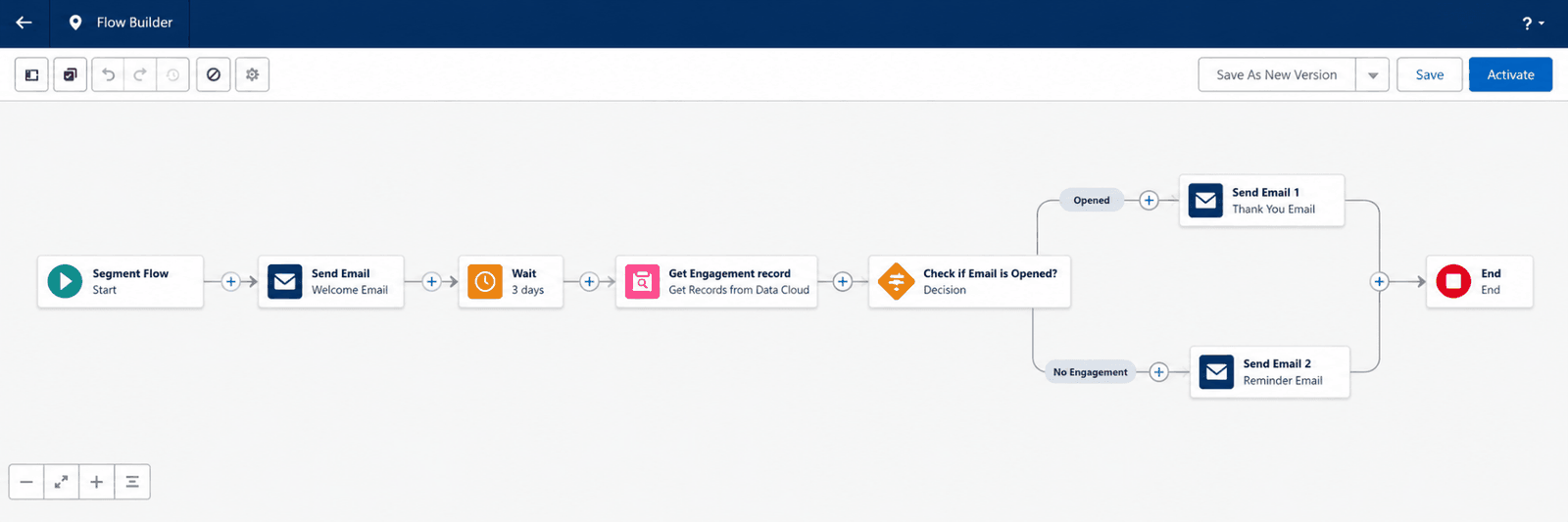
Figure 13: The same journey redesigned in Marketing Cloud Next
The important point is that the business journey remains, but the underlying implementation is redesigned.
12. Phase 8 — Automation Studio Migration
Automation Studio commonly handles:
- SQL
- Imports
- Exports
- File transfers
- Data preparation
- Scheduled processing
- Notifications
For each automation, determine its purpose.
For example:
| SFMC Automation | Target Approach |
|---|---|
| Create audience | Data 360 Segment |
| Transform data | Data Transform |
| Calculate metric | Calculated Insight |
| Update Salesforce | Salesforce Flow / Integration |
| Schedule marketing action | Marketing Flow |
| Move external files | Integration / Data ingestion |
| Generate operational notification | Flow / Integration |
The goal is to eliminate unnecessary legacy automation rather than reproduce it automatically.
13. Phase 9 — SMS and Other Channels
Journey inventories often include SMS, push and other channels. Each has its own compliance and technical setup, so treat them separately from email. Review:
- Channel availability and prerequisites in Marketing Cloud Next (verify against current documentation)
- Sender registration, such as short codes, long codes, sender IDs and carrier or regulatory approvals
- Keyword, opt-in and opt-out handling (for example STOP and HELP) and the related consent records
- Message templates and personalization for each channel
- Message quotas and throttling
- Delivery and engagement tracking
Sender registration and approvals can take weeks, so start early.
14. Phase 10 — API and Integration Migration
Marketing Cloud Engagement APIs and Marketing Cloud Next APIs should be treated as separate integration surfaces.
Create an integration inventory:
| Integration | Source | Target | Authentication | Frequency | Business Criticality |
|---|---|---|---|---|---|
| Customer Sync | CRM | Marketing | OAuth | Daily | High |
| Order Data | Commerce | Data 360 | API | Hourly | High |
| Audience Export | Marketing | External | API/File | Daily | Medium |
| Campaign Status | Marketing | Data Warehouse | API | Daily | Medium |
Review:
- Authentication
- OAuth scopes
- Endpoints
- Payload structures
- IDs
- Error handling
- Retry logic
- Monitoring
- Rate limits
- Data ownership
Do not assume that an existing SFMC API integration can simply be pointed to a Marketing Cloud Next endpoint.
15. Phase 11 — Tracking, UTM and Reporting
Marketing teams should define the tracking strategy before migration.
Document:
- UTM Source
- UTM Medium
- UTM Campaign
- UTM Content
- UTM Term, if applicable
- Campaign naming convention
- Website attribution
- Conversion definitions
For example:
utm_source = salesforce
utm_medium = email
utm_campaign = summer_offer
utm_content = cta_01
The important point is consistency.
Do not change the tracking methodology during migration unless there is a deliberate reason to do so, because doing so can make historical and new campaign performance difficult to compare.
Reporting and Historical Data
Decide early which SFMC reports, dashboards and tracking data must continue to exist. Review:
- Tracking extracts (sends, opens, clicks, bounces, unsubscribes) used by BI tools or a data warehouse
- Scheduled reports and dashboards that stakeholders rely on
- Historical engagement data needed for compliance, suppression logic or trend analysis
- Metric definitions, so that old and new results can be compared fairly
Historical engagement data rarely needs to live in the marketing platform. Archiving it in a data warehouse is often sufficient and avoids loading unnecessary data into Data 360.
16. Phase 12 — Testing Strategy
Migration testing should be performed at multiple levels.
Data Testing
Validate:
- Record counts
- Primary keys
- Relationships
- Null values
- Data types
- Date values
- Duplicate records
- Historical ranges
Identity Testing:
Validate:
- Matching
- Duplicate profiles
- Unified Individual creation
- Lead/contact relationships
- Source priority
Consent Testing
Validate:
- Opt-in
- Opt-out
- Resubscribe
- Suppression
- Channel preferences
Content Testing
Validate:
- Personalization
- Dynamic content
- Links
- Images
- Mobile rendering
- Unsubscribe links
Flow Testing
Validate:
- Entry
- Decision branches
- Waits
- Actions
- Exits
Integration Testing
Validate:
- API calls
- Authentication
- Payloads
- Error handling
- Retry mechanisms
Parallel Validation
Where practical, run the legacy and target implementations in parallel for critical use cases.
For example:
SFMC Journey → Test Population → Expected Outcome
Marketing Cloud Next Flow → Test Population → Expected Outcome
Compare:
- Audience size
- Branch distribution
- Email population
- Personalization
- Consent
- Conversion
- Error rates
Do not expect every metric to be numerically identical if the underlying data model or attribution methodology has changed. Document the reason for differences.
17. Phase 13 — Cutover, Go-Live and Hypercare
A successful migration ends with a controlled cutover rather than a single switch-over.
Cutover Planning
- Cutover runbook with owners, sequence and timings
- Change freeze window for SFMC assets
- Final data synchronization, including consent changes (such as unsubscribes) since the last load
- Go/no-go criteria and sign-off
- Communication plan for stakeholders
Rollback
- Define rollback triggers (for example consent errors, a drop in deliverability or failed critical flows)
- Keep SFMC intact and reachable until exit criteria are met
- Document how to re-enable SFMC journeys and re-sync data without causing duplicate sends
Hypercare
- Daily monitoring of sends, errors, bounces and complaints for the first weeks after go-live
- Reconciliation of audience counts and consent status
- Issue triage with named owners
- Formal sign-off before disabling SFMC
Decommissioning and Optimization
Once exit criteria are met, export any required archives, pause and then disable SFMC automations and journeys, revoke API credentials and Installed Packages, and update documentation. After that, use the new platform to improve data quality, tune segments and flows, retire remaining legacy assets and extend into use cases that were not practical in SFMC.
18. Common Migration Mistakes
Mistake 1 — Copying Every Data Extension
This often reproduces the old architecture and creates unnecessary complexity.
Better approach: Identify the business purpose and redesign the target data model.
Mistake 2 — Treating Subscriber Key as the Entire Identity Strategy
Subscriber Key is important in SFMC, but Marketing Cloud Next uses a broader Data 360 identity architecture.
Better approach: Define identity resolution and Unified Individual requirements.
Mistake 3 — Rebuilding Every Journey Identically
A step-by-step copy can preserve unnecessary complexity.
Better approach: Rebuild the business process using target-native capabilities.
Mistake 4 — Migrating Consent at the End
Consent is not just another field.
Better approach: Treat consent as a dedicated migration workstream.
Mistake 5 — Migrating Unused Content
Large Content Builder libraries often contain outdated assets.
Better approach: Classify assets before migration.
Mistake 6 — Assuming API Compatibility
The API architecture is different.
Better approach: Inventory and redesign integrations individually.
Mistake 7 — Switching Off SFMC Too Early
Turning off the legacy environment before validating the target can create operational problems.
Better approach: Use controlled cutover and parallel validation for critical workloads.
19. Best Practices Checklist
Architecture
- Design the target architecture before migration.
- Use Data 360 as the data foundation where appropriate.
- Define identity resolution early.
- Define business-unit strategy.
- Document data ownership.
Data
- Do not migrate unnecessary fields.
- Define primary keys.
- Validate relationships.
- Monitor data quality.
- Define retention requirements.
Segmentation
- Translate business requirements rather than copying SQL blindly.
- Use the appropriate target segmentation capability.
- Validate audience counts.
Consent
- Define the source of truth.
- Map legacy subscriptions.
- Test every consent state.
- Never overwrite newer consent accidentally.
Content
- Migrate only required assets.
- Standardize naming.
- Test personalization.
- Test links and rendering.
- Inventory AMPscript, SSJS and GTL usage and plan its redesign.
Journeys
- Document the business objective.
- Document entry and exit rules.
- Rebuild rather than blindly copy.
- Test every critical branch.
Integration
- Inventory every API.
- Review authentication.
- Replace legacy identifiers where necessary.
- Implement monitoring and retry logic.
Testing
- Reconcile data.
- Test identity.
- Test consent.
- Test content.
- Test flows.
- Test integrations.
Deliverability
- Authenticate sending domains (SPF, DKIM, DMARC).
- Plan IP and domain warm-up.
- Ramp volume in stages and monitor reputation.
Cutover
- Prepare a cutover runbook and rollback plan.
- Define go/no-go criteria.
- Run hypercare before decommissioning SFMC.
20. Sample Migration Matrix
| SFMC Component | Current Purpose | Target Capability | Migration Type | Status |
|---|---|---|---|---|
| Customer Data Extension | Customer profile | Data 360 | Migrate | Assessment |
| Order Data Extension | Purchase history | Data 360 | Redesign | Assessment |
| SQL Audience | Customer segment | Data 360 Segment | Redesign | Assessment |
| Journey Builder | Welcome journey | Marketing Flow | Redesign | Assessment |
| Automation Studio | CRM update | Salesforce Flow | Redesign | Assessment |
| Publication List | Newsletter consent | Communication Subscription | Migrate | Assessment |
| Content Builder | Email template | Next Email Content | Replace | Assessment |
| API Integration | Audience sync | Next/Salesforce integration | Redesign | Assessment |
| CloudPage | Preference center | Target preference capability | Redesign | Assessment |
21. Conclusion
Migrating from SFMC to Marketing Cloud Next is best approached as a redesign of how marketing runs on Salesforce, not a lift-and-shift. Start with a full inventory, decide whether each component should be migrated, redesigned, replaced, retired or archived, and build the data, identity and consent foundations first. Only then rebuild segments, content, flows and integrations. Test at every level, validate in parallel where it matters, and cut over in a controlled way with a rollback plan and hypercare.
Suggested next steps
- Complete the migration inventory and classify every component.
- Confirm the target data, identity and consent architecture.
- Agree on scope, priorities and a phased plan.
- Prepare the test strategy, cutover runbook and rollback plan.
- Validate feature availability against current Salesforce documentation before build starts.